
A receipt-style Github receipt designed to work perfectly as an embeddable iframe, inspired by the original git-receipt.com (now discontinued).
I discovered git-receipt.com and absolutely loved the concept of displaying Github stats in a creative, receipt-style format. However, when I tried to embed it on my personal website as an iframe, it didn't work as expected.
Important
Notice: Both the original website (git-receipt.com) and its repository (github.com/ankitkr0/gitreceipt) have been discontinued and are currently down. It appears the original creator deleted their Github profile, making the original project and its host entirely inaccessible.
So I decided to build my own version from scratch that:
- Maintains the aesthetic I loved from the original
- Works perfectly as an embeddable iframe
- Includes smart caching to handle Github API limits
- Is actively maintained and easy to deploy
- 🖼️ Iframe Ready - Built from the ground up to work perfectly when embedded
- ⚡ High Performance - Smart caching with Ristretto for fast responses
- 📊 Real-time Metrics - Cache statistics and performance monitoring
- 🔐 Github API Support - Works with or without authentication tokens
- 🚀 Easy Deployment - Simple setup with Tailscale Funnel or any cloud platform
- Go 1.24 or higher
- Github token (optional, for higher API limits)
To use the Github receipt in your profile, simply embed it using the following format:
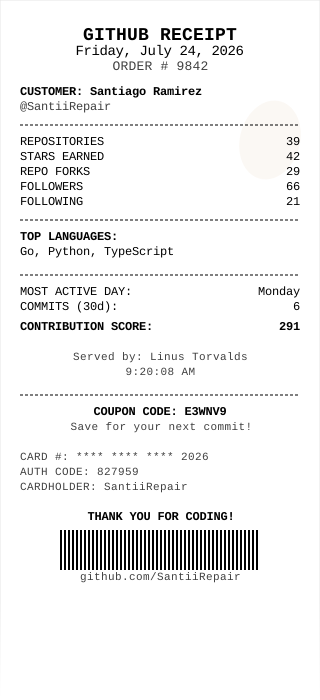or to use it on your website as an iframe:
<iframe
  src="https://gh-receipt.vercel.app/:username"
  width="400"
  height="600"
  frameborder="0"
  style="border: 1px solid #e1e4e8; border-radius: 6px;"
>
</iframe>
Replace :username with the Github username you want to display. For example:
<iframe
  src="https://gh-receipt.vercel.app/octocat"
  width="400"
  height="600"
  frameborder="0"
>
</iframe>Or if you want to see what it looks like, let's look at it using the Octocat as an example.