
Read this in other languages: 日本語 | Español | Français | 한국어 | 中文 | Deutsch | Português | Italiano
Compare LLM outputs side-by-side from your terminal - 12 cloud providers + local models, with parallel streaming, batch evaluation, LLM-as-judge scoring, hallucination detection, and CI/CD-ready assertions.





pip install cli-modelarium
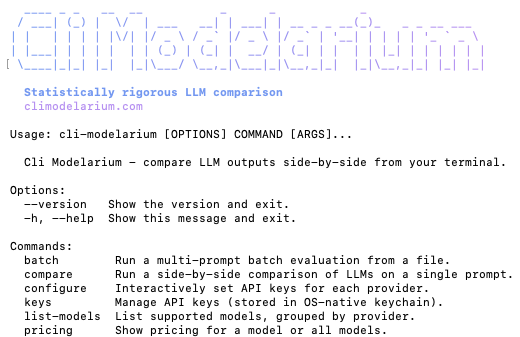
Cli Modelarium is a polished command-line tool for comparing LLM outputs across providers, models, system prompts, and temperatures - with live parallel streaming, batch evaluation, deterministic testing, and quality scoring built in.
Useful for evaluating which model fits your specific task, running prompt regression tests in CI/CD, comparing local models against cloud APIs, or building evaluation datasets - all from a single terminal command.
- Python 3.11 or higher (Python 3.10 users: install
cli-modelarium==0.1.1) - ~350 MB disk space (scipy and numpy are about two-thirds of it)
- macOS (Apple Silicon and Intel), Windows 10+ (x64 and ARM), Linux (x64 and ARM)
- Internet access for the first install (PyPI wheel download)
pip install cli-modelarium

# Configure API keys (saves securely to your OS keychain)
cli-modelarium configure

# Run your first comparison
cli-modelarium "Explain quantum computing in one sentence" \
  --models gpt-5.5,claude-opus-4-8,gemini-3.1-pro-preview
That's it. You'll see all three models stream their responses live in parallel, with latency, token counts, and cost displayed in a clean comparison table.
- Cloud providers: OpenAI, Anthropic, Google (Gemini), xAI (Grok), DeepSeek, Mistral, Groq, OpenRouter, Alibaba (DashScope), Z.AI (GLM), NVIDIA (NIM), Moonshot AI (Kimi)
- Local models: Ollama, LM Studio, vLLM, llama.cpp - any OpenAI-compatible server running on localhost
- Mix-and-match local and cloud models in the same comparison
- Choose any registered model id per call - not limited to the built-in group shortcuts
- Live token-by-token display across all models simultaneously
- Time-to-First-Token (TTFT) tracking per model
- See which model finishes first, watch outputs diverge in real time
- Streams from all 12 providers (SSE under the hood)
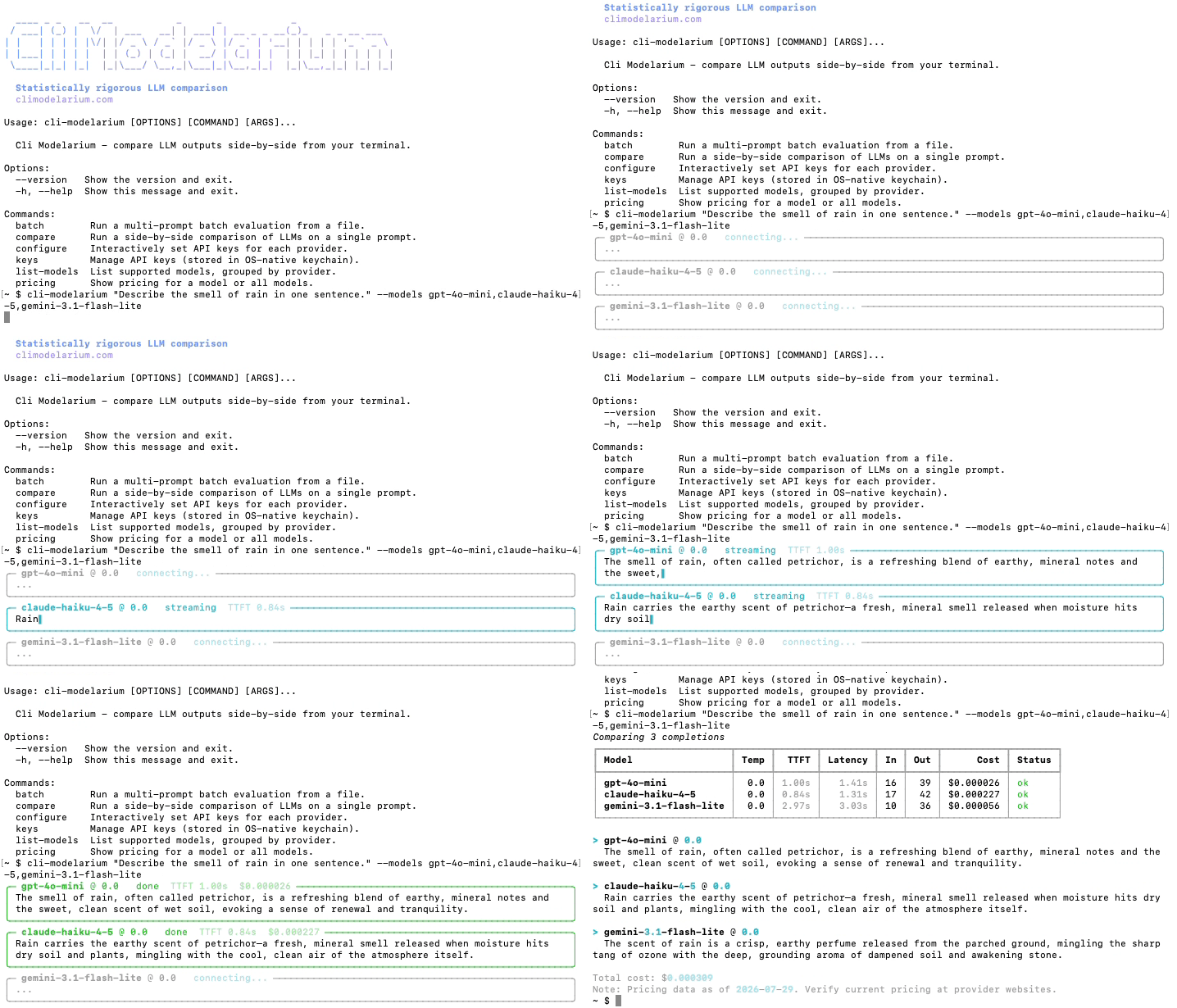
Pricing note: Cost figures in demos are from one run at recording time. Pricing changes; verify against the provider before relying on any figure.
- Single prompt vs. multiple models - quick "which is best?" comparisons
- Single prompt vs. multiple temperatures - see how randomness affects output
- Multiple system prompts vs. one user prompt - A/B test prompt engineering
- Batch mode - multi-prompt × multi-model for real evaluation work
- Local vs. cloud comparisons - quantify the gap (or lack thereof)
- Statistical reproducibility analysis -
--runs Nruns each configuration N times and reports mean/stdev/CV of latency and tokens, output frequency, mode output, and output diversity. Combine with--check-hallucinationto measure hallucination rate across runs. - Deterministic assertions - 10 assertion types (
contains,regex,json_valid,json_schema,max_length_chars,latency_under,cost_under, and more) with pass/fail output and CI exit codes - LLM-as-a-judge scoring - Use one LLM to score outputs from others on quality criteria
- Judge panels - Multiple judges average scores for less biased evaluation
- Hallucination detection preset - Ready-to-use criteria for factual accuracy checking
- Custom criteria - Define your own scoring rubrics
- Self-evaluation auto-skip - Judge models automatically skipped when also being judged

- Live terminal - Rich-powered panels with progress bars and streaming display
- CSV - Spreadsheet-friendly (open in Excel, Google Sheets, pandas). The header row is the contract; column position is not. Columns are appended as the tool grows, so read by name.
- JSON - Structured for scripts and pipelines
- Markdown - Pretty tables for blog posts and reports
- Exit codes - 0/1/2/3 reflecting pass/fail status for CI/CD
- Per-call cost shown from each provider's reported usage
- Total cost summary per comparison
- Judge cost shown separately when LLM-as-judge is enabled
- Local models displayed as "Free"
--max-costflag that stops dispatching new calls once the ceiling is passed (calls already in flight still finish, so it bounds a run rather than preventing a bill)
- API keys stored in OS-native keychain via
keyring(Mac Keychain, Windows Credential Manager, Linux Secret Service) - Format validation catches paste errors before storage
- Error message redaction prevents key leakage in tracebacks
- Localhost-only validation for local model URLs
SECURITY.mdwith responsible disclosure policy
- Per-provider concurrency limits (default 5) - one value applied to every provider, so check it against your own tier
- Automatic 429 retry with exponential backoff
- Anthropic 529 "overloaded" handled separately from rate limits
--concurrencyflag for power users on higher tiers- Graceful per-model failure (other models continue)
- DashScope free-tier and flagship Qwen (qwen3.7-max) rate limits are tighter than most providers; lower
--concurrencyif you encounter 429s - Moonshot requires a $1 minimum top-up before any use - there is no free tier. Tier0 is 1 concurrent request, 3 requests per minute and 1.5M tokens per day; $10 cumulative top-up moves you to Tier1. Lower
--concurrencyon Tier0.
- Works identically on macOS, Windows (10+ and ARM), and Linux
- All file I/O uses
pathlib+ explicit UTF-8 encoding - CSV writing uses
newline=""for Windows compatibility - Python 3.11+ required
- Single CLI binary -
pip install cli-modelariumand you're done - Polished Rich-based UI - Claude Code-level terminal polish
- JSON output - Pipe into anything (
jq, scripts, monitoring) - CI/CD ready - Exit codes, structured output, GitHub Actions example included
- Apache 2.0 licensed - Use in any project, commercial or otherwise
cli-modelarium "Write a Python function to find the longest palindromic substring" \
--models gpt-5.5,claude-opus-4-7,gemini-3.1-pro-previewcli-modelarium "What is quantum computing?" \
--models gpt-5.5,claude-opus-4-7 \
--runs 5Each model gets called 5 times in parallel. The output shows mean/stdev of
latency, coefficient of variation, mode answer, and output diversity per
model. Combine with --check-hallucination and --judge to measure the
hallucination rate across runs.
When you run two or more models with --runs > 1, cli-modelarium automatically
computes pairwise statistical significance tests (Welch's t-test by default)
with Bonferroni correction and Cohen's d effect sizes. The math is delegated
to scipy so results match the scientific Python ecosystem.
cli-modelarium "Solve this math problem step by step" \
  --models gpt-5.5,claude-opus-4-7 \
  --runs 20 \
  --judge gemini-3.1-pro-preview
The output adds a "Statistical Significance Tests" block with pairwise
p-values (corrected), Cohen's d effect sizes, and a significance verdict at
the chosen threshold. The default metric is the judge score when judging is
on, otherwise latency_ms.
Customise the analysis:
cli-modelarium "Q" \
  --models gpt-5.5,claude-opus-4-7,gemini-3.1-pro-preview \
  --runs 30 \
  --judge mistral-large-latest \
  --significance-test mann-whitney \
  --correction holm \
  --significance-threshold 0.01
Opt out:
cli-modelarium "Q" --models gpt-5.5,claude-opus-4-7 --runs 10 --no-significanceEvery per-cell mean comes with a bootstrap confidence interval showing
measurement uncertainty. A cell is one (model, temperature, system prompt)
combination, and each cell's interval is computed from that cell's own runs, so
a two-temperature sweep reports two intervals rather than one shared between
them. CIs are auto-enabled whenever --runs > 1, and the default method is BCa
(bias-corrected and accelerated) — the publication-grade standard.
A metric that does not vary within a cell gets no interval. At temperature 0 a
model often returns the identical answer on every run, so its token and cost
samples are constant and there is nothing for the bootstrap to resample;
latency still varies, so it keeps one. Raising --runs does not bring the
missing intervals back — that is how you tell this from too few samples.
cli-modelarium "Q" \
  --models gpt-5.5,claude-opus-4-7 \
  --runs 30 \
  --bootstrap-seed 42
For publication, always set --bootstrap-seed. Without a seed, CIs vary
slightly across invocations because the bootstrap resampling is stochastic.
Customise:
cli-modelarium "Q" --models gpt-5.5,claude-opus-4-7 --runs 30 \
  --ci-level 0.99 \
  --ci-method percentile \
  --bootstrap-resamples 10000 \
  --bootstrap-seed 42
Disable entirely:
cli-modelarium "Q" --models gpt-5.5,claude-opus-4-7 --runs 30 --no-confidence-intervalsWhen the same prompts are run on multiple models, paired tests have more
statistical power than independent-sample tests because they exploit the
within-prompt correlation. Pick paired-t for roughly-normal score
differences and wilcoxon-signed for ordinal or non-normal data.
cli-modelarium "Q" --models gpt-5.5,claude-opus-4-7 --runs 30 \
  --significance-test paired-t
cli-modelarium "Q" --models gpt-5.5,claude-opus-4-7 --runs 30 \
--significance-test wilcoxon-signedPaired tests automatically align observations by run_index, so they handle
asymmetric failures correctly (if model A succeeded runs [0,1,2,4,5] and
model B succeeded [0,1,3,4,5], only the intersection [0,1,4,5] is used).
When --check-hallucination is set with --runs > 1 and 2+ models, McNemar's
test automatically compares hallucination pass/fail outcomes between every
pair of models. The implementation uses the exact binomial test for small
discordant counts (n_discordant < 25) and Edwards continuity-corrected
chi-square otherwise.
cli-modelarium "Q" --models gpt-5.5,claude-opus-4-7 --runs 30 \
  --check-hallucination --expected-facts facts.txt \
  --bootstrap-seed 42
The output adds a "Binary Outcome Significance (McNemar)" block alongside the standard significance tests.
Create eval.json:
[
  {
    "id": "math-1",
    "prompt": "What is 2 + 2?",
    "assertions": [
      {"type": "contains", "value": "4"},
      {"type": "max_length_chars", "value": 100}
    ]
  },
  {
    "id": "json-1",
    "prompt": "List 3 colors in JSON array format",
    "assertions": [
      {"type": "json_valid"}
    ]
  }
]
Run it:
cli-modelarium batch eval.json \
  --models gpt-5.5,claude-opus-4-7 \
--output results.csvcli-modelarium "Explain recursion in one paragraph" \
--models gpt-5.5,claude-opus-4-7,gemini-3.1-pro-preview,local/llama-3.3-70b \
--judge claude-opus-4-7 \
--judge-criteria "accuracy,clarity,brevity"

Demo note: Scores and cost figures are from one run at recording time. Judge scores are signal, not ground truth, and will not reproduce exactly across runs or model versions. Pricing changes; verify against the provider before relying on any figure.
cli-modelarium "Tell me about the Eiffel Tower" \
  --models gpt-5.5,claude-opus-4-7 \
  --judge claude-opus-4-7 \
  --check-hallucination \
--expected-facts "Built 1887-1889,Located in Paris France,Designed by Gustave Eiffel"# Start Ollama first: ollama run llama3.3
cli-modelarium "Summarize the key features of microservices architecture" \
--models local/llama-3.3-70b,gpt-5.5,claude-opus-4-7- name: Run LLM evaluation
env:
OPENAI_API_KEY: ${{ secrets.OPENAI_API_KEY }}
ANTHROPIC_API_KEY: ${{ secrets.ANTHROPIC_API_KEY }}
run: |
cli-modelarium batch ./eval/test_suite.json \
--models gpt-5.5,claude-opus-4-7 \
--output eval_results.json \
--min-pass-rate 0.90The command exits with code 1 if pass rate drops below 90%, failing the build.
| Code | Meaning |
|---|---|
0 |
Success. |
1 |
Assertion failure - one or more assertions did not pass, a batch run verified nothing, or a model refused and left configured assertions unevaluated. Only batch produces an assertion verdict; compare can still exit 1 on an unexpected error. |
2 |
The run could not complete. |
3 |
--max-cost stopped the run. Cells that had already started were allowed to finish, so the saved output holds what was measured and marks the calls that never ran. The ceiling bounds further dispatch, not spend already committed. |
4 |
diff found a difference. Its own code because every other non-zero code means something went wrong, and a diff that reports movement succeeded. Only diff produces it. |
Code 2 covers several distinct causes and does not distinguish between them: a missing API key, an unknown model, a retired model, a provider error, an exceeded cost cap, a malformed batch file, a rejected flag combination, an output-file conflict, or an exceeded batch size cap.
Three rules are worth knowing before you gate a pipeline on these:
- Call failures outrank assertions. If any model call fails,
batchexits2without reporting an assertion verdict, even if assertions also failed. A red suite and a broken API key look the same from the exit code. - An unreachable local server is not a failure.
list-models --localexits0when no server answers, so the exit code cannot be used to detect one. - A refusal fails the gate, whatever the pass rate says. A declined request has no output to assert against, so its assertions are recorded as errored and excluded from the pass rate - which means the rate above them describes only the requests that were answered.
batchexits1when a refusal left any configured assertion unevaluated, even at a pass rate of 100%. The JSON reports how many undertotal_assertions_refused.
To find out why a run failed, read the error field of each result from JSON output - it carries the provider's message, with credential-shaped strings redacted:
cli-modelarium batch ./eval/test_suite.json \
  --models gpt-5.5,claude-opus-4-7 \
  --output-format json --output results.json
code=$?
if [ "$code" -eq 2 ]; then
  jq -r '.results[] | select(.error) | "\(.model): \(.error)"' results.json
fi
A refusal is not an error - error stays null on a declined request, so its cost stays in every total, and exit code 1 rather than 2 is what reports it. select(.error) therefore returns nothing for the run a refusal turned red. To cover both:
jq -r '.results[] | select(.error or .refused)
       | "\(.model): \(.error // "refused: " + (.stop_category // "no category"))"' results.json
--output-format json is required - the default output carries no machine-readable error field. Note that failures which happen before any model is called (a missing key, an unknown model, a bad batch file) produce no JSON at all; the console message is the only signal in those cases.
Every JSON payload carries four top-level fields that say which run it is. Before this release it could not: two runs of the identical command produced JSON that differed in latency_ms and ttft_ms and in nothing else. A probe against the published 0.1.9 measured exactly that pair, 93 seconds apart, and the second run was the faster one - so even "higher latency ran earlier" would have ordered them backwards. Filesystem mtime was the only signal left, and it does not survive git add, a copy, a tar extract or an artifact upload.
| Field | What it is |
|---|---|
started_at |
When the run began - ISO 8601 UTC, second precision, Z suffix. Taken before flag resolution and before any provider call, so it is a start time and not a finish time. |
run_id |
A UUID identifying this run. It survives copying and renaming, and separates two runs that began in the same second. |
experiment_key |
Sixteen hex characters of a SHA-256 over the inputs that define the experiment. Two payloads that share one are measuring the same thing. |
invocation |
The resolved flags: command name, model list, temperatures, system prompts and judge models. |
All four come from compare and batch alike, unconditionally. Markdown carries Started at and Run ID as well; CSV carries none of them, since identity is run-level and CSV is row-level.
# Are two payloads even comparable?
[ "$(jq -r .experiment_key before.json)" = "$(jq -r .experiment_key after.json)" ] \
  && echo "same experiment" || echo "different experiment - do not compare"
started_at uses seconds and Z rather than microseconds and +00:00 because jq's fromdateiso8601 - the first thing a shell monitor reaches for - rejects both of the others.
invocation records what ran, not what you typed. A run launched with --models all-flagship lists the ids that group expanded to, which is what a consumer needs: group membership is registry state and moves between releases, so the name alone would not let anyone reproduce the run.
Nothing secret can reach invocation, and that is an allowlist rather than a redaction pass. The field is built from four named keys, so anything not named there cannot get in. --local-url is excluded because it can carry credentials in the userinfo position (http://user:pass@host/v1) - a shape no pattern matcher can be trusted to catch. File paths are excluded because a path leaks a home directory and a username, while the content that matters is recorded anyway. Building the field from a fixed list is the stronger guarantee: a redaction pass would have to recognise every secret it was shown, and this one never sees any.
What experiment_key hashes: the resolved command name, the prompts, the model list, the temperatures, the resolved system prompts, the judge models and the run count. Measured values are excluded by construction - latency, cost and token counts are the outputs being compared, and a key that moved with them would never match. So is the output destination, since --output report.json and --output-format json piped to stdout are the same experiment written twice. The inputs are documented here and at the constant itself because a hash whose inputs are unknown is worse than no hash: two keys that differ tell a consumer nothing unless they know whether the experiment changed or the hashing did. EXPERIMENT_KEY_VERSION exists for the same reason, and is bumped when the hash inputs change - never for a cosmetic edit.
The run count is in the key. --runs 1 and --runs 10 over the same cells do not share one, deliberately: the second answers a question about variance that the first cannot, so a monitor that pooled them would be comparing a point estimate against a distribution.
The model list is deliberately not sorted. Sorting would let --models a,b and --models b,a share a key, which is defensible on the grounds that the same cells are measured - but prompt_id in compare is a positional row ordinal, so p1 is a different model in each of those two runs. A consumer joining them on (experiment_key, prompt_id) would mis-align every row while both keys agreed. A false "different" costs one skipped comparison; a false "same" silently corrupts one. The temperature list keeps the order given for the same reason.
An identical experiment_key does not mean identical results. Measured live on gemini-3.8-flash: two invocations identical in every way the key can see returned the same output text - Paris both times - with 65 then 58 output tokens, costing $0.00025125 and then $0.000225. Across the eight runs that returned a result output_tokens spanned 58 to 66 at a fixed input of 10, because a thinking model's internal tokens vary from call to call. Those eight are the whole sweep and not a selection from it: fourteen attempts ran on 2026-09-06 and six came back 503, landing as dead cells at zero tokens that no span can be taken from. Cost moving between two runs of one experiment is therefore normal, and is not evidence that anything changed. That is the argument for the key rather than against it: two runs that differ in cost can still be recognised as the same experiment, which is what you need before you can ask whether the difference means anything.
diff reads two JSON payloads you already have and reports what moved. It writes nothing, stores nothing and watches nothing.
cli-modelarium compare "capital of France?" --models gpt-5.5,claude-opus-4-8 --output before.json
# ... later ...
cli-modelarium compare "capital of France?" --models gpt-5.5,claude-opus-4-8 --output after.json

cli-modelarium diff before.json after.json
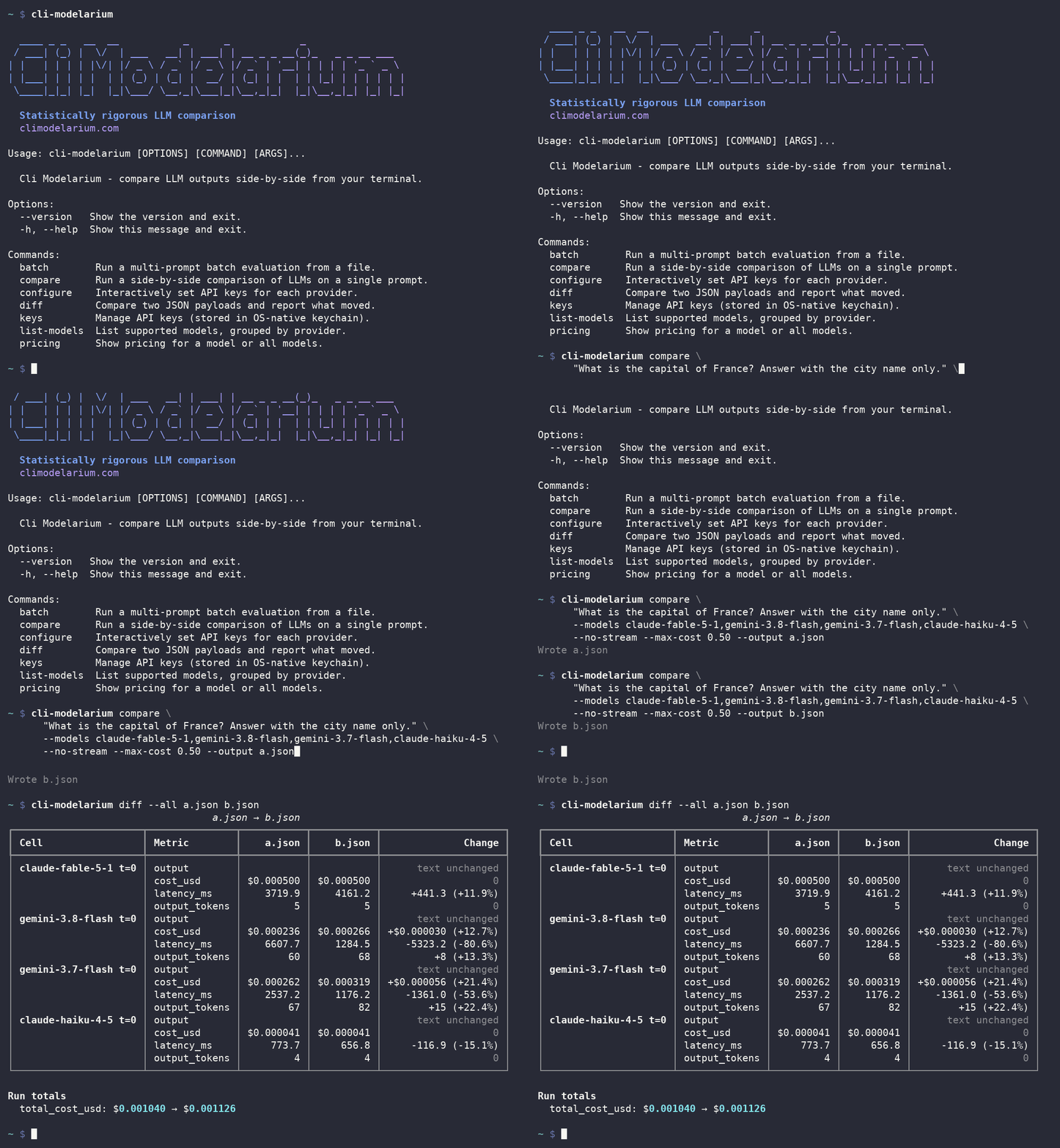
Argument order sets the direction. The first file is read as the earlier run, whatever the timestamps say. Nothing in a payload can order two runs written in the same second - started_at has second precision and run_id is a random UUID carrying no time - so the rule that is always available is the one you typed. When started_at disagrees, diff says so and carries on.
It compares cells, not files. Two rows can share a model, a temperature and a system prompt, because --temperatures 0,0 asks for the same cell twice, so the join also counts each row's position within its own cell group. Unchanged cells are hidden; --all shows them.
Every shown cell reports whether the answer text changed, before its numbers. A thinking model routinely returns the same text at a different token cost, so "the cost moved and the answer did not" is the ordinary reading - and a changed answer at an identical token count would otherwise move nothing and be hidden. It is same or not same, never a similarity score: a percentage there would be a number the payload does not contain. When a side refused, errored or was stopped, there is no answer to compare and the command says that instead.
What it refuses: a changed prompt, a changed run count (one run is a point estimate and ten are a distribution), and a batch payload against a compare one. An added or removed model is not a refusal - the overlapping cells stay comparable, and cells that ran on only one side are listed on their own.
What it qualifies instead of refusing: two payloads priced from different rate tables are still comparable, but part of the cost difference is the price list rather than the models, so that is said before any cost figure. A truncated run, a changed judge model, and a payload older than 0.2.0 are flagged the same way. An older payload is still compared, by matching row content, and diff names the two things that shape cannot tell it - which command wrote the payload, and which judges ran.
Significance verdicts are printed from both sides and never subtracted. A p-value describes one sample, so two of them from independent runs are both true and their difference is not a quantity either one contains.
--output-format json carries every cell, changed or not, all six metrics and every qualifier. The console shows cost, latency and output tokens for the cells that moved. Exit codes are in the table above: nothing moved is 0, something moved is 4, and a pair that cannot be compared is 2.
Privacy note: Every output format - JSON, CSV and Markdown - embeds the full prompt, the full system prompt and the full model response for every result, alongside any provider error message. JSON additionally embeds each judge's reasoning text; --include-reasoning gates only the console display, not the file, and CSV and Markdown do not carry it. Treat any output file as sensitive before committing it or uploading it as a public CI artifact. Separately, providers differ on data retention and on whether they train on what you send; this tool makes no claim about any of them, and you should check the terms of each provider you configure. Claude Fable 5.1 requires 30-day retention and is not available under zero-data-retention. A judge model is a second provider: --judge forwards your prompt as well as the model's response to it, so judging widens who sees the prompt. A request the first model declines is no longer sent to a judge at all. A compare report also records the environment that produced it - the tool version, the exact installed scipy version and the full Python version - in the methodology block of JSON and Markdown, at every run count. That is host metadata rather than your data, but it pins a dependency version precisely. CSV carries none of it, and batch records none of it.
The examples/ folder contains focused demo scripts for
every major feature:
basic_comparison.sh- simple multi-model comparisonreproducibility_analysis.sh- variance analysis with--runsstatistical_significance.sh- significance tests with correctionpublication_grade_eval.sh- bootstrap CIs + paired tests with reproducible seedsmcnemar_hallucination.sh- McNemar's test for hallucination ratesbatch_evaluation.json- multi-prompt batch with assertionsci_eval_suite.json+github_actions_workflow.yml- CI/CD integration template
See examples/README.md for the full list.
Cli Modelarium stores API keys in your OS-native keychain (Mac Keychain, Windows Credential Manager, or Linux Secret Service via keyring). Keys never touch disk in plain text.
# Interactive setup (recommended)
cli-modelarium configure

# Or set individually
cli-modelarium keys set openai
cli-modelarium keys set anthropic
cli-modelarium keys set google

# Check which keys are configured
cli-modelarium keys list

# Remove a key
cli-modelarium keys delete openai
You can also use environment variables (useful for CI/CD):
export OPENAI_API_KEY=sk-...
export ANTHROPIC_API_KEY=sk-ant-...
export GOOGLE_API_KEY=...
Environment variables take precedence over keychain storage.
On Linux servers without a desktop environment (no gnome-keyring, KWallet, or other Secret Service backend), the OS keyring may not be available — common on CI/CD runners, cloud VMs, and Docker containers. In that case, skip cli-modelarium configure and keys set entirely, and use environment variables instead:
export OPENAI_API_KEY="sk-..."
export ANTHROPIC_API_KEY="sk-ant-..."
export GOOGLE_API_KEY="..."        # or GEMINI_API_KEY
export MISTRAL_API_KEY="..."
export XAI_API_KEY="xai-..."
export DEEPSEEK_API_KEY="sk-..."
export GROQ_API_KEY="gsk_..."
export OPENROUTER_API_KEY="sk-or-..."
export DASHSCOPE_API_KEY="sk-..."
export ZAI_API_KEY="..."
export NVIDIA_API_KEY="nvapi-..."
export MOONSHOT_API_KEY="sk-..."
cli-modelarium checks environment variables before the OS keyring, so this works out of the box. If you prefer a keyring on Linux, install gnome-keyring (GNOME), KWallet (KDE), or keyrings.alt (file-based fallback).
Local models work via OpenAI-compatible endpoints - no API keys needed. The tool auto-detects the default Ollama port.
# Default: assumes Ollama at localhost:11434
cli-modelarium "test" --models local/llama-3.3

# Use LM Studio instead
cli-modelarium "test" --models local/qwen-3-32b --local-url http://localhost:1234/v1

# Save a custom local URL as default
cli-modelarium keys set local --base-url http://localhost:1234/v1| Provider | API Keys Needed | Streaming | Cost Tracking | Pricing verified |
|---|---|---|---|---|
| OpenAI (GPT-6 Astra, GPT-5.6 Sol, GPT-5.5, o3, etc.) | ✅ | ✅ | ✅ | first-party |
| Anthropic (Claude Opus 5, Sonnet 5, Fable 5.1, Haiku 4.5, etc.) | ✅ | ✅ | ✅ | first-party |
| Google (Gemini 3.8 Flash, 3.7 Flash, 3.1 Pro, etc.) | ✅ | ✅ | ✅ | first-party |
| xAI (Grok 4.6, Grok 4.3, etc.) | ✅ | ✅ | ✅ | first-party |
| DeepSeek (V4 Pro, V4 Flash, etc.) | ✅ | ✅ | ✅ | first-party |
| Mistral (Medium, Large, Small, Codestral) | ✅ | ✅ | ✅ | first-party |
| Groq (Llama 3.3, Llama 4 Scout, gpt-oss) | ✅ | ✅ | ✅ | third-party |
| OpenRouter (8 registered IDs: Qwen, DeepSeek R1, Llama 3.3, gpt-oss, GLM) | ✅ | ✅ | ✅ | unchecked |
| Alibaba/DashScope (Qwen3.8 Max, Qwen3.7 Max, Qwen3 Coder, etc.; select Qwen models, International/Singapore) | ✅ | ✅ | ✅ | first-party |
| Z.AI/GLM (GLM-5.3, GLM-5.2, GLM-4.7, etc.; OpenAI-compatible, overseas endpoint) | ✅ | ✅ | ✅ | first-party |
| NVIDIA NIM (9 registered IDs: Nemotron, Gemma 4, Mistral Nemotron, MiniMax M3, Laguna, Llama 3.1) | ✅ | ✅ | No published rate | unpublished |
| Moonshot AI / Kimi (4 registered IDs: K3, K2.7 Code, K2.7 Code HighSpeed, K2.6) | ✅ | ✅ | ✅ | reseller |
| Local: Ollama | ❌ | ✅ | Free | — |
| Local: LM Studio | ❌ | ✅ | Free | — |
| Local: vLLM | ❌ | ✅ | Free | — |
| Local: llama.cpp server | ❌ | ✅ | Free | — |
Run cli-modelarium list-models to see all currently supported models.
Instead of listing model IDs, --models accepts a group shortcut. Static groups expand verbatim: every member listed below runs, so you need a key for each provider the group spans, and the run aborts on the first one missing. The dynamic groups all and all-local are the exception - those resolve against what you actually have configured.
Static groups (fixed membership):
| Group | Models |
|---|---|
all-premium / all-flagship |
gpt-5.6-sol, claude-opus-5, gemini-3.1-pro-preview, grok-4.6, deepseek-v4-pro, mistral-large-latest, qwen3.8-max, glm-5.2 |
all-budget |
gpt-5.4-nano, claude-haiku-4-5, gemini-3.1-flash-lite, grok-4.20-0309-non-reasoning, deepseek-v4-flash, mistral-small-latest, qwen3.7-plus, glm-4.5-air |
all-reasoning |
o3, o4-mini, deepseek-v4-pro, glm-5.2 |
all-cheap |
gpt-4o-mini, claude-haiku-4-5, gemini-2.5-flash-lite, deepseek-v4-flash, mistral-small-latest, qwen-flash, glm-4.7-flashx |
all-open-weight |
openai/gpt-oss-120b, openai/gpt-oss-safeguard-20b, llama-3.3-70b-versatile, meta-llama/llama-4-scout-17b-16e-instruct |
Dynamic groups (resolved at runtime):
all— every cloud model you have a configured API key for (excludes local models, OpenRouter and NVIDIA - the latter two are a registered subset rather than the provider's full catalog, and NVIDIA's cost cannot be stated). This can fan out to many models, so pair it with--max-cost.all-local— every model reported by your running local server (Ollama / LM Studio / vLLM / llama.cpp). If no server is reachable, you get a clear message instead of an error.
cli-modelarium "Explain CAP theorem" --models all-budget
cli-modelarium "Explain CAP theorem" --models all --max-cost 0.50
cli-modelarium "Explain CAP theorem" --models all-localCli Modelarium uses a modular provider abstraction layer that hides the API differences between OpenAI's messages array, Anthropic's top-level system parameter, Google's system_instruction, and others. Every provider implements the same async streaming interface, so the CLI can run them all in parallel with asyncio.gather().
Cost calculations come from each provider's reported usage field (input tokens, output tokens, cached tokens) multiplied by current pricing constants. Most pricing data was verified from official provider documentation on September 6, 2026; four providers were not fully covered - see Notes & Limitations.
For local models, the same OpenAI Python SDK is used with a custom base_url, since Ollama, LM Studio, vLLM, and llama.cpp all expose OpenAI-compatible REST endpoints.
Most pricing built into Cli Modelarium was verified from official provider documentation on September 6, 2026. Some entries carry their own verification date, noted beside each one in the registry. Groq, Moonshot, NVIDIA and OpenRouter were not fully verified in that pass and are marked as unverified in the registry. Two sets of rates are known to expire: gemini-3.6-flash, gemini-3.7-flash and gemini-3.8-flash are on introductory rates that double on January 1, 2027, and gpt-5.6-sol is on a promotional rate that ends around November 21, 2026. Both make a comparison run today look cheaper than the same run will be later, and both move uniformly, so nothing in the output stands out as odd. LLM pricing changes frequently (sometimes monthly). The pricing_as_of date is carried in JSON and Markdown output and shown in the console; CSV output does not include it. Always verify against each provider's official pricing page before relying on cost calculations for budgeting or production decisions.
Prices are each provider's standard/list public rate per 1M tokens (not batch, priority, off-peak, or promotional pricing, with one annotated exception: gpt-5.6-sol, whose current published rate is promotional); for input-size-tiered models the entry/short-context tier is shown, and cached pricing is the cache-read rate. DashScope/Qwen costs reflect non-thinking rates (the tool sends enable_thinking=false).
NVIDIA NIM is the exception. NVIDIA publishes no per-token rate for its hosted NIM endpoints, so cost is not tracked for NVIDIA models: the zero shown in the cost column is the absence of a rate, not a price of zero. Because that cost is always zero, --max-cost will never trigger on an NVIDIA model and a cost_under assertion will always pass - neither gives you any spending protection on this provider. Access is metered in account credits rather than billed per token, so the failure mode to watch for is exhausting your credits, not an unexpected bill. A caveat panel is printed whenever an NVIDIA model is part of a run.
Run cli-modelarium pricing (or pricing --all) for current per-model rates.
Rate limit handling and the default per-provider concurrency settings are based on provider rate limits verified June 21, 2026. Your specific tier's limits may differ from the defaults assumed here. Verify your current limits against the provider's official dashboard before building production capacity assumptions.
Models supported by Cli Modelarium reflect what providers offered on August 15, 2026. Providers regularly release new models, deprecate older ones, and adjust capabilities. If a model in the registry no longer works, run cli-modelarium list-models and check the provider's documentation.
Cli Modelarium is designed for evaluation and comparison - running ad-hoc side-by-side tests across providers from a developer terminal. It is NOT a production inference gateway. If you need production-scale routing, load balancing, fallback chains, or SLA-managed inference, look for tools specifically built for that purpose.
Token counts shown in results are reported by each provider's API. Different providers use different tokenizers, so "output tokens" is not directly comparable across providers for the same text. If you're comparing cost efficiency for production use, run real prompts in your actual workload - don't rely solely on per-token math across providers.
Cli Modelarium includes optional LLM-as-a-judge scoring (enabled with the --judge flag), which uses one LLM to evaluate outputs from other LLMs. This is standard benchmarking methodology and is permitted under the Terms of Service of all supported providers as evaluation/benchmarking activity.
When using --judge, you are responsible for following the Terms of Service of each provider whose models you use. Each provider's ToS applies to both the models being judged and the judge model itself.
Judge bias notice: LLM judges have documented biases (self-preference, same-family preference, verbosity preference). Judge scores are useful signal, not ground truth. Use judge panels (--judges with multiple models) to reduce bias.
The hallucination detection preset is a useful comparison signal between models, not a ground-truth validation. Detection accuracy varies based on the judge model used, the domain knowledge required, and whether reference facts are provided via --expected-facts. Use it for relative quality comparison, not absolute correctness verification.
LLMs are non-deterministic at temperature > 0 - re-running the same prompt may produce different outputs. A single comparison run shows you ONE sample from each model, not a definitive quality verdict.
To draw more reliable conclusions:
- Use
--runs 5(or higher) to automatically run each comparison N times and see statistical summaries: mean latency, coefficient of variation, mode output, and output diversity. Coefficient of variation below 0.05 indicates stable model behavior across runs. - For hallucination consistency analysis, combine
--runswith--check-hallucinationto see how often the model produces hallucinations across multiple runs (the hallucination rate). - Use
--temperatures 0for more deterministic outputs. Some models do not accept a temperature setting at all -claude-opus-4-7,claude-opus-4-8,claude-opus-5,claude-sonnet-5,claude-fable-5,claude-fable-5-1,o3,o4-mini,gpt-5,gpt-5.5,gpt-5.6-sol,gpt-5.6-terra,gpt-5.6-luna,gpt-6-astra,gemini-3.8-flash,kimi-k3,kimi-k2.7-code,kimi-k2.7-code-highspeedandkimi-k2.6. The tool omits the field for those so the call still succeeds, and they run at their provider's default instead. - Use
--system-prompts "You are terse.,You are verbose."to run the same prompt under several system prompts and compare them side by side. It multiplies the call count like--modelsand--temperaturesdo. Where more than one is in play the reports label each rowSP 1,SP 2and so on, and print a legend giving the full text of each - soSP 2in the per-cell summary is the same prompt asSP 2in the table above it. CSV and JSON carry the full system prompt on every row instead. - Compare across multiple prompts, not just one
- Use the
--output-format jsonflag to save runs for systematic analysis (with--runs > 1the JSON includes per-cellstats_by_cellaggregates)
Those nineteen models are called without the temperature field, and models_without_temperature in the JSON output names the ones affected by any given run. Three consequences are worth knowing. A multi-value --temperatures sweep against one of them issues identical requests rather than a sweep, and the tool prints a warning when that happens. The temperature shown in the results table, the CSV and each JSON result record is the value you requested, not the value applied. And --significance is where this can change a conclusion rather than a label: comparing a model that omits temperature against one that honours it produces a variance difference that is a sampling artifact, which Welch or Mann-Whitney will report as though it were a model-quality difference. That case does warn: any significance run mixing an affected model with an unaffected one prints a Temperature not applied panel naming the models that ran at the provider default, and sets significance_temperature_mixed to true in the JSON output. A multi-temperature run that is also mixed gets both messages in a single panel. CSV carries no equivalent signal.
Cli Modelarium is a product of SoraVantia GK. It was originally created by Lavelle Hatcher Jr, who continues to maintain it.
- 📦 Repository: github.com/SoraVantia/cli-modelarium
- 💬 Questions or bugs: open an issue
- 🔧 Maintainer: Lavelle Hatcher Jr
Comparing LLM outputs across providers is tedious - different SDKs, different auth patterns, different response shapes, no easy way to see them side-by-side with cost and latency data. The polished cloud playgrounds only show one provider at a time, and the available open source options either focus on production routing or are full evaluation platforms optimized for teams.
Cli Modelarium is the small, focused CLI tool that does one thing well: side-by-side comparison with quality scoring, assertions, batch mode, and streaming - all designed for the terminal-first developer workflow.
It's intentionally focused: no production routing, no agent orchestration, no fine-tuning, no GUI. Just clean, fast comparison from the command line.
Built with a modular provider abstraction, parallel execution, transparent cost calculation, and secure key storage via OS keychain systems for local users.
Issues and PRs welcome. See CONTRIBUTING.md for guidelines.
For security issues, please see SECURITY.md - do not file public issues for security concerns.
Licensed under the Apache License, Version 2.0.
See the NOTICE file for attribution requirements.
A product of SoraVantia GK, created and maintained by Lavelle Hatcher Jr
Licensed under Apache 2.0. Issues, PRs, and conversations welcome.