TIA Openness Manager is now AnyAutomation Studio.


Thank you to everyone who uses, stars, and supports TIA Openness Manager.
Development has moved into AnyAutomation Studio. Every feature you know from the Manager (export/import, compare, find-unused, protection, vault, OPC UA, AI Chat, unit testing) has been rebuilt there as a complete code-first engineering IDE, with much more on top.
- Your account and license keep working. Sign in to Studio with your existing account; active licenses apply there unchanged.
- Existing Manager installations keep working, including account, license, and support access. New downloads are no longer offered here. Existing customers who need the installer again (for example after a hardware change) can contact support@tiaopenessmanager.ch.
- Download: latest Studio release:
AnyAutomationStudioSetup-x64-<version>.exe - Learn more: anyautomation.ch
- Docs: anyautomation.ch/docs
Everything from TIA Openness Manager, rebuilt in a full editor workbench — plus major new capabilities:
- Agentic workflow — a dedicated Agents window runs AI agent sessions for you: hand off a task, run several sessions in parallel against local or remote projects, then review and apply each session's changes. On top of that, AI Cascade is a project-wide assistant that reads your whole project to ask, generate, and refactor with full context.
- Multi-User engineering — open, edit, and commit a TIA Multi-User session entirely inside Studio, without keeping TIA Portal open. Upload a single-user project to a TIA Project Server and check it out, so a whole team works on one project together.
- Unit Testing, leveled up — write, run, and evaluate SCL unit tests against PLCSIM Advanced or a real S7 PLC, with AI-authored test cases, boundary generation, Visual / JSON / SCL editing, persisted pass/fail history, and CI/CD integration.
- Forge — a reusable Block Type Library: capture blocks from a project, organise them into folders, and deploy the whole library into any connected PLC, with the folder structure recreated as PLC groups.
| Capability | What it does |
|---|---|
| AI Cascade | Project-wide AI assistant — ask, generate, refactor with full context (MCP, multi-provider). |
| Agents Window | Run multiple AI agent sessions in parallel, local or remote; review and apply changes. |
| TIA Portal | Analyse, export, compare, and generate blocks programmatically (V15–V21, Openness). |
| Multi-User | Open, edit, and commit TIA Multi-User sessions; upload and check out from a TIA Project Server. |
| PLC Online | Live to the controller — watch and write values without TIA Portal open (S7, OPC UA). |
| Hardware Simulation | Spin up and control PLCSIM Advanced instances — no physical hardware. |
| Unit Testing | SCL unit tests on PLCSIM or real hardware, AI-authored, with CI/CD. |
| Forge | Reusable block-type library — capture, organise, deploy into a PLC. |
| OPC UA | Browse the address space, read/write, live subscriptions. |
| Trace | Oscilloscope-style live signal trace and dashboards. |
| Import / Export | Bulk export/import with folder structure, compile, and diff. |
| Find Unused | Detect and clean up unreferenced blocks across the project. |
| Password Vault | AES-256 encrypted vault for know-how-protection passwords. |
| Git Client | Full version control for your automation project. |
| EPLAN Connector | Bridge to EPLAN for electrical-engineering data exchange. |
Available in 14 display languages.
Basic · Pro · Pro+ · Enterprise — monthly or yearly, in CHF, cancel any time. See the full comparison at anyautomation.ch.
The Studio workbench: Activity Bar, Project Explorer, editor area, AI Chat, and status bar. Click the image to watch the demo video.
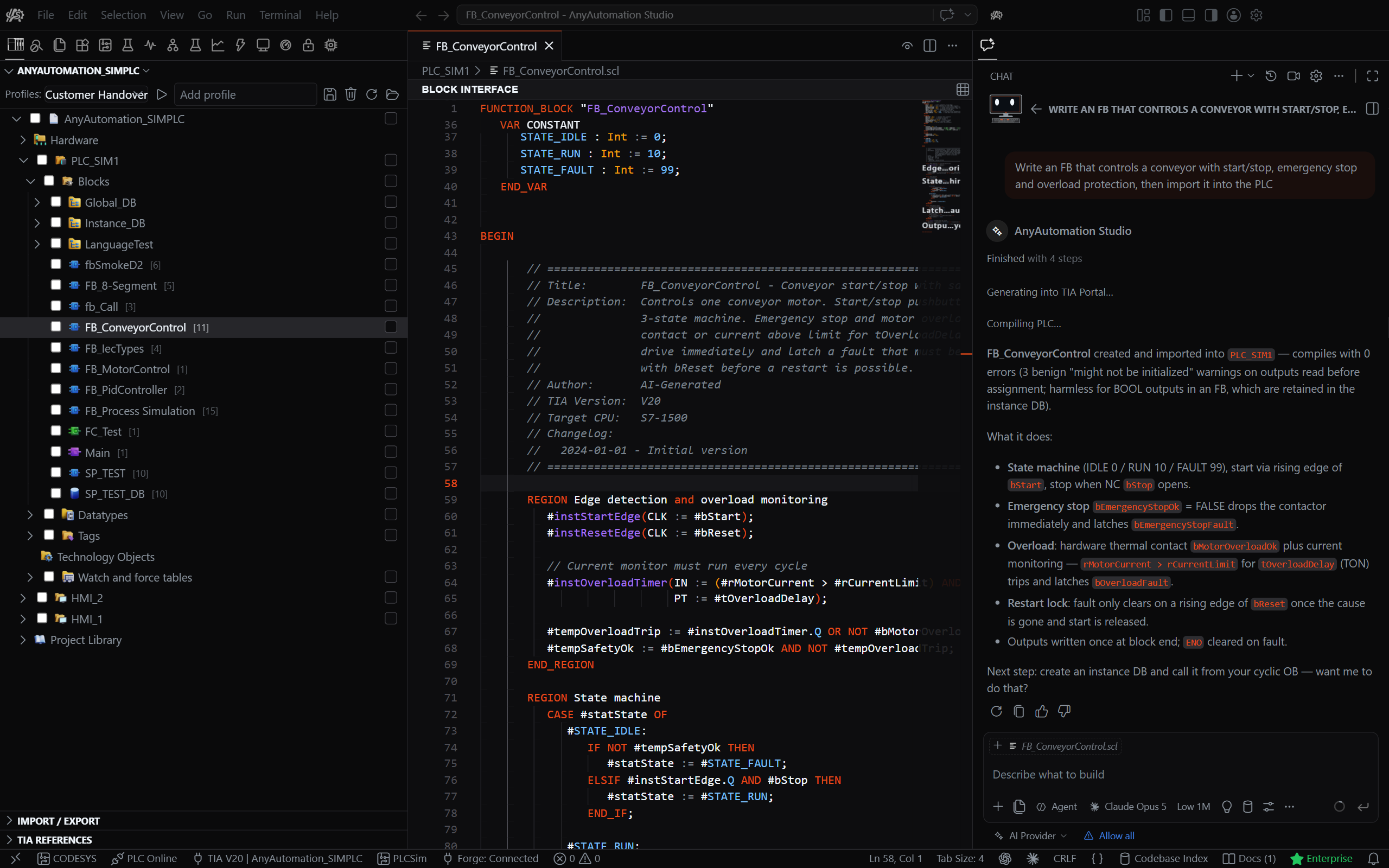
More screenshots in the AnyAutomation Studio repository. Demo videos on youtube.com/@AnyAutomation-Studio.
V15 · V16 · V17 · V18 · V19 · V20 · V21
- Website: anyautomation.ch
- Email: support@tiaopenessmanager.ch
- Issues: GitHub Issues
The software is provided "as is" without warranty of any kind.
The provider assumes no liability for:
- Damages caused by faulty LLM outputs or AI-generated code
- Data loss, production downtime, or system failures
- Engineering errors or faulty code generation
- Damages caused by improper use or configuration
The user bears full responsibility for reviewing and validating all generated content before use in production systems.
This software uses the official Siemens TIA Portal Openness API. Siemens and TIA Portal are registered trademarks of Siemens AG.
See EULA and Terms for full legal details.
© 2026 AnyAutomation. All rights reserved.
Made with passion for the automation community