AI-assisted coarse alignment for mobile optical terminals
A reproducible camera-to-control workbench for acquisition, tracking, and recovery.


Team IRODOV · Smart India Hackathon 2026 · SIH26169
Quick start · Demo · Results · Architecture · Documentation
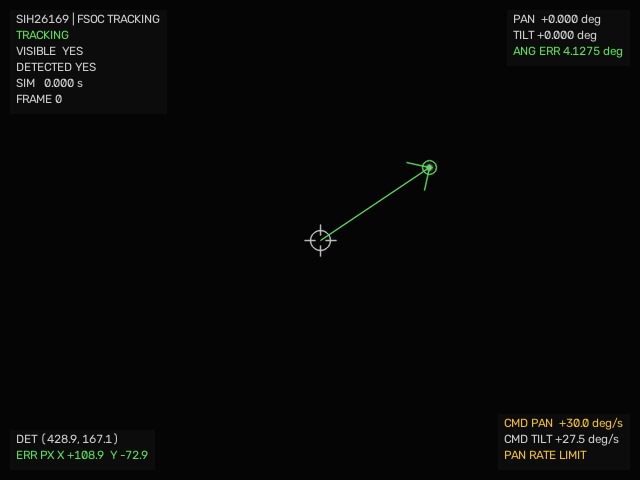
Actual C++ Step-9 visualizer output during initial acquisition. Click to open the recorded simulation demo.
FSOC closes the loop between what a camera sees and how an optical terminal points. It renders a moving beacon, locates it with classical or learned perception, checks temporal consistency, and commands a rate-limited virtual pan/tilt camera. Every correction changes the next observation.
The core runs in C++20. TinyBeaconNet performs neural inference through OpenCV DNN, while Mission Control makes the resulting trajectories, errors, controller commands, and tracking states inspectable.
Current scope: the default branch provides a deterministic software-in-the-loop system. The phone-camera branch extends it toward real image input with a virtual actuator; its physical validation remains separate from the simulation results below.
An optical communication beam must stay aligned with its receiver. When a terminal moves, a camera must acquire the remote beacon and maintain coarse pointing so a downstream fine-tracking stage can take over.
FSOC addresses SIH26169, the ISRO / Department of Space problem statement: Development of an AI-Based Virtual Camera Tracking System for Coarse Alignment of Mobile Free Space Optical Communication Terminals.
The workbench lets developers investigate a practical question: when sensing becomes uncertain, which measurements should a controller trust? Repeatable scenarios make it possible to compare perception and tracking changes before integrating an optical terminal.
| Capability | What it provides |
|---|---|
| Run the complete feedback loop | Image-derived centroid → pointing error → PID rate command → virtual camera motion → new image |
| Compare perception modes | Classical detection, standalone neural detection, and a conservative hybrid decision policy |
| Track through short gaps | An optional alpha-beta estimator with acquisition checks, bounded prediction, and loss/reacquisition states |
| Challenge the detector | Seeded noise, clutter, occlusion, and degraded-frame evaluation scenarios |
| Inspect the experiment | A nine-screen Mission Control UI with tracking overlays, spatial view, charts, events, and playback |
| Keep the evidence | A 42-column CSV schema, reproducible evaluation tools, model artifacts, and documented trade-offs |
You need a C++20 compiler, Ninja, OpenCV with core, imgproc, imgcodecs, and dnn, plus Node.js and npm for Mission Control. The frontend CI currently uses Node.js 20.
Use CMake 3.25 or newer for the checked-in presets: they use preset schema version 6, even though the underlying project declares a 3.24 minimum.
macOS setup
Install Xcode Command Line Tools if they are missing:
xcode-select --installWith Homebrew available:
brew install cmake ninja opencv nodeSee SETUP_MACOS.md for the repository's setup guide.
Ubuntu setup
sudo apt-get update
sudo apt-get install -y build-essential cmake ninja-build libopencv-dev
cmake --version
Ensure the installed CMake supports schema version 6; older distribution packages may need updating. Install Node.js and npm separately. The CI workflow records the exact automated build environment.
git clone https://github.com/ThatKJ/FSOC.git
cd FSOC

cmake --preset debug -DFSOC_ENABLE_OPENCV=ON
cmake --build --preset debug
ctest --preset debug --output-on-failure
Explicitly enabling OpenCV makes missing image-processing dependencies a configuration error. The default AUTO setting can otherwise build only the math/control subset.
Run these commands from the repository root so the bundled model resolves correctly:
# Classical baseline
./build/debug/fsoc_demo static

# Hybrid perception with temporal tracking
./build/debug/fsoc_demo static --mode hybrid --tracker

# Save a complete run
mkdir -p generated/demo
./build/debug/fsoc_demo sinusoidal --mode hybrid --tracker --csv generated/demo/sinusoidal.csv
The ONNX model is already committed; training is not required to run the demo. Python is used by the optional offline training tools, not the C++ inference runtime.
cd frontend
npm ci
npm run dev
Open localhost:4317. Select ENGINE to compute a new experiment with the local binary, or REPLAY to inspect a checked-in recording.
The CLI includes five self-contained disturbance presets:
| Command | What to inspect |
|---|---|
./build/debug/fsoc_demo normal |
Classical baseline acquisition and correction |
./build/debug/fsoc_demo noise |
Response to ordinary image noise |
./build/debug/fsoc_demo clutter |
Conservative rejection and reduced tracking availability under bright distractors |
./build/debug/fsoc_demo occlusion |
Short prediction-assisted bridging across a detection gap |
./build/debug/fsoc_demo reacquisition |
Loss after a longer gap, followed by fresh acquisition |
These presets fix their own perception mode, tracker setting, and duration. Use the base scenarios—static, sinusoidal, loss, open, closed—when supplying --mode, --tracker, or --duration yourself. --csv remains available for preset runs.
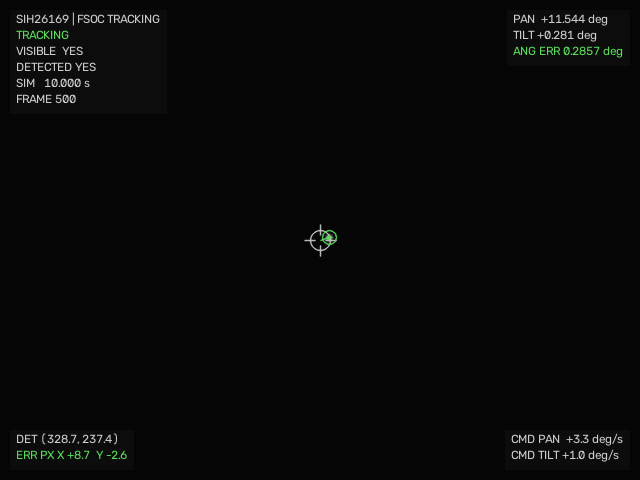
| Sinusoidal tracking | Loss and re-entry scenario |
 |
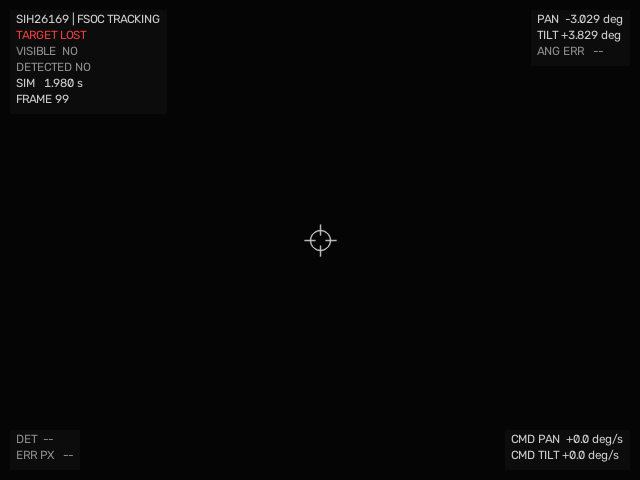 |
The images are native simulation visualizations. The browser UI is described below. For a narrated walkthrough, see the Golden Demo guide; recorded clips are in demo assets.
The frontend uses Next.js, TypeScript, Tailwind CSS, Recharts, React Three Fiber, and Framer Motion. A shared playback state keeps the experiment's displays on the same sample.
| Screen | Purpose |
|---|---|
| Overview and Mission Control | Experiment context, selected source, state, and primary telemetry |
| Optical Tracking | Centroid reticle, boresight, error vector, and pan/tilt readouts |
| Spatial View | Visualize target and camera geometry |
| Telemetry | Inspect time series and perception/tracker diagnostics |
| Scenarios, Benchmarks, and Validation | Review presets and documented baseline evidence |
| Architecture | Explore the system's module boundaries |
How data reaches the UI:
| Source | Actual behavior |
|---|---|
| ENGINE | The local Next.js server executes fsoc_demo, waits for the finite run to finish, reads its CSV, and returns the computed samples for interactive playback. |
| REPLAY | The server loads committed recordings from the C++ engine. These fixtures use classical perception with the tracker disabled. |
| AUTO | The server prefers the local engine and falls back to replay when necessary. Check the returned source before interpreting a run. |
ENGINE computes fresh results; the current default-branch transport is run-then-playback, rather than continuous frame streaming. Play, pause, and seek operate on the returned samples. The browser tracking viewport draws telemetry-driven overlays over a presentation background; it is not a raw camera-frame stream.
Inspect the implementation in engine.ts and the simulation API. The server needs access to the compiled native binary; a static website host alone cannot provide ENGINE mode.
flowchart TD
    World["Target trajectory"] --> Render["Camera image and optional disturbances"]
    Render --> Classical["Classical detector"]
    Render --> AI["TinyBeaconNet"]
    Classical --> Fusion["Selected perception policy"]
    AI --> Fusion
    Fusion --> Tracker["Optional alpha-beta tracker"]
    Tracker --> Control["Steering gate, error and PID"]
    Control --> Camera["Rate-limited pan and tilt"]
    Camera -->|"Updated view"| Render
    World -.->|"Evaluation truth only"| Evidence["Metrics and CSV telemetry"]
    Control -.-> Evidence
    Evidence --> UI["Mission Control"]
The controller receives measurements, never target-truth coordinates. The simulator uses truth to construct images and evaluate results. Perception extracts the centroid from those images; the tracker and controller act on that measurement path.
The pure math/control modules remain separate from OpenCV. Angles are radians internally and converted at presentation boundaries. The baseline uses a fixed 20 ms simulation step; measured processing throughput is a separate quantity.
TinyBeaconNet is a 27,282-parameter heatmap localizer trained on synthetic beacon images and exported to ONNX. It returns beacon presence and localization outputs; AiBeaconDetector runs it in C++ through OpenCV DNN. The model card documents the Stage-2 training snapshot; MVP metrics cover the subsequent C++ integration and evaluation.
In Hybrid mode, resolve_perception() uses an explicit policy:
| Available detections | Control-facing result |
|---|---|
| Classical and AI agree within 8 px | Accept the classical centroid |
| Classical only | Accept the classical centroid |
| AI only | Reject the unverified candidate |
| Classical and AI disagree | Reject both |
| Neither detector finds a candidate | Report no detection |
Standalone --mode ai is a separate diagnostic mode that does accept thresholded AI output. The rejection rules above apply to Hybrid.
The optional TargetTracker adds an alpha-beta position/velocity estimate, temporally consistent acquisition, and a bounded coast period. It can decline a candidate or declare loss instead of continuing an unsupported track. It is enabled with --tracker; the classical baseline remains available with it disabled.
These are recorded simulation results, linked to their committed methods and evidence. They are not physical-camera accuracy measurements or a fresh benchmark of the reader's machine.
The Step-10 comparison runs the same sinusoidal trajectory with and without control:
| Metric | Open loop | Closed loop |
|---|---|---|
| RMS angular error | 6.4549° | 0.5461° |
| Detection fraction | 57.4% | 100.0% |
| Lost frames | 426 | 0 |
The baseline acceptance suite reports 7/7 passing scenarios: static acquisition, slow linear tracking, sinusoidal tracking, near-FOV-edge acquisition, actuator saturation, target loss/re-entry, and open-versus-closed-loop comparison. Method and results · Consolidated metrics
The Stage-4 ablation evaluates 11 scenarios × 5 seeds × 400 steps = 22,000 steps per configuration:
| Configuration | Severe pointing outliers >50 px | Accepted-detection coverage |
|---|---|---|
| Classical | 2,240 | 99.69% |
| Classical + tracker | 12 | 77.51% |
| Hybrid | 1,808 | 97.35% |
| Hybrid + tracker | 9 | 77.05% |
Hybrid + tracker reduces severe outlier counts by approximately 99.5% versus Hybrid, while coverage falls by 20.3 percentage points. The benefit comes from rejecting unreliable measurements. It is not a 99.5% accuracy claim. Reported RMS in this ablation uses accepted-detection frames, so reduced coverage affects its interpretation. Full ablation and counterexamples
| Measurement | Recorded result |
|---|---|
| TinyBeaconNet parameters | 27,282 |
| ONNX Runtime ↔ C++ decoded-centroid difference | 1.54 × 10⁻⁷ px on the recorded parity fixture |
| Hybrid + tracker full-step P95 | 1.21 ms in the uncontended MVP freeze run |
| Fixed simulation interval | 20 ms / 50 Hz |
| CSV telemetry | 42 columns: 27 core + 7 perception + 8 tracker |
Timing was measured on the documented Apple M5 development machine, not embedded or flight hardware. Earlier runs report P95 values of 1.439–1.639 ms under their recorded conditions; timing depends on workload and platform. Freeze run · Timing methodology
Run the baseline checks from the repository root:
cmake --preset debug -DFSOC_ENABLE_OPENCV=ON
cmake --build --preset debug
ctest --preset debug --output-on-failure
./build/debug/step10_validation_smoke
For the frontend, run the following inside frontend/ after npm ci. The checked-in Playwright configuration uses installed Google Chrome, rather than a Playwright-managed Chromium download.
npm run typecheck
npm run lint
npm run build
npx playwright test
The CI workflow separately builds/tests C++ and checks the frontend. Its browser job uses replay fixtures; local tests that require an engine need the native build available. The badge at the top links to current runs; freeze-time test results are historical evidence.
Reproduce AI evaluation, tracker ablation, and latency measurements
From the repository root:
cmake --preset release -DFSOC_ENABLE_OPENCV=ON
cmake --build --preset release

./build/release/ai_inference_benchmark
./build/release/stage4_evaluation --out generated/ai_stage4
./build/release/stage4_tracker_ablation --out generated/ai_stage4_ablation
./build/release/mvp_dynamic_scenarios --out generated/mvp_dynamic_scenarios
./build/release/mvp_latency_budget
The full evaluation and ablation are longer-running experiments. Measure latency separately from CPU-heavy evaluations so the load condition is clear. The frozen Stage-4 protocol defines scenarios, seeds, and metrics.
The evaluation deliberately includes failure cases:
- Coherent moving distractors remain a weakness. A smoothly moving distractor defeats the temporal gate in the documented counterexample.
- Coverage is traded for reliability. The outlier reduction does not eliminate the classical detector's 44.93% common-frame false-positive rate in the degraded evaluation.
- AI recall is limited. The recorded synthetic tests report roughly 16–40% recall depending on the evaluation; real-camera generalization requires separate evidence.
- Physics and hardware remain bounded in scope. Image degradations do not establish validated atmospheric propagation. Fine optical PAT, physical gimbal tracking, and an optical data link are outside the default branch's measured capability.
| Stage | Status |
|---|---|
| Deterministic C++ coarse-alignment loop | Implemented; baseline acceptance documented |
| Neural inference and Hybrid policy | Implemented; model, parity checks, and evaluation committed |
| Temporal tracking and bounded recovery | Implemented; ablation and failure cases documented |
| Phone/webcam frame input with virtual actuation | Separate development branch; physical measurements pending in its test documentation |
| Continuous streaming, stronger live-session UX, and evidence export | Further integration work |
| Packaged desktop application and physical pan/tilt bench | Planned |
| Coarse-to-fine handoff and optical-link validation | Future research |
| Start here | Read it for |
|---|---|
| Documentation index | A map of the complete project |
| Golden Demo | Commands, narration, and expected behaviors |
| MVP metrics | Experiment conditions and measured results |
| Tracker ablation | The clutter investigation, trade-offs, and counterexamples |
| MVP freeze | The reproducible presentation baseline |
| Coordinates and math | Geometry, signs, and units |
| Interface contracts | Boundaries between modules |
| Telemetry schema | The CSV fields and their meanings |
| AI architecture | Learned perception and hybrid integration |
| Model card | Training data, checkpoint, and model limitations |
| Architecture decisions | Why the system is built this way |
| Development history | The engineering progression from the initial baseline |
Repository map
| Path | Contents |
|---|---|
include/fsoc/ |
Public C++ interfaces and data contracts |
src/ |
Geometry, simulation, perception, tracking, control, and telemetry |
apps/ |
Demo, validation, dataset, and benchmark executables |
tests/ |
C++ tests and parity fixtures |
models/ |
Trained ONNX model, metadata, and evaluation records |
tools/ai/ |
Optional offline Python training/export tools |
frontend/ |
Mission Control, data adapters, and browser tests |
docs/ |
Design, metrics, protocols, and engineering history |
.github/workflows/ |
CI definitions |
generated/ |
Local run artifacts; created at runtime and git-ignored |
| Symptom | Check |
|---|---|
fsoc_demo is missing after a build |
Reconfigure with -DFSOC_ENABLE_OPENCV=ON, resolve missing OpenCV components, then rebuild. |
| CMake rejects the presets | Use CMake 3.25+ for schema version 6. |
| ENGINE is unavailable | Build the native executable and start Next.js from frontend/. A server-side FSOC_DEMO_BIN can override its path. |
| AI/Hybrid falls back to Classical | Run from the repo root and check that models/tiny_beacon_net.onnx loads. Inspect the warning and active-mode banner; fallback is not evidence of an AI run. |
| Perception settings do not change a replay | The committed fixtures are classical/tracker-off. Use ENGINE to compute a different configuration. |
| Playwright cannot find Chrome | Install Google Chrome to match frontend/playwright.config.ts. |
Open an issue with the scenario, configuration, commit, and evidence needed to reproduce a problem. Keep changes focused and include relevant tests.
Read AGENTS.md and CLAUDE.md before implementation. Preserve the frozen baseline, keep truth out of the controller, retain explicit units, and document any algorithm change with its measured effect. The repository does not currently include a LICENSE file.
Built by Team IRODOV
Student project for SIH26169 · Space Technology