







Ansi codes library for console applications.
- About the Project
- Features
- Getting Started
- Example
- Contributing
- Bug / Issue Reporting
- License
- Contact
- Acknowledgments
The AnsiCode library is a .NET library that provides a simple and efficient way to work with ANSI escape codes in console applications. It allows developers to easily format text, change colors, and create visually appealing command-line interfaces.
- Text Formatting: Apply various text formatting options such as bold, underline, and italics.
- Color Support: Change text and background colors using ANSI escape codes.
To get started with the AnsiCode library, follow the instructions below to install it in your .NET project.
- .NET 10.0 or later
You can install the AnsiCode library using the NuGet Package Manager Console. Open the console and run the following command:
Install-Package TirsvadCLI.AnsiCode- Open your project in Visual Studio.
- Right-click on your project in the Solution Explorer and select "Manage NuGet Packages".
- Search for "TirsvadCLI.AnsiCode" in the NuGet Package Manager.
- Click "Install" to add the library to your project.
You can also install the AnsiCode library using the .NET CLI. Open a terminal and run the following command:
dotnet add package TirsvadCLI.AnsiCode
If you want to clone the repository and build the library from source, you can do so using Git. Make sure you have Git installed on your machine. Then, run the following command in your terminal:
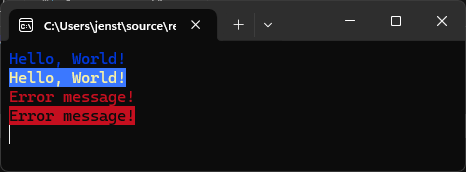
git clone git@github.com:TirsvadCLI/Dotnet.Lib.AnsiCode.gitIn the example you can see how to use the AnsiCode class.
Contributions are what make the open-source community such an amazing place to learn, inspire, and create. Any contributions you make are greatly appreciated.
- Fork the Project
- Create your Feature Branch (
git checkout -b feature/AmazingFeature) - Commit your Changes (
git commit -m 'Add some AmazingFeature') - Push to the Branch (
git push origin feature/AmazingFeature) - Open a Pull Request
If you encounter a bug or have an issue to report, please follow these steps:
-
Go to the Issues Page
Navigate to the GitHub Issues page. -
Click "New Issue"
Click the green "New Issue" button to create a new issue. -
Provide Details
- Title: Write a concise and descriptive title for the issue.
- Description: Include the following details:
- Steps to reproduce the issue.
- Expected behavior.
- Actual behavior.
- Environment details (e.g., OS, .NET version, etc.).
- Attachments: Add screenshots, logs, or any other relevant files if applicable.
- Submit the Issue
Once all details are filled in, click "Submit new issue" to report it.
Distributed under the GPL-3.0 License.
Jens Tirsvad Nielsen - LinkedIn