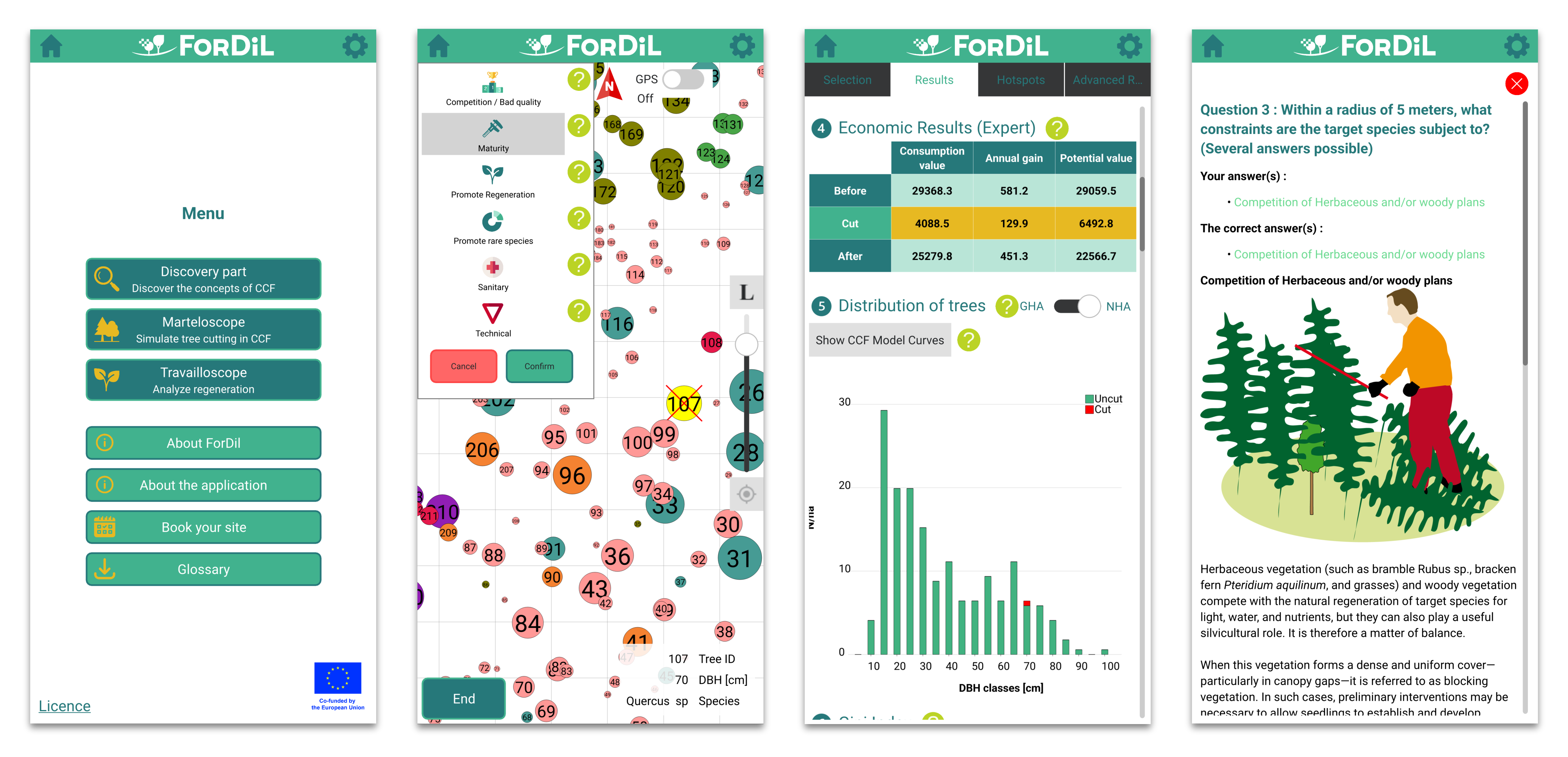
ForDil is a tool to learn Continuous Cover Forestry approach (CCF) approach through practical cases and field situations. It is intended for current and future forest owners and managers (students in forestry or silviculture programs at vocational schools and higher education institutions).
For more information, see the official ForDil website https://www.fordil.net/ or linkedin https://www.linkedin.com/company/fordil/
ForDil app is available on Google Play Store https://play.google.com/store/apps/details?id=com.mendelu.fordil
ForDil app APK file download https://github.com/VaclavBubnik/ForDil/releases
Copyright (C) 2025 - Present MENDELU.
- Société Royale Forestière de Belgique https://srfb.be/
- Lycée professionnel de Bavay - Institut de Genech https://www.lyceedebavay.fr/
- Institut Technique Gembloux Suarlée http://www.ith-gembloux.be/
- Centre de Développement Agroforestier de Chimay https://www.cdaf.be/
- Mendel University in Brno https://www.mendelu.cz/
ForDil is free software and is distributed under the GNU General Public License, version 3. In short, this means you are free to use ForDil for any purpose commercial or non-commercial without any restrictions. You are also free to modify the program as you wish. If you distribute software which uses any part of ForDil, you must provide access to the software's source code. See LICENSE for more information.
The application requests location access at runtime to enable GPS functionality and provide accurate positioning services. This is necessary for displaying your current location on the map and enabling location-based features.
ForDil source code includes third-party libraries which are stored under 3rdparty directory. This approach allows to use compatible versions of third-party libraries without downloading and installation of each library.
- This application uses QXlsx licensed under MIT.
- Some icons are provided by Flaticon https://www.flaticon.com/
The code uses C++, Qt, Qt QML, Qt Creator, Java JDK, Android SDK, NDK and Tools. The build process generates APK (and optionally ADB).
- Install Qt
- Install via the Qt Online Installer from https://www.qt.io/download -> GPL
- Downloaded file "qt-online-installer-windows-x64-4.9.0"
- In Qt Online Installer select "Developer tools" and "Custom Installation"
- Under Qt > Qt 6.9.0, select "Android", "Sources", "Additional Libraries"
- Under Qt > Build Tools, select "LLVM-MinGW 17.0.6 64-bit", "CMake", "Ninja"
- Under Qt Creator, select "Qt Creator 16.0.1"
- Click "Next" and finish the installation
- Tested with:
- Qt Creator 15.0.0, Qt 6.11, Windows 11
- Qt Creator 16.0.0, Qt 6.8.1, Windows 10
- Install Java JDK
- Visit: https://adoptium.net/en-GB/temurin/releases/?version=17
- Download the Windows x64 MSI
- Install and check "Set to override JAVA_HOME" to set environment variables
- Install Android Studio for Android SDK, NDK, and Command-Line Tools
- Visit https://developer.android.com/studio
- Download and run the installer.
- Start Android Studio and finish the Android Studio Setup Wizard
- The default SDK path is C:\Users\user\AppData\Local\Android\Sdk
- You may uncheck the Virtual Device
- Open the SDK Manager in Android Studio (Settings > Languages > Android SDK)
- In SDK Platforms Tab:
- Check Android API 36 (API Level "36")
- Click "Apply" button
- In SDK Tools Tab check "Show Package Details":
- Istall the latest version of Android SDK Build-Tools
- Expand "NDK (Side by side)" list and check version 28.2.13676358
- Click "Apply" button
- In SDK Platforms Tab:
- Open the Virtual Device Manager in Android Studio
- You may skip this and create virtual devices from Qt Creator
- Click Create virtual device
- Select a device like Pixel 3a with API 28+
- Select API 28 "Pie" in the device configuration
- Select System Image with ABI x86, x86_64 or (slow) ARM 64 v8a
- This will download a system image, required to create virtual devices
- Install git, required for SDK configuration in Qt Creator
- Open "Git for windows" https://git-scm.com/downloads
- Download installer Git-2.36.1-64-bit.exe or newer
- Run the installer
- Choose all the options as default recommended values with these suggestions:
- You may enable "(NEW!) Add a Git Bash Profile to Windows Terminal".
- You may prefer to choose default editor used by Git to "Notepad".
- You may choose default branch name as "main".
- Choose "Checkout as-is, commit as-is" eg. do not convert CRLF/LF (autocrlf = false in global config). This project uses LF line endings. Windows can handle LF just fine at least since version 10.
- Configure Qt Creator for Android
- In Qt Creator go to Tools > External > Configure > Devices > Android
- Set paths for:
- JDK: should be already set by JAVA_HOME example location: C:\Android\jdk-17.0.13+11
- SDK: browse to your sdk directory or click button "Set Up SDK" which may download additional packages example location: C:\Android\Sdk
- NDK: example C:\Users\user\AppData\Local\Android\Sdk\ndk\28.2.13676358
- Open, Build and Deploy Project in Qt Creator
- In Qt Creator click "Open Project"
- Open CMakeLists file in ForDil\app-mobile directory
- Configure Project for Android emulator x86/x86_64 or real device arm64-v8a
- Silence emulator warnings if needed from Android Studio PowerShell Terminal: c:\Android\Sdk\platform-tools\adb shell setprop log.tag.emuglGLESv2_enc SILENT c:\Android\Sdk\platform-tools\adb shell setprop log.tag.EGL_emulation SILENT This may require to re-open Qt Creator or your emulated image.
- You can add new project configurations later from "Projects" wrench icon
- Check your build target in the left panel - "ForDil" phone icon
- Click "Run" to build and deploy the application
-
Go to the directory with the application source code:
cd c:\ForDil -
Locate "lupdate", "linguist", and "lrelease" in the Qt installation directory
-
Update the ".ts" file from all files "." in the application source code:
c:\Qt\6.8.1\msvc2022_64\bin\lupdate . -ts translations\translation_fr.ts -
(Optional) Run the Qt Linguist application:
c:\Qt\6.8.1\msvc2022_64\bin\linguist.exe -
(Optional) Open '.ts' in Qt Linguist, translate texts with '?', save.
-
Generate binary versions of translations:
c:\Qt\6.8.1\msvc2022_64\bin\lrelease translations\translation_fr.ts -
Build the application.
.gitignore                    - Files and directories ignored by Git.
LICENSE                       - GPL license.
README.md                     - Project documentation.

3rdparty                      - Third-party libraries.
data                          - Data assets.
images                        - Image assets.
tests                         - Automated tests.
translations                  - Translations files.

backend                       - C++ backend.
    c_chart.cpp               - Chart generator.
    c_chart.h                 -
    c_data.cpp                - Application data.
    c_data.h                  -
    c_mappainter.cpp          - Map rendering and interaction.
    c_mappainter.h            -
    c_pdf.cpp                 - PDF writer.
    c_pdf.h                   -
    c_result.cpp              - Results calculation.
    c_result.h                -
    c_type.cpp                - Data types.
    c_type.h                  -

app-mobile                    - Cross-platform Qt Quick (QML) application.
    android                   - Android-specific configuration.
    .qmlls.ini                - QML Language Server config (generated).
    c_backend.cpp             - QML application interface to C++.
    c_backend.h               -
    c_main.cpp                - The main QML/C++ application.
    ChapterHeader.qml         - Chapter header component.
    CloseButton.qml           - Close button component.
    CustomPopup.qml           - Custom popup component.
    CMakeLists.txt            - CMake project file.
    CMakeLists.txt.user       - User-specific build settings (generated).
    Components.qml            - Shared QML components.
    DialogWindow.qml          - Dialog window component.
    Globals.qml               - Global QML variables.
    IconTextButton.qml        - Text button with icon component.
    LogWindow.qml             - Log window component.
    MapView.qml               - Interactive map component.
    PageAbout.qml             - Information about the app.
    PageAdvancedResults.qml   - Marteloscope advanced Results page.
    PageDiscoveryPart.qml     - Discovery part page.
    PageGlobalResults.qml     - Marteloscope global Results page.
    PageHome.qml              - The home page.
    PageHotspots.qml          - Marteloscope hotspots page.
    PageMain.qml              - The main page with application layout.
    PageMarteloscope.qml      - Marteloscope tree selection page.
    PageSettings.qml          - The settings page.
    PageSiteDiscovery.qml     - Discovery site selection page.
    PageSiteMarteloscope.qml  - Marteloscope site selection page.
    PageSiteTravailloscope.qml- Travailloscope site selection page.
    PageTravailloscope.qml    - Travailloscope spot selection page.
    PageValuation.qml         - Travailloscope valuation page.
    qmldir                    - QML module definition.
    qtquickcontrols2.conf     - Qt Quick Controls configuration file.
    resources.qrc             - Qt Resource Collection File to bundle assets.
    SiteSelection.qml         - Site selection component.
    TextButton.qml            - Text button component.
    ZoomableView.qml          - Interactive zoomable view component.
PageMain.qml
    - PageHome.qml
        - Discovery
            - PageSiteDiscovery.qml
                - PageDiscoveryPart.qml
        - Marteloscope
            - PageSiteMarteloscope.qml
                - PageMarteloscope.qml
                - PageGlobalResults.qml
                - PageHotspots.qml
                - PageAdvancedResults.qml
        - Travailoscope
            - PageSiteTravailloscope.qml
                - PageTravailloscope.qml
                - PageValuation.qml
        - PageSettings.qml
        - PageAbout.qml