
Video to JPG is the Ultimate Browser-Based Video Frame Extraction Tool.
In today's digital age, extracting high-quality images from videos has become an essential task for content creators, educators, marketers, and everyday users. Video to JPG emerges as a powerful, free, and privacy-focused solution that transforms any video into crisp, clear images directly in your browser. This comprehensive tool eliminates the need for expensive software or complex technical knowledge, making professional-grade frame extraction accessible to everyone.
Video to JPG is a sophisticated browser-based application that extracts high-quality images from videos without compromising user privacy. Unlike traditional video processing tools that require software installation or server uploads, this innovative solution operates entirely within your web browser, ensuring that your videos never leave your device. The tool supports a wide range of video formats including MP4, MOV, AVI, MKV, and WEBM, making it versatile enough to handle virtually any video file you might encounter.
One of the tool's standout capabilities is its comprehensive format compatibility. Whether you're working with professional footage in MOV format, compressed MP4 files, or specialized formats like MKV and WEBM, Video to JPG handles them all seamlessly. On the output side, users can choose between JPEG for balanced quality and file size, PNG for lossless compression and transparency support, or WebP for modern web optimization. This flexibility ensures that extracted frames meet specific requirements for different use cases.
Perhaps the most innovative feature is the Smart Clarity Detection system. This advanced algorithm automatically analyzes each extracted frame for sharpness and quality, identifying and prioritizing the clearest images from your video. This intelligent selection process saves countless hours that would otherwise be spent manually reviewing hundreds or thousands of frames to find the perfect shots. Users can also manually exclude frames from automatic selection, giving them complete control over the final output.
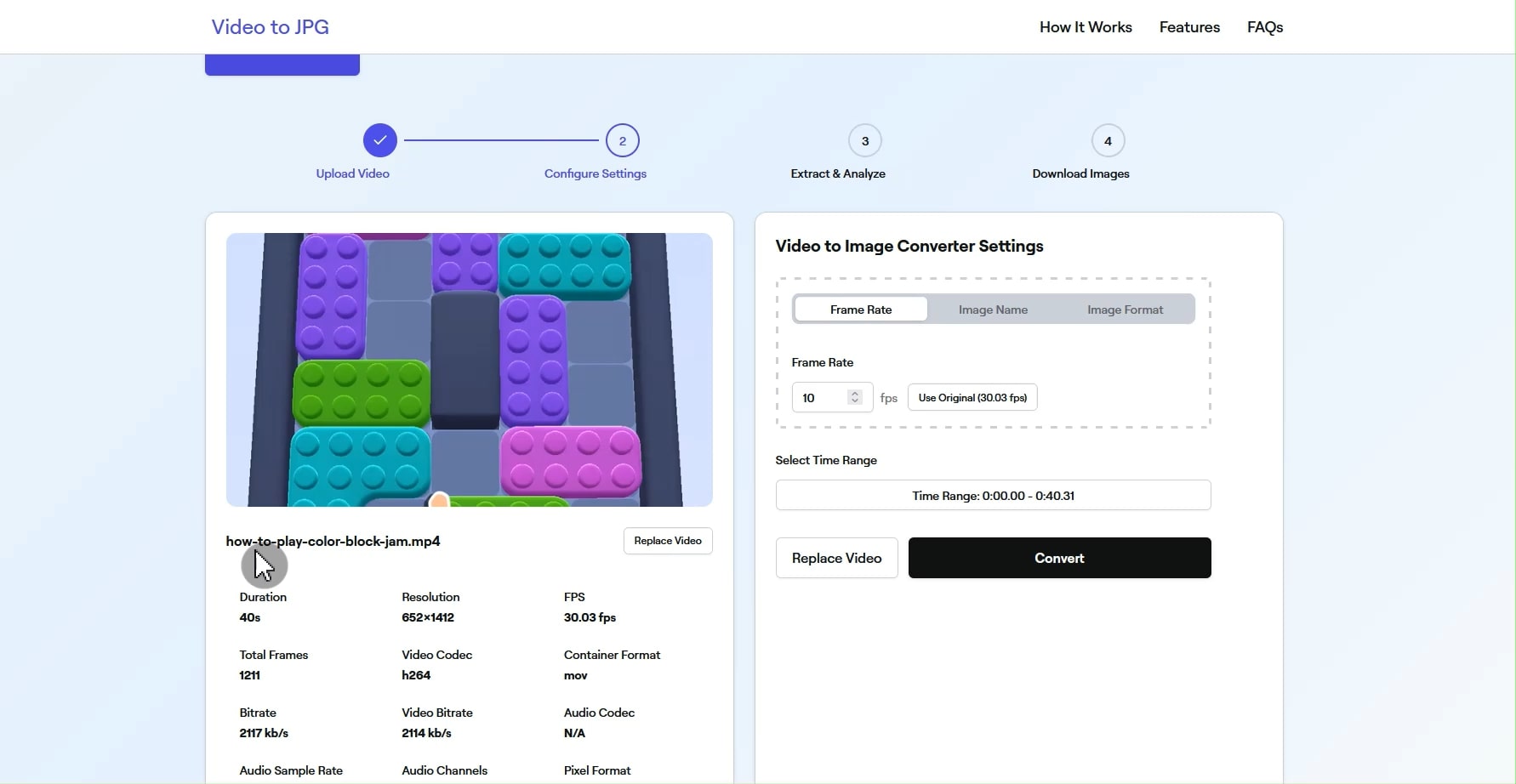
Video to JPG offers granular control over the extraction process. Users can specify custom frame rates, choosing exactly how many frames per second to extract, or maintain the original video frame rate for maximum accuracy. The custom time range feature allows for targeted extraction from specific video segments, perfect for focusing on key moments without processing unnecessary footage. Additionally, the custom file prefix option helps organize extracted images systematically, making file management effortless for large projects.
Before extraction begins, the tool automatically analyzes and displays crucial video metadata including resolution, duration, codec information, and native frame rate. This information helps users make informed decisions about extraction settings and ensures optimal results. Understanding your source material is crucial for achieving the best possible output quality, and Video to JPG makes this information readily accessible.
In an era where data privacy is paramount, Video to JPG stands out with its commitment to user security. All video processing occurs locally in your browser using advanced web technologies. Your videos are never uploaded to external servers, transmitted over the internet, or stored anywhere outside your device. This approach not only protects sensitive content but also eliminates concerns about bandwidth limitations or slow upload speeds that plague cloud-based solutions.
The process of converting videos to images is remarkably straightforward:
- Upload Your Video: Simply select any video file from your device. The intuitive interface accepts drag-and-drop uploads or traditional file selection, accommodating videos of any size or resolution.
- Configure Settings: Choose your preferred output format and adjust extraction parameters. Set custom frame rates, define time ranges, and configure quality settings to match your specific needs.
- Extract & Analyze: The tool processes your video locally, extracting frames according to your specifications. The blur detection algorithm simultaneously analyzes each frame, identifying the sharpest and most usable images.
- Download Images: Preview all extracted frames in a convenient gallery view. Select individual images for download or use the batch download feature to obtain all selected frames in a single ZIP file.

Video to JPG serves diverse professional and personal needs. Filmmakers and video editors use it to create storyboards and extract key frames for promotional materials. Educators extract slides from recorded lectures for study materials. Social media managers capture perfect moments from video content for posts and thumbnails. Researchers document experimental procedures by extracting sequential frames. The tool's versatility makes it invaluable across industries and use cases.
The development team continuously enhances Video to JPG based on user feedback. The latest version 1.2.0 introduced WebP format support, catering to modern web optimization needs. Frame filtering options now allow users to sort results by sharpness or selection status, streamlining the workflow for large extraction projects. Performance optimizations in version 1.1.0 significantly improved processing speed and introduced manual frame exclusion capabilities, giving users even greater control over their results.
Video to JPG represents a paradigm shift in video frame extraction technology. By combining powerful features with uncompromising privacy protection and intuitive design, it democratizes access to professional-quality image extraction. Whether you're a content creator seeking the perfect thumbnail, an educator preparing course materials, or simply someone wanting to preserve special moments from videos, Video to JPG provides the tools you need without complexity or cost.
The tool's commitment to continuous improvement, evidenced by regular updates and feature additions, ensures it remains at the forefront of browser-based video processing technology. As video content continues to dominate digital communication, tools like Video to JPG become increasingly essential for efficiently repurposing and maximizing the value of video assets. Best of all, it's completely free to use, with no hidden fees, subscriptions, or usage limitations, making professional video frame extraction accessible to everyone.