Example of how to build a machine learning full pipeline with AWS (AWS simulated by "LocalStack" soft).
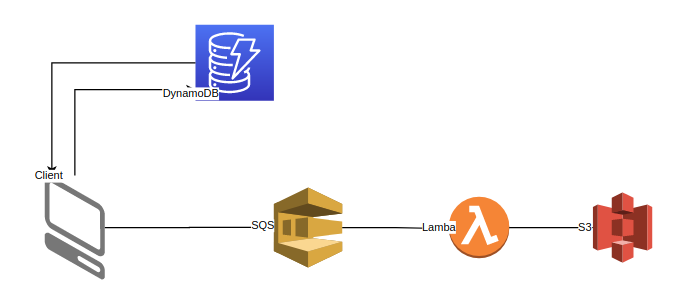
The flow of the system is:
- make a query to DataBase (DynamoDB)
- write the results: images and metadata to S3
- optionally: run transformations (augmentations) and computer vision deep learning model (deepfashion) on results images
LocalStack runs under docker-compose.
There is also an example of how to build an SQS queue bonded
with Lambda Functions, which runs an additional docker.
- lambdas - package for lambda functions
- localstack - docker-compose config for AWS simulations
- scripts - to populate AWS DB and S3 from the dataset
- src - source code for manage queries and additional processing
- make poetry-download
- make install
- make aws-cli-install
Download dataset into this folder from this site: https://www.kaggle.com/paramaggarwal/fashion-product-images-small
-
run:
docker-compose upfrom localstack folder -
from another terminal: source poetry virtual env in ~/.cache/pypoetry/virtualenvs/...
-
run script to init DB and S3:
bash scripts/create_and_fill_db.sh -
run queries:
python api.py --query {number_of_query}
(number_of_query can be a number from 1 to 5, check api code to understand which options you have) -
you can run jupyter notebook with examples from this repo that uses api code.
- DynamoDB (NoSQL) provides scalability through its architecture - multiple partitions are created by uniform distribution of the uniq (id) key.
- SQS allows you to create a job queue. One queue per task - copying images to s3, applying transformations (augmentations), launching ml models on images.
- Lambda functions are bound to each queue, consume messages from the Amazon SQS queue, and run multiple docker images of lambda functions for each message.
- implement tests for api/lambda and services.
- add CI (github actions).
- add Lambda func for each task (when LocalStack will fix all the bugs with SQS,Lambda connections).