



An all-in-one Home Assistant package for Goboony camper/motorhome rental owners.
Includes a custom integration (sensors, calendar, binary sensors, diagnostics) and a custom Lovelace card with visual editor.
Track your bookings, earnings, availability, rates and reviews directly in your smart home.
If this project helped you, please consider buying me a coffee ☕

| Feature | Description |
|---|---|
| Bookings overview | Total, confirmed, accepted, pending and inquiry counts |
| Next booking | Upcoming booking details with countdown |
| Check-in countdown | Hours until next check-in |
| Earnings tracking | Total confirmed + accepted earnings |
| Rate monitoring | Base and peak season rates |
| Calendar availability | Booked, blocked and available day counts |
| Occupancy rate | Percentage of booked vs available days |
| Blocked periods | Named blocked periods (holidays, maintenance, etc.) |
| Reviews & rating | Listing rating and review count |
| Currently rented | Binary sensor: ON when camper is rented out |
| Pending requests | Binary sensor: ON when there are open booking requests |
| Upcoming booking | Binary sensor: ON when a future booking exists |
| Turnaround | Binary sensor: ON between check-out and next check-in |
| Manual refresh | Button entity to trigger an immediate data update |
| Listing photo | Image entity showing your listing's main photo |
| Calendar entity | Native HA calendar with all bookings and blocked periods |
| Custom card | Fully configurable bookings card with visual editor |
| Diagnostics | Download debug data from the integration page |

- Open HACS in your Home Assistant instance
- Search for Goboony in the HACS store
- Click Download
- Restart Home Assistant
Available in the default HACS store since v1.7.5.
- Download the latest release
- Copy the
custom_components/goboonyfolder to yourconfig/custom_components/directory - Restart Home Assistant
- Go to Settings > Devices & Services > Add Integration
- Search for Goboony
- Enter your credentials:
| Name | Type | Required | Description |
|---|---|---|---|
email |
string | yes | Your Goboony owner account email |
password |
string | yes | Your Goboony password |
listing_id |
string | yes | Found in the URL of your listing page (e.g. goboony.com/listings/12345) |
The integration supports re-authentication — if your session expires, Home Assistant will prompt you to re-enter your credentials.
After setup, go to Settings > Devices & Services > Goboony > Configure to change:
| Name | Type | Required | Default | Since | Description |
|---|---|---|---|---|---|
scan_interval |
number | no | 60 |
v1.0.0 | How often to fetch data from Goboony (minutes, range: 15–1440) |
| Sensor | Description | Unit | Category |
|---|---|---|---|
| Total bookings | Number of all bookings | — | — |
| Confirmed bookings | Number of confirmed + accepted bookings | — | — |
| Next booking | Dates of the next confirmed booking | — | — |
| Days until next booking | Countdown to next booking | days | — |
| Check-in countdown | Hours until next check-in | hours | — |
| Total earnings | Sum of confirmed + accepted booking earnings | EUR | — |
| Occupancy rate | Booked days as percentage of total | % | — |
| Reviews | Listing rating (e.g. 5.0) with review count | — | — |
| Base rate | Low season daily rate | EUR | Diagnostic |
| Peak rate | High season daily rate | EUR | Diagnostic |
| Booked days | Days with confirmed bookings | days | — |
| Blocked days | Owner-blocked days | days | — |
| Available days | Available days on calendar | days | — |
| Blocked periods | Number of blocked periods | — | Diagnostic |
| Sensor | Description |
|---|---|
| Currently rented | ON when the camper is currently rented out |
| Pending requests | ON when there are open booking requests or inquiries |
| Upcoming booking | ON when there is a future confirmed booking |
| Turnaround | ON between a check-out and the next check-in |
| Entity | Type | Description |
|---|---|---|
| Refresh data | Button | Trigger an immediate data refresh |
| Listing photo | Image | Main photo from your Goboony listing |
| Bookings calendar | Calendar | All bookings and blocked periods |
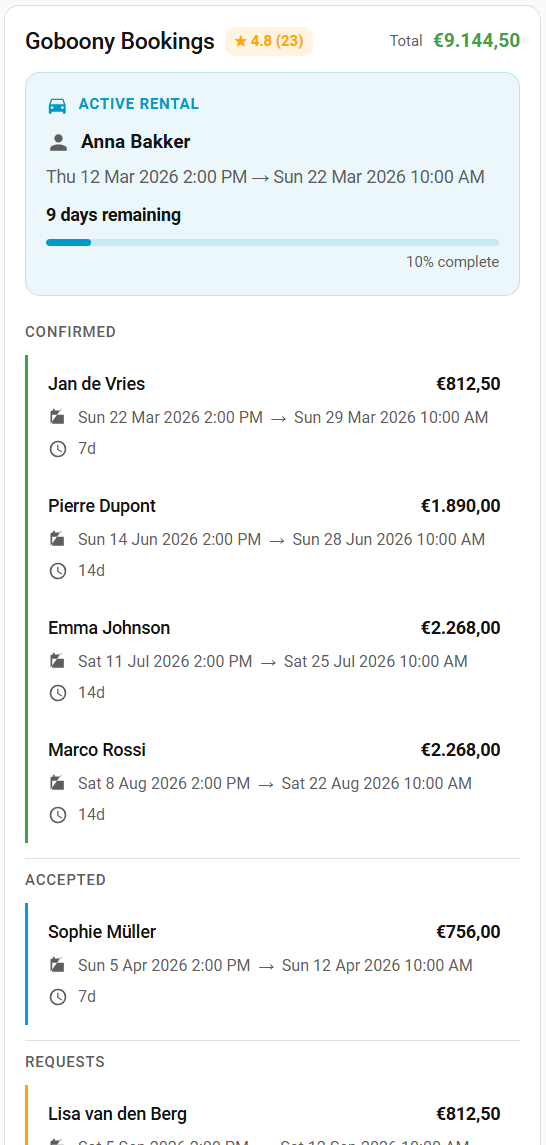
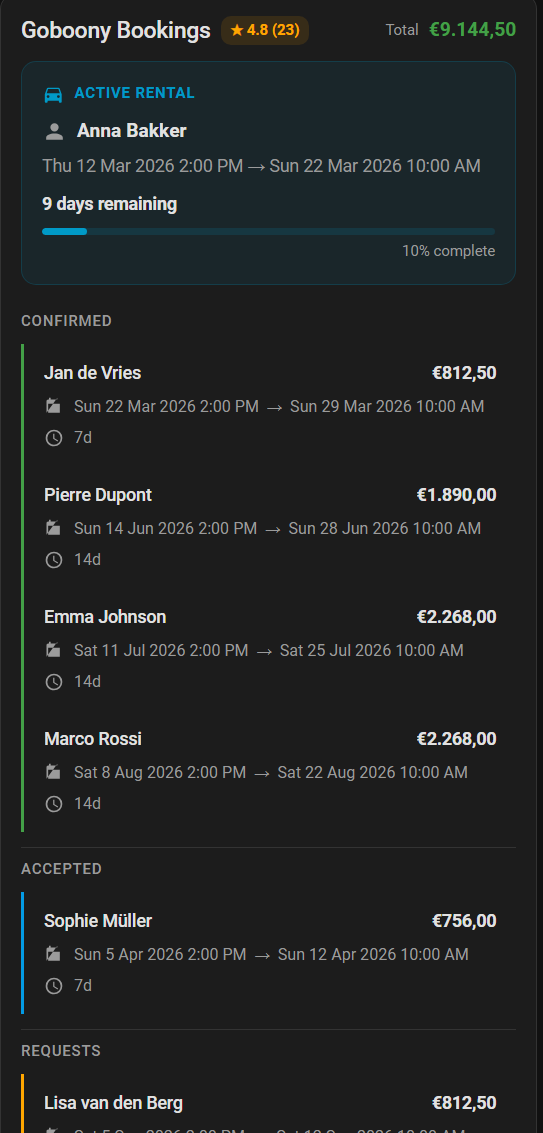
The integration includes a custom bookings card that is automatically registered — no manual resource setup needed.
- Edit your dashboard
- Click Add Card
- Search for Goboony Bookings
- Configure via the visual editor
- Active rental banner with progress bar and countdown
- Gap indicators between bookings showing days between rentals
- Changeover day detection (when check-out = next check-in)
- Clickable bookings linking to Goboony detail page
- Relative date badges ("in 3d", "tomorrow", etc.)
- Review rating display in header
- Multi-status filtering (confirmed, accepted, requests, inquiries, messages, modified)
- Earnings per booking and total earnings in header
- Compact mode for a denser layout
- Fully themed using HA CSS variables — works with all themes (light, dark, custom)
- Visual editor
The visual editor is organized in collapsible sections:
| Name | Type | Required | Default | Since | Description |
|---|---|---|---|---|---|
entity |
string | yes | — | v1.0.0 | The Goboony total bookings sensor entity |
review_entity |
string | no | — | v1.5.0 | The Goboony reviews sensor entity |
| Name | Type | Required | Default | Since | Description |
|---|---|---|---|---|---|
title |
string | no | Goboony Bookings |
v1.0.0 | Custom title text |
show_header_icon |
boolean | no | true |
v1.7.0 | Show/hide the camper icon in the header |
show_total_earnings |
boolean | no | true |
v1.7.0 | Show/hide total earnings in the header |
show_review |
boolean | no | true |
v1.7.0 | Show/hide the star rating badge |
| Name | Type | Required | Default | Since | Description |
|---|---|---|---|---|---|
show_active_rental |
boolean | no | true |
v1.7.0 | Show/hide the active rental section |
show_progress_bar |
boolean | no | true |
v1.7.0 | Show/hide the rental progress bar |
| Name | Type | Required | Default | Since | Description |
|---|---|---|---|---|---|
show_earnings |
boolean | no | true |
v1.7.0 | Show/hide earnings on each booking |
show_days |
boolean | no | true |
v1.7.0 | Show/hide rental duration |
show_booking_number |
boolean | no | true |
v1.7.0 | Show/hide the booking reference (#12345) |
show_checkout_date |
boolean | no | true |
v1.7.0 | Show/hide the check-out date |
show_relative_date |
boolean | no | true |
v1.7.0 | Show/hide relative date badges (e.g. "in 3d") |
show_gap_indicators |
boolean | no | true |
v1.7.0 | Show/hide gap days and changeover indicators |
max_bookings |
number | no | 0 |
v1.7.0 | Limit the number of bookings shown (0 = all) |
compact_mode |
boolean | no | false |
v1.7.0 | Use a compact single-line layout |
| Name | Type | Required | Default | Since | Description |
|---|---|---|---|---|---|
show_statuses |
list | no | all | v1.6.0 | Which booking statuses to display (confirmed, accepted, request, inquiry, message, modified) |
| Name | Type | Required | Default | Since | Description |
|---|---|---|---|---|---|
show_section_labels |
boolean | no | true |
v1.7.0 | Show/hide section labels (Confirmed, Requests, etc.) |
show_last_updated |
boolean | no | true |
v1.7.0 | Show/hide the "Updated X min ago" footer |
type: custom:goboony-bookings-card
entity: sensor.goboony_68972_total_bookings
review_entity: sensor.goboony_68972_reviews
title: My Camper Bookings
show_statuses:
  - confirmed
  - accepted
  - request
show_header_icon: true
show_total_earnings: true
show_review: true
show_active_rental: true
show_progress_bar: true
show_earnings: true
show_days: true
show_booking_number: true
show_checkout_date: true
show_relative_date: true
show_gap_indicators: true
show_section_labels: true
show_last_updated: true
max_bookings: 0
compact_mode: falseThe integration creates a native Home Assistant calendar entity showing:
- Confirmed and accepted bookings with renter name and dates
- Owner-blocked periods
This works with all calendar cards and automations in Home Assistant.
Go to Settings > Devices & Services > Goboony > three dots > Download diagnostics to get a debug data file. Credentials are automatically redacted.
Goboony does not provide a public API. Their mobile app uses server-rendered HTML via Turbo Native. This integration scrapes the owner dashboard to retrieve your data.
- Polling interval: configurable, default 60 minutes (range: 15–1440 minutes)
- Resilient fetching: on failure, retries every 2 minutes while keeping previous data (up to 3 consecutive failures)
- Authentication: lazy login — only authenticates when session cookies expire
- Data sources: dashboard bookings, booking details, availability calendar, rates, public listing page
The integration UI is translated into all Goboony market languages:
| Language | Status |
|---|---|
| English | Fully translated |
| Nederlands | Fully translated |
| Deutsch | Fully translated |
| Français | Fully translated |
| Italiano | Fully translated |
| Issue | Solution |
|---|---|
| Integration not loading | Clear browser cache and restart HA |
| Authentication failed | Check credentials, re-authenticate via Settings > Integrations |
| No bookings shown | Verify your listing ID is correct |
| Card not appearing | Make sure the integration is loaded, then search for "Goboony Bookings" when adding a card |
| Accepted bookings not showing | Make sure "Accepted" is checked in card settings, and clear browser cache |
| Sensors showing "unknown" | Wait for the first data fetch (up to 60 min) or press the Refresh button |
This integration is not affiliated with or endorsed by Goboony. It relies on web scraping, which means it may break if Goboony changes their website. Use at your own risk.
MIT License — see LICENSE file for details.