Know what’s on your plate, and why it matters.
nutri.ai is an AI-powered pregnancy food-safety and nutrition assistant. It combines a user’s pregnancy stage, health context, allergies, and dietary preferences with product data, food images, and curated public-health guidance to produce calm, structured educational reports.
Pregnancy is a particularly important use case because foodborne-illness precautions, caffeine context, and nutritional needs can differ from those of the general population. nutri.ai makes the reasoning visible: results identify the ingredient or characteristic that affected the verdict, disclose uncertainty, and link to the public-health guidance used.
nutri.ai provides educational information and is not medical advice. Food safety and nutritional needs vary by person and pregnancy. Confirm important decisions with a qualified healthcare professional.
- Pregnancy profile with due-date or last-period calculation, trimester, baby count, age, height, pre-pregnancy/current weight, conditions, allergies, restrictions, and dietary preferences
- Fast camera barcode scanner with a visible targeting frame, animated scan line, rear-camera preference on mobile, flashlight support where available, and manual entry fallback
- Server-side Open Food Facts lookup with ingredients, allergens, additives, labels, categories, serving size, images, nutrition data, and catalogue completeness
- Live Gemini analysis for barcodes, meal photos, screenshots, and text searches
- Multi-product extraction from shopping, delivery, grocery, and restaurant screenshots
- Structured results with four supported statuses:
- Generally suitable
- Use caution
- Consider avoiding
- Not enough information
- Ingredient-level explanations, trimester and condition context, moderation guidance, alternatives, confidence, limitations, and provider questions
- Clickable public-health source cards
- Context-preserving follow-up chat on each analysis
- Global Ask assistant available from every page
- Local consumption tracker with editing, filtering, weekly charts, and analysis links
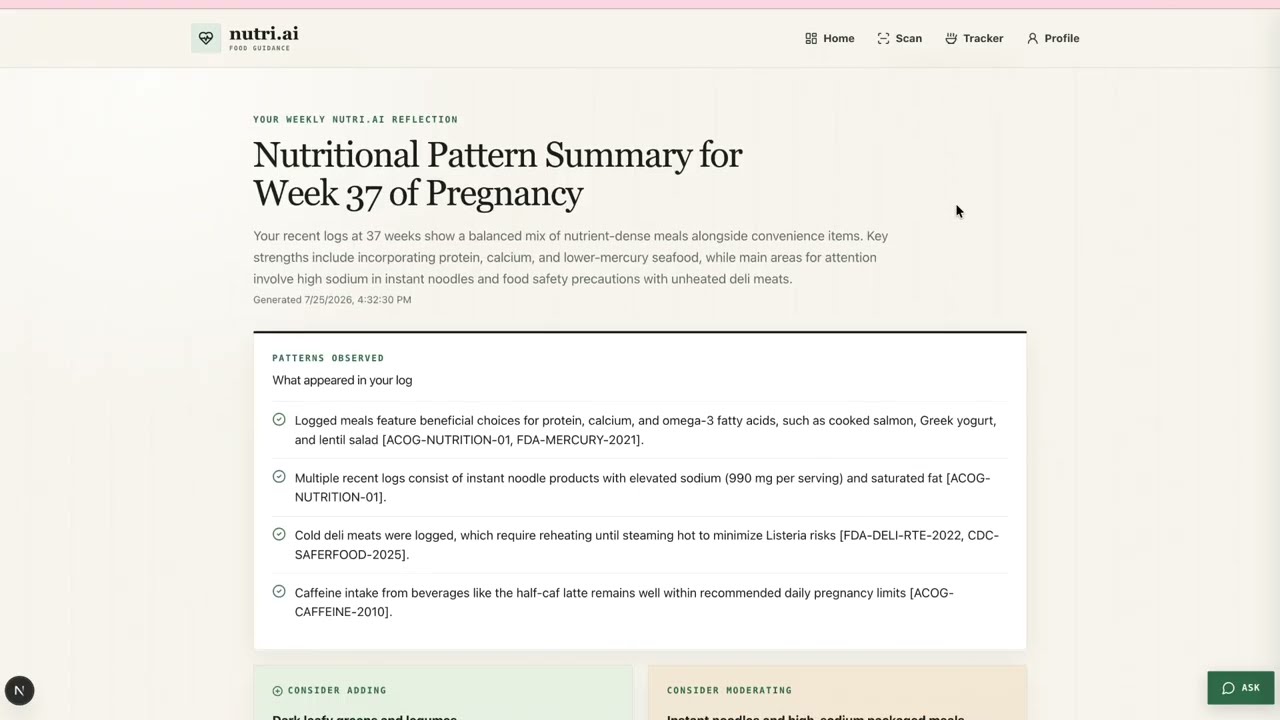
- Gemini weekly pattern summaries and week-level follow-up chat
- Responsive, squared editorial interface under the
nutri.aibrand
Sparse or unknown catalogue records degrade honestly. The app still produces a limited report explaining what information is missing, rather than inventing a product identity or ingredient list.
| Area | Technology |
|---|---|
| Framework | Next.js 16 App Router |
| UI | React 19, TypeScript, Tailwind CSS 4, custom CSS design system |
| AI | Google Gemini / Vertex AI through @google/genai |
| Validation | Zod and Gemini structured-output schemas |
| Barcode scanning | @zxing/browser and @zxing/library |
| Product data | Open Food Facts API |
| Charts | Recharts |
| Icons | Lucide React |
| MVP persistence | Browser localStorage |
| Quality checks | ESLint, TypeScript, Next.js production build |
No Gemini key is exposed to client-side code. All model calls run through Next.js server routes.
Gemini is the reasoning and synthesis layer; the repository-controlled guidance corpus is the medical and food-safety fact layer.
-
Multimodal food identification
Gemini vision identifies likely foods, visible ingredients, preparation cues, and uncertainty from meal photos. -
Screenshot understanding
Gemini extracts every visible food or product from a shopping, delivery, grocery, or restaurant screenshot and returns separate item-level analyses. -
Personalized safety reasoning
Product or image details are considered alongside pregnancy week and trimester, health conditions, allergies, avoided foods, and dietary preferences. -
Ingredient-level explanation and alternatives
Reports identify the specific ingredient or characteristic behind a caution and suggest alternatives that respect the user’s preferences. -
Follow-up conversation
Analysis chat retains the current profile, product, structured verdict, conversation, and approved sources. Responses are intentionally concise and conversational. -
Weekly pattern analysis
Gemini examines only logged foods and uses non-diagnostic wording such as “few identifiable iron-rich foods were logged.” -
Global Ask assistant
The app-wide assistant can answer broader pregnancy food questions and use recent locally stored scans as context. -
Source-grounded responses
The model receives selected summaries from a curated 26-source corpus covering FDA, CDC, ACOG, NHS, Health Canada, and the Public Health Agency of Canada. It may cite only supplied source IDs.
Gemini responses used by the report interface are JSON-schema constrained and validated with Zod. A deterministic rule layer establishes a minimum severity for high-stakes hazards. Unknown citations, unsupported cautions, and attempted severity downgrades are rejected before reaching the UI.
The grounding corpus lives at src/data/guidance.json. Retrieval and enforcement live under src/lib/spine.
The analysis pipeline is:
- Normalize product, text, or image-derived information.
- Run deterministic checks for known high-stakes pregnancy hazards.
- Retrieve relevant guidance plus a broad baseline for sparse products.
- Ask Gemini for a structured, personalized explanation.
- Validate the JSON response with Zod.
- Remove unknown source IDs and enforce the deterministic severity floor.
- Fall back to a transparent rule-only result if Gemini is unavailable.
The app never diagnoses a condition, recommends supplement dosages, advises stopping medication, makes absolute guarantees, or provides appearance/weight-loss recommendations.
- Node.js 20.9 or newer
- npm
- A Gemini Developer API key or Vertex AI Express Mode key
npm install
cp .env.example .env.localGEMINI_API_KEY=your_key_here
GEMINI_MODEL=gemini-3.6-flash
GOOGLE_GENAI_USE_VERTEXAI=falseGEMINI_API_KEY=your_vertex_express_key
GEMINI_MODEL=gemini-3.6-flash
GOOGLE_GENAI_USE_VERTEXAI=trueFor full Vertex AI authentication with Application Default Credentials, also set:
GOOGLE_CLOUD_PROJECT=your_project_id
GOOGLE_CLOUD_LOCATION=global
Enable the Vertex AI API and run:
gcloud auth application-default loginNever prefix the key with NEXT_PUBLIC_. .env and .env.local are ignored by Git.
npm run devOpen http://localhost:3000.
npm run lint
npm run typecheck
npm run build
bash scripts/check-citations.sh- Open Profile and configure a third-trimester pregnancy context.
- Open Scan → Barcode and scan a product or enter its digits.
- Show the live Gemini report, exact flagged ingredient, confidence, limitations, and source cards.
- Ask a concise follow-up question from the analysis page.
- Open Scan → Food photo and take or upload a meal photo.
- Open Scan → Screenshot and upload a shopping or restaurant screenshot containing multiple products.
- Add an analysed item to the tracker.
- Open Tracker and generate a weekly pattern analysis.
- Use the global Ask assistant or the week-level chat for a follow-up.
The Tracker includes an optional seeded sample week for demonstrations when no foods have been logged. Seeded content is clearly identified as demo data and is never presented as live Gemini output.
| Method | Route | Purpose |
|---|---|---|
GET |
/api/product/:barcode |
Open Food Facts lookup with graceful sparse/unknown handling |
POST |
/api/analyse/barcode |
Product and pregnancy-context analysis |
POST |
/api/analyse/image |
Multimodal meal identification and analysis |
POST |
/api/analyse/screenshot |
Multi-product screenshot extraction and analysis |
POST |
/api/analyse/text |
Food, ingredient, supplement, drink, or meal analysis |
POST |
/api/chat |
Follow-up conversation for a saved analysis |
POST |
/api/ask |
Global contextual assistant |
POST |
/api/weekly-summary |
Logged-food pattern synthesis |
POST |
/api/week-chat |
Follow-up conversation about the current week |
Routes include input validation, payload limits, timeouts, structured errors, JSON parsing, schema validation, and graceful model failure handling.
Open Food Facts does not require an API key. Barcode lookups are performed server-side and request product names, brands, ingredients, allergens, additives, labels, categories, serving size, images, nutrition facts, and record completeness.
If Open Food Facts does not know a barcode, nutri.ai preserves the scan and returns an uncertainty-first report that recommends supplying a package photo or ingredient list.
The existing extension/ directory contains the hackathon browser-extension proof of concept. It captures the visible tab, sends the image to the same screenshot-analysis endpoint, and links detected products back to the web app.
The production roadmap would add:
- Authenticated cross-device profiles
- Extension-origin controls and short-lived upload tokens
- Stronger visual-to-DOM matching
- Inline status badges beside detected products
- Direct links to persisted full analyses
The extension’s seeded fallback remains isolated from the live web MVP.
- Aaron Tran
- Aaron Wang
- Anita Jiang
- Kaley Wu
Repository: https://github.com/aarontran321/hackthevalley
nutri.ai provides educational information and is not medical advice. Food safety and nutritional needs vary by person and pregnancy. Confirm important decisions with a qualified healthcare professional.