
A mod menu for Claude Code and Codex.
Auto continue after the usage limit is reset, and auto ping to line your
5-hour limit windows up with your workday.



Getting started · Auto continue · Auto ping · FAQ · Contributing
You keep the normal Claude Code / Codex interface: same colors, same shortcuts, same
everything. ctrl+g opens the mod menu on top of it, wearing the color of whichever
agent it is covering.
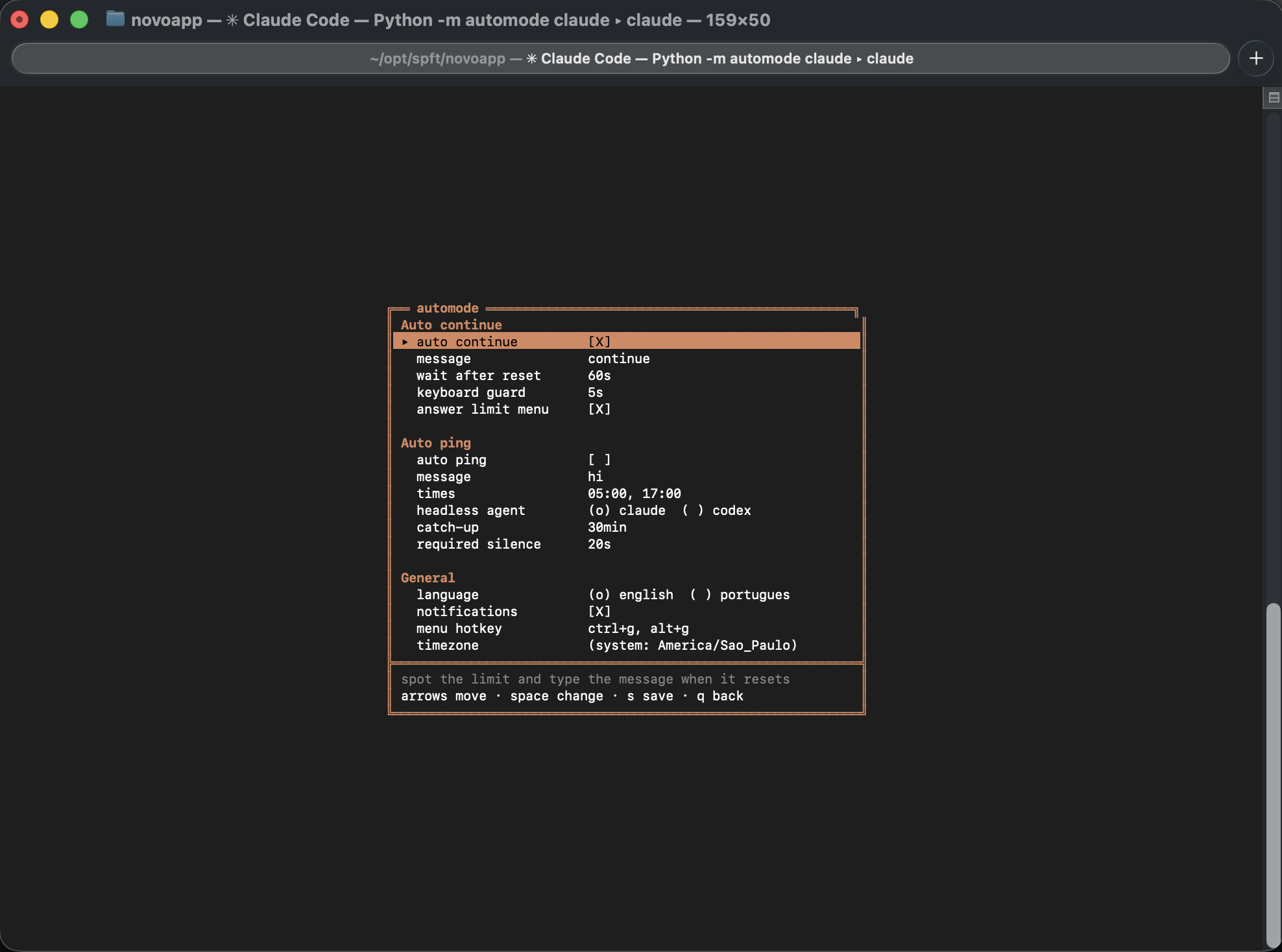
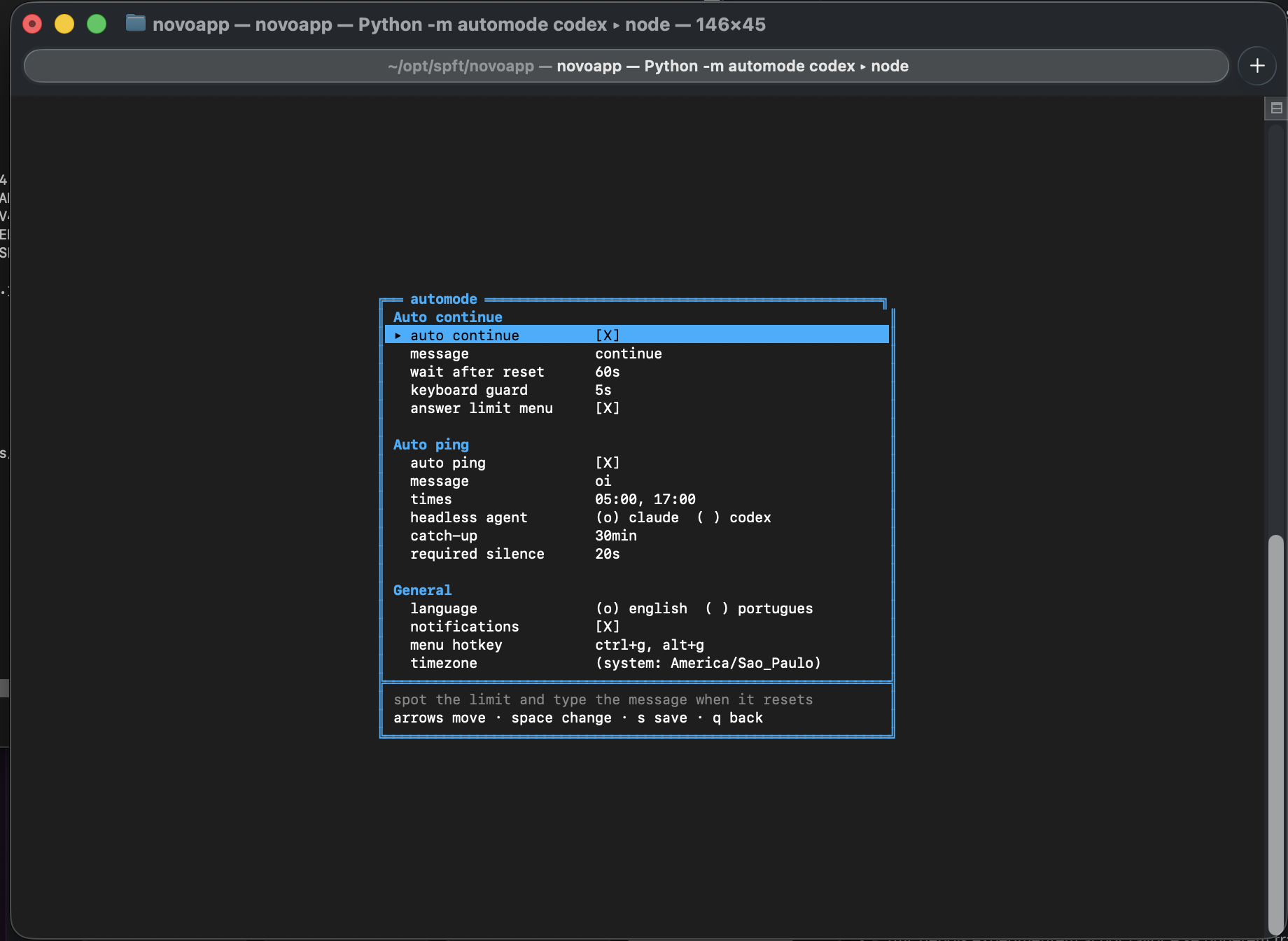
Pure Python standard library. No dependencies.
You hit the limit at 2pm. The message says it resets at 6:20pm. At 6:20pm you are
not at your desk, so the work just sits there until you remember to come back and
type continue.
automode reads the message, works out the reset time, waits, and types it for you.
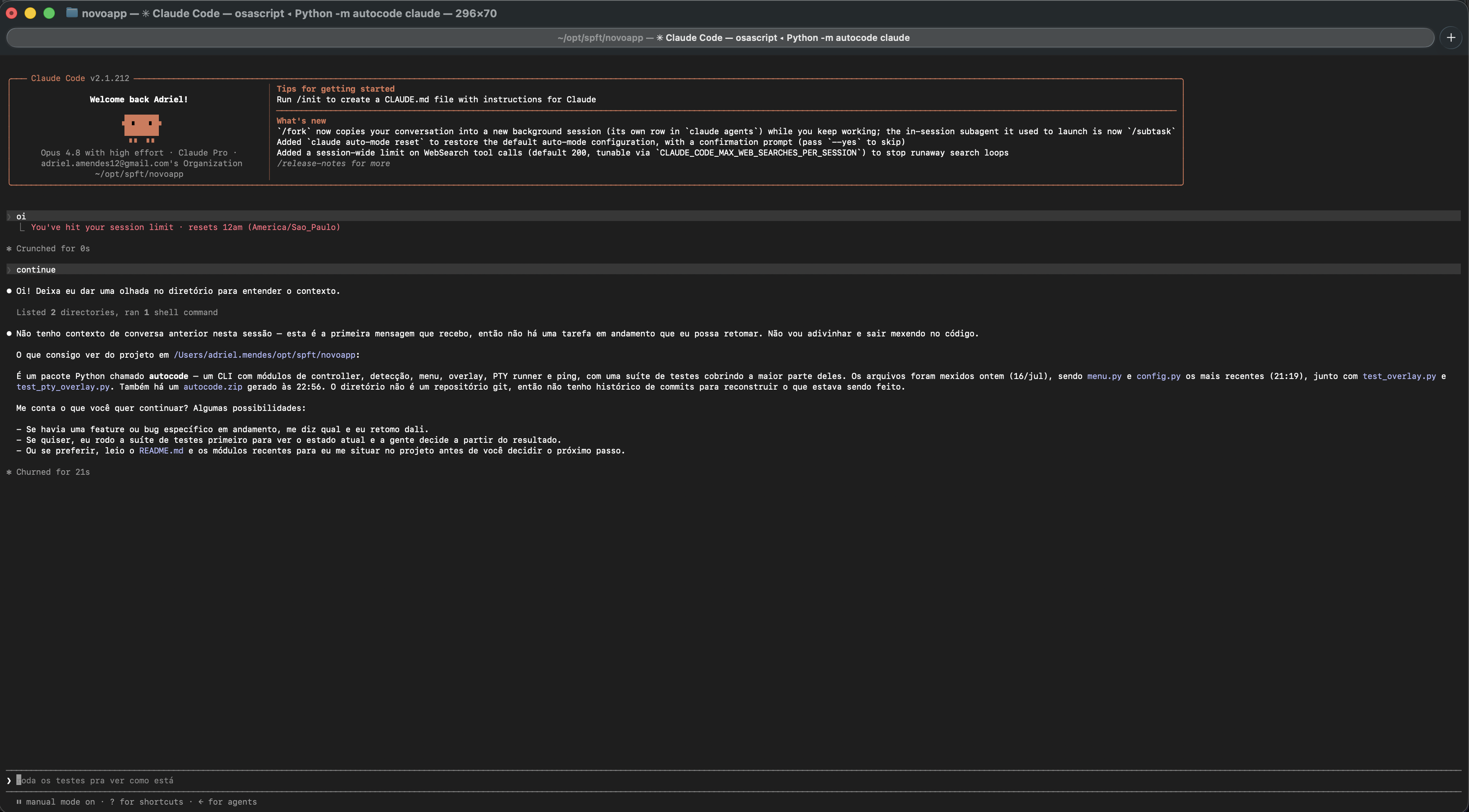
That is a real session: oi hits the session limit, automode sees it resets at 12am,
waits, types continue on its own, and Claude picks the work back up.
It also answers the menu the agent leaves on screen. That part matters more than it
sounds: hitting the limit does not just print a message, it parks the agent on a
blocking choice. Typing continue at that screen does nothing at all. The answer
has to come first. automode picks the option that costs nothing and waits for the
reset (Stop and wait for limit to reset on Claude, Keep current model on Codex),
reading the option number out of the screen rather than assuming it.
This is the one that changes your day.
Your 5-hour window starts on your first prompt, not at a fixed hour. So if your first "hi" of the morning is at 8:00, your window ends at 13:00, right in the middle of the workday. You run out at lunch and wait.
Send that first prompt at 5:00 instead and the whole thing shifts:
| first prompt | window resets | resets again | |
|---|---|---|---|
| without automode | 08:00 | 13:00 🙃 | 18:00 |
| with automode | 05:00 | 10:00 ✅ | 15:00 ✅ |
You start at 8:00 with a fresh window, it renews at 10:00 while you are working, and again at 15:00, still inside office hours. Both renewals land while you are at the keyboard instead of while you are asleep or gone for the day.
Nobody wakes up at 5am to type "hi". automode does it for you, on both Claude and Codex, with the terminal closed and you asleep.
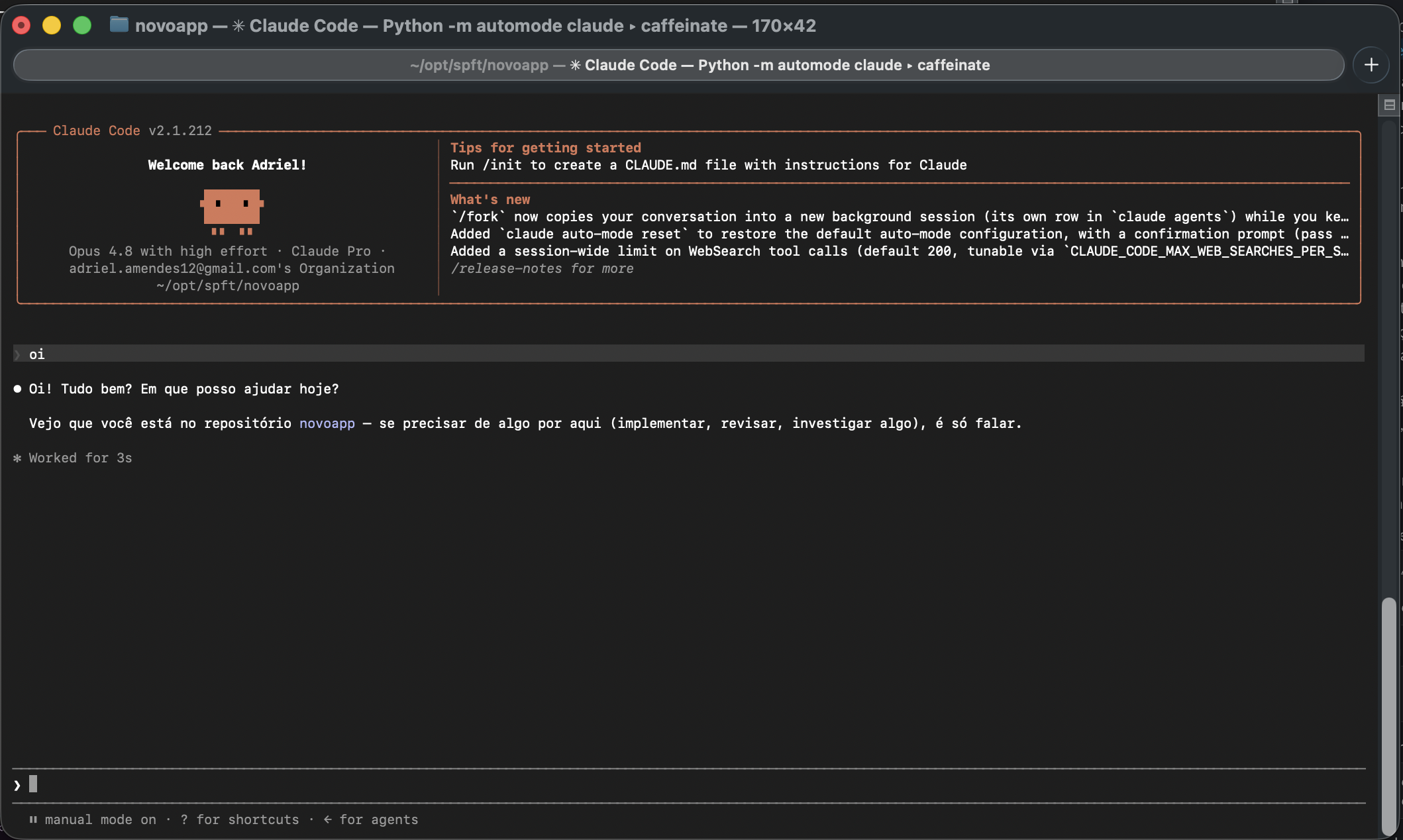
Nobody typed that oi. The ping did, at the hour you picked. The window is open now,
and it will renew while you are at the keyboard instead of while you are asleep.
pipx install automode-cli     # or: uv tool install automode-cli
automode install
(The command is automode; only the package is automode-cli, because PyPI
reads plain automode as identical to an existing auto-mode.)
No pipx or uv? Run it straight from a clone. There is nothing to build:
git clone https://github.com/adrielmendes28/automode
cd automode
python3 -m automode install
Either way, automode install points your shell at it:
alias claude='automode claude'
alias codex='automode codex'
Open a new terminal, and that is it. claude now has the mods.
claude          the agent, with the mods
\claude         the agent, bare (the backslash skips the alias)
ctrl+g          the mod menu, from inside a session
automode menu   the same menu, from outside
Requires Python 3.11+ and macOS or Linux.
automode menu               # turn on auto ping, set your times
automode schedule install   # schedule it with launchd (macOS)
launchd does not wake your Mac. If the machine is asleep at 5:00 the ping only fires once it wakes, which defeats the whole point. Schedule the wake as well.
automode schedule installprints the exact command:sudo pmset repeat wakeorpoweron MTWRFSU 04:58:00Check it with
pmset -g sched, undo it withsudo pmset repeat cancel.
automode claude [args...]     run claude with the mods (args pass through)
automode codex  [args...]     same for codex
automode -- <cmd> [args...]   wrap any other command

automode install              install the aliases and launcher
automode menu                 open the settings menu
automode status               show settings and what is scheduled
automode doctor               check the detector against known limit messages
automode ping                 send the ping now, with no session open
automode schedule install     schedule the ping with launchd (macOS)
automode uninstall            remove the aliases and the launcher
The menu writes ~/.config/automode/config.toml, but it is a plain file:
language = "en"             # "en" or "pt", also switchable from the menu
auto_continue = true
continue_message = "continue"
answer_limit_prompt = true  # answer the blocking menu the limit leaves on screen
grace_seconds = 60          # how long to wait past the reset time
idle_guard_seconds = 5      # never type while you are typing
timezone = ""               # empty = system timezone
notify = true
hotkey = "ctrl+g, alt+g"

[ping]
enabled = false
message = "hi"
times = ["05:00", "17:00"]
agent = "claude"            # which agent the scheduled ping wakes
catchup_minutes = 30        # if the machine slept through it, still count for X min
idle_seconds = 20 # only ping when the session is idleyour keyboard ──> automode ──> PTY ──> claude (normal interface, untouched)
your terminal <── automode <── PTY <──┘
│
├─> copy of the output ──> detector ──> auto continue
└─> clock ────────────────────────────> auto ping
The agent runs inside a real pseudo-terminal, so it never knows it is wrapped: colors, mouse, resize and exit codes all pass through byte for byte. automode only reads a copy of what comes out and, at the right moment, writes into the PTY as if you had typed.
The sentence never arrives in one piece. The TUI repaints constantly and wraps the message inside its borders:
╭────────────────────────────────╮
│ ■ You've hit your usage limit. │
│ ...try again at Jul 23rd,      │
│ 2026 1:16 AM.                  │
╰────────────────────────────────╯
So before any regex runs, the text goes through: ANSI stripping (holding back escape
sequences cut in half between two reads), borders replaced with spaces, and all
whitespace collapsed onto one line. Then matching happens in two steps. First a
trigger (hit your usage limit, limit reached), and only within the next 400
characters does it look for a time. One big regex would happily fire on any
"resets 6pm" sitting elsewhere on screen.
Why not match on the red color? Because stripping the color is exactly what makes the sentence readable again, and the color depends on your terminal theme.
Recognised formats. Run automode doctor to watch them all parse:
| message | becomes |
|---|---|
try again at Jul 23rd, 2026 1:16 AM |
that exact moment |
resets 6:20pm (America/Sao_Paulo) |
next 18:20 in that zone |
Your limit will reset at 4pm |
next 16:00 |
resets Tue 9am |
next Tuesday 09:00 |
try again in 4 hours 32 minutes |
now + 4h32 |
- It types for you. When the limit comes back, the agent goes back to work on its
own and may run tools while you sleep. If that bothers you, set
auto_continue = falseand use auto ping only. - False positives are possible. If the text of a limit message shows up on screen
without being a real limit (you pasted it into the chat, say), automode may arm
itself for nothing. Everything it arms goes to
~/.local/state/automode/automode.log. - The message may change. The detector depends on what Anthropic and OpenAI print
today. If they change it,
automode doctorsays so and the regex inautomode/detect.pyneeds a nudge. - The ping costs a little quota, which is precisely its job.
- macOS and Linux. The wrapper uses a POSIX PTY; the scheduler currently only
speaks launchd (macOS). On Linux, point cron or a systemd timer at
automode ping.
Claude Code hit the usage limit in the middle of a task. Can it continue by itself
after the limit is reset?
Yes, that is what auto continue does. automode reads the reset time out of
You've hit your session limit · resets 6:20pm, waits until then, answers the
What do you want to do? menu with Stop and wait for limit to reset, and types
continue. You do not have to be at the keyboard.
Codex says You've hit your usage limit ... try again at Jul 23rd, 2026 1:16 AM.
Same thing?
Same thing. It also answers Codex's Approaching rate limits prompt with
Keep current model, which is the one that hands the input back.
When does the Claude 5-hour window start? On your first prompt of the window, not at a fixed hour. That is why the reset time drifts every day, and why sending a prompt early moves every renewal for the rest of the day. Auto ping automates that.
Does this raise my usage limit, or get around it? No. It changes when your window starts and picks the work back up when the window you already pay for renews. Same quota, same limits, same plan.
Will it keep working when Anthropic or OpenAI change the wording?
Not automatically, and nothing can. automode doctor checks every known message and
runs in CI, so a change breaks the build loudly instead of breaking auto continue
silently at 3am. If you see a message it misses,
open an issue with the exact wording.
Issues and pull requests are welcome. See CONTRIBUTING.md.
The most valuable thing you can report is a limit message we do not recognise. The whole project rests on reading a sentence that Anthropic and OpenAI can change whenever they like, so a paste of the exact wording is worth more than a patch.
python3 -m unittest discover -s tests -t .   # the whole suite, no dependencies
python3 -m automode doctor                   # detector against real messages
python3 -m automode -- bash                  # exercise the wrapper, no quota spent
By participating you agree to the Code of Conduct.
MIT. See LICENSE.