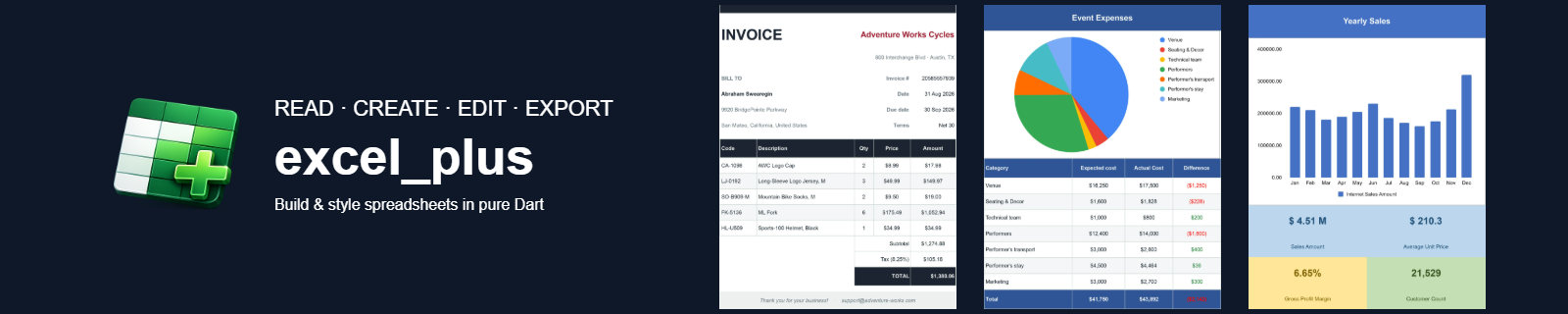


excel_plus is a fast, low-memory, non-UI Dart library for creating, reading,
editing, and styling Microsoft Excel .xlsx spreadsheets. It works in plain
Dart and in Flutter apps, on the VM, Web (JS & WASM), and mobile. excel_plus is a
source-compatible drop-in replacement for the excel
package — change one import and your existing code keeps working, with far more
features, better performance on large workbooks, and active maintenance.
⭐ Find this useful? Star it on GitHub and 👍 like it on pub.dev — it helps other Dart & Flutter developers discover a maintained, full-featured Excel library.
excel_plus reads and writes the Office Open XML .xlsx format used by Microsoft
Excel, Google Sheets, and LibreOffice Calc. It parses workbooks with a streaming
(SAX) reader and loads each sheet lazily, so memory stays low even on large files,
and it reuses untouched parts of a workbook byte-for-byte when saving.
What you can do with it:
- Read and parse existing
.xlsxfiles, or create new Excel workbooks from scratch. - Edit cells, rows, columns, and multiple sheets, then save back to
.xlsx. - Style spreadsheets — fonts, colors, fills, borders, alignment, number formats, and merged cells.
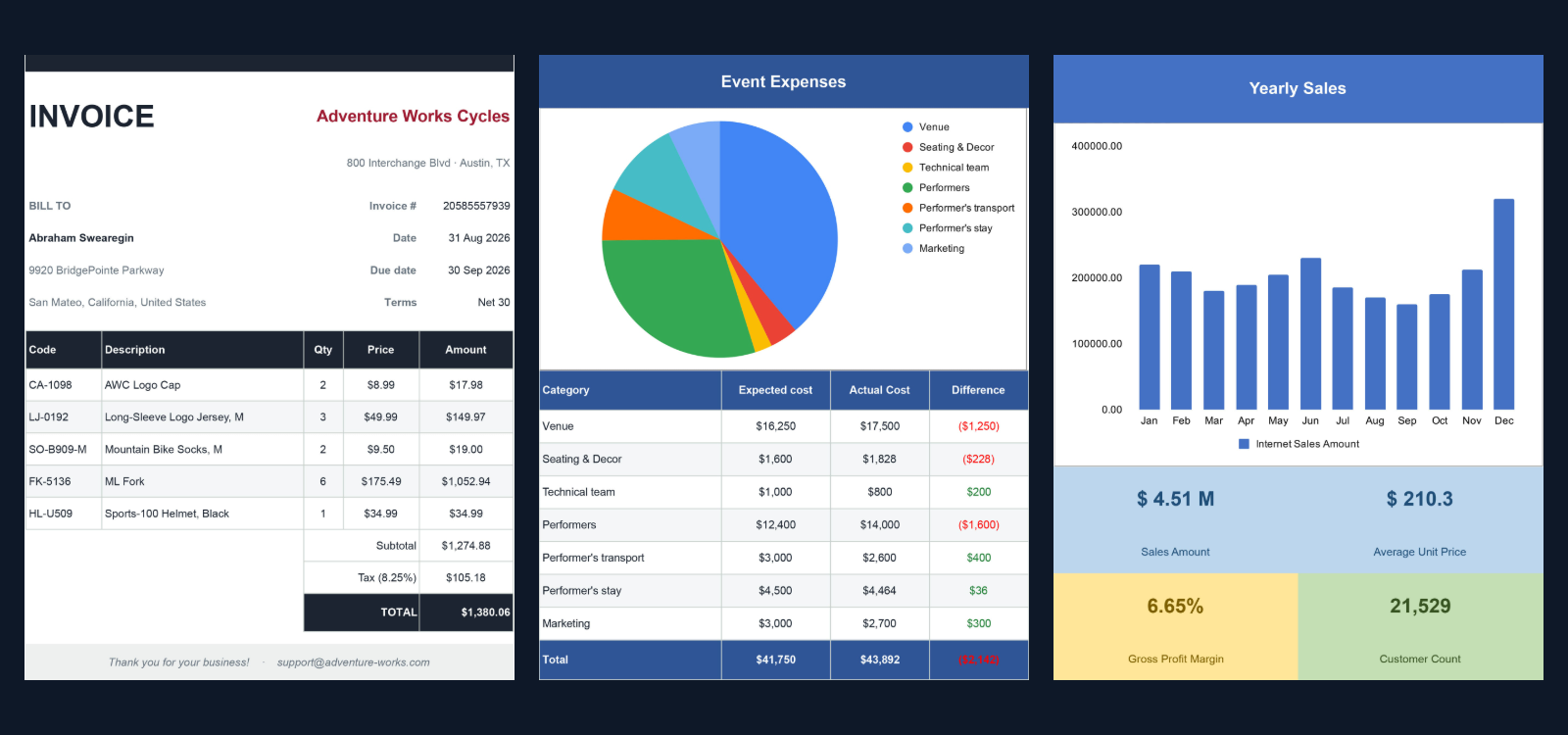
excel_plus is built for large workbooks: a streaming SAX parser instead of full-DOM parsing, lazy per-sheet loading, O(1) reverse indexes for styles and shared strings, and byte-for-byte reuse of untouched workbook parts on save.
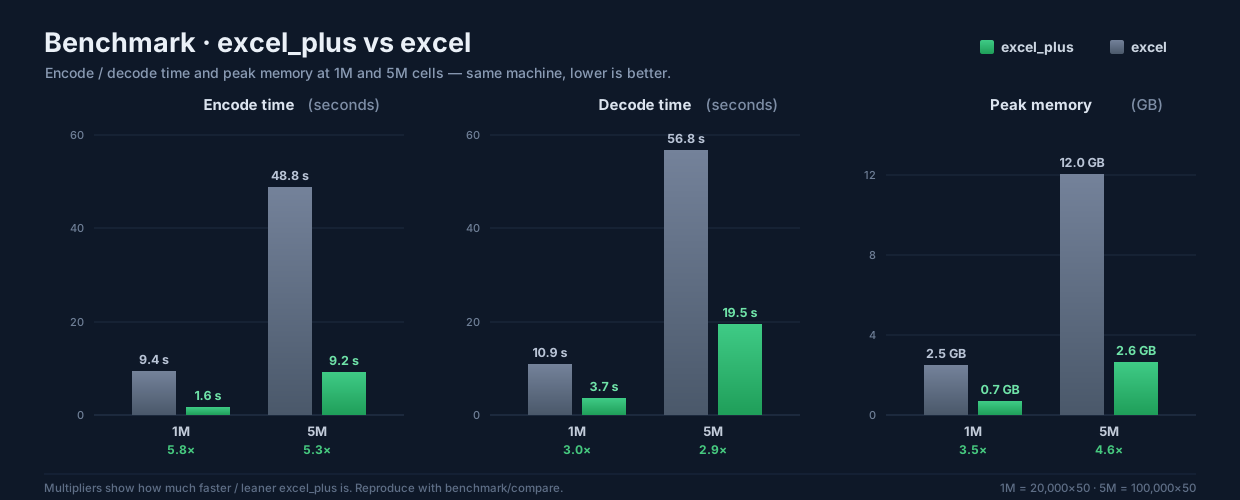
It comfortably handles workbooks with millions of cells. Here is a head-to-head
against the original excel package — same machine,
same workload:
| Workload | Encode (excel → excel_plus) |
Decode | Peak memory | Create |
|---|---|---|---|---|
| 5,000,000 cells | 48.8 s → 9.2 s · 5.3× | 56.8 s → 19.5 s · 2.9× | 12.0 GB → 2.6 GB · 4.6× | ≈ equal |
| 1,000,000 cells | 9.4 s → 1.6 s · 5.8× | 10.9 s → 3.7 s · 3.0× | 2.5 GB → 0.7 GB · 3.5× | ≈ equal |
| 10,000 cells | 184 ms → 41 ms · 4.5× | 141 ms → 75 ms · 1.9× | ≈ equal* | ≈ equal |
| 500 cells | 54 ms → 16 ms · 3.3× | 32 ms → 19 ms · 1.7× | ≈ equal* | ≈ equal |
* Below ~100k cells peak memory is dominated by the Dart VM baseline (~250 MB), so
it is comparable; the gap widens with size (3.5× at 1M → 4.6× at 5M, where excel
needed ~12 GB RAM). Create time is within noise — both build cells the same way.
The two libraries pin conflicting archive/xml majors, so they can't run in one
program; each harness lives in its own package under
benchmark/compare/.
Timings vary by hardware — reproduce both on your own machine:
cd benchmark/compare/excel_baseline   && dart pub get && dart run bin/benchmark.dart
cd ../excel_plus_bench && dart pub get && dart run bin/benchmark.dart- Excel (.xlsx) Library for Dart & Flutter
- Overview
- Performance
- Table of contents
- Key features
- Limitations
- Roadmap
- Example
- Other useful links
- Installation
- Getting started
- Create a simple Excel document
- Add text, number, boolean, and date values
- Add formulas
- Read an existing Excel file
- Read a single cell
- Style a cell — font, color, fill, alignment
- Add borders
- Apply number formats
- Merge and unmerge cells
- Insert and delete rows and columns
- Append a row
- Column width, row height, and auto-fit
- Work with multiple sheets
- Find and replace
- Save the workbook
- Flutter — read from assets, edit, and save
- Charts
- Pivot tables
- Conditional formatting
- Data validation (dropdown lists)
- Hyperlinks
- Freeze panes
- Excel tables
- Insert an image
- Cell comments
- excel_plus vs excel
- Migrating from the excel package
- FAQ
- Support and feedback
- About
A complete read / create / edit toolkit for .xlsx, on every Dart & Flutter
platform. Expand a group for details:
📄 Core & platform
- Read, create & edit
.xlsx - Multiple sheets — create, copy, rename, delete
- All cell types — text, int, double, bool, date, time, datetime, formula
- Cross-platform — VM, web (
dart2js+wasm) & Flutter mobile - Source-compatible drop-in for the
excelpackage
🎨 Cells, styling & text
- Cell styling — font, fill, borders, alignment, rotation, wrap
- Number formats — standard & custom
- Rich text (read & write)
- Theme & indexed colours
- Merge & unmerge
📐 Rows, columns & layout
- Insert / delete / clear rows & columns
- Column width, row height & auto-fit
- Grouping & outline levels
- Page & print setup
🧩 Worksheet features
- Hyperlinks
- Data validation / dropdowns
- Conditional formatting
- Freeze & split panes
- Autofilter
- Sheet & workbook protection
- Defined names / named ranges
📊 Formulas & data tools
- Formula-evaluation engine — ~130 functions
(function reference),
plus
registerFunctionfor your own - Excel tables (ListObjects)
- Pivot tables — read & write (row / column / page / nested fields + measures)
- Find & replace
🖼️ Objects & media
- Charts — read & write (column, bar, line, area, pie, doughnut, scatter)
- Images
- Comments / notes
🛡️ Reliability & performance
- Typed exceptions —
ExcelException+ subtypes - Lazy per-sheet parsing & SAX streaming for large files
- Round-trip safety — unmodeled parts preserved byte-for-byte
- ❌ Long-tail statistical, engineering & database functions (register your own)
- ❌ Dynamic-array spilling across the grid
- ❌ R1C1-style references (A1-style only)
Planned next — direction is driven by what users request on the issue tracker:
- ⬜ More formula functions — long-tail statistical, engineering & database (D-)
- ⬜ Dynamic-array spilling across the grid
- ⬜ Streaming / sink encode to cap peak memory on very large saves
Shipped milestones are in the changelog.
Opening or saving a file throws a typed, catchable
ExcelException. Catch the
base type for any failure, or narrow to a specific kind — each carries a
message, an optional part (the package part involved), and an optional
cause:
try {
  final excel = Excel.decodeBytes(bytes);
  // ... edit ...
  excel.save();
} on ExcelArchiveException catch (e) {
  // Not a readable .xlsx (bad ZIP, or a required part is missing).
  print('Not a usable file: ${e.message}');
} on ExcelFormatException catch (e) {
  // A valid ZIP, but its XML is malformed/inconsistent.
  print('Corrupt content in ${e.part}: ${e.message}');
} on ExcelException catch (e) {
  // Any other excel_plus failure (e.g. ExcelEncodeException on save).
  print('Workbook error: ${e.message}');
}
Invalid arguments you pass to the API (a negative cell index, an empty table
name, an out-of-range row) throw ArgumentError, the standard Dart type for
programming errors — they are not ExcelExceptions. A malformed formula is not
thrown either: it evaluates to an #ERROR! cell value.

▶ Try the live demo — build, style and export real
.xlsxfiles right in your browser. No install needed.
A complete, runnable sample lives in the
example/ directory.
Clone the repository and run it, or copy any snippet from
Getting started below.
dart pub add excel_plus
# or, in a Flutter app:
flutter pub add excel_plus
Then import it:
import 'package:excel_plus/excel_plus.dart';final excel = Excel.createExcel(); // a new workbook with one default sheet
final sheet = excel['Sheet1'];
sheet.updateCell(CellIndex.indexByString('A1'), TextCellValue('Hello, world!'));
final bytes = excel.save(); // List<int> of the .xlsx filesheet.updateCell(CellIndex.indexByString('A1'), TextCellValue('Name'));
sheet.updateCell(CellIndex.indexByString('B1'), IntCellValue(42));
sheet.updateCell(CellIndex.indexByString('C1'), DoubleCellValue(3.14));
sheet.updateCell(CellIndex.indexByString('D1'), BoolCellValue(true));
sheet.updateCell(CellIndex.indexByString('E1'), DateCellValue(year: 2026, month: 6, day: 9));
sheet.updateCell(CellIndex.indexByString('F1'), TimeCellValue(hour: 9, minute: 30, second: 0));
sheet.updateCell(
CellIndex.indexByString('G1'),
DateTimeCellValue(year: 2026, month: 6, day: 9, hour: 9, minute: 30),
);Formulas are stored and round-tripped as text, and excel_plus can also evaluate
them: sheet.evaluate(cell) returns the computed value, and excel.recalculate()
writes each formula's result into its cached value (so a saved file shows
results). See the
formula functions reference
for the ~130 built-in functions.
sheet.updateCell(CellIndex.indexByString('A1'), IntCellValue(10));
sheet.updateCell(CellIndex.indexByString('A2'), IntCellValue(20));
sheet.updateCell(CellIndex.indexByString('A3'), FormulaCellValue('SUM(A1:A2)'));

// ...or set a formula on an existing cell:
sheet.cell(CellIndex.indexByString('A4')).setFormula('AVERAGE(A1:A2)');

// Evaluate one cell, or recompute the whole workbook:
print(sheet.evaluate(CellIndex.indexByString('A3'))); // 30
excel.recalculate(); // store every formula's computed result

// Register a custom function, callable as =TRIPLE(A1):
excel.formula.registerFunction('TRIPLE', (args) {
  final v = args.isEmpty ? null : args.first;
  return IntCellValue((v is IntCellValue ? v.value : 0) * 3);
});import 'dart:io';
final bytes = File('input.xlsx').readAsBytesSync();
final excel = Excel.decodeBytes(bytes);
for (final sheetName in excel.tables.keys) {
for (final row in excel[sheetName].rows) {
print(row.map((cell) => cell?.value).toList());
}
}final cell = excel['Sheet1'].cell(CellIndex.indexByString('B2'));
print(cell.value); // a typed CellValue: TextCellValue, IntCellValue, ...sheet.updateCell(
CellIndex.indexByString('A1'),
TextCellValue('Header'),
cellStyle: CellStyle(
bold: true,
italic: true,
fontSize: 14,
fontColorHex: ExcelColor.white,
backgroundColorHex: ExcelColor.fromHexString('#21A366'),
horizontalAlign: HorizontalAlign.Center,
verticalAlign: VerticalAlign.Center,
),
);sheet.cell(CellIndex.indexByString('A1')).cellStyle = CellStyle(
leftBorder: Border(borderStyle: BorderStyle.Thin),
rightBorder: Border(borderStyle: BorderStyle.Thin),
topBorder: Border(borderStyle: BorderStyle.Medium),
bottomBorder: Border(borderStyle: BorderStyle.Medium, borderColorHex: ExcelColor.red),
);// Currency with a thousands separator (custom format code).
sheet.updateCell(
CellIndex.indexByString('A1'),
DoubleCellValue(12500.5),
cellStyle: CellStyle(numberFormat: NumFormat.custom(formatCode: r'$#,##0.00')),
);
// Percentage (built-in format).
sheet.updateCell(
CellIndex.indexByString('A2'),
DoubleCellValue(0.125),
cellStyle: CellStyle(numberFormat: NumFormat.standard_10), // 0.00%
);sheet.merge(
CellIndex.indexByString('A1'),
CellIndex.indexByString('D1'),
customValue: TextCellValue('Merged title'),
);
sheet.unMerge('A1:D1');sheet.insertRow(2); // insert a blank row at index 2
sheet.removeRow(5); // delete row 5
sheet.insertColumn(1); // insert a blank column at index 1
sheet.removeColumn(3); // delete column 3sheet.appendRow([
TextCellValue('Alice'),
IntCellValue(30),
DoubleCellValue(12500.0),
]);sheet.setColumnWidth(0, 24.0);
sheet.setRowHeight(0, 32.0);
sheet.setColumnAutoFit(1);final excel = Excel.createExcel();
excel['Sales'].updateCell(CellIndex.indexByString('A1'), TextCellValue('Q1'));
excel['Inventory'].updateCell(CellIndex.indexByString('A1'), TextCellValue('SKU'));
excel.rename('Sales', 'Revenue');
excel.copy('Revenue', 'Revenue (Backup)');
excel.delete('Inventory');
excel.setDefaultSheet('Revenue');// Within one sheet — returns the number of replacements made.
final count = excel['Sheet1'].findAndReplace('draft', 'final');
// Across a named sheet via the workbook.
excel.findAndReplace('Sheet1', 'old', 'new');// 1) As bytes.
final List<int>? bytes = excel.save();
// 2) To a file (Dart VM / desktop / mobile).
import 'dart:io';
File('output.xlsx').writeAsBytesSync(excel.save()!);
// 3) Trigger a browser download on Flutter Web.
excel.save(fileName: 'report.xlsx');import 'package:flutter/services.dart';
import 'package:path_provider/path_provider.dart';
final data = await rootBundle.load('assets/template.xlsx');
final excel = Excel.decodeBytes(data.buffer.asUint8List());
excel['Sheet1'].updateCell(CellIndex.indexByString('A1'), TextCellValue('Updated'));
final dir = await getApplicationDocumentsDirectory();
File('${dir.path}/output.xlsx').writeAsBytesSync(excel.save()!);Add a chart over a data range; charts in an opened file are read back via
sheet.charts.
// Assuming category labels in A2:A4 and values in B2:B4...
sheet.addChart(Chart.column(
  anchor: CellIndex.indexByString('D2'),
  title: 'Quarterly sales',
  categories: 'A2:A4',
  series: [ChartSeries(name: 'Sales', values: 'B2:B4')],
));

for (final c in sheet.charts) {
  print('${c.type} • ${c.series.length} series');
}
Also Chart.bar, Chart.line, Chart.area, Chart.pie, Chart.doughnut,
and Chart.scatter.
Colour series — and individual pie/doughnut slices — explicitly; anything left unset uses a built-in Office palette:
// per-series colour (column/bar/line/area/scatter)
sheet.addChart(Chart.column(
  anchor: CellIndex.indexByString('D2'),
  categories: 'A2:A4',
  series: [
    ChartSeries(name: 'Sales', values: 'B2:B4',
        color: ExcelColor.fromHexString('FF2962FF')),
  ],
));

// per-slice colours for pie/doughnut (index-aligned to the values;
// a short list colours the leading slices and palettes the rest)
sheet.addChart(Chart.pie(
  anchor: CellIndex.indexByString('D20'),
  categories: 'A2:A4',
  series: ChartSeries(values: 'B2:B4', pointColors: [
    ExcelColor.fromHexString('FF4285F4'),
    ExcelColor.fromHexString('FF34A853'),
    ExcelColor.fromHexString('FFFBBC04'),
  ]),
));sheet.addPivotTable(PivotTable(
name: 'ByRegion',
anchor: CellIndex.indexByString('F1'),
sourceFrom: CellIndex.indexByString('A1'), // header row
sourceTo: CellIndex.indexByString('C13'),
rowField: 0, // group by the 1st column
dataFields: [PivotDataField(2, function: PivotFunction.sum)],
));
// Pivots in an opened file are read back into sheet.pivotTables.final from = CellIndex.indexByString('B2');
final to = CellIndex.indexByString('B20');
// Bold-red any value greater than 100.
sheet.addConditionalFormat(
from,
to,
ConditionalFormat.greaterThan(
100,
style: CellStyle(bold: true, fontColorHex: ExcelColor.red),
),
);
// ...or a 3-colour heat map across the range.
sheet.addConditionalFormat(
from,
to,
ConditionalFormat.colorScale(
min: ExcelColor.red,
mid: ExcelColor.yellow,
max: ExcelColor.green,
),
);// A dropdown of fixed choices on B2.
sheet.setDataValidation(
CellIndex.indexByString('B2'),
DataValidation.list(['Low', 'Medium', 'High'], prompt: 'Pick a priority'),
);
// A whole-number range applied to B3:B10.
sheet.setDataValidation(
CellIndex.indexByString('B3'),
DataValidation.wholeNumber(min: 1, max: 100),
end: CellIndex.indexByString('B10'),
);sheet.setHyperlink(
CellIndex.indexByString('A1'),
Hyperlink.url('https://pub.dev', tooltip: 'Open pub.dev'),
);
sheet.setHyperlink(
CellIndex.indexByString('A2'),
Hyperlink.location("'Sheet2'!A1"), // jump within the workbook
);
sheet.setHyperlink(
CellIndex.indexByString('A3'),
Hyperlink.email('dev@example.com', subject: 'Hello'),
);// Keep the top row and first column in view while scrolling.
sheet.freezePanes(rows: 1, columns: 1);
// ...or independent split panes instead (offsets in twips, 1/20 pt).
sheet.splitPanes(xSplit: 2400, ySplit: 1200, topLeftCell: 'C3');sheet.addTable(ExcelTable(
name: 'Sales',
from: CellIndex.indexByString('A1'),
to: CellIndex.indexByString('C13'),
style: TableStyle.medium9,
));import 'dart:io'; // Dart VM / desktop / mobile
final bytes = File('logo.png').readAsBytesSync(); // PNG / JPEG / GIF
sheet.insertImage(
bytes,
anchor: CellIndex.indexByString('E2'),
width: 120,
height: 60,
);
// Images in an opened file are available via sheet.images.sheet.setComment(
CellIndex.indexByString('A1'),
Comment('Reviewed and approved', author: 'QA'),
);excel_plus is a performance-focused fork of the
excel package that keeps the same public API.
| excel_plus | excel | |
|---|---|---|
| XML parsing | Streaming SAX (parseEvents) |
Full-DOM (standard) |
| Sheet loading | Lazy, per sheet on first access | Eager |
| Large-file memory | Low — untouched parts reused byte-for-byte on save | Higher |
| Public API | Source-compatible drop-in | — (the original) |
| Platforms | VM, Web (JS & WASM), Android, iOS, desktop | VM, Web, mobile |
On a 1,000,000-cell sheet this measured ~5× faster encoding, ~3× faster decoding, and ~3.5× less peak memory — see Performance for the reproducible head-to-head.
Live pub score and likes are shown in the badges at the top.
// Before
import 'package:excel/excel.dart';

// After
import 'package:excel_plus/excel_plus.dart';
No other code changes needed for typical usage — excel_plus mirrors the excel
package's public API.
Is excel_plus a drop-in replacement for the excel package?
Yes. The classes, methods, and enums match the excel package — change the import
to package:excel_plus/excel_plus.dart and your existing code keeps working.
Which platforms are supported?
Dart VM, Web (both JavaScript and WebAssembly), and mobile (Android & iOS) via
Flutter, as well as desktop. It is a pure-Dart package with no dart:io in the
public path.
Can it read and write large .xlsx files efficiently?
Yes — sheets are parsed with a streaming SAX reader and loaded lazily, and
untouched parts of the workbook are reused byte-for-byte on save, keeping memory low.
Does it support formulas, styling, and merged cells? Yes — formula cells, full cell styling (fonts, colors, fills, borders, alignment, number formats), and merging/unmerging with custom values are all supported.
Is it Flutter-only? No. excel_plus is a pure Dart library; it works in plain Dart and in Flutter apps alike.
- Found a bug or want a feature? Open an issue on the issue tracker.
- Questions and ideas are welcome via GitHub Discussions.
- Pull requests are welcome — see the repository for contribution guidelines.
excel_plus is an open-source, MIT-licensed, performance-focused fork of the
excel package, rebuilt around a streaming
parser and lazy loading for speed and low memory on large .xlsx files while
staying API-compatible.
excel_plus is created and owned by Nurullah Al Masum.
excel_plus grows with its community — every contributor is listed here:
Want to help? Pull requests are welcome — see Support and feedback.