This package will allow you and your administrators to login to the OPNsense dashboard with a OpenID Connect provider.
Point OPNsense at the signed package feed once, then install/upgrade like any
other plugin. Replace <OWNER>/<REPO> with the GitHub Pages location (the feed
also serves ready-made copies of both files at its root):
fetch -o /usr/local/etc/pkg/keys/oidc.pub  https://<OWNER>.github.io/<REPO>/pkg-repo.pub
fetch -o /usr/local/etc/pkg/repos/oidc.conf https://<OWNER>.github.io/<REPO>/oidc.conf
pkg update
pkg install os-oidc
The repository is RSA-signed; oidc.pub is the public half (pinned via
signature_type: pubkey). Later upgrades are just pkg upgrade os-oidc.
Note
CLI pkg install/upgrade is the durable path. The Firmware → Plugins GUI is
managed by OPNsense's own repository set and may not list third-party repos
reliably; deploy the repo conf via configuration management so it persists
across firmware updates.
Download the .pkg from the GitHub release and install directly:
pkg add os-oidc-0.3.pkgMaintainer/release details (signing key, Pages setup, cutting a tag): see deploy/repo/README.md.
This is a link to the provider. The URL will need to have /.well-known/openid-configuration available for discovery.
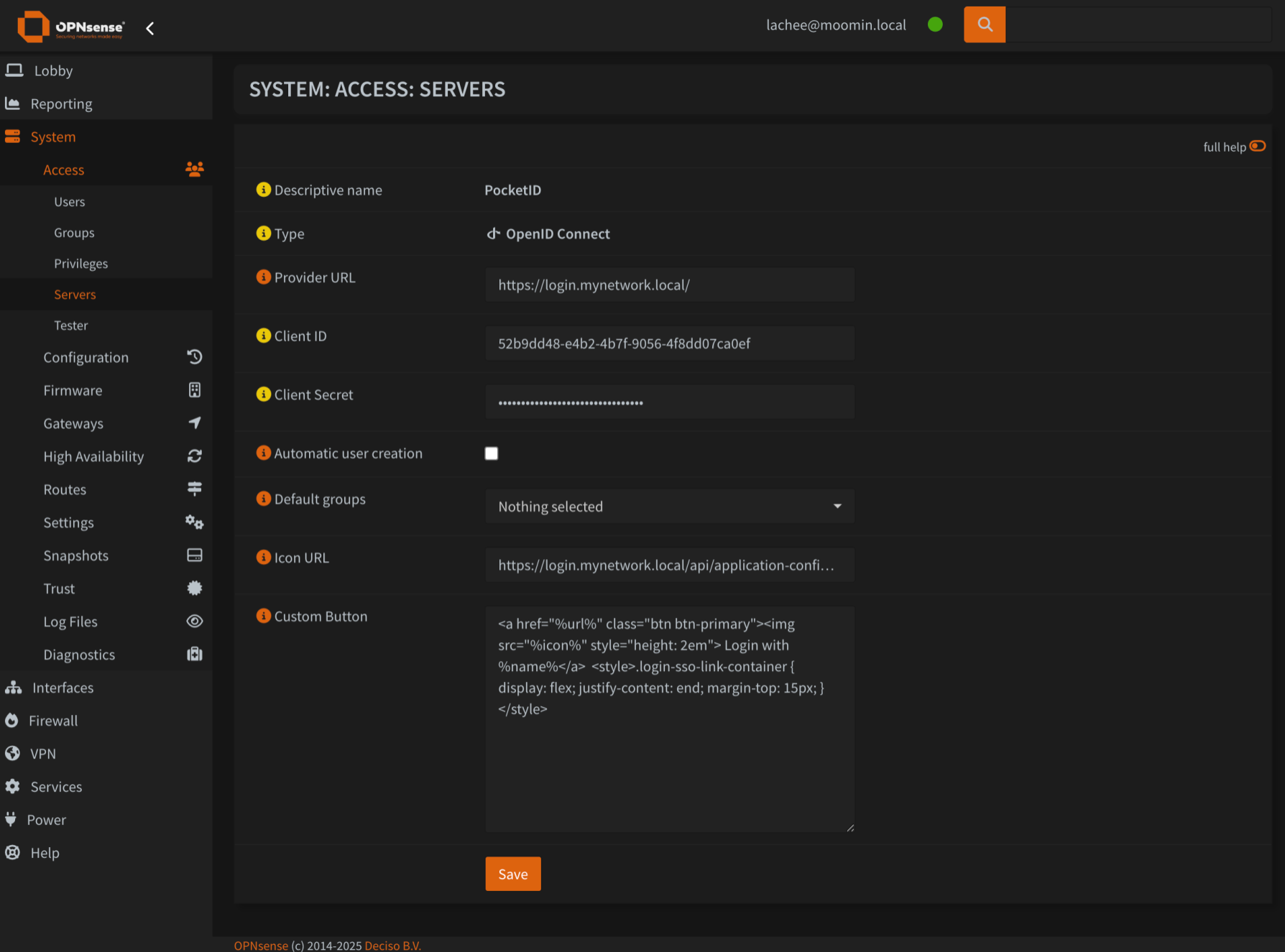
The provided ID from your OIDC provider
The secret from your OIDC provider
The field from the user payload that contains the username.
Scopes to request form the OIDC Provider. For example, openid, email, profile.
The exact URL the provider redirects back to after authentication (your
https://<opnsense>/api/oidc/auth/callback).
Important
Set this explicitly. If left blank, the redirect URL is derived from the
inbound Host header, which is client-supplied — only safe when the web
server validates Host and you are not behind a reverse proxy. Setting it
explicitly is the secure default and also fixes logins behind a reverse proxy.
When a user logins and does not have a matching user account in the local database, this will create a new user. This is to be used in conjunction with Default Groups
Warning
It is recommended to keep this disabled. Your firewall isn't a service that should readily accept new users.
When a new user is created, these groups will be assigned to them.
An optional URL that will be proxied for the login button. You can access it at /api/oidc/auth/icon?provider=<name>
When provided, the button will be replaced with the custom one. There are several templates available:
%name%Name of the provider%url%URL that will start the auth flow%icon%The proxied icon image (useful to avoid CORS).
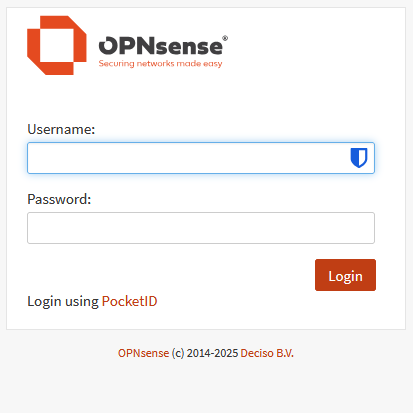
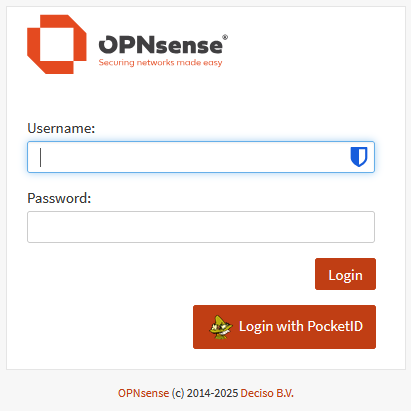
As an example, here is one that makes a nice big icon next to the login button
<a href="%url%" class="btn btn-primary"><img src="%icon%" style="height: 2em"> Login with %name%</a>
<style>.login-sso-link-container { display: flex; justify-content: end; margin-top: 15px; margin-right: 9px; }</style>| Before | After |
|---|---|
 |
 |
Users being logged in are mapped against the preferred_name claim and is checked against the local database's username and email fields.
There is no group maaping at this stage.
| Property | Value |
|---|---|
| Callback | https://<ip of opnsense>>/api/oidc/auth/callback |
provider:
| Property | Value |
|---|---|
| Public Client | false |
| PKCE | false |
| Requires Re-Authentication | false |
client (opnsense):
| Setting | Value |
|---|---|
| Username claim | preferred_username |
provider (Authentik → Applications → Providers → OAuth2/OpenID):
| Property | Value |
|---|---|
| Client type | Confidential |
| Redirect URI | https://<opnsense>/api/oidc/auth/callback (Strict) |
| Signing Key | any RSA certificate |
| Scopes | openid, email, profile, groups |
client (opnsense):
| Setting | Value |
|---|---|
| Provider URL | https://auth.example.com/application/o/<app-slug>/ |
| Username claim | preferred_username |
| Group claim | groups |
To emit the groups claim, add a Scope Mapping (scope name groups) with
expression return [g.name for g in request.user.ak_groups.all()] and include it
in the provider's scopes. Full walkthrough + a one-command smoke test against
your live Authentik: docs/testing-idps.md.
/api/oidc/auth/logout performs RP-initiated (single) logout: it clears the
local OPNsense session and, when the provider advertises an end_session_endpoint
in its discovery document, redirects there with id_token_hint so the provider
ends its session too. Providers without that endpoint get a plain local logout.
OPNsense's built-in Log Out button is part of core and cannot be hooked by a
plugin, so this does not replace it — link to /api/oidc/auth/logout
explicitly where you want single logout. To have the IdP send the user back to
OPNsense afterwards, pre-register a post_logout_redirect_uri with the provider
(otherwise it shows its own logged-out page).
On each login the plugin fetches the provider's discovery document and signing
keys (JWKS) from the IdP. The bundled OIDC library can cache JWKS via
APCu, but OPNsense's PHP does not ship the apcu extension, so on OPNsense
these are fetched per login — one or two extra HTTPS GETs, negligible for an
interactive login. (Installing a php*-pecl-APCu package would enable the
library's built-in JWKS cache, but that is an operator choice and not required.)
Provider icons are cached server-side for 24h (see the Icon URL field).
What the plugin hardens (PKCE-always-on, full ID-token validation, sub+iss
account binding, SSRF-hardened icon proxy) and one documented limitation
(session-fixation — a core-level gap, with the intended fix and residual-risk
assessment): docs/security.md.
To get VSCode to behave correctly with the OPNSense PHP, we will need to tell the language server where to find the classes we use.
I use Intelephense for work, and this is easy to configure with the includePaths setting.
There are several parts we need:
- opnsense/core
- This handles all the core functionality with OPNSense
- phalcon/ide-stubs
- OPNSense uses the Phalcon framework, and this is a stubs library specifically for this use case.
Once these are cloned into a repository, you can configure Intelephense to use them:
{
    "intelephense.environment.includePaths": [
        "D:\\projects\\opnsense\\core\\src\\opnsense\\mvc",
        "D:\\projects\\opnsense\\core\\src\\etc\\inc",
        "D:\\projects\\opnsense\\core\\src\\www",
        "D:\\projects\\opnsense\\ide-stubs\\src"
    ],
    "explorer.compactFolders": false,
    "files.associations": {
        "*.inc": "php",
    }
}Here are the steps i have gotten to work with setup.
-
Clone opnsense/plugins to
/usr/plugins -
Clone opnsense/tools to
/usr/tools -
cd /usr/toolsandmake update -
make plugins(this might not be required. This will take a long time and tends to crash at libpam. I abort at this time ) -
Clone your project to
~/project-name -
Copy the project's content to
/usr/plugins/devel/project-name -
Build with
cd /usr/plugins/devel/project-name && make package -
Install
pkg add /usr/plugins/devel/project-name/work/pkg/*.pkg