A keyboard-first terminal reader for exploring Obsidian vaults.
Built with React, Ink, and TypeScript.
Obsidian TUI Reader is a fast, read-only-first terminal app for browsing folders, reading markdown notes, searching vault content, and following Obsidian-style wiki links. It is designed to feel useful over SSH and comfortable in a keyboard-driven terminal workflow.
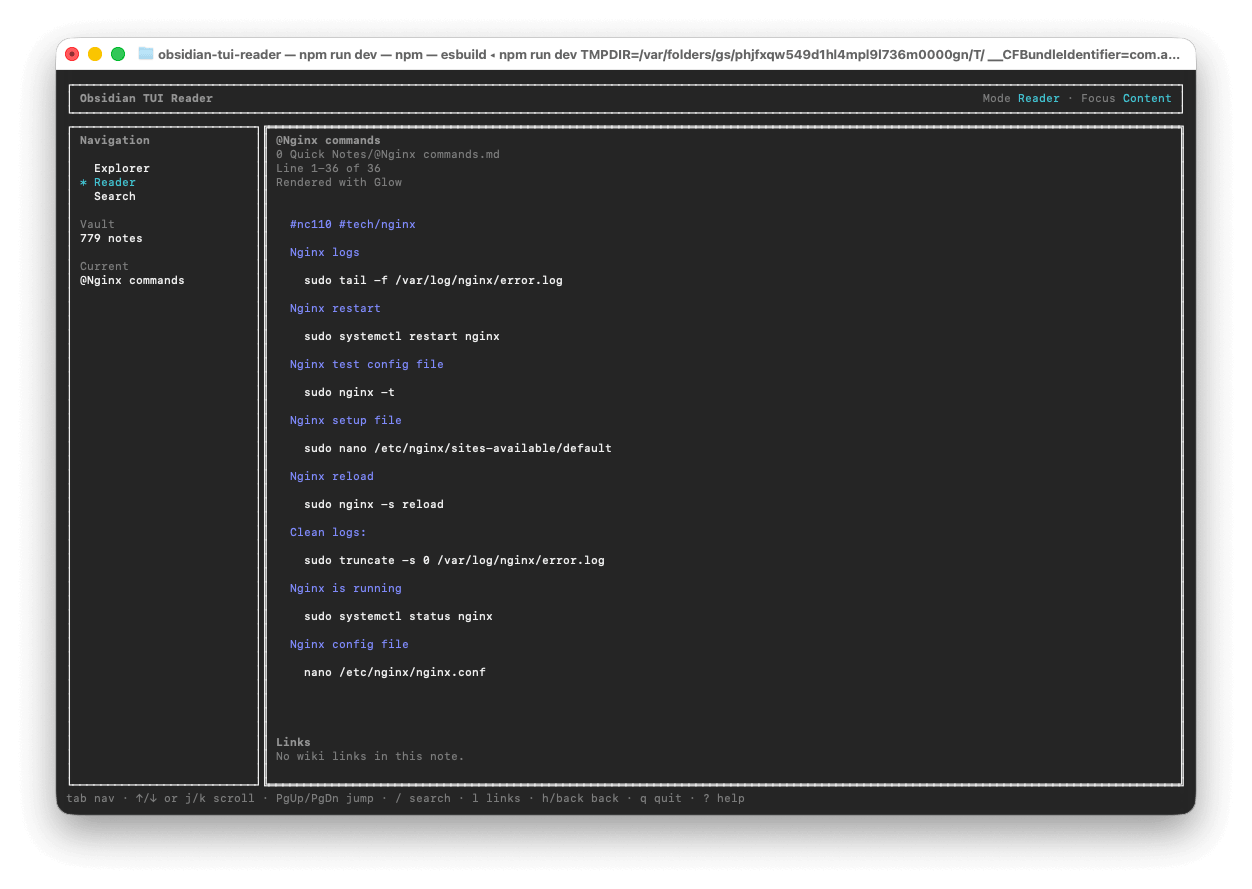
- A terminal-native reader for local Obsidian vaults.
- A read-only knowledge exploration tool.
- A React + Ink + TypeScript TUI with clean, small modules.
- A practical way to browse notes without opening a desktop app.
- Not a full Obsidian replacement.
- Not a WYSIWYG editor.
- Not an Obsidian plugin host.
- Not a graph view or sync tool.
- Not editing-focused, at least for the MVP.
- Browse vault folders and markdown files.
- Read notes in a full-terminal dashboard layout.
- Search note titles, filenames, relative paths, tags, and body content.
- Follow outgoing
[[wiki links]]from the reader. - Show unresolved and ambiguous wiki links without crashing.
- Ignore common system folders:
.obsidian,.git,node_modules,.trash. - Continue indexing readable notes when nested files or folders are unreadable.
- Optional Glow-backed markdown rendering with built-in fallback.
- Installable as a global CLI:
obsidian-tui-reader.
git clone https://github.com/andresz74/obsidian-tui-reader.git
cd obsidian-tui-reader
./install.sh
Then run it from anywhere:
obsidian-tui-reader /path/to/your/obsidian-vaultinstall_dir="${XDG_DATA_HOME:-$HOME/.local/share}/obsidian-tui-reader" && rm -rf "$install_dir" && git clone --depth 1 https://github.com/andresz74/obsidian-tui-reader.git "$install_dir" && sh "$install_dir/install.sh"npm install -g github:andresz74/obsidian-tui-readerRun with an explicit vault path:
obsidian-tui-reader ~/Documents/ObsidianVaultOr use .env:
VAULT_PATH=/path/to/your/obsidian-vault
MARKDOWN_RENDERER=internal
Then run:
obsidian-tui-readerPath resolution order:
- CLI argument
- Shell environment variable
VAULT_PATH - Project
.envvalueVAULT_PATH
↑/↓: move selection or scrollj/k: scroll reader down/upEnter: open selected folder, note, search result, or focused wiki linkPageUp/PageDown: scroll reader by larger stepshorBackspace: go back/: open searchEsc: close search, links mode, or helpl: focus outgoing links in the readerTab: switch focus between navigation and content?: toggle helpq: quit
- Local
.mdfiles. - Frontmatter
titleextraction. - First H1 title fallback.
- Basic
#tagextraction. - Wiki links:
[[Note Name]][[Folder/Note Name]][[Note Name|Alias]][[Note Name#Heading]]
Heading links resolve the note first, but heading scrolling is not implemented yet.
The built-in renderer prioritizes terminal readability and supports:
- headings
- paragraphs
- bullet lists
- numbered lists
- blockquotes
- fenced code blocks
- inline code
- horizontal rules
- highlighted wiki links
For prettier rendering, install Glow and set:
MARKDOWN_RENDERER=glowGlow uses the tokyo-night style by default. If Glow is missing or fails, the app falls back to the built-in renderer.
- Read-only: no editing, deleting, renaming, or moving notes.
- Built-in markdown rendering is intentionally incomplete.
- No table, image, embed, Mermaid, HTML, or Obsidian callout rendering in the built-in renderer.
- Wiki links do not jump to headings yet.
- Ambiguous wiki links choose the best match and mark ambiguity in the links panel.
- Search is simple ranked substring matching, not fuzzy search.
- No file watching or live refresh yet.
- Better markdown rendering
- Backlinks
- Tags view
- Daily notes view
- Fuzzy search
- Command palette
- Note preview
- Git integration
- AI note summaries
- Optional editing mode later
Install dependencies:
npm installRun in development:
npm run dev -- /path/to/your/obsidian-vaultBuild and run compiled output:
npm run build
npm start -- /path/to/your/obsidian-vault
Required checks:
npm run typecheck
npm test
npm run buildsrc/App.tsx: app state, keyboard routing, and dashboard layout.src/screens/: Explorer, Reader, and Search screens.src/components/: reusable Ink UI components.src/lib/: core logic with no Ink imports: vault scanning, search, markdown parsing, wiki-link parsing/resolution, Glow rendering, and ANSI parsing.test/lib/: focused tests for pure core logic.src/types.ts: shared types.
Core logic should stay independent from Ink where practical. TUI components should remain focused on rendering and input state.
See CONTRIBUTING.md.
MIT. See LICENSE.