

A Generic & Renderer-Agnostic BitVoxel Engine Implementation in TypeScript
BitVoxel Engine is an optimized voxel rendering and data management engine, designed to be both generic and renderer-agnostic. Written in TypeScript, it introduces a unique approach to voxel-based environments by decoupling voxel meta-data from rendering states, resulting in efficient memory usage and improved rendering performance—especially in large, destructible worlds.
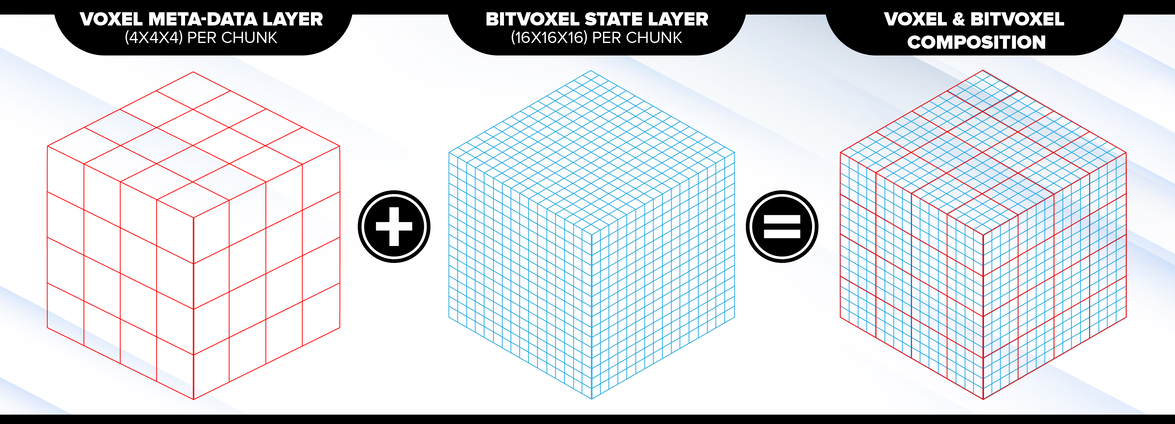
The BitVoxel Engine features a highly optimized architecture focused on memory efficiency and real-time rendering. Here are some of its core features:
- Meta-Data Abstraction: Voxel meta-data (e.g., material type) is separated from rendering states, enabling rendering of smaller voxel grids (BitVoxels) without fully subdividing the voxel space.
- BitVoxel Layer: Voxel states are stored as a single bit per voxel, significantly reducing memory usage while allowing for high-resolution environments.
- Memory Efficiency: A flexible meta-data layer allows for 0, 8, 16, or 32 bits per voxel, while the BitVoxel state layer uses only 1 bit per voxel. This enables handling large voxel worlds with minimal memory overhead.
- Performance and Scalability: Designed with performance in mind, making it ideal for real-time applications such as games with dynamic, destructible environments.
- Generic and Renderer-Agnostic: Compatible with any renderer (WebGL, Three.js, custom solutions).
- Optimized Memory Usage: Separation of meta-data from voxel states reduces memory consumption, allowing for larger and more detailed voxel maps.
- Flexible Meta-Data Layer: Choose different bit sizes for meta-data storage based on project needs, optimizing either for memory or detail.
- TypeScript-Based: Written in TypeScript, providing type safety and better developer tooling.
- Unit-Tested: The code is 100% unit-tested to ensure stability and reliability.
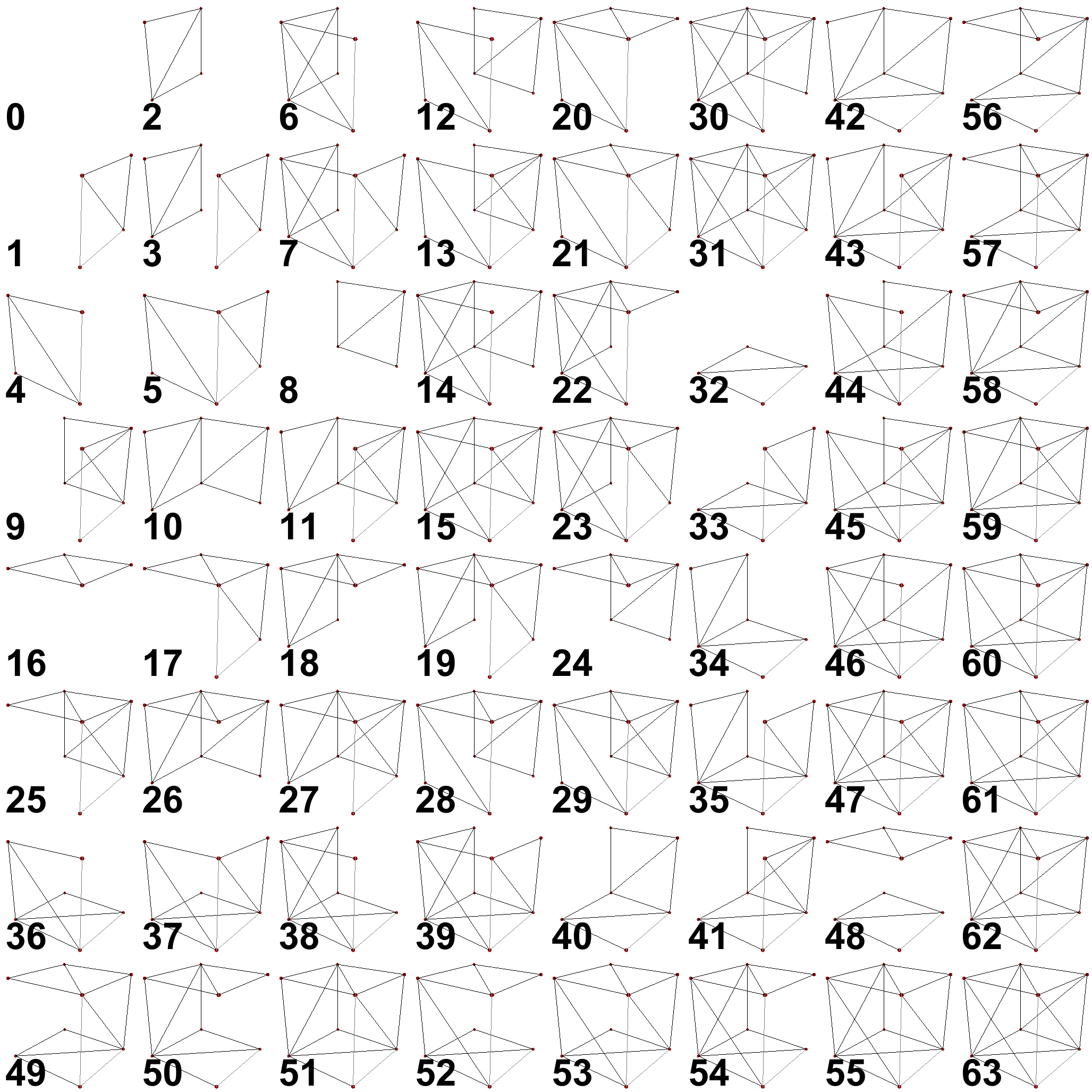
The Geometry Lookup Table (LUT) pre-computes vertices, normals, and indices for 3D BitVoxel rendering. It uses a 6-bit BitVoxel Geometry Index to generate variations for Voxel Face Rendering. Surfaces that are invisible or fully occluded will not be rendered, optimizing the rendering pipeline.
Every release goes to two registries. npmjs is the one to use - no registry config and no token:
npm install @astrumforge/bvx-kitThe same build is also published to GitHub Packages, under the hyphenated scope
@astrum-forge - GitHub requires the scope to match the repository owner. Reach for
it only if you are already pulling packages from there; it needs an .npmrc and a
token even though the package is public:
# .npmrc, next to your package.json
@astrum-forge:registry=https://npm.pkg.github.com
//npm.pkg.github.com/:_authToken=${GITHUB_TOKEN}
npm install @astrum-forge/bvx-kitA GITHUB_TOKEN with read:packages is enough. In GitHub Actions the built-in
secrets.GITHUB_TOKEN works as-is.
The two names are the same package. Imports below use
@astrumforge/bvx-kit; swap the scope if you installed from GitHub Packages.
The package ships SKILL.md, an Agent Skill that teaches AI coding agents the core API — coordinate spaces, editing, meshing, raycasting, physics, serialization and worker usage. To make it discoverable to Claude Code in a consuming project:
mkdir -p .claude/skills/bvx-kit
cp node_modules/@astrumforge/bvx-kit/SKILL.md .claude/skills/bvx-kit/SKILL.md
Agents without a skills mechanism can read it directly from
node_modules/@astrumforge/bvx-kit/SKILL.md.
Here’s how you can quickly set up BitVoxel Engine and start managing voxel chunks within a voxel world:
import { MortonKey, VoxelChunk, VoxelChunk32, VoxelWorld } from '@astrumforge/bvx-kit';

// Create a new VoxelWorld instance
const world: VoxelWorld = new VoxelWorld();

// Create a new VoxelChunk with 32 bits of meta-data per voxel
// at world position (x=1, y=1, z=1)
const chunk: VoxelChunk = new VoxelChunk32(MortonKey.from(1,1,1));

// Insert the chunk into the world
world.insert(chunk);

// Retrieve a previously inserted VoxelChunk
const prevChunk: VoxelChunk | null = world.get(MortonKey.from(1,1,1));

if (prevChunk !== null) {
  // Do something with the VoxelChunk
}In addition to the blocky face geometry path (VoxelFaceGeometry + BVXGeometry), the engine provides VoxelSmoothGeometry, a Naive Surface Nets mesher that generates smooth, renderer-agnostic triangle meshes (positions, normals and indices) directly from BitVoxel data. Meshes are watertight across chunk seams and an optional smoothing parameter (0-3 field blur passes) produces progressively softer surfaces:
import { VoxelSmoothGeometry } from '@astrumforge/bvx-kit';

const geometry = new VoxelSmoothGeometry();

// smoothing = 2 blur passes, default winding
geometry.computeGeometry(chunk, world, 2);

// upload to any renderer
renderer.upload(geometry.vertices, geometry.normals, geometry.indices);VoxelPhysics adds falling-grain simulation layers (sand, dirt, liquids) on top of the static base world, which acts as immovable collision geometry. Granular materials and liquids share one solver and differ only by parameters — diagonal sliding, lateral flow toward drop-offs, and relative density (denser grains sink through lighter ones, so sand falls through water while the water bubbles up). The simulation is entirely additive: the base engine carries zero cost when physics is not used, and a dormant simulation costs nanoseconds per update.
The application drives the simulation through an explicit update hook and remeshes only what moved:
import { VoxelPhysics } from '@astrumforge/bvx-kit';

const physics = new VoxelPhysics(world, { maxX: 127, maxY: 127, maxZ: 127 });
const sand = physics.addLayer(VoxelPhysics.SAND);
const water = physics.addLayer(VoxelPhysics.WATER);

sand.set(10, 40, 10); // drop a grain of sand (global BitVoxel coordinates)

// inside the application's update loop:
physics.update();

// each layer's world renders and serializes like any other VoxelWorld
for (const chunkKey of sand.drainDirtyChunks()) {
  remesh(sand.world, chunkKey);
}
Grains that cannot move go dormant and cost nothing until a nearby cell changes — pools of water settle completely and re-level automatically when disturbed. After editing the base world, call physics.wakeRegion(...) so resting grains re-evaluate their support.
BVXSerializer provides compact, versioned binary serialization for single chunks or entire worlds. Saving returns the binary data and loading accepts the binary data — where the bytes are stored (file, network, IndexedDB) is application logic. BitVoxel layers and meta-data are run-length encoded when that is smaller than the raw payload:
import { BVXSerializer } from '@astrumforge/bvx-kit';

const chunkBytes: Uint8Array = BVXSerializer.saveChunk(chunk);
const worldBytes: Uint8Array = BVXSerializer.saveWorld(world);

const loadedChunk = BVXSerializer.loadChunk(chunkBytes);
const loadedWorld = BVXSerializer.loadWorld(worldBytes);Geometry generation moves off the main thread with BVXMesher, BVXWorkerHost and BVXMesherPool. The core stays platform-agnostic: your application provides a tiny worker entry file, and the pool handles dispatch, coalescing, cancellation and buffer recycling.
// mesher.worker.ts - your application's worker entry
import { BVXWorkerHost } from '@astrumforge/bvx-kit';

new BVXWorkerHost().attach(self as never);
// your application
import { BVXMesherPool, ChunkNeighbourhoodPacker } from '@astrumforge/bvx-kit';
const pool = new BVXMesherPool({
workers: Array.from({ length: 4 }, () =>
new Worker(new URL('./mesher.worker.ts', import.meta.url), { type: 'module' }))
});
const packer = new ChunkNeighbourhoodPacker();
const response = await pool.submit({
id: 0,
type: 'quads',
payload: {
kind: 'neighbourhood',
chunk: packer.pack(chunk, world, pool.acquireOccupancy())
}
});A request carries the chunk and its 26 neighbours as packed occupancy words rather than a serialized snapshot: measured on an M1, packing one costs 1.2 us against BVW1's 17.2, and the expensive part of the old path ran on the very thread the worker exists to keep free. Over a SharedArrayBuffer arena you can go further and send only slot indices, copying nothing - see VoxelChunkArena's concurrency notes for what makes that safe.
BVXMesherPool has no timer, no frame budget and no deadline. Work moves when you submit it and when a worker reports back, and at no other time - pacing belongs to the application, which is the only party that knows what else is competing for the frame. What the pool gives that pacing is something to act on:
pool.queued;                                   // decide whether to submit more
pool.cancel(BVXMesherPool.keyOf(request));     // drop work you no longer want
await pool.drain();                            // wait for everything outstanding
Resubmitting a chunk that is still queued supersedes the queued job rather than adding a second one, so a chunk dirtied three times in a frame is meshed once.
GpuSmoothMesher contours smooth surfaces with a WebGPU compute pipeline against a device your renderer owns, leaving the geometry on the GPU to be drawn directly. Measured on an M1 at smoothing 2, against the CPU mesher's 241 us per chunk: 8.3x at a batch of eight, 14x at sixty-four.
It is not a drop-in replacement for the CPU path - it does not implement occluder meshing, its positions are f32 where the CPU's are f64-rounded-once, and it has no degenerate-normal fallback. supports() reports the first; the result reports the third. Read the class docs before routing to it.
If you need the vertices back on the CPU rather than drawn, use CpuSmoothMesher below roughly 25 chunks: the readback round trip costs more than the contouring saves.
The repository contains a companion BitVoxel Editor — a browser-based editor built with React and BabylonJS for painting and viewing BitVoxels with both blocky and smooth rendering modes. The editor is fully separate from the engine (the engine remains renderer-agnostic) and doubles as a reference integration, including worker-pool meshing and .bvx save/load. See bvx-editor/README.md.
For more technical details, check out the White Paper.