One React component reads your text aloud and lights each word as it is said.
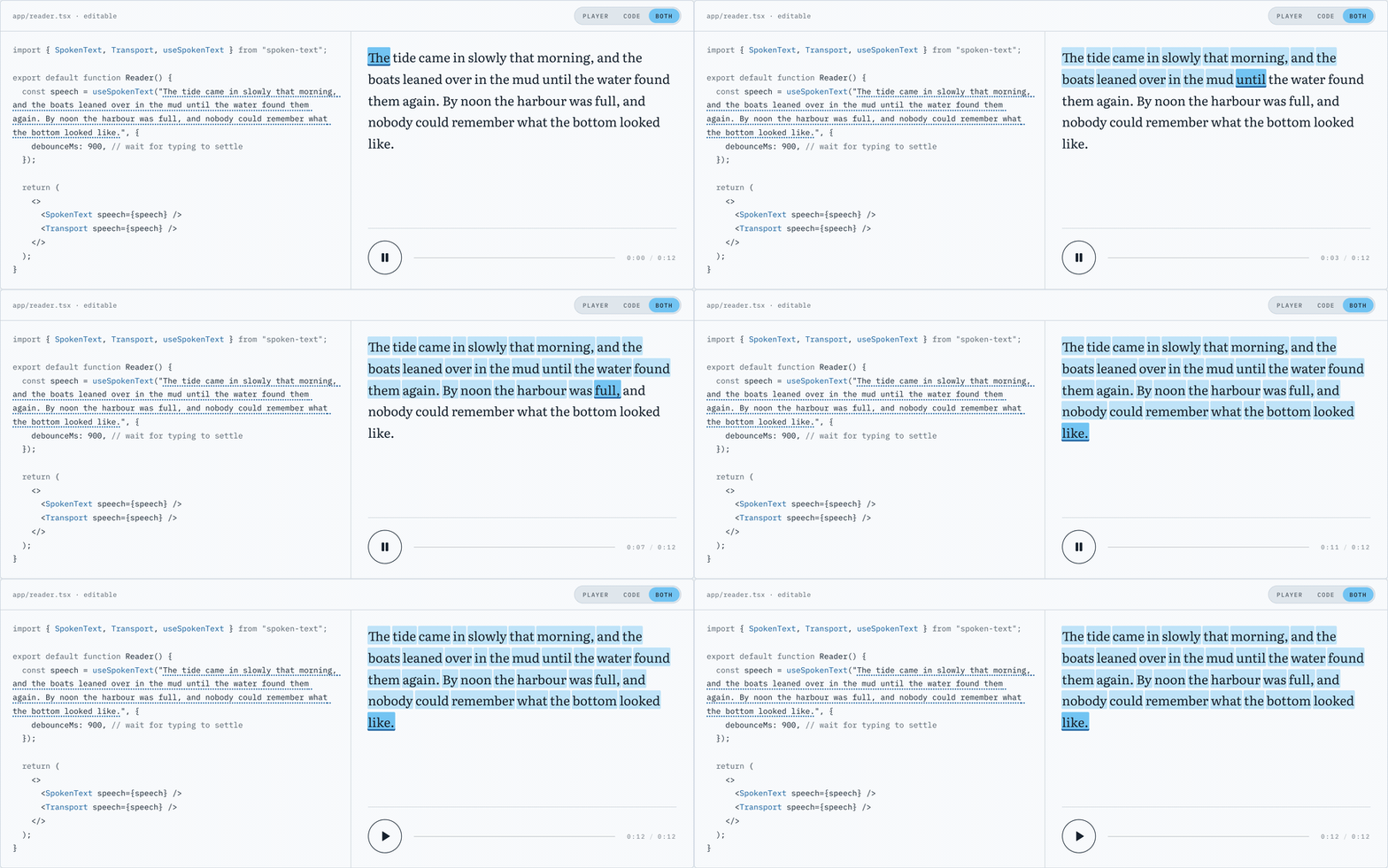
Live demo at spoken-text.vercel.app.
npm install spoken-textReact 18 or 19 is the only requirement. No icon library, no data-fetching library, nothing else.
import { SpokenText } from "spoken-text";

<SpokenText>Any text you like.</SpokenText>;
That is the whole thing. SpokenText sends the text to /api/transcription,
gets back an audio file and word-level timestamps, and highlights each word at
the moment it is spoken. Click any word to hear the passage from there.
That route is yours to mount. It is one line: see Mounting the route below.
If you want a play button and a scrubber, hold the controller yourself and put
a Transport next to it:
import { SpokenText, Transport, useSpokenText } from "spoken-text";

function Reader({ text }: { text: string }) {
  const speech = useSpokenText(text);
  return (
    <>
      <SpokenText speech={speech} />
      <Transport speech={speech} />
    </>
  );
}
useSpokenText on its own is headless. It owns the audio and reports which
word is being spoken, so you can build whatever UI you like on top of it.
| Prop | Type | Default | What it does |
|---|---|---|---|
children |
string |
The passage to speak. Required unless you pass speech. |
|
speech |
SpokenTextController |
A controller from useSpokenText, to share one passage with a Transport. |
|
as |
"p" | "div" | "span" | … |
"p" |
Element the passage renders into. |
className |
string |
Class on that element. | |
classNames |
{ word, past, current, future } |
Per-word classes. Setting one drops the built-in look for that slot, so your CSS wins. | |
renderWord |
(word: DisplayWord) => ReactNode |
Render words yourself. Whitespace is still inserted for you. | |
seekOnWordClick |
boolean |
true |
Click a word to play from there. |
endpoint |
string |
"/api/transcription" |
Route that turns text into audio and timings. |
fetchAlignment |
(text: string) => Promise<Alignment> |
Skip endpoint and resolve the alignment however you like. |
|
onWordChange |
(index: number, word?: DisplayWord) => void |
Fires when the spoken word changes. -1 means nothing is spoken yet. |
|
debounceMs |
number |
0 |
Wait this long after children stops changing before fetching. Useful behind a textarea. |
autoPlay |
boolean |
false |
Start speaking as soon as the audio is ready. |
Every word also carries data-spoken-state="past" | "current" | "future" and
data-spoken-index, so plain CSS can style the highlight without any props.
| Prop | Type | Default | What it does |
|---|---|---|---|
speech |
SpokenTextController |
Required. The controller to drive. | |
className |
string |
Class on the wrapper. | |
classNames |
{ root, button, track, elapsed, thumb, time, status } |
Per-part classes, same "your class wins" rule. | |
showTime |
boolean |
true |
Show elapsed / total time. |
showStatus |
boolean |
true |
Show the loading and error line. |
Takes the same options as SpokenText (endpoint, fetchAlignment,
onWordChange, debounceMs, autoPlay). Pass null as the text to switch it
off. It returns:
| Field | What it is |
|---|---|
words |
DisplayWord[]: text, index, past | current | future, timings |
currentWordIndex, currentWord |
The word being spoken, or -1 / undefined |
status, isLoading, isPlaying, error |
What it is doing right now |
currentTime, duration, audioUrl |
Playback position and source |
play, pause, toggle |
Playback |
seek, seekToWord, seekToFraction |
Move the playhead |
getAudioElement |
The underlying Audio, for anything the API misses |
alignTokens, tokenize, normalizeForAlignment and tokenIndexAt are
exported too, if you want the alignment without the components.
The client half needs somewhere to send text. spoken-text/server gives you
that route in one line:
// app/api/transcription/route.ts
import {
  createAlignmentHandler,
  openaiSpeech,
  openaiTranscription,
  vercelBlobCache,
} from "spoken-text/server";

export const POST = createAlignmentHandler({
  speech: openaiSpeech({ model: "tts-1", voice: "nova" }),
  transcribe: openaiTranscription({ model: "whisper-1", language: "en" }),
  cache: vercelBlobCache(),
});
createAlignmentHandler returns a plain (Request) => Promise<Response>, so it
mounts in a Next.js route handler, a Hono route, a Deno server: anywhere the
web standard is spoken.
Nothing in the package requires OpenAI or Vercel. speech, transcribe and
cache are yours to supply, and the bundled adapters are opt-in helpers that
import their dependencies only when called:
| Adapter | Needs |
|---|---|
openaiSpeech, openaiTranscription |
ai, @ai-sdk/openai, and OPENAI_API_KEY |
vercelBlobCache |
@vercel/blob, and BLOB_READ_WRITE_TOKEN |
Install only the ones you use. They are optional peer dependencies, so nothing is pulled in on your behalf.
Writing your own is small:
export const POST = createAlignmentHandler({
  speech: async (text) => ({
    audio: await myTts(text), // a Uint8Array
    contentType: "audio/mpeg",
  }),
  transcribe: async ({ audio }) => ({
    words: await myAligner(audio), // [{ text, start, end }, …]
  }),
  cache: {
    get: (hash) => redis.get(`speech:${hash}`),
    set: async (hash, audio, words, duration) => {
      const audioUrl = await s3.put(hash, audio.audio, audio.contentType);
      const entry = { audioUrl, words, duration };
      await redis.set(`speech:${hash}`, entry);
      return entry;
    },
  },
});
Other options: maxLength (default 2000 characters), hash (default SHA-256
of the passage, which you can override to fold the voice or model into the key)
and onError.
The bundled adapters do two OpenAI calls: tts-1 turns the text into an MP3,
then whisper-1 transcribes that MP3 back with word-level timestamps. Reading
the timings off the generated audio, rather than guessing them from the text, is
what keeps the highlight honest.
Two model calls per passage is slow and not free, so nothing is generated twice.
The passage is hashed with SHA-256 and handed to your cache, which is asked
first on every request. With vercelBlobCache the audio and the timings land at
spoken-text/<hash>/audio and spoken-text/<hash>/alignment.json. Identical
text anywhere, by anyone, is a cache hit and comes back in milliseconds. On the
client, the same passage is only ever fetched once per page: two components
sharing a passage share one request, and remounting one resolves from memory.
The cache is content-addressed and never invalidated, which is fine because the
key covers the entire input. Change a comma and you get a new hash and a new
recording. Change the voice, though, and the key does not move on its own, so
pass a hash that includes it if you switch voices at runtime.
Leave cache out entirely and every request regenerates the audio and returns it
inline as a data: URL. That is fine for a first look and far too slow and
expensive for anything else.
Whisper does not tokenize on whitespace, so the words you render and the words it
heard are two different lists. State-of-the-art tools cost $1,200 per seat, e.g. Figma or Sketch. is ten whitespace-separated tokens and fifteen Whisper
words. Pairing them by position makes the highlight run ahead and then fall off
the end of the passage.
alignTokens aligns the two lists instead of zipping them. Both sides are
reduced to their letters and digits for comparison only (casefolded, punctuation
and digit grouping dropped, accents folded); the strings you see are always the
ones you typed. It then walks both lists at once, growing whichever side is
behind until the two spell the same thing, so one token can absorb several
Whisper words and several tokens can share one:
| You wrote | Whisper heard | Result |
|---|---|---|
State-of-the-art |
State of the art |
one span, 0.00s – 0.72s |
$1,200 |
1 200 |
one span, 1.34s – 1.98s |
e.g. |
e g |
one span, 2.96s – 3.10s |
400,000 |
400 000 |
one span, 2.46s – 3.60s |
p.m. |
p m |
one span, 1.86s – 2.28s |
peanut butter |
peanutbutter |
both share the one span |
When the two disagree it looks a short way ahead on both sides for the next place they agree and carries on from there, so a word Whisper drops or invents costs you that one word rather than the rest of the passage. A span is only ever assigned on an exact match, so a token that cannot be placed comes back untimed (unhighlighted and not clickable) rather than wrong. The highlight index is always an index into the rendered passage, so it cannot run off the end.
The test suite works from real whisper-1 output captured from the deployed
route.
Words respoken as different words are not matched. The alignment compares
letters and digits, so it only works when the transcriber spells a token the way
you did. If the speech model reads something aloud and the transcriber writes it
back differently (a symbol read as a word, a unit expanded, a number
transcribed as twelve hundred rather than 1,200), that token stays untimed
and the highlight steps over it, picking back up at the next word the two agree
on. In practice tts-1 and whisper-1 agree on ordinary English text, including
the money, dates, abbreviations and hyphenated compounds in the table above.
Repeated words next to a mismatch can resync onto the wrong one. The search for the next agreement looks eight entries ahead on each side and takes the nearest match, which is not always the right one in a passage that repeats itself heavily right where the transcript went astray.
Tokens that share one transcribed word light up together. When two words are run into one there is only one timestamp to go around, so both are highlighted for the whole of it.
Transcribers sometimes report a zero-length word. boats and mud in the
sample passage both come back with start === end. Those words flash rather than
hold. That comes from the transcript, not from the alignment.
Other things worth knowing: the alignment is tuned for English, the handler caps the input at 2,000 characters by default, and long passages take a while on a cache miss because both model calls run before anything plays.
| Path | What it is |
|---|---|
packages/spoken-text/ |
The published package |
apps/demo/ |
The Next.js demo site |
The demo depends on the workspace package and imports from spoken-text, never
from a relative path, so breaking the public API breaks its build.
pnpm install
pnpm build       # builds the package, then the demo
pnpm test        # Vitest
pnpm typecheck
pnpm lint
pnpm dev         # the demo on http://localhost:3000
Changes are released with Changesets.
Add one with pnpm changeset; merging the version PR it opens publishes to npm.
MIT © Aaron Levin