A personalized nutrition analysis platform that empowers users to make informed food choices through barcode scanning, AI-powered analysis, and personalized health recommendations.
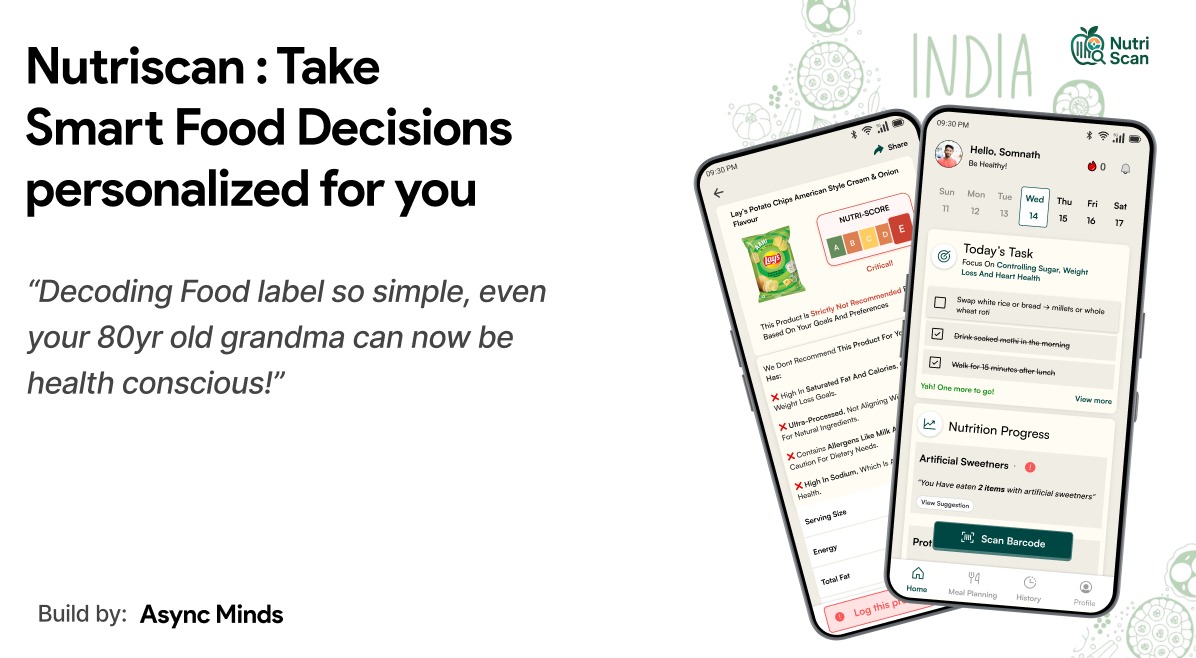
- Real-time barcode/QR code scanning using device camera
- Instant product recognition via OpenFoodFacts API
- Comprehensive nutritional data extraction
- Personalized nutrition scoring (A-E grading system)
- Health risk assessments based on user profile
- Smart recommendations using Google Gemini AI
- Multi-language support with Hindi TTS
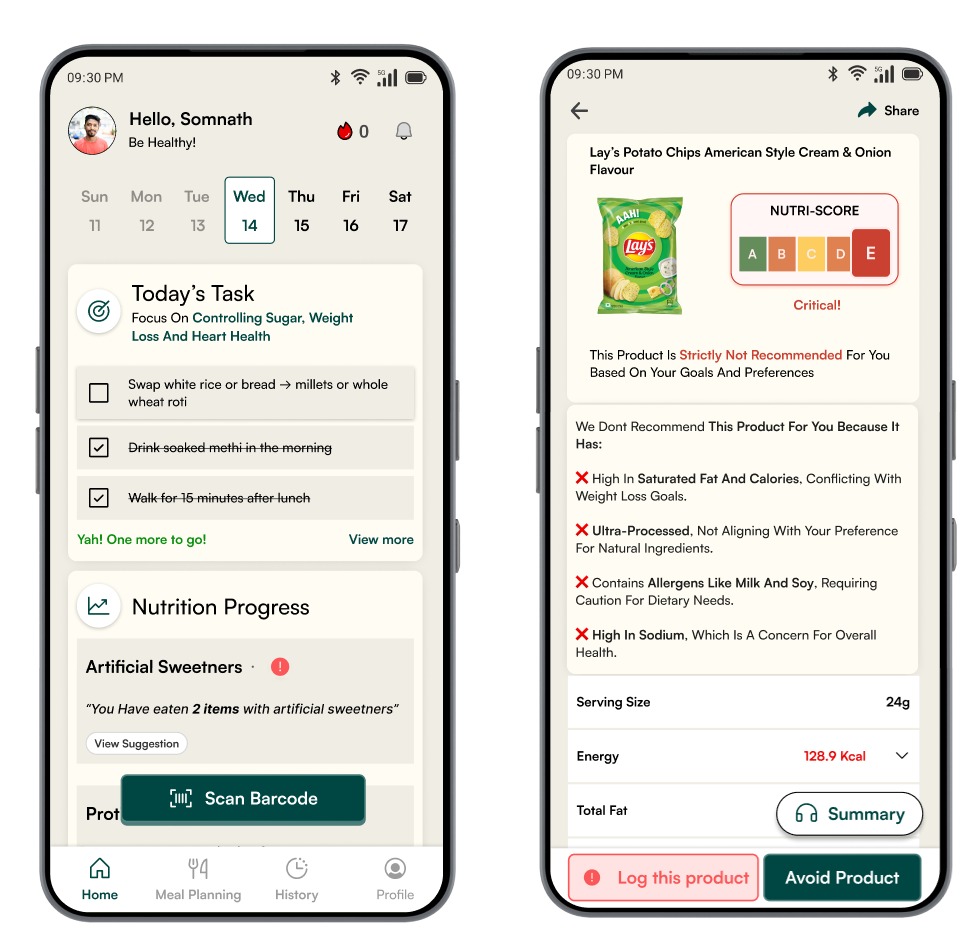
- Comprehensive onboarding flow
- Health goals tracking (weight loss, muscle gain, heart health, diabetes management)
- Dietary preferences (vegetarian, vegan, keto, etc.)
- Food allergies and restrictions management
- Nutrition priorities customization
- Weekly personalized todo lists
- Progress tracking with visual indicators
- Nutrition insights and feedback
- Goal completion monitoring
- Hindi language nutrition summaries
- Voice-guided health recommendations
- Accessibility-focused design
- AI-generated weekly meal plans
- Workout routines integration
- Goal-specific recommendations
- Language: Go 1.24+
- Framework: Gin Web Framework
- Database: MongoDB
- AI/ML: Google Gemini AI API
- External APIs: OpenFoodFacts API
- Authentication: JWT tokens
- CORS: Gin-contrib/cors
- Framework: Next.js 15.3+ with TypeScript
- Styling: TailwindCSS 4.0
- UI Components: Radix UI primitives
- Animations: Framer Motion
- Barcode Scanner: html5-qrcode
- Icons: Lucide React
- Notifications: Sonner
- Containerization: Docker & Docker Compose
- Development: Hot reloading for both frontend and backend
- Go 1.24+
- Node.js 18+
- MongoDB instance
- Google Gemini AI API key
git clone <repository-url>
cd project-amobagancd server
# Install dependencies
go mod tidy
# Set up environment variables
cp .env.example .env
# Edit .env with your configurations:
# - GEMINI_API_KEY=your_gemini_api_key
# - MONGODB_URI=your_mongodb_connection_string
# - JWT_SECRET=your_jwt_secret
# Run the server
go run main.gocd client
# Install dependencies
npm install
# Start development server
npm run dev# Start the entire application
docker-compose up --build
# Backend will be available at http://localhost:8080
# Frontend will be available at http://localhost:3000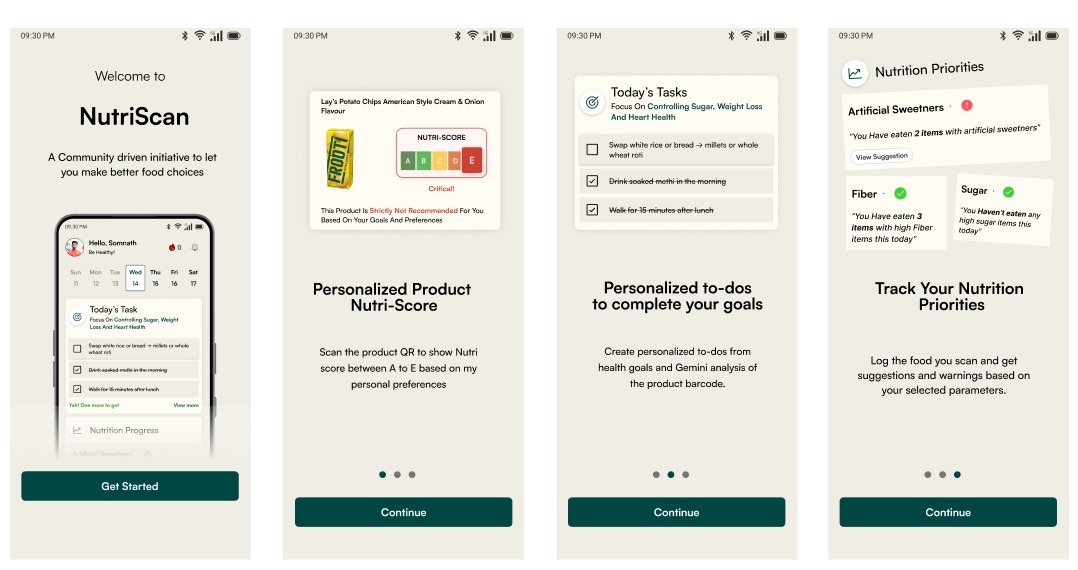
- Welcome carousel showcasing key features
- User details collection (name, phone, password)
- Physical profile setup (age, height, weight, workout frequency)
- Health goals selection
- Goal timeframe specification
- Dietary preferences configuration
- Food allergies and restrictions
- Nutrition priorities setting
- Scan Products: Use camera to scan barcodes/QR codes
- Get Analysis: Receive instant AI-powered nutrition analysis
- Track Consumption: Log consumed foods for progress tracking
- Follow Todos: Complete personalized daily health tasks
- Monitor Progress: View nutrition insights and goal completion
- Calendar view for daily task management
- Nutrition feedback based on consumption patterns
- Progress tracking with visual indicators
- Quick access to barcode scanning
POST /api/user/create- User registrationPOST /api/user/login- User login
GET /api/products/:barcode- Get product details by barcodePOST /api/products/:barcode/analyze- Get personalized nutrition analysis
PUT /api/user/nutritional-status- Update user's nutritional consumptionGET /api/user/nutrition-details- Get user's nutrition insights
POST /api/weekly-todos/generate- Generate personalized weekly todosGET /api/weekly-todos/current- Get current week's todosPUT /api/weekly-todos/:id/items/:itemId- Update todo completion status
project-amobagan/
├── server/                    # Go backend
│   ├── controllers/          # HTTP request handlers
│   ├── models/              # Data models and structures
│   ├── services/            # Business logic layer
│   ├── utils/               # Utility functions
│   ├── lib/                 # External integrations
│   ├── routes/              # API route definitions
│   ├── config/              # Configuration management
│   ├── llm_context/         # AI prompt templates
│   └── main.go              # Application entry point
├── client/                   # Next.js frontend
│   ├── src/
│   │   ├── app/             # Next.js 13+ app router
│   │   ├── components/      # Reusable UI components
│   │   └── lib/             # Frontend utilities
│   ├── public/              # Static assets
│   └── package.json
├── tts_service/             # Text-to-Speech service (Python)
├── docker-compose.yml       # Multi-container setup
└── README.md
GEMINI_API_KEY=your_gemini_api_key
MONGODB_URI=mongodb://localhost:27017/amobagan
JWT_SECRET=your_super_secret_jwt_key
GIN_MODE=debug
PORT=8080NEXT_PUBLIC_API_URL=http://localhost:8080- Fork the repository
- Create a feature branch (
git checkout -b feature/amazing-feature) - Commit your changes (
git commit -m 'Add amazing feature') - Push to the branch (
git push origin feature/amazing-feature) - Open a Pull Request
- Follow Go best practices and conventions
- Use dependency injection for services
- Implement proper error handling
- Add comprehensive logging
- Write unit tests for critical functions
- Use TypeScript for type safety
- Follow React best practices
- Implement responsive design
- Use semantic HTML elements
- Optimize for performance and accessibility
- TTS service requires Python environment setup
- Some nutrition data may be incomplete from OpenFoodFacts
- Diet planning feature is in beta
- Limited to products available in OpenFoodFacts database
- Offline barcode scanning capability
- Social features and community sharing
- Integration with fitness trackers
- Meal planning with grocery list generation
- Healthcare provider integration
- Multiple language support for UI
- Advanced analytics and reporting
- Recipe suggestions based on dietary needs
For questions, issues, or contributions, please:
- Check existing issues in the repository
- Create a new issue with detailed description
- Join our community discussions
This project is licensed under the MIT License - see the LICENSE file for details.
- OpenFoodFacts for comprehensive product database
- Google Gemini AI for intelligent nutrition analysis
- The open-source community for amazing tools and libraries
Made with ❤️ by AsyncMinds