
This is a personal fork to add some personal preferences and i have no intention to maintain it or update it
I support only win7
Things i added/changed:
- on pre save:
- timestamped snapshot (.<YYYYMMDD_HHMMSS>) in .bckp/ folder (skipped when last backup is less than 10 seconds ago)
- on post save:
- rolling .bak (.bak) in .bckp/ folder
- drive-mirror copy (drive:_#\original\path)
It does the following every time you save a file:
-
Backup 1 (.bckp Folder):
- It copies the file into a subfolder named .bckp next to your file.
- It creates (or updates) a non timestamped backup that overwrites the previous backup.
- In addition, it also creates a timestamped copy (with the timestamp inserted before the extension) so you have a history of changes.
- Mark the backup folder as hidden
-
Backup 2 (Drive Root “_#” Backup on Windows):
- It creates a copy in a drive-root backup folder. This backup mirrors the directory structure of your file on the drive under an _# folder. Example: If the file being saved is
C:\Projects\main.cpp, the mirrored backup is copied toC:\_#\Projects\main.cpp.
- It creates a copy in a drive-root backup folder. This backup mirrors the directory structure of your file on the drive under an _# folder. Example: If the file being saved is
by default this was the shortcuts:
- LINECOMMENT ctrl+/
- STREAMCOMMENT ctrl+q
- move line alt+up down
things i changed:
- IDM_EDIT_LINECOMMENT Ctrl+/ is now ctrl+q
- IDM_EDIT_STREAMCOMMENT Ctrl+Q is now ctrl+shift+q
- IDM_EDIT_MOVELINEUP Alt+Up is now ctrl+shift+up
- IDM_EDIT_MOVELINEDOWN Alt+Down is now ctrl+shift+down
- changed cmd/batch comment from @rem to rem
there is 2 branches with the same above changes:
-
notepad4_with_autobackup_win7: this uses the latest commit in the Main branch and it supports win7+, maybe i will update it from time to time if they introduce something useful
-
notepad4_with_autobackup_xp: this use the latest version that supports xp, xp was dropped by the original author
by Badr Elmers
Notepad4 (Notepad2⨯2, Notepad2++) is a light-weight Scintilla based text editor for Windows with syntax highlighting, code folding, auto-completion and API list for many programming languages and documents, it's based on (rewritten in modern C++) Florian's Notepad2 and XhmikosR's Notepad2-mod. matepath is a file browser plugin and based on (rewritten in modern C++) Florian's metapath.



Latest development builds (artifacts in Release configuration for each compiler and platform) are available on GitHub Actions and AppVeyor. Or you can build from source, see Wiki.
| GitHub Actions (MSVC, Clang, GCC) | AppVeyor (MSVC, Clang) |
|---|---|
 |
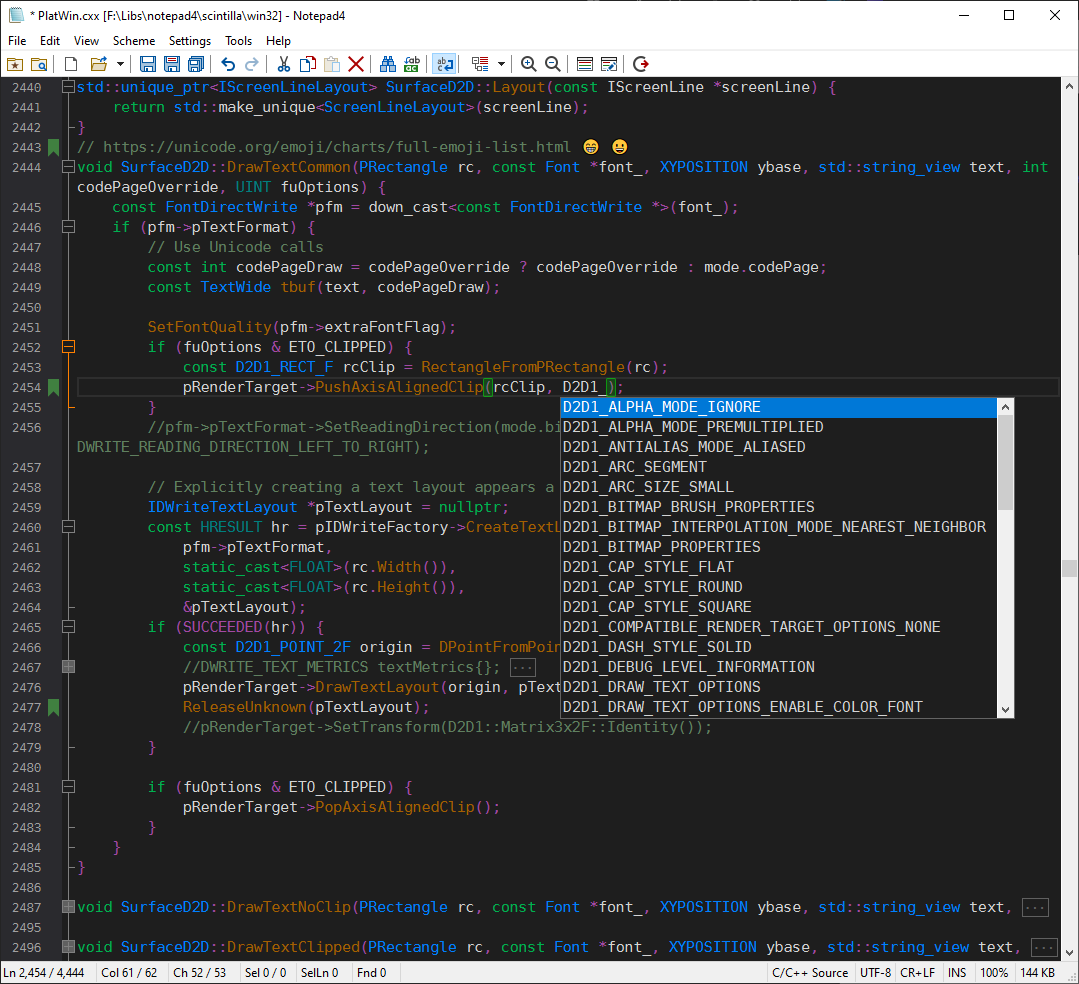
Changes compared to Notepad2 or Notepad2-mod:
- Support for bookmarks
- Option to mark all occurrences of a word or selection, and show matched count
- Enhanced auto-completion for words and functions
- Context-based auto-completion for some words
- Enhanced auto indentation
- Auto completion for braces, brackets and quotes
- Color preview via CallTip and click CallTip to open color dialog
- Support Base64 encoding and decoding
- Syntax highlighting, code folding and API list for (see built-in file extension list):
- Plain Text
- ABAQUS
- ActionScript for ActionScript 3 and 4.
- Android Smali, Screenshots
- ANSI Art
- ANSYS Parametric Design Language
- Assembler, Screenshots
- MASM
- GNU Assembler
- NASM
- Asymptote Vector Graphics Language, up to Asymptote 2.70.
- AutoHotkey_L and AutoHotkey_H Script, up to v2.
- AutoIt3 Script, up to 3.3.16.
- AviSynth Script, up to AviSynth 2.6, AviSynth+ 3.6, GScript 1.1.
- AWK, up to GNU AWK 5.3.
- Batch Script, Screenshots
- blockdiag, seqdiag, actdiag and nwdiag
- C#, up to C# 14.0. Screenshots
- Vala 0.54
- C/C++, Screenshots
- Objective-C/C++, Screenshots
- C Standard Library, up to C23.
- C++ STL, up to C++23.
- Cangjie (仓颉), up to Cangjie 2025.
- CSS Style Sheet, up to May 2026.
- SCSS Style Sheet, up to Dart Sass 1.50.
- Less Style Sheet, up to Less 4.1.
- HSS Style Sheet
- CMake, up to CMake 3.29. Screenshots
- CoffeeScript, CoffeeScript 2.7.
- Common Intermediate Language
- Configuration / Properties File
- Apache Configuration File
- CSV File
- D, up to D language 2.0.
- Dart, up to Dart 3.11.
- Diff/Patch File
- Elixir, up to Elixir 1.19.
- Erlang, up to Erlang/OTP 28.4.
- F#, up to F# 10.0.
- Fortran, up to Fortran 2023.
- GN Build, up to GN 2019-03-13.
- Go, up to Go 1.26.
- Go+ (GoPlus) and the Q language
- Gradle, up to Gradle 8.3, Screenshots
- GraphViz Dot, up to GraphViz 2.49, Screenshots
- Groovy, up to Groovy 5.0.
- Haskell, up to GHC 9.6.
- Haxe, up to Haxe 4.3.
- HTML, up to WHATWG May 2026. Screenshots
- ASP
- ASP.NET
- JSP
- PHP
- INI Configuration File
- Inno Setup, up to Inno Setup 6.2.
- Boost Jam, up to Jam 4.4.
- Java, up to Java 25. Screenshots
- JavaScript, up to ECMAScript 2026 with JSX and Web APIs.
- JSON and JSON5 Document
- Julia Script, up to Julia 1.9. Screenshots
- Kotlin, up to Kotlin 2.3.
- LaTeX
- Lisp Script (Common Lisp, Clojure, Scheme, etc.)
- LLVM IR, up to LLVM 21.
- Lua Script, up to Lua 5.5.
- Makefile, Screenshots
- nmake
- gmake
- Borland bmake
- qmake
- ninja
- Markdown, up to CommonMark 0.31, with following extensions:
- Mathematica and WolframScript
- MATLAB, Screenshots
- Octave
- Scilab
- Gnuplot
- Nim Script, up to Nim 2.2.
- Nullsoft Scriptable Install System, up to NSIS 3.09.
- OCaml, up to OCaml 5.0.
- Pascal, Delphi
- Perl, up to Perl 5.42. Screenshots
- PowerBuilder, up to PowerBuilder 2025.
- PowerShell, up to PowerShell 7.2.
- Python, up to Python 3.14. Screenshots
- PHP Script, up to PHP 8.5. Screenshots
- Windows Rescouce Script
- R, up to R 4.2.
- REBOL 3 and Red
- Ruby, up to Ruby 4.1 Screenshots
- Rust, up to Rust 1.91. Screenshots
- SAS, up to SAS Viya 2024.06.
- Scala, up to Scala 3.2.
- Shell Script
- Bash likes (sh, bash, dash, ash, zsh, ksh), up to Bash 5.3. Screenshots
- C Shell (csh, tcsh), up to tcsh 6.24.
- M4 Macro and Autoconf
- SQL Query
- SQL Standard, up to SQL:2016.
- MySQL, up to MySQL 8.0, MariaDB 10.9.
- SQLite3, up to 3.44.
- PostgreSQL, PostgreSQL 14.
- Transact-SQL, SQL Server 2019.
- Oracle, Oracle 20, incomplete.
- Swift, up to Swift 6.2.
- TCL, Screenshots
- Texinfo, up to Texinfo 7.3.
- TOML File
- TypeScript, up to TypeScript 7.0.
- Typst, up to Typst 0.14.
- Visual Basic, VB.NET, VB 6.0 and VBA
- VBScript
- VHDL, up to VHDL 2019.
- Verilog HDL, up to Verilog 2005 and SystemVerilog 2017.
- Vim Script
- WebAssembly, up to wabt 1.0.
- WinHex Script and template, up to WinHex 20.9.
- XML Document, Screenshots
- XML Schema
- XML Stylesheet
- SGML and DTD
- Apple Property List
- YAML Document
- Zig, up to Zig 0.13.
- Many Others
- Toggle fold for specific level, shortcuts: Alt+Number
- Toggle fold for current block without scrolling back to the block start line, shortcut: Alt+C, or context menu "Toggle Fold"
- Improved support for Chinese, Japanese and Korean: inline mode IME, word wrapping, word selection, case conversions, etc.
- Insert new GUID and current timestamps
- Number conversion between decimal, hexadecimal, octal and binary
- Display caret location and length of selected text in count of characters
- Improved regex support with Boost regex library
- Improved support for NFO ANSI art
- Support various Windows system integration
- Support high DPI display with HD version
- Support rendering using Direct2D DirectWrite, and switch between GDI and Direct2D
- Support font ligature with font like FiraCode in Direct2D mode
- Support color font (Windows 8.1 and above) in Direct2D mode, useful to display color Emoji 😊 and others
- Experimental support for RTL layout (GDI) and bidirectional (Direct2D), useful for Arabic and Hebrew
- Support using fractional font size
- Support full screen mode
- Support compress & pretty for CSS, JavaScript, JSON and JSON5
- Support copy as RTF
- Support evaluate expression
- Support text transliteration
- Support URL highlighting
- Support drag and drop file from Visual Studio, Android Studio, IntelliJ IDEA, etc.
- Other various major or minor changes and tweaks
- Windows Vista, 7, 8, 8.1, 10 and 11, both 32-bit and 64-bit
- Windows Server 2008, 2012, 2016, 2019, 2022 and 2025, both 32-bit and 64-bit
- Windows 10 and 11 on ARM64
- Windows XP, Windows Server 2003 and Windows 8/8.1 on ARM32 (Windows RT) using v25.06r5696
- Other systems using Wine
- XhmikosR
- Kai Liu
- RL Vision
- Aleksandar Lekov
- Bruno Barbieri
- Homam
- Everyone else on GitHub and on Notepad2-mod's Contributor List
- Florian's Notepad2 website
- XhmikosR's Notepad2-mod website
- Scintilla's website
- Build Notepad4 and matepath
- Localization
- Deutsch by @xelsios
- French by @VoilierBleu
- Italiano by @Matteo-Nigro
- Polish by @kbabol and @miroslaw-zylewicz
- Русский by @tretdm and @Dimmitrius
- 日本語 by @maboroshin
- 中文 (繁體)
- 中文 (简体)
- 한국어 by @VenusGirl
- 한국어 by @bluenlive
- Notepad4 Wiki