



Parse your shell history. Recover your past. Understand your work.
TermStory turns your terminal history into a searchable, AI-narrated timeline of your development life. It groups shell commands into sessions, correlates Git commits, resolves project names, and renders everything into a high-density TUI dashboard — with a built-in forensic engine that can recover the real dates of commands you typed before you even knew timestamps were missing.
One-liner (recommended):
curl -fsSL https://raw.githubusercontent.com/bitflicker64/Termstory/main/scripts/install.sh | bashOr from PyPI:
pip install termstoryTermStory works best when your shell records timestamps.
echo '\nsetopt EXTENDED_HISTORY\nsetopt HIST_STAMPS="yyyy-mm-dd"' >> ~/.zshrc
source ~/.zshrc
(If you have old history without timestamps, TermStory's Timestamp Detective will automatically forensically recover real dates.)
# Launch the interactive TUI Dashboard
termstory ui

# View your developer activity for today
termstory today

# Search across your history and session summaries
termstory search auth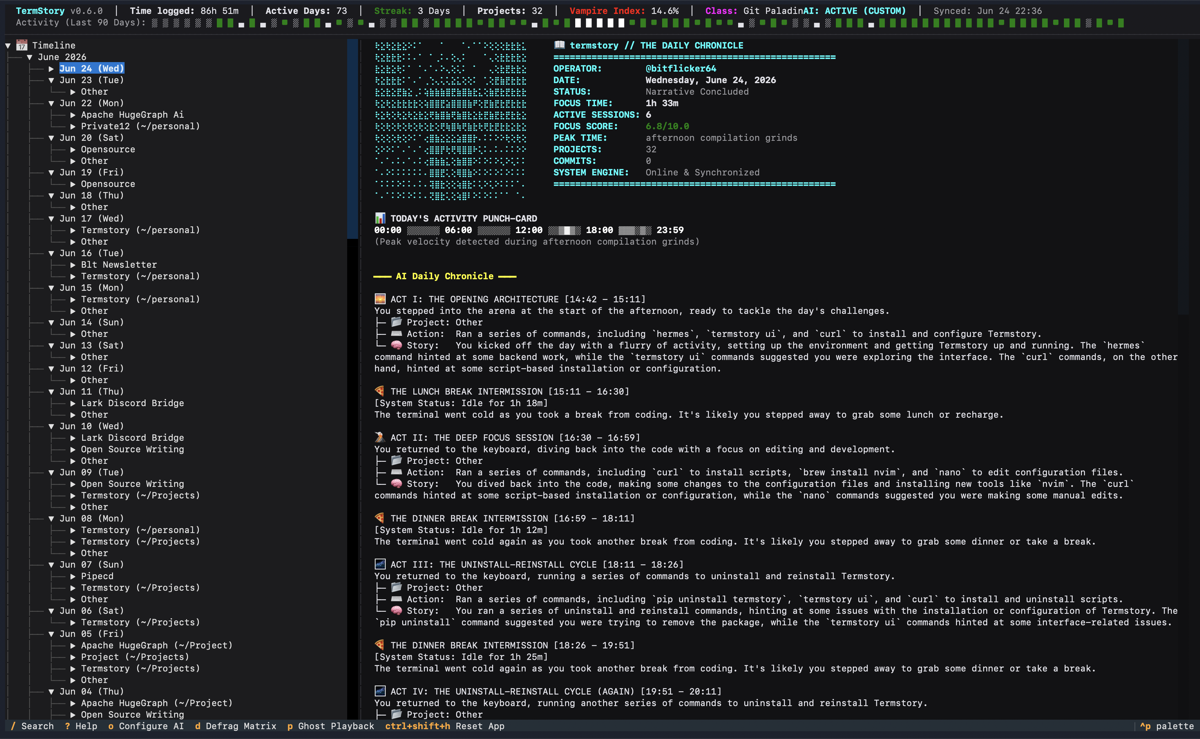
TermStory v0.6.4 — AI-narrated daily chronicle, project timeline, focus metrics, and command playback.
Learn more about TermStory by exploring the detailed documentation below:
- Architecture & Core Concepts — Project layout, ingestion pipeline, timestamp detective, and git correlation.
- Architecture Threat Tracker — Resolved architectural threats and remediation decisions.
- Database Schema — Thread-safe SQLite WAL schema and concurrency handling.
- Data Privacy — How TermStory handles your data and the trust architecture.
- Privacy Sanitizer — Learn how TermStory redacts credentials and protects local PII.
- AI Integration — Zero-dependency LLM client supporting Groq, OpenAI, and Ollama.
- TUI & AI Narratives — Dashboard layout, interactive features, and AI-generated logs.
- CLI Reference — Extended subcommands (Predict, Ask, RPG Classes, Replay, etc.).
- Configuration — Setup guide for AI providers and settings.
- Troubleshooting — Tips for recovering history and handling errors.
- We welcome contributions! Please see CONTRIBUTING.md for guidelines on how to get started, set up your development environment, and submit pull requests.
- Please read our Code of Conduct.
Use the dedicated uninstaller script — it removes the venv, data directory, and the PATH line that the installer added to your shell RC file:
curl -fsSL https://raw.githubusercontent.com/bitflicker64/Termstory/main/scripts/uninstall.sh | bash -s -- --yesOr run locally:
bash scripts/uninstall.sh --yesOr uninstall by hand (a subset of what the script does):
pip uninstall termstory -y 2>/dev/null
rm -rf ~/.termstory-venv
rm -rf ~/.termstoryMIT © TermStory Contributors
GitHub: https://github.com/bitflicker64/Termstory
PyPI: https://pypi.org/project/termstory/