In this demo I'll show you how to automatically run tests built in Postman anytime you deploy changes to a RESTful api.
- Postman
- Newman - the node.js based postman cli
- dotnet core 3 http api (based on: Azure-Samples dotnet core api project)
- Docker
- Dockerhub
- Azure Pipelines
- Azure Container Instances
- Azure Cli
These technologies are not a requirement for doing integration testing in a CI/CD pipeline, you're free to use any number of equivalent technologies. Popular equivalents like Jenkins for CI/CD, AWS to host applications or even on-prem servers, bitbucket for source control are capable of accomplishing the same concept.
To set up your environment to be able to execute the steps as part of this demo you need to do the following.
- Create a new Azure tenant and subscription to host the applications (take advantage of Azure's free trial like I did!)
- Create a resource group in your Azure subscription named todo-api-demo-rg
- Create two dockerhub registries to host your containers. Find mine here & here.
- Create a visualstudio.com account and project to host your pipeline
- Create service connections in your visualstudio.com project to your github, docker registry, and azure subscription
- Update references in azure-pipelines.yml to your github, docker repos and azure subscription
- Create a new pipeline in your visualstudio.com account using the supplied azure-pipelines.yml
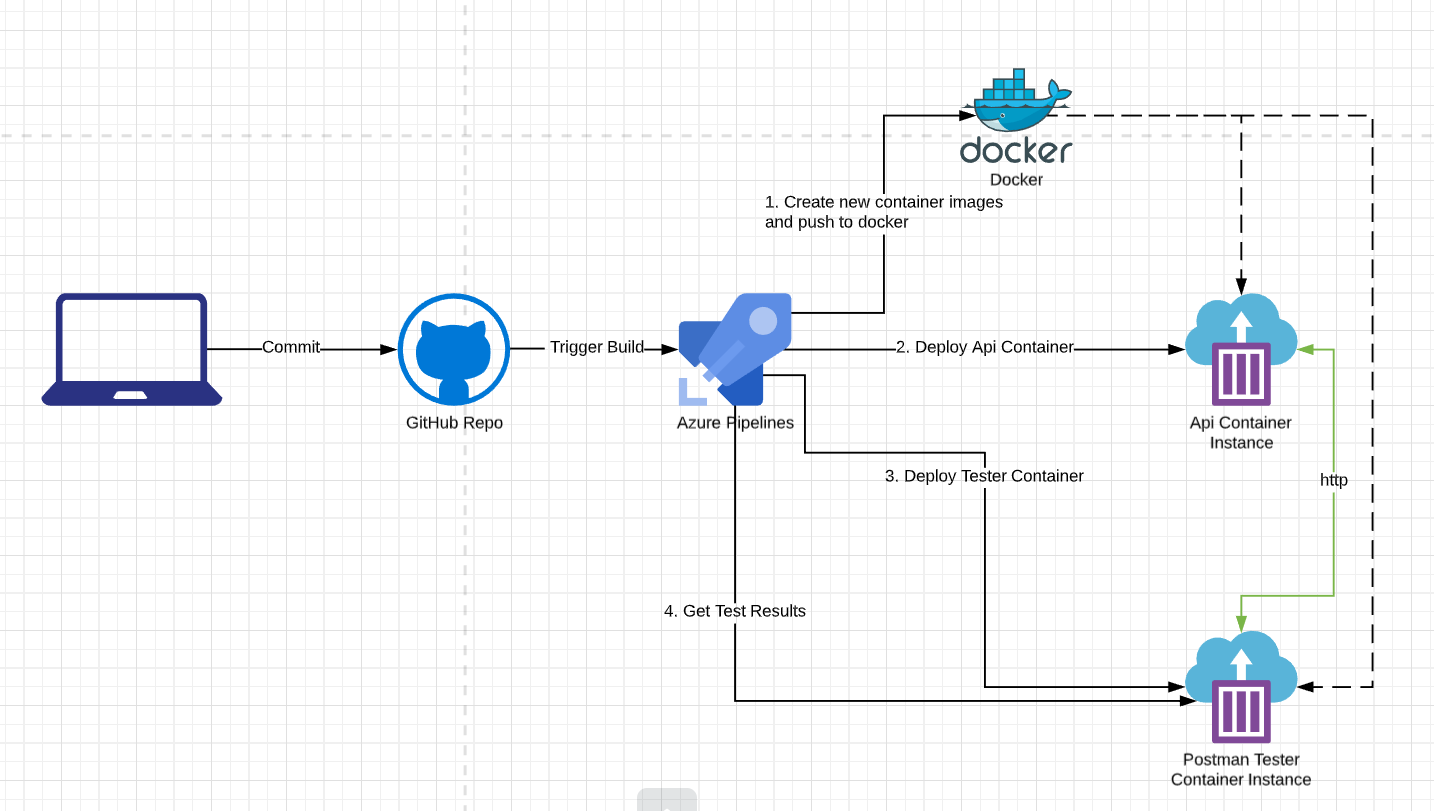
The process we're implementing is kicked off by updating the master branch in your github repo which automatically triggers your pipeline to run. The pipeline will do the following:
- Build your dotnet core api container image and push it to your dockerhub repo
- Build your newman container image and pushes it to your dockerhub repo
- Use the latest container image from your dockerhub api repo to deploy your dotnet core api using Azure Container Instances
- Use the latest container image from your dockerhub api tester repo to deploy your newman testing application using Azure Container Instances. When this container starts it will execute tests against the instance of the api that was just deployed.
- Get the results from the test run
How can you take this to the next level?
- Package your postman test source and environment variable set with your container image (good for private collections and using different variables for testing in different environments)
- Generate pretty html reports and post them somewhere your stakeholders can access. see: https://www.npmjs.com/package/newman-reporter-htmlextra
- Create a multi-staged pipeline for staging/production deployments and gate them based on test results