
This is a Full Stack Application built using the MERN stack: MongoDB, Express, React and Node.js. The application is designed to showcase the use of these technologies to create a web application.
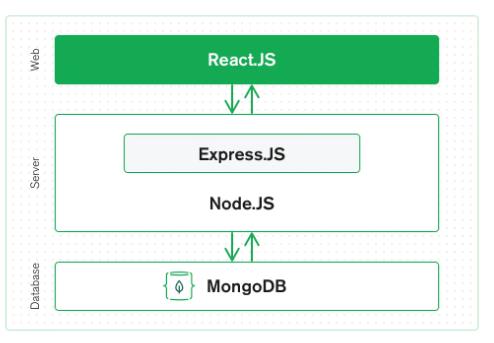
The MERN architecture allows you to easily construct a three-tier architecture (front end, back end, database) entirely using JavaScript and JSON.
-
Clone the repository
-
Install dependencies:
- Server:
cd server && npm install - Client:
cd client && npm install
- Server:
-
Create a
.envfile in the server directory and add the following:MONGO_URI=<your_mongo_uri>
PORT = 5001 -
Create a
.env.localfile in the client directory and add the following:REACT_APP_BASE_URL=<your_server> -
Start the application:
- Server:
cd server && npm run dev || npm run start - Client:
cd client && npm run start
This application uses the following technologies:
- MongoDB Cloud: A document-oriented NoSQL database used for storing data.
- Express: A fast, unopinionated, minimalist web framework for Node.js used for building APIs.
- React: A JavaScript library for building user interfaces.
- Node.js: A JavaScript runtime built on Chrome's V8 JavaScript engine used for building server-side applications.
The following VS Code extensions are recommended for development:
- ES7+ React/Redux/React-Native snippets: Provides shortcuts for commonly used React/Redux snippets.
- Prettier - Code formatter: A code formatter that helps maintain a consistent style across the codebase.
- Tailwind Shades: A Tailwind CSS color palette generator.
This application uses the following environment variables:
MONGO_URI: The MongoDB connection string from MongoDB Cloud.PORT: The server port number.REACT_APP_BASE_URL: The base URL of the React application.
This application can be deployed using different cloud platforms. For example, the frontend can be deployed using Vercel and the backend can be deployed using Render.
To deploy the backend on Render, follow these steps:
- Create an account on Render and create a new web service.
- Connect the service to your GitHub repository and select the branch to deploy.
- Add a new environment variable called
MONGO_URIand set it to your MongoDB URI. - Add a new environment variable called
PORTand set it to the server port number. - Follow the prompts to deploy the service.
To deploy the frontend on Vercel, follow these steps:
- Sign up for an account on vercel.com.
- Connect your GitHub account to Vercel.
- Create a new project on Vercel and select the React app template.
- Follow the prompts to configure your deployment settings. Add a new environment variable called
REACT_APP_BASE_URLand set it to your server URI from render.com. - Once the deployment is complete, you can access your app at the URL provided by Vercel.