



Fast local database checkpoints for Prisma, Drizzle, Playwright and Vitest.
Save a known-good local DB state, break things during development or tests, then restore it with one command.
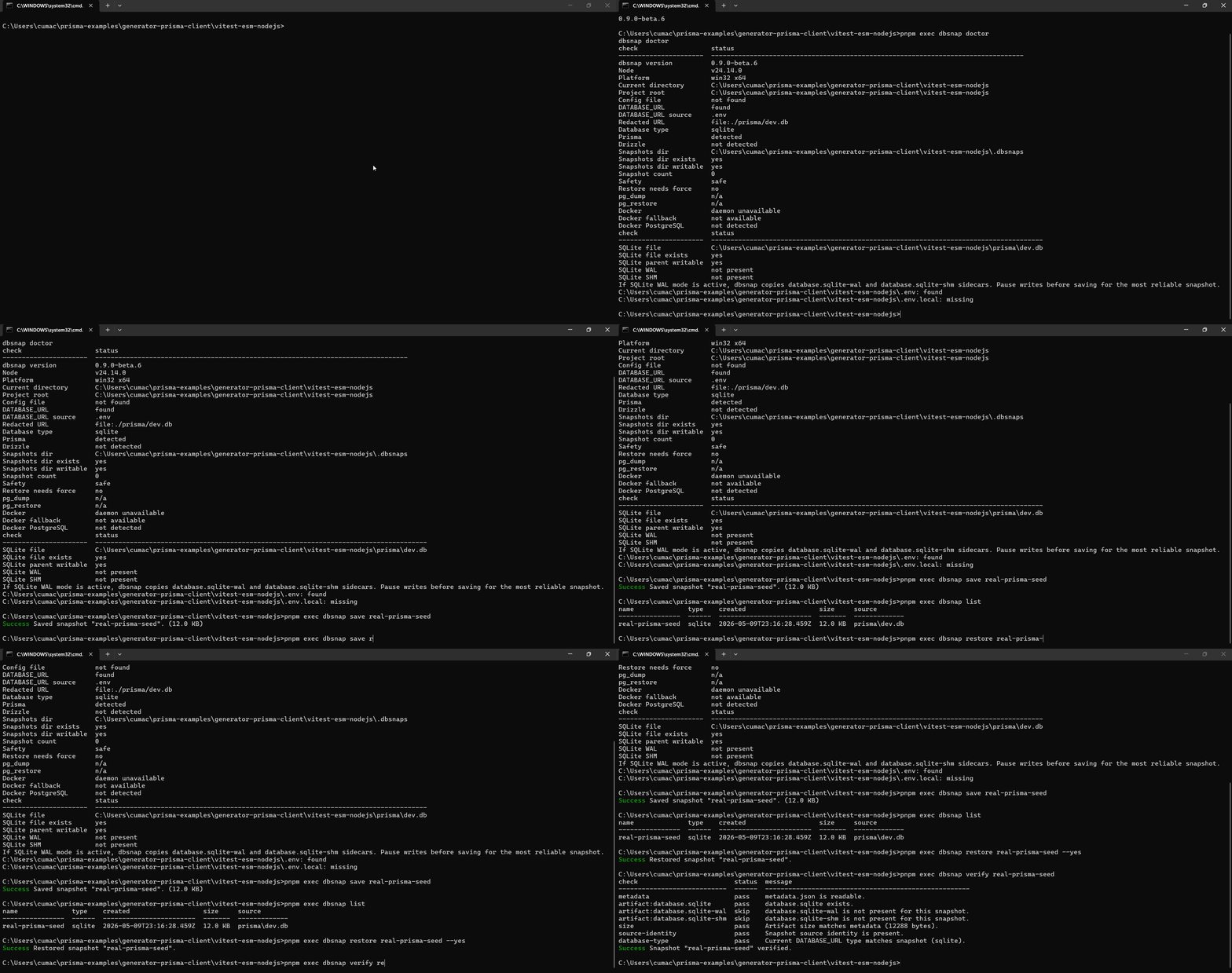
dbsnap is an npm CLI for disposable local PostgreSQL and SQLite databases. Snapshot your local dev/test database once, restore it before tests or risky migrations, and stop rebuilding seed data manually.
Warning
dbsnap is not a production backup tool. Restore is destructive. Use it only with local development and test databases.
Local database state is often the slowest part of a development loop:
- you re-run seeds repeatedly
- you manually recreate users, carts, permissions, roles, subscriptions, and test data
- a migration breaks your local database while you are experimenting
- Playwright E2E tests leave the database dirty
- Vitest integration tests need the same known-good state again and again
- ad-hoc
pg_dumpscripts start simple, then grow naming, safety, Docker, and cleanup edge cases
dbsnap gives that workflow a small, boring, repeatable shape:
dbsnap save checkout-ready
# run risky code, migrations, manual QA, or tests
dbsnap restore checkout-ready --yesRun with npx:
npx @canblmz1/dbsnap --helpRun with pnpm dlx:
pnpm dlx @canblmz1/dbsnap --helpInstall in a project:
npm install -D @canblmz1/dbsnap
pnpm add -D @canblmz1/dbsnap
Global install is useful when you want the same CLI across many local projects:
npm install -g @canblmz1/dbsnap
dbsnap --help
The npm package is @canblmz1/dbsnap. The CLI binary is dbsnap.
- Point dbsnap at a local database:
DATABASE_URL="file:./dev.db"or:
DATABASE_URL="postgresql://postgres:postgres@localhost:5432/app_dev"- Check the environment before doing anything destructive:
npx dbsnap doctor- Save a known-good checkpoint:
npx dbsnap save checkout-ready- Break things locally:
# run migrations, tests, manual QA, or experiments- Restore the checkpoint:
npx dbsnap restore checkout-ready --yes- List what you have:
npx dbsnap list- Save a checkpoint before risky migrations.
- Save a seeded app state before manual QA.
- Restore a known state before Playwright E2E tests.
- Reset local integration test data in Vitest.
- Switch between feature branches without rebuilding the same data every time.
- Keep multiple named local states like
empty,seeded,checkout-ready, andadmin-ready.
pnpm prisma migrate dev
pnpm prisma db seed
pnpm exec dbsnap doctor
pnpm exec dbsnap save seeded
Later:
pnpm exec dbsnap restore seeded --yesdbsnap doctor detects prisma/schema.prisma, .env, .env.local, and the active DATABASE_URL source.
pnpm drizzle-kit migrate
pnpm tsx scripts/seed.ts
pnpm exec dbsnap doctor
pnpm exec dbsnap save seeded
Later:
pnpm exec dbsnap restore seeded --yesdbsnap doctor detects drizzle.config.ts. See examples/drizzle-vitest for a Vitest-oriented skeleton.
Use a global setup when every test should begin from the same checkpoint:
// tests/global-setup.ts
import { restoreSnapshot } from "@canblmz1/dbsnap";

export default async function globalSetup() {
  await restoreSnapshot("e2e-ready", { yes: true });
}
// playwright.config.ts
import { defineConfig } from "@playwright/test";
export default defineConfig({
globalSetup: "./tests/global-setup.ts",
workers: 1,
});If you run tests in parallel, use one database per worker or restore once per isolated worker database. Restoring the same database while other tests are writing to it will be flaky.
See examples/prisma-playwright for a Prisma + Playwright skeleton.
Restore before integration tests:
// test/setup.ts
import { beforeEach } from "vitest";
import { restoreSnapshot } from "@canblmz1/dbsnap";

beforeEach(async () => {
  await restoreSnapshot("test-ready", { yes: true });
});
// vitest.config.ts
import { defineConfig } from "vitest/config";
export default defineConfig({
test: {
setupFiles: ["./test/setup.ts"],
poolOptions: {
threads: { singleThread: true },
},
},
});For parallel tests, prefer one isolated database per worker. See examples/drizzle-vitest.
Put this near the top of your mental model: restore replaces the current local database state.
dbsnap is built for local development and test databases, not production backups or disaster recovery. It intentionally tries to make dangerous usage noisy:
saveandrestorerefuse non-local PostgreSQL hosts by default.- SQLite paths and PostgreSQL database names containing
prod,production,staging, orliveare blocked by default. NODE_ENV=productionis blocked by default.- Restore checks whether the snapshot was saved from a different database target.
- JSON/non-interactive restore refuses to wait for prompts.
- Database URLs and known secret fields are redacted in logs, JSON output, metadata output, and debug output.
dbsnap initadds the snapshots directory to.gitignore.
Use dbsnap doctor before restore when you are not sure what dbsnap will touch:
npx dbsnap doctorThere are two separate escape hatches:
npx dbsnap restore snapshot-name --force-i-know-what-i-am-doing
npx dbsnap restore snapshot-name --allow-different-target --yes
--force-i-know-what-i-am-doing is only for the risky/remote database guard. --allow-different-target is only for restoring a snapshot into a different local database target. One does not bypass the other.
Do not commit .dbsnaps/, .env, local SQLite files, PostgreSQL dumps, or snapshot artifacts.
| Symptom | What to check |
|---|---|
DATABASE_URL is missing |
Run dbsnap doctor and set DATABASE_URL in your shell, .env, .env.local, or dbsnap.config.ts |
| PostgreSQL save/restore cannot find tools | Install pg_dump and pg_restore, or run with --docker when your local PostgreSQL is in Docker |
| Docker fallback does not work | Make sure Docker Desktop or the Docker daemon is running and only one matching PostgreSQL container exposes the target port |
| SQLite restore looks stale | Stop the app/test process before saving; WAL mode uses -wal and -shm sidecars that dbsnap copies when present |
| CI or scripts hang waiting for input | Use explicit snapshot names plus --yes or --dry-run; --json mode does not prompt |
| Snapshot name is rejected | Use only letters, numbers, dots, dashes, and underscores, for example checkout-ready_1 |
| Command | Description |
|---|---|
dbsnap init |
Initialize dbsnap in this project |
dbsnap doctor |
Check configuration, safety, and local tooling |
dbsnap save <name> |
Save the current local database state |
dbsnap restore [name] |
Destructively restore a saved database snapshot |
dbsnap list |
List saved database snapshots |
dbsnap prune [options] |
Delete old snapshots by retention policy |
dbsnap delete <name> |
Delete a saved snapshot |
dbsnap rename <old> <new> |
Rename a saved snapshot |
dbsnap info <name> |
Show details for one snapshot |
dbsnap verify <name> |
Verify snapshot metadata and artifacts |
dbsnap --version |
Print version |
Global options:
| Option | Description |
|---|---|
--json |
Print JSON output where supported |
--yes |
Skip confirmation prompts |
--dry-run |
Show what would happen without changing files or databases |
--debug |
Print additional debug information with secrets redacted |
--verbose |
Print more command output |
--snapshots-dir <dir> |
Snapshots directory |
--docker |
Use PostgreSQL client tools inside a matching Docker container |
--no-docker |
Do not fall back to Docker for PostgreSQL client tools |
--force-i-know-what-i-am-doing |
Allow save/restore to a database dbsnap considers risky |
--allow-different-target |
Allow restore when the snapshot was saved from a different database target |
Prune examples:
dbsnap prune --keep-last 5 --dry-run
dbsnap prune --older-than 7d --jsonimport {
saveSnapshot,
restoreSnapshot,
listSnapshots,
verifySnapshot,
pruneSnapshots,
} from "@canblmz1/dbsnap";
await saveSnapshot("checkout-ready");
await restoreSnapshot("checkout-ready", { yes: true });
await verifySnapshot("checkout-ready");
await pruneSnapshots({ keepLast: 5, dryRun: true });The API is typed, does not prompt, does not print to the terminal, and enforces the same safety checks as the CLI.
This table is positioning guidance, not a benchmark. Tools make different tradeoffs.
| Approach | Local-first | Node/TS friendly | Prisma/Drizzle examples | Playwright/Vitest examples | SQLite | PostgreSQL | Named snapshots | Safety guards | Ease of setup |
|---|---|---|---|---|---|---|---|---|---|
| dbsnap | Yes | Yes, npm package and typed API | Yes | Yes | Yes | Yes | Yes | Built in | Small npm install |
| pg_dump script | Yes | Manual glue | Manual | Manual | No | Yes | Manual naming | Manual | Starts easy, grows scripts |
| Docker volume snapshot | Yes, if DB is in Docker | Not directly | Manual | Manual | Volume-level only | Yes | Manual | Manual | Medium; platform-specific edges |
| Prisma seed / Drizzle seed | Yes | Yes | Native fit | Works, but rebuilds data | Yes | Yes | No, rebuilds state | Depends on app code | Good when seed data is enough |
| Snaplet | Often team/data-workflow oriented | JavaScript ecosystem tooling | Different focus | Different focus | Not dbsnap's focus | Yes for supported workflows | Product-specific | Data transform/de-identification focus | More setup than a local checkpoint CLI |
| DSLR | Local Postgres focus | Python CLI | Manual | Manual | No | Yes | Yes | Different safety model | Good if you want Postgres template snapshots |
| pgbranch | Local Postgres branching focus | Go CLI | Manual | Manual | No | Yes | Branch-style states | Different safety model | Good if you want Postgres branches |
Why use dbsnap instead of plain seeds? Seeds are great for deterministic baseline data. dbsnap is useful after you have created an expensive local state: logged-in users, permissions, carts, feature flags, test fixtures, and app-specific rows that are tedious to rebuild manually.
No. dbsnap is for disposable local development and test databases. Use real backup tooling for production.
Yes. PostgreSQL snapshots use pg_dump and pg_restore, or Docker fallback when a matching local PostgreSQL container is available.
Yes. SQLite snapshots copy the database file and, when present, matching WAL/SHM sidecars.
Yes. Restore replaces the current local database state. Run dbsnap doctor first if you are unsure what database is active.
You can. dbsnap wraps boring primitives with named snapshots, metadata, .env detection, Docker-aware PostgreSQL handling, SQLite support, restore target checks, and secret redaction.
Use seeds for baseline data. Use dbsnap when the useful state is expensive to recreate or was created through UI/test flows.
Yes, for disposable CI databases. Use non-interactive flags like --yes, --json, and --dry-run where appropriate. Do not point CI at shared or production-like databases.
By default in .dbsnaps/<name>/ under the project root. You can change this with --snapshots-dir <dir>.
Run dbsnap init; it adds the snapshot directory to .gitignore. Also avoid committing .env, SQLite database files, PostgreSQL dumps, and generated snapshot artifacts.
Run dbsnap doctor, confirm DATABASE_URL points to the expected local database, and make sure no app/test process is actively writing to that database.
- Better benchmark docs and repeatable benchmark fixtures.
- More example apps for Prisma, Drizzle, Playwright, and Vitest.
- MySQL support.
- Snapshot compression.
- Faster PostgreSQL restore strategies where they can be implemented safely.
- Shell completions.
- Web docs later if the project grows beyond a README.
- PostgreSQL support depends on
pg_dump/pg_restorelocally or inside Docker. - SQLite in-memory databases cannot be snapshotted.
- Restoring to a different target requires separate explicit confirmation.
- Large local databases may take time to save and restore.
- SQLite WAL sidecars are copied, but snapshots are most reliable when the app is not actively writing during
save.
See the contributing guide, security policy, and benchmark methodology.
pnpm install
pnpm typecheck
pnpm test
pnpm build