A budget, open-source touch desk monitor for your Bambu Lab printers — powered by Bambuddy.
Visit the project site → — overview, a screen-by-screen tour, and the in-browser flasher.
Bamboard is a small ESP32-S3 device with a 4.3" capacitive touch screen that lives on your desk and shows you, in real time, what your Bambu Lab printers are doing. It talks only to your self-hosted Bambuddy instance over its REST API — your printers never see a third-party cloud.
Total BOM is around 20 € (single all-in-one board, USB-C cable, a few screws, ~120 g of filament for the case). The enclosure is a community design by TomE1337 (CC BY-NC-SA 4.0), FDM-printable on any Bambu (or other) printer with a 0.4 mm nozzle.
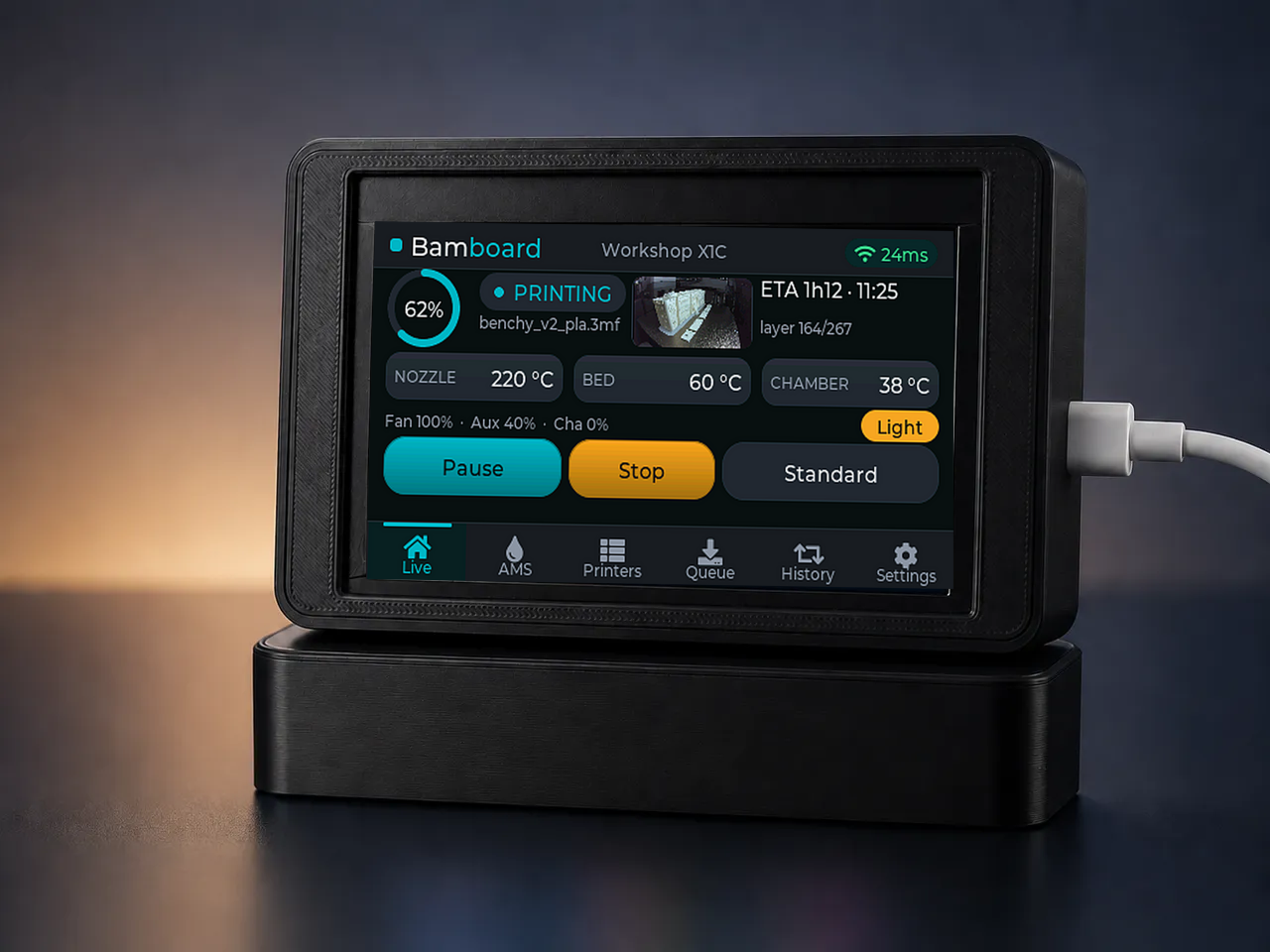
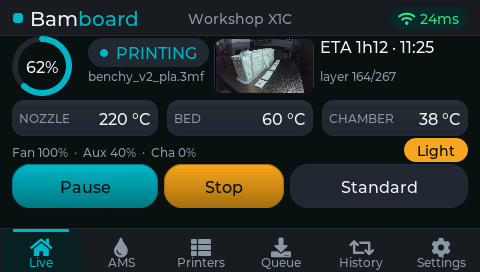
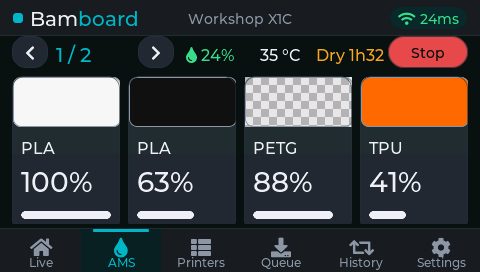
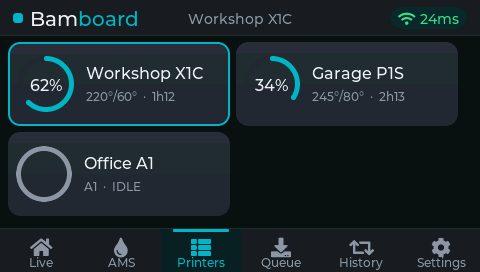
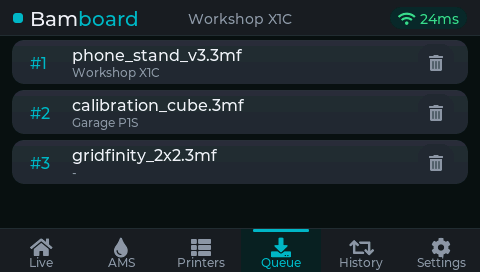
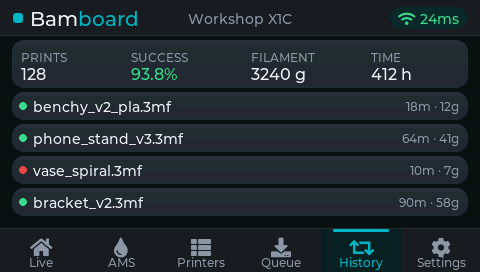
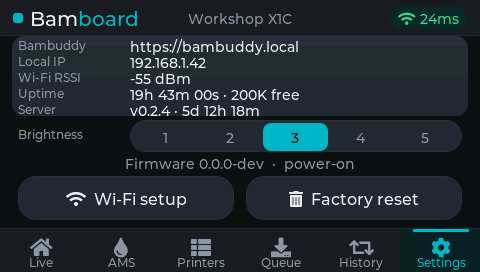
The screen captures below are rendered by the host simulator from a built-in demo dataset (a print running, a full queue, a drying AMS…) and published to GitHub Pages on every release — so they always match the current UI.
| Live | AMS | Printers |
|---|---|---|
 |
 |
 |
| Queue | History | Settings |
 |
 |
 |
- Live dashboard — nozzle / bed / chamber temperature, layer progress, ETA, filename. While printing it also carries inline Pause / Resume and Stop (two-tap) controls, a chamber-light toggle, and a fan-speed readout (part / aux / chamber) shown when no error is active. Tap the temperature row for a full-screen live graph of the nozzle / bed / chamber temperatures.
- AMS overview — per-slot filament colour / type / remaining %, plus AMS humidity, temperature and active drying countdown. Each slot is a colour swatch: every swatch is outlined so even black filament reads on the dark panel, and clear / translucent filament shows a checkerboard instead of a flat square. Big ◀ / ▶ side buttons cycle through chained AMS units, and a one-tap Dry / Stop pill on heater-equipped units (AMS-HT and AMS 2 Pro) starts (or aborts) a drying cycle whose temperature and duration are taken from the loaded filament — Bambu's per-spool RFID profile when present, a per-filament-type fallback otherwise.
- Printers grid — a control-wall grid of tiles, one per printer Bambuddy knows about: a progress ring (accent arc + % while printing, a full state-coloured ring otherwise), the name and inline temps + ETA, highlighted by state. Tap a tile to focus that printer and jump to Live.
- Print queue — the jobs Bambuddy still has queued (pending), in order, with each job's target printer.
- History & stats — last 10 prints, success rate, total filament, total time.
- Settings — Bambuddy URL, the Bambuddy server version + uptime, local IP, Wi-Fi RSSI, device uptime, brightness 1–5 segmented selector, a two-tap Wi-Fi setup button (re-opens the captive portal without wiping your Bambuddy details — see Connectivity), and a two-tap Factory reset button.
- Ambient clock — when the whole farm is quiet (nothing printing or faulted) and the panel has been untouched for a while, a full-screen clock floats over the screen — time, date and a one-line farm summary (the next queued job, or "all idle"). Tap to dismiss.
- HMS surfacing — the HMS string is shown in red on the dashboard, and a full-screen pulsing red overlay pops every 30 s while the error persists. Tap anywhere to dismiss; the overlay re-arms after the cooldown so the alert can't be silenced indefinitely.
- Bottom tab bar — 6 tabs always visible (Live / AMS / Printers / Queue / History / Settings). Tap to switch.
- Swipe gesture — swipe left / right inside the screen body to move to the next / previous tab.
- Inline action area on Live — appears contextually based on the focused printer's state:
- while printing / paused → Pause / Resume + Stop (tap twice to confirm) next to the print-speed button (Silent / Standard / Sport / Ludicrous);
- when finished →
Clear platepill; - while an HMS error is active → red
Clear HMSpill (takes priority).
- Chamber-light toggle on Live — turns the printer's chamber light on/off (amber when lit).
- Brightness 1–5 — segmented selector on Settings. Persisted to NVS and applied at boot. The auto-dim wake target follows the chosen level instead of always ramping to full.
- Factory reset — Settings → "Factory reset" → tap a second time within 3 s to confirm. Wipes all persisted settings (Wi-Fi + Bambuddy creds, timezone, daily-reboot hour, brightness and interface language) and reboots into the captive portal.
- Live REST polling — polls Bambuddy every 2 s for each printer's
printer_status, so temperatures, progress and HMS alerts track within a poll cycle. API-key auth only — no WebSocket, nothing to log into. - Wi-Fi captive portal — first-boot Wi-Fi + Bambuddy host + API key + timezone / daily-reboot-hour + interface language (EN / ES / FR / PT / DE) setup; no re-flash needed to change them. Tap Wi-Fi setup on the Settings screen to re-open the portal without wiping your Bambuddy host / API key / token — handy for moving the device to a new network. (Holding the side BOOT button at boot also re-runs the portal, but wipes everything first, like a factory reset.)
- HTTP (LAN) or HTTPS (remote) — by default the device talks to Bambuddy over plain HTTP on your LAN (a private IP or an
*.localname). Tick Use HTTPS in the portal to reach it by domain over TLS instead — the server certificate is validated against a built-in, CI-refreshed root-CA bundle — with optional Cloudflare Access service-token fields for a Bambuddy published behind Cloudflare. One firmware build covers both. - Auto-dim — backlight drops after 60 s without a touch, wakes on the next tap.
- Browser-based install — flash the latest firmware straight from the web installer in Chrome / Edge / Opera (no CLI, no toolchain). Only needed for the very first install — everything after lands over the air. Firefox / Safari / Linux users can flash
bamboard-factory.binfrom the latest release withesptoolinstead. - Over-the-air updates from GitHub — on every boot the device checks this repo's latest GitHub Release. If it carries a newer firmware than the one running, the device downloads and flashes it (with a full-screen progress overlay) before coming up — no PC, no LAN tooling, no being on the same network. If it's offline or already current, boot continues normally. The device also reboots itself once a day at local midnight, so this check runs unattended — new releases land overnight with no power-cycle (timezone set in the captive portal). Releases are built and published automatically by
.github/workflows/release.ymlon every pushedv*tag. See docs/flashing.md.
- Order the parts from
hardware/bom.md(~20 €). - Print the enclosure (3 parts) from
case/— TomE1337's ESP32-S3 dashboard case — then slice → print in PLA / PETG. - Seat the Guition board in the case, close the cover, and drop it into the
stand. (No wiring — everything's on the one PCB.) See
case/and TomE1337's Printables page for the exact fit + fasteners. - Flash the firmware: plug the board in via USB-C, open the web installer in Chrome / Edge / Opera and click Connect. See docs/flashing.md for details (and the esptool fallback for Firefox / Safari / Linux).
- First boot: device exposes a
Bamboard-setupWi-Fi AP, connect, and via the captive portal fill in your Wi-Fi credentials, your Bambuddy URL + API key, your timezone + daily-reboot hour, and the interface language. - Enjoy.
.
├── firmware/        PlatformIO project (ESP32-S3 + LVGL + LovyanGFX)
│   ├── src/         C++ sources
│   │   ├── hw/      Display + GT911 touch HAL (LovyanGFX-based)
│   │   ├── net/     Bambuddy REST client + GitHub OTA updater
│   │   ├── ui/      LVGL screen manager + per-screen builders
│   │   ├── config.h All compile-time tunables
│   │   └── main.cpp Boot, Wi-Fi provisioning, FreeRTOS tasks, boot-time OTA
│   ├── include/     lv_conf overrides
│   └── platformio.ini
├── .github/         CI: build-check every push; publish release + web installer on v* tags
├── sim/             Host LVGL simulator — CI renders every screen to PNG for review
├── web/             Browser-based flasher (ESP Web Tools → GitHub Pages)
├── hardware/        Bill of materials, wiring diagram
├── case/            3D-printable enclosure (STL) by TomE1337 — CC BY-NC-SA
└── docs/            Assembly, flashing, configuration guides
- A running Bambuddy instance (see https://github.com/maziggy/bambuddy)
- A Bambuddy API key with at least
printers:readandstatistics:readpermissions (addprinters:controlif you want to use the inline Speed / Clear plate / Clear HMS actions).
The 3D-printable enclosure is the "ESP32-S3 Klipper Dashboard Case" by
TomE1337
(model),
used and redistributed under CC BY-NC-SA 4.0. The hero render composites
Bamboard's live UI onto TomE1337's product photo and is likewise CC BY-NC-SA 4.0.
See case/LICENSE.
Bamboard's own code and documentation are MIT — see LICENSE.
The enclosure in case/ and the hero render are CC BY-NC-SA 4.0
(© TomE1337), not MIT. Bamboard is not affiliated with Bambu Lab, with the
Bambuddy project, or with TomE1337.