Azure Static Web Apps allows you to easily build React apps in minutes. Use this repo with the React quickstart to build and customize a new static site.
This project was bootstrapped with Create React App.
Static web apps are web applications that are made up of static files such as HTML, CSS, and JavaScript. Unlike dynamic web apps, they don't require server-side processing or a database to generate content. This means that they are typically faster to load and easier to deploy and maintain.
Static web apps are suitable for a wide range of use cases, from simple blogs and landing pages to complex web applications. They are often built using popular frameworks like React, Vue.js, or Angular, which enable developers to create dynamic user interfaces using JavaScript.
Overall, static web apps offer a simple and efficient way to build and deploy web applications that don't require complex server-side processing, making them ideal for simple websites, prototypes, and proof of concept applications.
Azure Static Web Apps is a hosting service offered by Microsoft Azure for static web applications. It allows you to deploy and host static web apps that are built with popular frameworks like React, Angular, Vue.js, and more.
Azure Static Web Apps also includes authentication and authorization features, which enable you to secure your app and control access to specific resources. Additionally, it provides integration with Azure Functions, enabling you to build serverless APIs and microservices for your app.
In summary, Azure Static Web Apps is a simple and efficient way to deploy, host, and scale your static web applications in the cloud.
There are several reasons why static web apps are important, including:
Speed : Static web apps are typically faster to load than dynamic web apps since they don't require server-side processing to generate content. This makes them ideal for websites and applications that require quick load times and smooth user experiences.
Security: Static web apps are generally more secure than dynamic web apps since they don't rely on server-side processing and databases, which are more vulnerable to attacks. This makes them suitable for applications that require high levels of security, such as e-commerce sites or banking applications.
Scalability: Static web apps are highly scalable since they can be easily replicated and distributed across multiple servers, allowing them to handle high traffic loads without impacting performance.
Simplicity: Static web apps are easier to develop, deploy, and maintain than dynamic web apps since they don't require complex server-side programming or databases. This makes them ideal for small to medium-sized projects or applications that require quick turnaround times.
Cost: Static web apps are generally cheaper to host and maintain than dynamic web apps since they don't require expensive server infrastructure or databases. This makes them ideal for startups or small businesses with limited budgets.
Overall, static web apps are an important development tool for building fast, secure, scalable, and cost-effective web applications, making them a popular choice for developers and businesses of all sizes.
Follow the steps below to get started with deploying Static Web Apps using Azure Static Web Apps Service :
- Azure subscription
Students can apply for the Github Student Developer Pack where they can get access to exiting github content for free and not the least The Students can claim $100 dollar Azure credicts. Click here to Apply
Step 1: Log in to Azure
Go to the Azure portal at https://portal.azure.com/ and log in with your credentials.
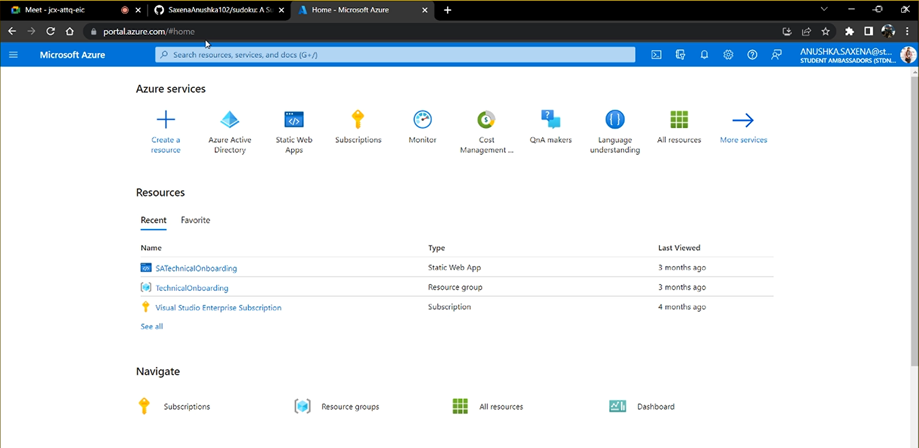
Step 2: Create a new resource
Click on the "+ Create a resource" button in the top-left corner of the portal.
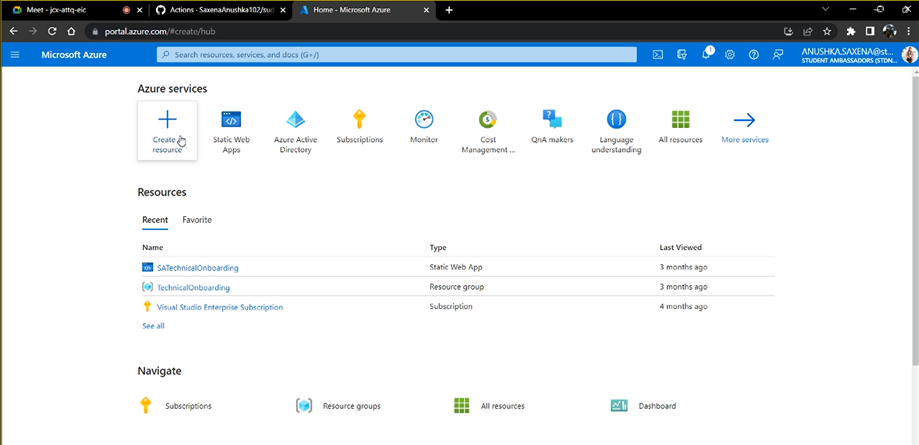
Step 3: Search for Static Web App
Search for "Static Web App" in the search bar at the top of the page and select it.
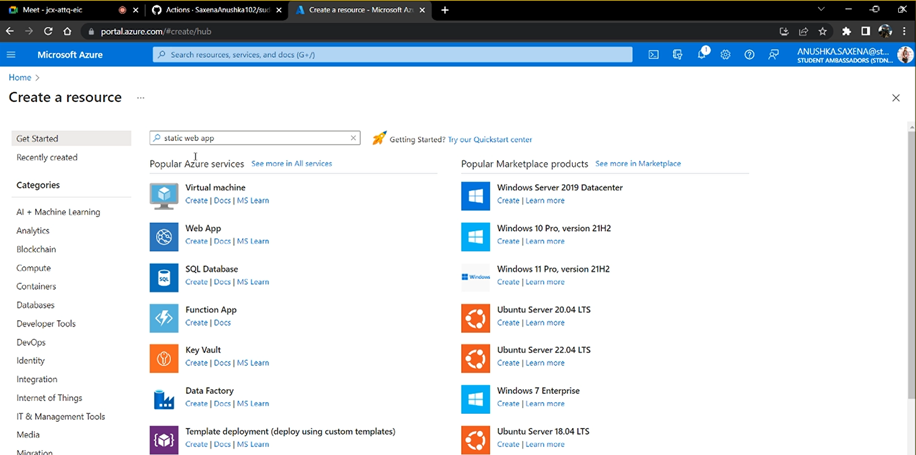
Step 4: Create a new Static Web App
Click the "Create" button to create a new Static Web App.
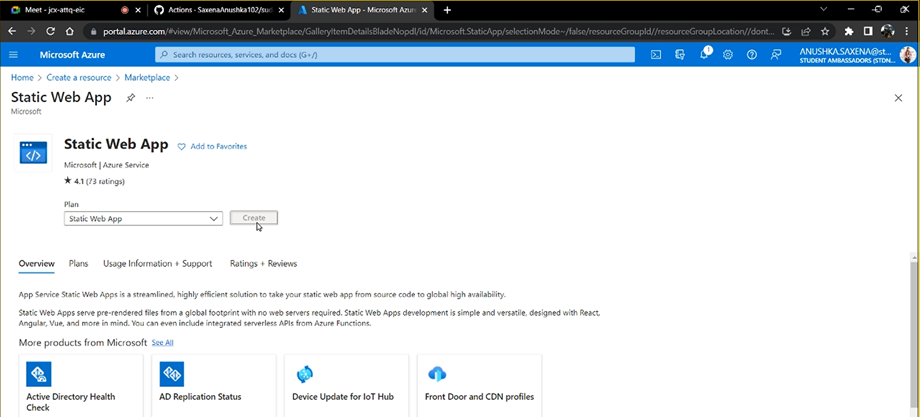
Step 5: Fill out the form
Fill out the form with the following information:
- Subscription: Select your subscription.
- Resource group: Create a new or select an existing resource group.
- Name: Enter a unique name for your Static Web App.
- Region: Select a region for your app.
- Publish code: Select "Code" for the build and deployment method.
- Operating System: Select "Linux".
- SKU and size: Select the "Free" SKU.
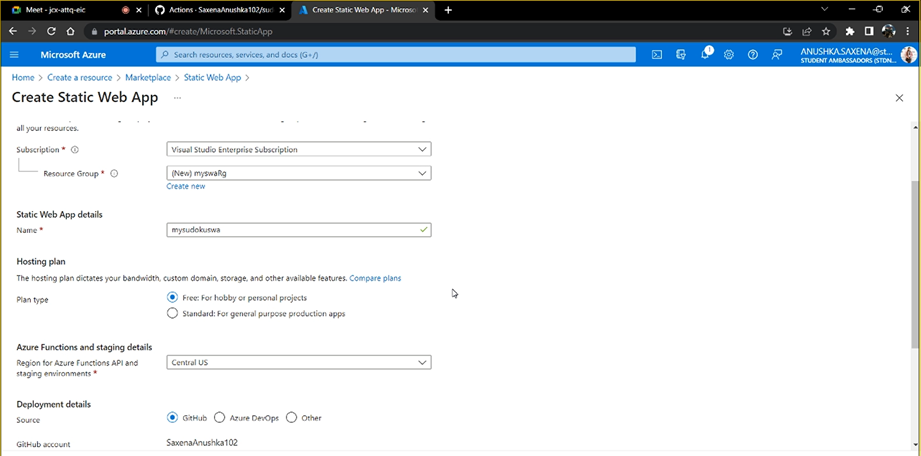
Then, click "Review + create" at the bottom of the page.
Step 6: Review and create
Review the information on the summary page, and if everything is correct, click the "Create" button.
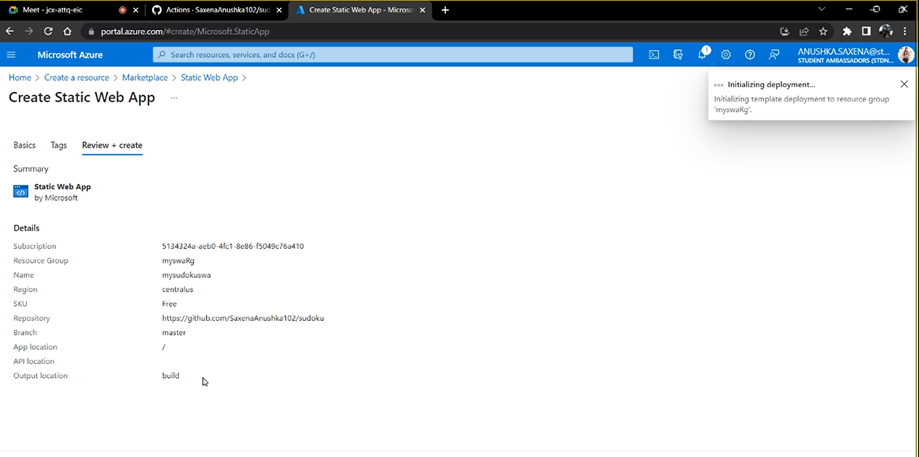
Step 7: Wait for deployment to complete
Wait for the deployment to complete. This may take a few minutes.
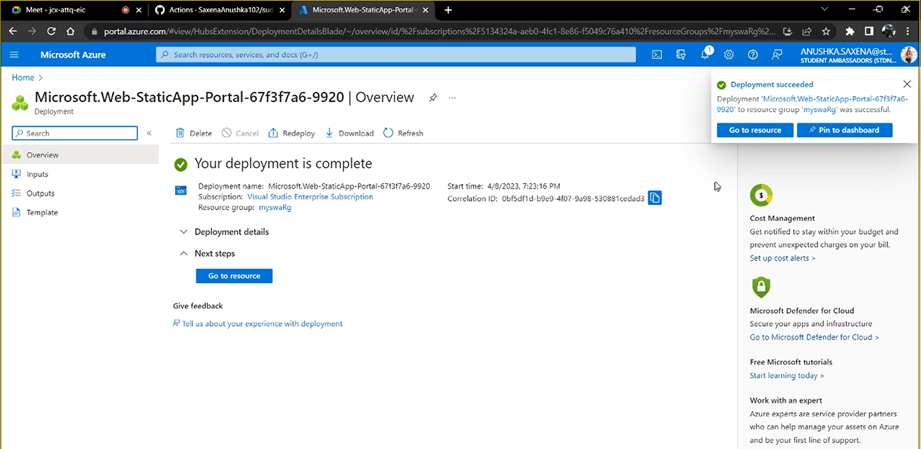
Step 8: Access your Static Web App
Once the deployment is complete, go to the "Overview" page of your Static Web App. Here, you can find the URL for your app. Click on the URL to access your Static Web App.

Step 9: Upload your code
To upload your code, click on the "Static files" tab on the left-hand side of the portal. Then, click the "Browse" button to select the folder that contains your static files. After you have selected your files, click the "Upload" button.
Step 10: Test your app
Once your files have been uploaded, refresh your app's URL to see your static website in action.
Congratulations! You have successfully created and deployed a static web app on Azure.
Pull requests are welcome. If you would like to contribute to this project, please follow these steps:
Fork this repository to your own GitHub account.
- Clone the repository to your local machine using git clone
https://github.com/your-username/static-web-app.git - Create a new branch with a descriptive name using
git checkout -b branch-name. - Make your changes and commit them with a descriptive commit message using
git commit -m "your message here". - Push your changes to your forked repository using
git push origin branch-name. - Create a pull request on the original repository and describe the changes you made.
Thank you for your contribution!
Publish an Angular, React, Svelte, or Vue JavaScript app with Azure Static Web Apps
Quickstart: Building your first static site with Azure Static Web Apps
-
Need to bulid an interactive library website
-
Add an UI
-
Adding extra other functionalites.
Special thanks to our bootcamp mentors who generously shared their time, expertise, and knowledge with us throughout the program.
Their guidance and support have been invaluable in helping us achieve our goals and create a successful project.