███████╗███╗   ███╗ █████╗ ██╗  ██╗
██╔════╝████╗ ████║██╔══██╗██║  ██║
█████╗  ██╔████╔██║╚█████╔╝███████║
██╔══╝  ██║╚██╔╝██║██╔══██╗╚════██║
██║     ██║ ╚═╝ ██║╚█████╔╝     ██║
╚═╝     ╚═╝     ╚═╝ ╚════╝      ╚═╝
💜 A synthwave-infused dual-pane TUI file manager, forged in Rust 💜
Version 0.8.2 ▀▄▀▄ Neon Dreams Edition
⚠️ WARNING: ALPHA SOFTWARE⚠️ 🚧 This is a work in progress! 🚧
Things will break. Features may eat your files. Use at your own risk. Back up your data. Trust no one. Not even this README.
We're still soldering the circuits on this one, choom. 🔧
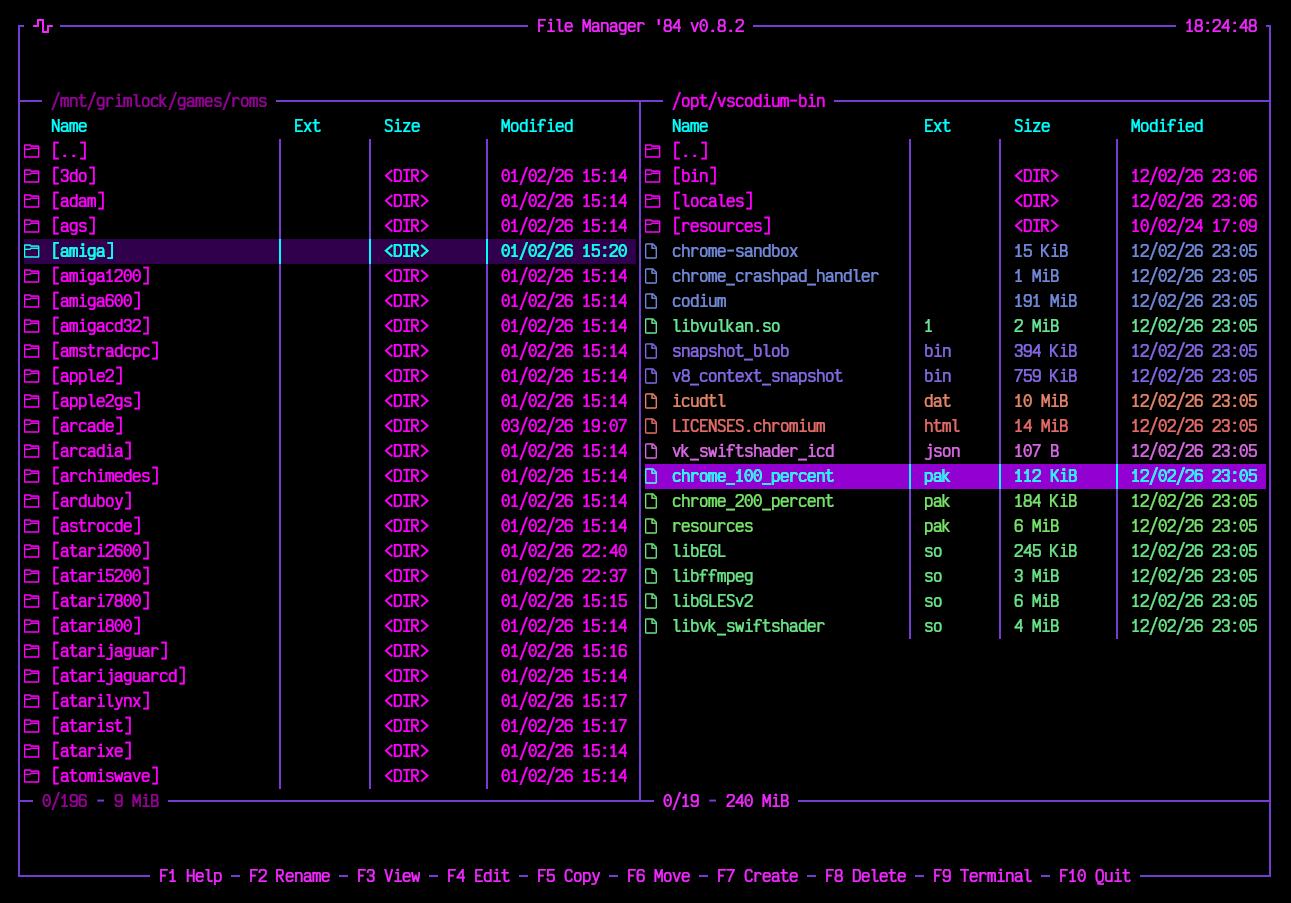
Step into the neon-lit streets of '84. Where files flow like synth waves and directories pulse with purple energy. FM84 is your retro-futuristic companion for navigating the filesystem - dual-pane style, just like the legends intended.
Built with 💜 in Rust using Ratatui + Crossterm.
- 📁 Dual-pane layout - because one panel is never enough
- ⌨️ Arrow keys - glide through your files
- 🏠 Home/End - teleport to the edges
- 📄 PageUp/PageDown - cruise in style
- 🔀 Tab - switch between panels like flipping cassettes
- ↩️ Enter - dive into directories
- ⬅️ Backspace - ascend to parent realm
- 🔎 Type-ahead search - just start typing to find files
- ⬆️⬇️ Navigate matches - Up/Down arrows jump between results
- 🧹 Esc - clear the search vibes
- F1 💡 - Help/About
- F2 ✏️ - Rename files & folders
- F3 👁️ - View files (bordered, plain text, horizontal scrolling)
- F4 📝 - Edit files with syntax highlighting (Ctrl+S to save, unsaved changes prompt, mouse click to position cursor)
- F5 📋 - Copy to other panel (selected items or cursor item)
- F6 📦 - Move to other panel (selected items or cursor item)
- F7 📂 - Create new directories
- F8 / Delete 🗑️ - Delete files & folders (selected items or cursor item, with confirmation)
- F9 💻 - Open external terminal in current directory
- F10 🚪 - Exit to the void
- Space / Insert ✅ - Select/deselect files for batch operations
- 🖱️ Double-click - open directories or view files
- 🖱️ Mouse scroll - scroll content in Viewer, Editor, and file panels
- 📈 Panel stats - selected/total file count and size shown per panel
- 🎨 Active/inactive styling - active panel stats highlighted, inactive dimmed
- 🖼️ Bordered frame with filename title bar
- 📊 Line numbers in the gutter
- 🔢 Status bar - filename, line count, file size, detected syntax
- 🚫 Binary detection - won't melt your terminal with garbage
↔️ Horizontal scrolling - Left/Right keys and mouse scroll wheel- 🖱️ Mouse scroll - vertical and horizontal scrolling with the scroll wheel
- 🌈 Syntax highlighting for Rust, Python, JS, TS, JSON, TOML, YAML, Markdown, Shell, C/C++, HTML, CSS
- 🖼️ Bordered frame with filename and modified indicator in title bar
- 📄 Full text editing - cursor navigation, insert, delete
- 💾 Save - F2 or Ctrl+S
- 📍 Line/Column tracking - always know where you are
⚠️ Unsaved changes prompt - Save/Discard/Cancel dialog on close↔️ Horizontal auto-scroll - viewport follows cursor past the right edge- 🖱️ Mouse scroll - vertical and horizontal scrolling with the scroll wheel
- 🖱️ Mouse click - click to position cursor anywhere in the editor
- 📏 Calculated on select - press Space on a directory to calculate its size
- 📌 Persistent display - sizes stay visible after deselecting
| Key | Action |
|---|---|
↑ ↓ ← → |
Navigate |
Tab |
Switch panels |
Enter |
Open directory / Execute |
Backspace |
Go to parent directory |
Home / End |
Jump to first / last item |
PageUp / PageDown |
Page navigation |
[a-z0-9] |
Quick search |
Esc |
Clear search / Close dialogs |
F1 |
Help |
F2 |
Rename |
F3 |
View file |
F4 |
Edit file |
F5 |
Copy to other panel |
F6 |
Move to other panel |
F7 |
Create directory |
F8 / Delete |
Delete (selected items or cursor item) |
F9 |
Open terminal |
F10 |
Quit |
Space / Insert |
Select/deselect file |
Scroll |
Scroll content (panels, Viewer, Editor) |
# 🦀 Clone the future
git clone https://github.com/coltwillcox/fm84.git
cd fm84

# ⚙️ Compile with cargo
cargo build --release

# 🚀 Launch into the neon grid
cargo run --releasePre-built binaries beam down from the neon sky:
| Platform | Architecture | Format |
|---|---|---|
| 🐧 Linux | x86_64, ARM64 | .tar.gz |
| 🍎 macOS | Intel, Apple Silicon | .tar.gz |
| 🪟 Windows | x86_64 | .zip |
# 📥 Download from GitHub Releases
# https://github.com/coltwillcox/fm84/releases

# 🎮 Extract and run
tar -xzf fm84-v*.tar.gz
./fm84
No cargo? No problem. Grab a binary and jack in. 🔌
- 🦀 Rust (2024 edition)
- 🖥️ ratatui - TUI framework
- ⌨️ crossterm - Terminal magic
- 🎨 syntect - Syntax highlighting
- 🕐 chrono - Time vibes
╔══════════════════════════════════════╗
║  VIOLET DREAMS • PURPLE HAZE • NEON  ║
║    ▓▓▓▓▓ SYNTHWAVE FOREVER ▓▓▓▓▓     ║
╚══════════════════════════════════════╝
The color palette channels pure 80s energy:
- 💜 Violet borders -
#743AD5 - 🔮 Purple selections -
#9400D3 - 💗 Magenta directories -
#FF00FF - 🩵 Cyan accents -
#00FFFF - 💙 Soft purple files -
#7289DA
- 🌅 FM-84 (the band, obviously)
- 🖥️ Midnight Commander
- 🎮 Total Commander
- 🌆 Synthwave aesthetics
- 📼 That retro terminal feel
Ride free through the neon grid.
💜 FM84 💜
Where every file operation feels like a synth drop
▀▄▀▄▀▄ v0.8.2 ▄▀▄▀▄▀