Repository navigation
Modeling Features
Forks let one transition condition feed several branch conditions. This avoids duplicating the common part of an expression on every outgoing transition.
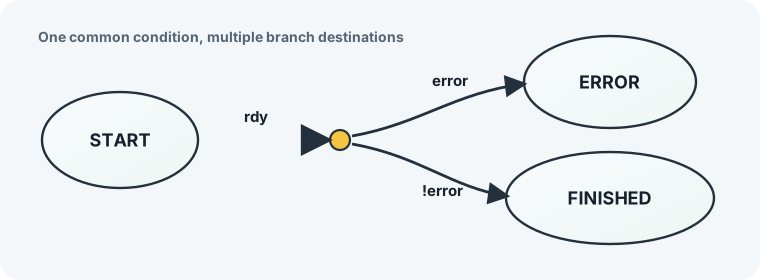
Without a fork, a state like START may need repeated logic:
START: begin
  if (rdy && error)
    nextstate = ERROR;
  else if (rdy && !error)
    nextstate = FINISHED;
end
With a fork, rdy is written once on the transition into the fork. The branch
transitions choose the final destination:
START: begin
  if (rdy) begin
    if (error)
      nextstate = ERROR;
    else
      nextstate = FINISHED;
  end
end
Fork priority rules:
- The transition into the fork controls where expanded fork transitions sit relative to other transitions leaving the original source state.
- Outgoing fork branches are sorted by their own priority.
- Lower numeric priority values are tested first.
-
equation == 1is treated as the default/fallback branch. - If the incoming transition has a priority, generated branches keep that priority with a tiny stable ordering offset.
Every transition has a priority attribute. The HDL backend uses that
attribute to sort transitions from the same source before emitting the
if/else decision tree. Lower numeric values are tested first.
Fizzim 2.0 keeps priority mostly out of the way:
- The default priority is
1000. - A transition with only the default/implied priority does not show a priority label on the canvas.
- The priority row appears immediately after
equationin the transition property editor and property inspector. - When a transition source has multiple outgoing transitions, Fizzim can fill inherited/default priorities automatically so the ordering is explicit.
- If you manually edit a transition priority, that value becomes local to that transition and the automatic priority pass preserves it.
- Manual priorities are still checked by lint. Use unique integer priorities
from
0through10000for transitions that leave the same source.
This behavior is GUI-side metadata management. The Perl backend still consumes
the same saved priority attribute it always used for RTL ordering.
State groups let several real states share transition or output behavior. A state group is drawn as a rounded rectangle around member states. Only one level of grouping is supported.
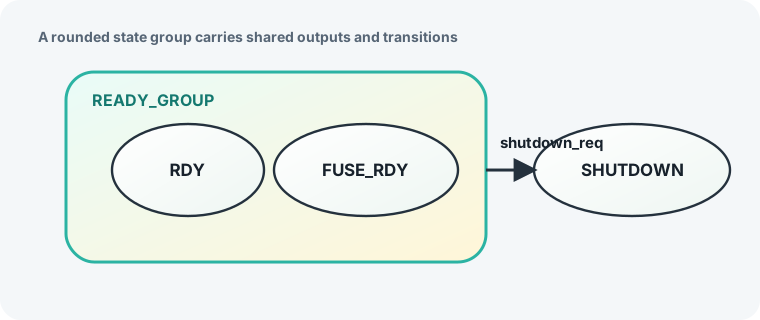
A group is a diagram and code-generation convenience, not a real encoded state. The generated FSM still uses the original child states.
State group behavior:
- Shared state outputs are inherited by child states only when the child state leaves that output blank.
- A transition out of a state group is expanded into one transition from each child state.
- A transition into a state group resolves to a real child state using the
group's
Default entrysetting. - The default entry child is drawn with a bold outline.
State group exits intentionally have priority over transitions authored inside child states. This lets a group define a common escape condition that exits the group even when a child transition is also true.
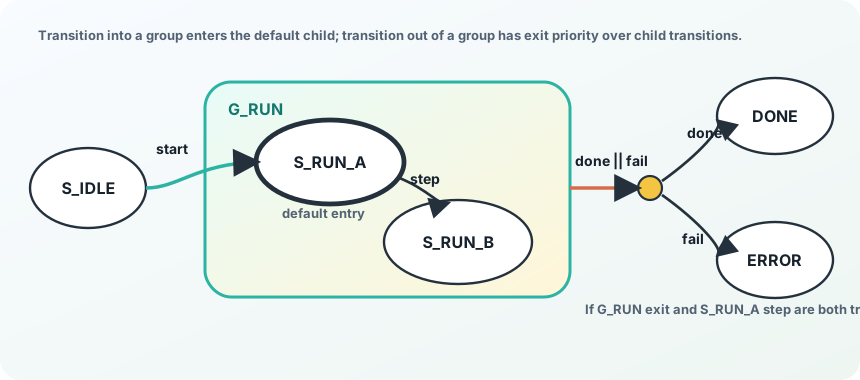
The mental model is:
- Resolve state-group entry destinations.
- Expand state-group exits to each child state.
- Expand forks by combining incoming and outgoing equations.
- Sort transitions from each real state: state-group exits first, lower priority first, unconditional fallbacks last, then transition name for deterministic output.
Transition actions let a regdp output be assigned directly on a transition.
This is useful for one-cycle pulses that are awkward to express as destination
state behavior.
Example intent:
S1 -- rdy / pulse_done = 1 --> S2
This avoids encoding the pulse in S2 using a nextstate == S2 expression.
Transition actions have higher priority than state-authored assignments for the same registered output on that transition path.
The original Fizzim tutorial covers several modeling features that still matter
for compatibility and advanced use: statebit, comb, and regdp output
types; HEROS and one-hot encoding; implied_loopback versus
default_state_is_x; custom backend options; comments; parameters; includes;
and warning controls.
See Legacy Fizzim Concepts for the compact reference.
Simulation debug state names are guarded from synthesis:
`ifndef SYNTHESIS
reg [2047:0] statename;
...
`endif
The default width reserves 256 ASCII characters. For grouped states, debug
names use GROUP.CHILD format.