Build your go-to-market engine with coding agents, Python scripts, and structured context.
Open this repo in Claude Code and type help me set up. The AI walks you through building a personalized GTM workspace — ICP, positioning, outbound sequences, content, automation — all from your terminal.
Structured context + coding agents + Python scripts. Build alongside the tools you already use.
gtm-coding-agent/
│
├── CLAUDE.md                              # interactive onboarding         ← START HERE
├── README.md                              # you are here
│
├── chapters/                              # 13 educational chapters
│   ├── 01-coding-agents-vs-editors.md     #   agents vs cursor vs chatgpt
│   ├── 02-context-engineering.md          #   CLAUDE.md, structured context
│   ├── 03-token-efficiency.md             #   200K context, cost, subagents
│   ├── 04-oauth-cli-apis.md               #   3 ways tools connect
│   ├── 05-automation-agents.md            #   cron, n8n, trigger.dev
│   ├── 06-local-first-gtm.md             #   your mac as a GTM server
│   ├── 07-python-for-gtm.md              #   APIs, CSVs, enrichment
│   ├── 08-tools-ecosystem.md             #   apollo, clay, exa, firecrawl
│   ├── 09-voice-dna-content.md           #   voice extraction, anti-slop
│   ├── 10-terminal-mastery.md            #   tmux, SSH, multiplexing
│   ├── 11-build-your-dashboard.md        #   Next.js + Supabase signals dashboard
│   ├── 12-competitive-intel-engine.md    #   SQLite-in-git + d3-force + Claude subprocess
│   └── 13-crm-automation-slash-commands.md  #  HubSpot + Salesforce + /stale-opportunities
│
├── engine/                                # tool documentation (living, updated regularly)
│   ├── apify.md                           #   Apify CLI: scraping, actors, follower lists
│   ├── apollo.md                          #   Apollo: batch enrichment, job change detection
│   ├── claude-subprocess.md               #   Claude CLI as a subprocess — batch analysis pattern
│   └── _tool-template.md                  #   template for adding new tools
│
├── gtm-os/                                # operational skeleton
│   ├── CLAUDE.md                          #   GTM-OS operating instructions
│   ├── demand/                            #   ICP, positioning, competitors
│   ├── messaging/                         #   attack angles, value props
│   ├── segments/                          #   target account segments
│   ├── engine/                            #   tool integrations + docs
│   │   └── prompts/                       #   reusable AI prompts
│   ├── campaigns/active/                  #   live campaign tracking
│   ├── content/                           #   content pipeline
│   ├── status.md                          #   current GTM status
│   └── log.md                             #   decision log
│
├── modes/                                 # persona-based starter configs
│   ├── solo-founder.md                    #   one person, full stack GTM
│   ├── agency.md                          #   multiple clients
│   ├── single-client.md                   #   GTM eng at one company
│   └── abm-outbound.md                   #   target account pipeline
│
├── templates/                             # reusable templates
│   ├── claude-md/                         #   3 CLAUDE.md variants
│   ├── voice/                             #   voice DNA, anti-slop rules
│   ├── content/                           #   blog, content drop, SEO brief
│   └── partner/                           #   per-client folder structure
│
├── examples/                              # worked examples (anonymized)
│   ├── voice-dna/                         #   filled-in voice profile
│   ├── icp/                               #   example ICP for B2B SaaS
│   ├── prompts/                           #   qualification, gap analysis
│   └── scripts/                           #   Python enrichment patterns
│
├── prompts/                               # ready-to-use AI prompts
│   ├── icp-builder.md                     #   define ideal customer profile
│   ├── positioning-workshop.md            #   positioning & differentiation
│   ├── competitor-analysis.md             #   competitive landscape
│   ├── signal-mapping.md                  #   buying signals → actions
│   ├── email-sequence.md                  #   outbound email sequences
│   └── content-repurpose.md              #   1 piece → 5 formats
│
├── starters/                              # deployable starter projects
│   ├── signals-dashboard/                 #   Next.js + Supabase signals dashboard (Chapter 11)
│   │   ├── schema/                        #     SQL schemas + seed data
│   │   ├── pipeline/                      #     Python signal scoring pipeline
│   │   └── src/                           #     dashboard app (5 pages, dark theme)
│   ├── nexus-intel/                       #   SQLite-in-git competitive intel engine (Chapter 12)
│   │   ├── src/                           #     Next.js app with d3-force Nexus graph
│   │   ├── scripts/                       #     Apify CLI scrapers + Claude subprocess analyzers
│   │   └── data/                          #     SQLite schema, public seed, committed intel.db
│   └── crm-automation/                    #   HubSpot stale-opportunity engine (Chapter 13)
│       ├── stale_opportunity_check.py     #     surface 60-day deals, re-enrich, write custom props
│       ├── .claude/commands/              #     /stale-opportunities slash command
│       └── README.md                      #     setup + HubSpot custom property schema
│
└── social/                                # launch content
    ├── reddit-post.md
    ├── linkedin-post.md
    └── carousel-slides.md
| Interactive Onboarding | Educational Chapters |
CLAUDE.md asks 6 questions, then builds your workspace. Recommends tools, mode, and learning path — all personalized. |
13 chapters from "what is a coding agent" to "wire your CRM to the agent and automate RevOps." Read in order or jump to what you need. |
| GTM-OS Skeleton | Modes |
| A working folder structure for ICP, positioning, segments, campaigns, and content. Fork it. Fill it in. Run GTM from it. | 4 personas: solo founder, agency, single-client, ABM outbound. Each mode configures the skeleton differently. |
| Templates | Prompts |
| CLAUDE.md variants, voice DNA, content formats, partner structures. Copy into your projects, fill in the blanks. | 6 battle-tested AI prompts for ICP building, positioning, competitor analysis, signal mapping, email sequences, and content repurposing. |
| Starter Projects | |
| Three forkable starters. Signals dashboard (Ch 11) is Next.js + Supabase with 5 operational pages. Nexus Intel (Ch 12) is a Clay-companion intel engine with SQLite-in-git, d3-force graph, Apify CLI scrapers, and Claude subprocess analysis. CRM Automation (Ch 13) is a stale-opportunity script that re-enriches 60-day-old HubSpot deals and writes the verdict back as custom properties. Deploy any of them in minutes. |
Prefer reading to forking? The full playbook is available as a book-style web guide:
The GTM Coding Agent Playbook on shawnos.ai
13 chapters, expanded with narrative, examples, and Shawn's perspective. The web version is for reading cover to cover. This repo is for forking and building.
Chapter 11 - Signals Dashboard (Supabase + Recharts):
Shawn.Tenam.s.Video.-.Apr.7.2026.mp4
The signals dashboard running against a live Supabase database. 5 pages, dark theme, real-time polling.
Chapter 12 - Nexus Intel (SQLite + d3-force, 2x speed):
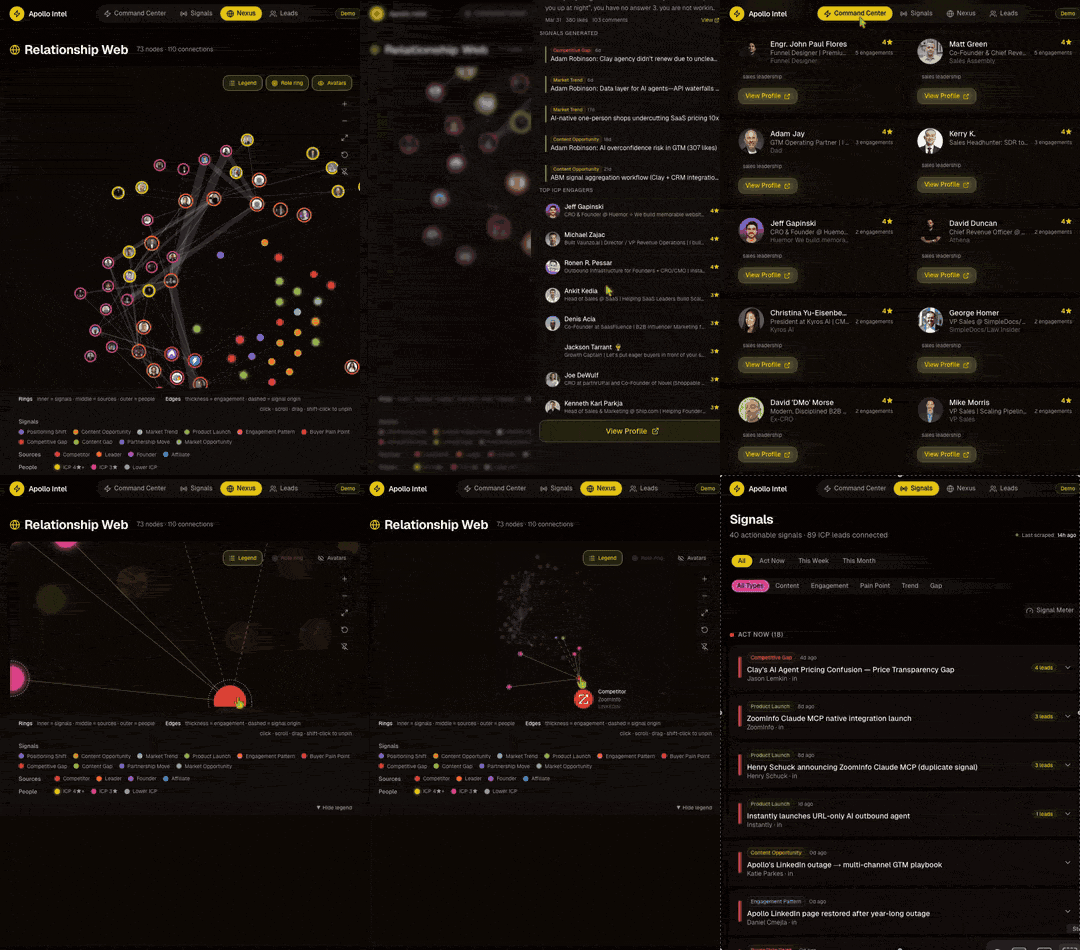
The competitive intel engine. Clone, seed, boot, see signals.
# 1. Clone the repo
git clone https://github.com/shawnla90/gtm-coding-agent.git
cd gtm-coding-agent

# 2. Open in Claude Code
claude

# 3. Type this
> help me set up
Claude reads the CLAUDE.md, asks you 6 questions about your GTM, then:
- Recommends whether to start with Cursor or Claude Code
- Picks your mode (solo founder, agency, etc.)
- Builds your folder structure
- Copies the right templates
- Gives you a 3-5 chapter learning path
You should use this if:
- You're a founder, GTM engineer, or agency operator
- You want to use coding agents (Claude Code, Cursor, Codex) for GTM — not just chat
- You want to understand what's happening under the hood of your GTM stack
- You want a system you can build on, not just configure
You probably don't need this if:
- You have a 50-person marketing team with established tooling
- You're looking for a no-code solution
- You want a pre-built product, not a learning system
Most GTM tools sell you a dashboard. This gives you a workspace.
The difference: a workspace is files you control, prompts you can edit, scripts you can modify, and context an AI agent can read. When your ICP, positioning, voice, and tooling all live in structured markdown files, a coding agent becomes your GTM co-pilot.
I still use HubSpot and Instantly. This is not about replacing tools. It's about understanding how things work and being able to build the pieces that don't exist yet. You'll learn how it works, then make it yours.
This repo gets updated with real workflows I'm actively using and stress testing. Apify CLI scraping patterns, Apollo batch enrichment, Instagram growth automation, terminal multiplexing setups. If it's in here, I've run it. If it broke, I documented how.
New commits land regularly as I discover better patterns, new CLI tools ship, or existing workflows evolve. The engine/ folder has detailed tool documentation (Apify, Apollo, and more coming) with working scripts you can run today.
If you learn from this and want to help it grow, star it, fork it, open a PR. This is how we build a GTM coding agents community. Not through courses. Through shared systems that actually work.
| Chapter | You'll Be Able To |
|---|---|
| 01 - Coding Agents vs Editors | Choose the right AI tool for your GTM workflow |
| 02 - Context Engineering | Structure CLAUDE.md files that make agents 10x more useful |
| 03 - Token Efficiency | Manage context windows without burning money |
| 04 - OAuth, CLI, and APIs | Connect any GTM tool to your agent |
| 05 - Automation Agents | Set up scripts that run your GTM on autopilot |
| 06 - Local-First GTM | Turn your Mac into a GTM server |
| 07 - Python for GTM | Write enrichment scripts, API calls, CSV pipelines |
| 08 - Tools Ecosystem | Evaluate and integrate Apollo, Apify, Clay, Exa, Firecrawl |
| 09 - Voice DNA & Content | Extract your voice, kill slop, create content that sounds like you |
| 10 - Terminal Mastery | tmux, SSH, multiplexing for running multiple agent sessions |
| 11 - Build Your Dashboard | Build and deploy a real-time GTM dashboard with Next.js, Supabase, and signal intelligence |
| 12 - Competitive Intel Engine | Build a Clay-companion intel engine: SQLite-in-git, Apify CLI scrapers, Claude-as-subprocess analysis, d3-force Nexus graph |
| 13 - CRM Automation & Slash Commands | Wire HubSpot and Salesforce to your agent, build /stale-opportunities, and mine the nurture graveyard AEs abandoned |
- Claude Code — AI coding agent (primary)
- Cursor — AI code editor (recommended for beginners)
- Python 3.10+ — scripting and automation
- Markdown — everything is structured text
- Next.js + React — dashboard starters
- Supabase — Postgres for the signals dashboard
- better-sqlite3 + d3-force — Nexus Intel starter
- Apify CLI — scraping actors for both starters
- Recharts + shadcn/ui — charts and components
This is a living educational repo. If you've built GTM workflows with coding agents and want to contribute:
- Fork the repo
- Add your example to
examples/or your tool doc toengine/(anonymize client data) - Open a PR with context on what GTM problem it solves
- Star the repo if it helped you. That's how others find it.
MIT — use it, fork it, make it yours.
Stop renting GTM tools. Start building GTM systems.