Crab is a clean website theme for the Hugo static site generator.
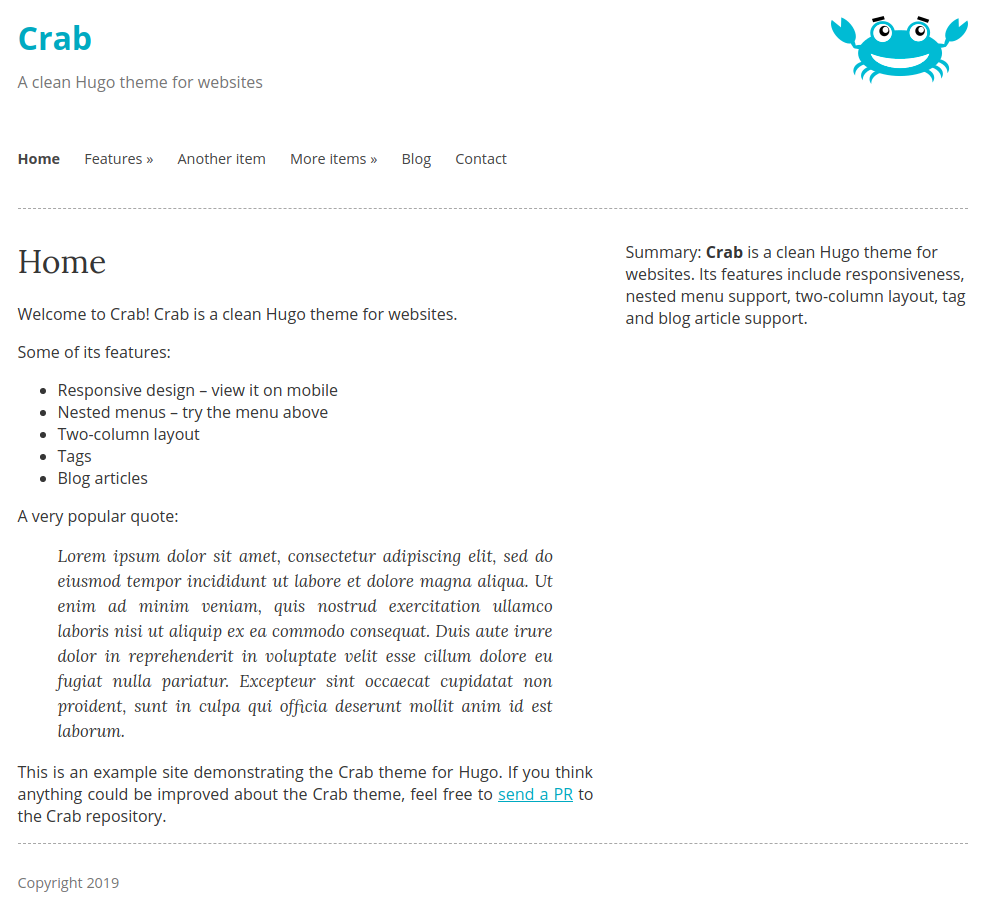
- responsive
- nested menus
- two-column
- tag support
- blog articles
If you'd like to get a live demo of the Crab theme locally, you could
clone the repository, cd to the exampleSite directory and run
HUGO_THEMESDIR=../.. hugo serve -t crab from there (assuming
Hugo is already installed).
Read the Hugo Quickstart Guide for an introduction to Hugo itself. Once you created a new Hugo site, you can use the Crab theme.
In your Hugo site's folder:
$ git clone https://github.com/thomasheller/crab themes/crabAlternatively, if your site is in a git repository, you can use git submodules:
$ git submodule add https://github.com/thomasheller/crab themes/crabTo update the theme to the latest version, simply pull in the changes:
$ git -C themes/crab pullThe file exampleSite/config.toml provides an example for how the
Crab theme can be configured, especially in regard to the menu items.
Once you put a config.toml in your site's root directory, you can
get a preview of your Hugo site as usual:
$ hugo serve -t crabPagination with automatically use the folder with the most files in it
if you do not set your mainSections (Meaning it will treat it like the
blog folder with tags enabled). If you want to set a custom folder,
please Add mainSections = [""] under [params] in config.toml
and insert the wanted folder's name in between the quotation marks.
You may have multiple folders by adding a comma, space, then the
quation marks. So a mainSections with both ABC, and XYZ as folders
would look like this:
mainSections = ["ABC", "XYZ"]In the exampleSite folder, mainSections is set to use the blog
folder and the features folder set within the included config.toml.
See the exampleSite/config.toml file for how the menus can be
configured:
- Use the
weightattribute to specify the order of menu items. Menu items with smaller numbers appear before those with bigger numbers. - For every menu, specify an
identifierif you intend the menu to have sub-items. In each sub-item, make sure theparentattribute matches the value of theidentifierused for the parent menu. - Choose a unique
namefor each item in the same menu.
Look at the exampleSite/content/home.md file for a sidebar example.
If you put a shortcode like this at the beginning of your content
file, the summary will appear in the right column:
{{% summary %}}
This appears in the sidebar. *Markdown* is supported!
{{% /summary %}}
Tags are supported as taxonomies described in the Hugo
manual. Make sure your config
file contains a proper taxonomies declaration, like in the
exampleSite/config.toml. You can then put tags in the front matter
as usual:
+++
title = "A Page With Tags"
tags = [ "Hugo", "theme", "Crab" ]
...
Tags will appear both on regular (fixed, static) pages as well as for blog posts, although they are probably more commonly used with blog posts.
Blog posts are intended to be created in the special directory
/blog/. The main difference about blog articles is that the layout
includes the timestamp when they were published (fixed pages don't
show a timestamp by default) and that they appear in the list of blog
articles.
The exampleSites/config.toml shows the kind of permalinks
declaration required to generate blog posts in the correct place.
To change the logo of the crab to your own customised image,
add logoimage to config.toml, where logoimage is the
path inside your site's static directory.
Use cover and coverdesc in each markdown file's frontmatter to add an image. cover sets the url and coverdesc sets the image's description. coverdesc is not required for embedding an image. Example:
+++ cover = "http://randomname/CDE.png" coverdesc = "An image of a random thing" +++

If you think anything could be improved about the Crab theme, feel free to send a PR to the Crab repository.