Rofi-mixer allows you to manage your speakers, apps and microphones on systems with pulse audio (or pipewire with the pulse audio capabilities).
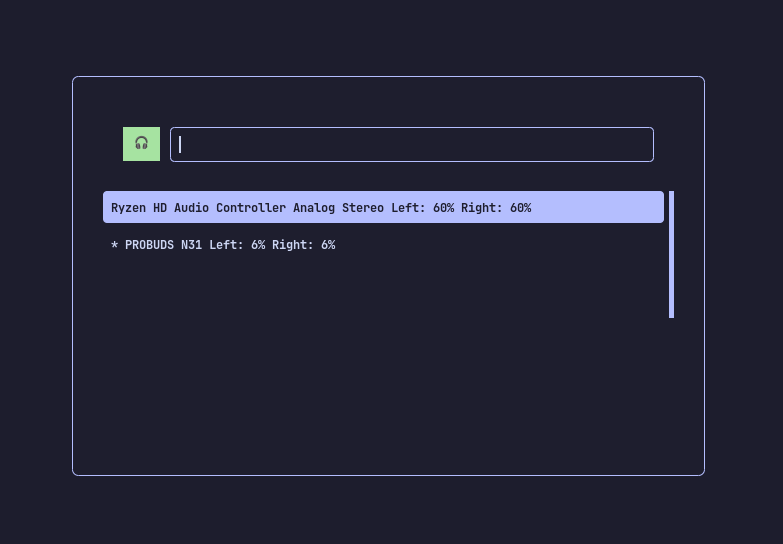
rofi-mixerThere are three available modes:
- output (speakers and the default)
- applications
- input (microphones, you have to switch to)
Shift+left or Shift+right are the default keybindings for changing modes in rofi.
| Shortcut | Action |
|---|---|
+, = |
Increase volume by 5 |
-, _ |
Decrease volume by 5 |
Alt+m |
Mute device |
Ctrl+equal |
Equalize L+R Speakers |
Clone the repository and install the scripts to ~/.local/bin/:
git clone https://github.com/dhanush777x/rofi-mixer.git && \
mkdir -p ~/.local/bin && \
cp rofi-mixer/src/rofi-mixer rofi-mixer/src/rofi-mixer.py ~/.local/bin/ && \
chmod +x ~/.local/bin/rofi-mixer ~/.local/bin/rofi-mixer.py && \
echo 'export PATH="$HOME/.local/bin:$PATH"' >> ~/.bashrc && \
source ~/.bashrc
This command will:
- Clone the dotfiles repository
- Create
~/.local/bin/directory if it doesn't exist - Copy
rofi-mixerandrofi-mixer.pyfromsrc/to~/.local/bin/ - Make the scripts executable
- Add
~/.local/bin/to your PATH in.bashrc - Reload
.bashrcto apply changes
After installation, you can run rofi-mixer from anywhere in your terminal.