Entity-Relationship Diagram Editor
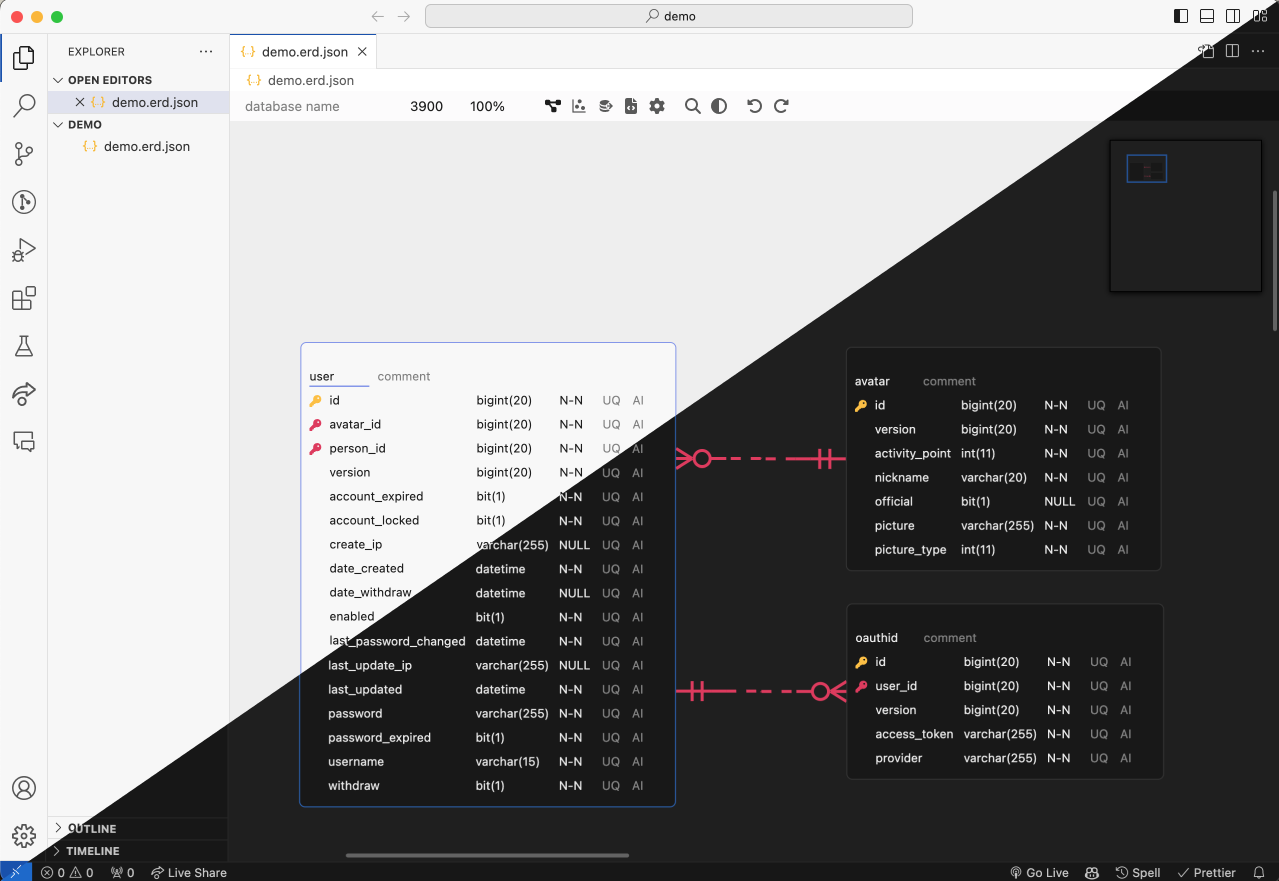
Design a database schema visually, import one you already have from SQL DDL, GraphQL SDL, DBML or AML, export DDL, and generate code from the result — in the browser, in VS Code or IntelliJ, or embedded in your own page as a custom element. One editor and one document format across all of them.
| Install | ||
|---|---|---|
| Web app | erd-editor.io | Installable PWA, works offline, real-time collaboration |
| VS Code | Marketplace | Opens .erd.json files in a custom editor |
| IntelliJ | JetBrains Marketplace | Same, for IntelliJ-based IDEs |
| Your app | npm install @dineug/erd-editor |
The framework-free <erd-editor> custom element |
To try it in an IDE, create an empty file with a .erd.json extension and open it.
- Visual schema design — tables, columns, memos, and four relationship cardinalities (zero-one, zero-N, one-only, one-N)
- SQL DDL import — point it at a
.sqldump and get a diagram; the parser skips what it does not recognize, so an awkward dump imports partially rather than failing outright - GraphQL SDL import — point it at a schema from any tool that emits SDL and get a diagram. Object types become tables, scalars map to the diagram's own dialect, and the fields that point at another type become the relationships between them
- DBML import — read a
.dbmlfile written for dbdiagram.io or dbdocs.io, or emitted bysql2dbmlorprisma-dbml-generator. Tables, columns, indexes, enums and everyRefspelling arrive; the elements the diagram has no place for are skipped rather than refused - AML import — read an
.amlfile written for Azimutt, in either the v2 or the legacy v1 spelling. Entities, attributes, indexes, enums and every relation arrow arrive; a check, a struct type and a view are skipped rather than refused - SQL DDL export — Databricks, MariaDB, MSSQL, MySQL, Oracle, PostgreSQL, Snowflake, SQLite
- Code generation — TypeScript, GraphQL, C#, Java, JPA, Kotlin, Scala, Go, SQLAlchemy, TypeORM, Sequelize, Drizzle, DBML, AML
- Visualization — a force-directed view of how the tables actually relate
- Export —
.erd.json,.sql,.png - Quick search, undo / redo, keyboard shortcuts, and a theme builder
- Real-time collaboration (experimental) — peer-to-peer, end-to-end encrypted, with no
backend holding your schema. Live on erd-editor.io; embedders get the same action stream
through the element's
getSharedStore()
npm install @dineug/erd-editorimport '@dineug/erd-editor';
const editor = document.createElement('erd-editor');
// the editor fills its container, and a custom element is inline by default
Object.assign(editor.style, { display: 'block', width: '100%', height: '100vh' });
document.body.appendChild(editor);It is a custom element, so it works from any framework or from none. See
packages/erd-editor for the element API, installation and
attributes.
Open a schema on erd-editor.io, start a session from the sidebar, and share the link it gives you — anyone who opens it joins the room.
The session belongs to the host and lives in their browser: guests see the host's document but nothing is stored on their side, and when the host closes their last tab the session ends. A guest who wants to keep the diagram should export it first.
Sessions are peer-to-peer over WebRTC and encrypted with AES-GCM. A signaling relay introduces the peers and never sees plaintext; the room's secret key lives in the URL fragment, so it is never sent to a server. Within one browser, tabs elect a leader and share a single connection.
Architecture
flowchart TB
    subgraph clientA["Client A"]
        bcA["Broadcast Channel"]
        tabA1["Tab (leader)"]
        tabA2["Tab"]
        swA["Shared Worker"]
        idbA[("IndexedDB")]

        bcA <--> tabA1
        bcA <--> tabA2
        tabA1 <--> swA
        tabA2 <--> swA
        swA <--> idbA
    end

    subgraph clientB["Client B (guest)"]
        tabB1["Tab"]
    end

    relay["Signaling Relay (nostr / mqtt)"]

    tabA1 <-->|"WebRTC (AES-GCM)"| tabB1
    tabA1 -. "signaling" .-> relay
    tabB1 -. "signaling" .-> relay
This is a pnpm workspace. The one package published to npm is
@dineug/erd-editor, the editor itself, syntax highlighting
included. Everything else is internal.
All 13 packages
| Package | Description |
|---|---|
erd-editor |
The editor core — the <erd-editor> custom element |
erd-editor-schema |
The .erd.json document format, parsers and LWW operators |
schema-sql-parser |
Permissive DDL parser used for SQL import |
r-html |
The tagged-template rendering framework the editor is built on |
vite-plugin-r-html |
JSX → tagged templates, plus HMR boundaries |
app |
The React PWA at erd-editor.io |
vscode-extension |
The published VS Code extension |
vscode-webview |
The bundle inside the VS Code webview |
webview-client |
The editor mounted into an IDE webview, host protocol wired, shared by both IDE bundles |
webview-bridge |
Typed host ↔ webview command protocol |
replication-store-worker |
Headless document replica for the VS Code host |
intellij-webview |
The bundle inside the IntelliJ plugin's editor panel |
intellij-plugin |
The published IntelliJ plugin — Kotlin and Gradle, not TypeScript |
Requires Node 22 (.nvmrc pins 22.23.2) and pnpm 10.34.3, which packageManager pins for you.
The IntelliJ plugin additionally needs a JDK; Gradle's toolchain resolver fetches JDK 21 if your
machine has none.
pnpm install
pnpm build            # build every package
pnpm test             # typecheck + unit tests
pnpm check            # format + lint + typecheck
pnpm format           # write formatting fixes
To run a single package, note that this workspace splits its command surface: build-style
tasks go through Vite+, whose vp binary pnpm install puts in
node_modules/.bin, and everything else is a package.json script.
pnpm exec vp run --filter @dineug/erd-editor --fail-if-no-match build   # a task
pnpm --filter @dineug/erd-editor dev                                    # a script
pnpm --filter @dineug/erd-editor-app dev                                # the web app
intellij-plugin is the exception — it is a Gradle project and declares neither, so its
commands are run from its own directory.
cd packages/intellij-plugin
./gradlew buildWebview   # the webview bundle it packages
./gradlew runIde         # a sandbox IDE with the plugin loaded
./gradlew buildPlugin    # the distributable zip
The Playwright and Extension Host suites are not part of pnpm test; CI runs them as separate
jobs.
pnpm --filter @dineug/erd-editor exec playwright install --with-deps chromium
pnpm --filter @dineug/erd-editor e2e   # also @dineug/r-html and @dineug/erd-editor-app
pnpm --filter vuerd-vscode e2e # launches a real VS Code; prefix with `xvfb-run -a` on LinuxIssues and pull requests are welcome. Commit messages follow Conventional Commits and are checked by commitlint.
MIT © SeungHwan-Lee