


A beautiful, highly customizable thermostat card for Home Assistant. Seamlessly control your smart thermostats, TRVs, air conditioners, fans, and humidifiers (climate.*, fan.*, and humidifier.* entities) from a single, modular Lovelace card—complete with a powerful visual editor and extensive theming support.
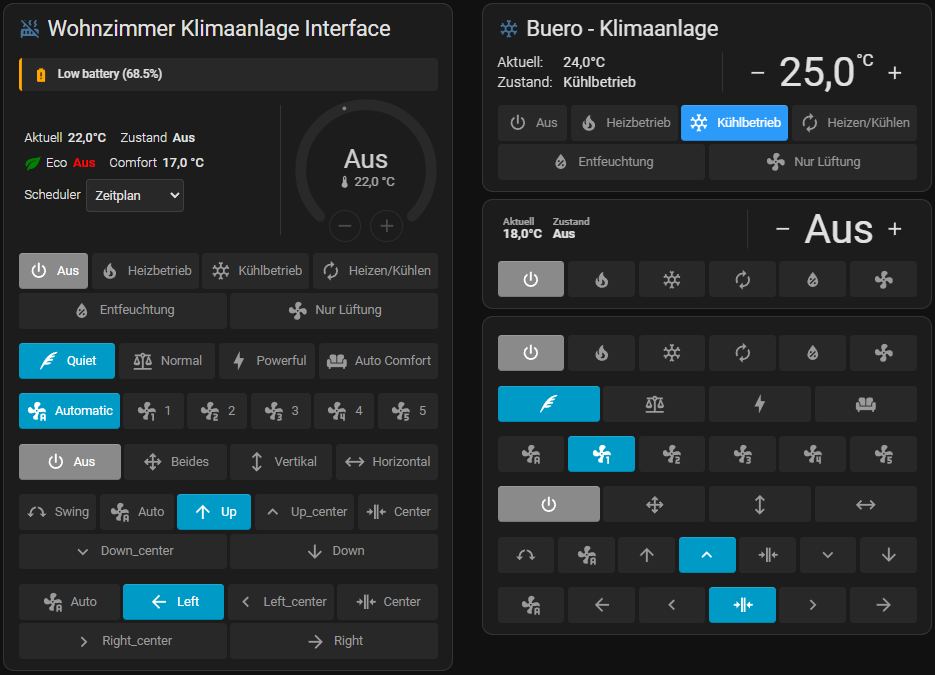
This project is a modernised fork of nervetattoo/simple-thermostat, rebuilt to support the latest Home Assistant versions. It includes numerous architectural improvements and features:
Exclusive Features only for this Fork:
- Advanced Banner System: Custom, condition-based notification banners directly above your thermostat controls.
- New Sensor Layouts: Support for modern
chipsandbadgeslayouts in addition to the classic lists and tables. - Circular Dial Setpoint: An optional native-style circular dial (
setpoint_style: dial) for the target temperature — draggable, mode-colored, and supporting dualheat_coolranges. - Press-and-Hold Stepping: Hold a +/- button to keep adjusting the setpoint instead of tapping repeatedly (number and dial styles).
For a detailed list of all new features, bug fixes, and improvements, please check the CHANGELOG.md.
Pair this card with Tempix — a 100% local, self-learning climate-control integration that turns your HVAC systems and smart TRVs into adaptive per-room heating (schedules, presence detection, window sensors, smart preheating). Tempix exposes a standard climate.tempix_<room> entity per room, so you can control and visualize each room right from this card.
- Home Assistant 2024.8 or higher
- HACS (recommended) or manual install
One click: use the button at the top of this page — it opens the repository straight in your Home Assistant. Then press Download.
Or add it by hand:
- Open HACS in Home Assistant
- Click the three dots in the top right corner → Custom repositories
- Paste this repository's URL and pick the type Dashboard
- Click Add, then search for Simple Thermostat and download it
- Reload the browser
- Download
simple-thermostat.jsfrom the latest release and place it inconfig/www/. - Add to your Lovelace resources:
resources:
  - url: /local/simple-thermostat.js?v=1
type: JavaScript-Module| Guide | What's in it |
|---|---|
| Configuration | Every option, with tables — header, setpoints, controls, sensors, banners, layout |
| Config examples | Ready-to-paste configs, from minimal to fully styled |
| Theming | 53 CSS variables, recipes for the most common restyling requests |
| Templating | version: 3 templated sensors |
| Visual Editor | What each editor section does |
| Changelog | What changed, release by release |
The card has a built-in visual editor accessible from the HA card picker (pencil icon). It fully supports configuring almost all layout options, banners, sensors, modes, and controls without touching YAML, and Home Assistant's UI tooltips describe every field. See the Visual Editor Guide for an overview of the sections.
💡 Tip: Advanced options like custom CSS or deeply nested objects can be configured in the YAML (code) editor. The Custom CSS panel lists every available CSS variable, grouped by area.
You only need type and entity. The card renders with sensible defaults and
adapts to the entity type.
type: custom:simple-thermostat
entity: climate.my_room # Also supports fan.* and humidifier.*
From there, everything is optional:
type: custom:simple-thermostat
entity: climate.my_room
setpoint_style: dial      # native circular dial instead of the number
layout:
  sensors:
    type: chips           # list | table | chips | badges
sensors:
  - entity: sensor.room_humidity
    name: Humidity
banners:
  - entity: binary_sensor.living_room_window
    state: "on"
    type: info
    text: Window open
    icon: mdi:window-open
👉 Full option reference · More examples
Mode colors follow your Home Assistant theme out of the box, and 53 CSS variables let you restyle anything from the setpoint color to the banner background — no card-mod needed:
styles: |
  ha-card {
    --st-setpoint-color: #ffd54f;
    --st-mode-border-radius: 12px;
  }