
A web application that allows users to share clipboard items across multiple devices using simple 6-digit session codes.
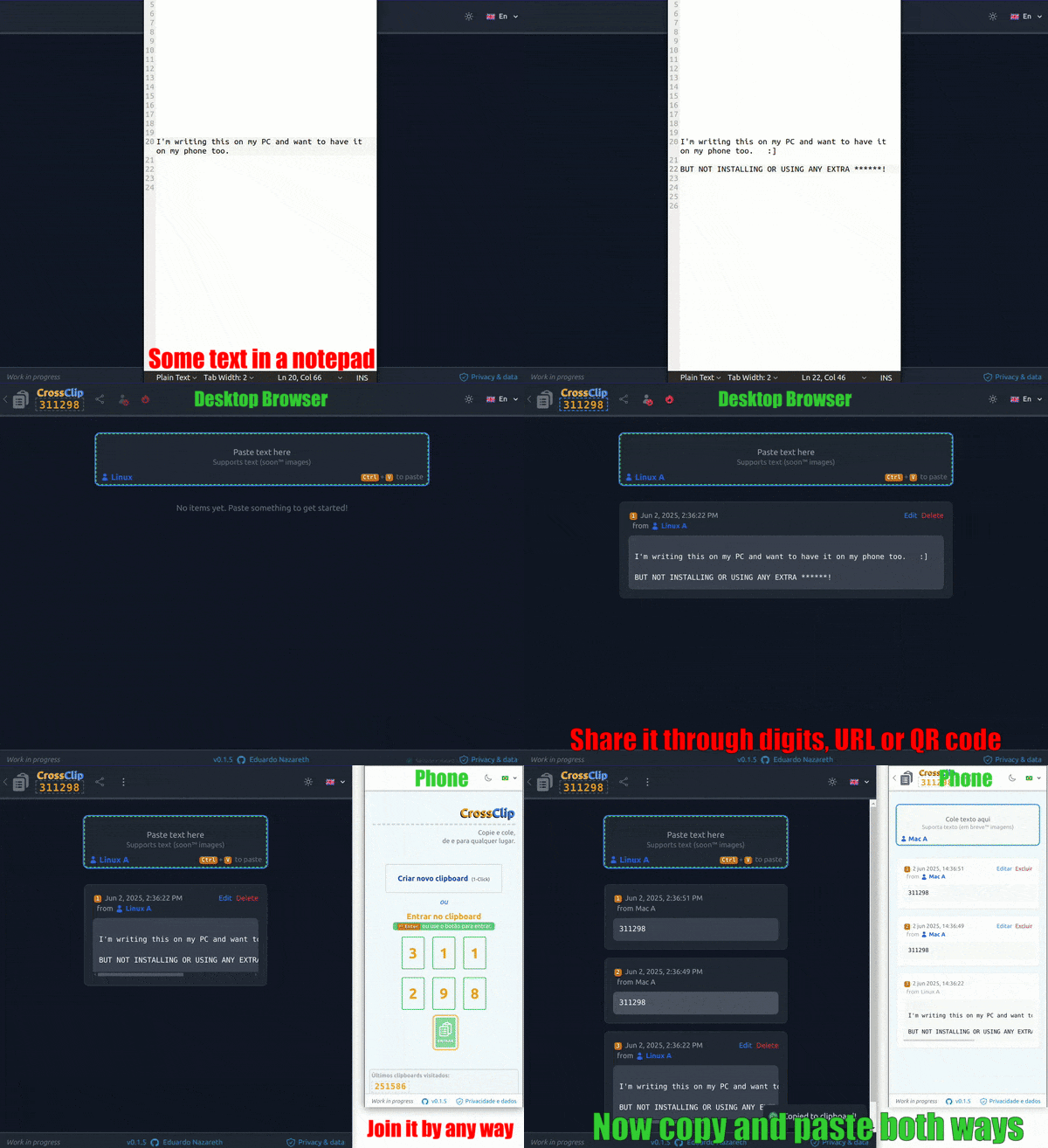
- Currently at https://cross-clipboard.vercel.app (see note below)
Using free tiers from Vercel (frontend), Render (backend/api) and MongoDB Atlas - there's a high chance the app hibernated and will cold start, being a bit unresponsive for 1-2 minutes, then working as expected. The app now includes a warm-up indicator to handle this gracefully.
This portfolio project demonstrates a practical use case while showcasing technical versatility through an intentional mix of technologies:
- Frontend: Vanilla JavaScript with React, Tailwind CSS, and Vite
- Backend: TypeScript with Node.js/Express
The deliberate combination of typed (backend) and untyped (frontend) code creates an interesting development workflow that reflects real-world scenarios where developers must adapt to different code environments. While standardizing on a single approach would be preferable in production, this hybrid approach serves as both a learning exercise and a demonstration of technical adaptability.
The application itself solves a common problem - sharing clipboard content between devices - with a simple, accessible interface using 6-digit session codes.
- 🔄 Real-time text sharing between any device with clipboard support
- 📱 Anonymous session creation with automatic device naming and identification
- 🔗 Join existing sessions via 6-digit codes
- ⌨️ Comprehensive keyboard shortcut support with clipboard permission handling
- 📤 One-click sharing options (6-digit code, direct URL, QR code)
- ✏️ Advanced item management with edit functionality and conflict resolution
- 🗑️ Device-specific item management (remove my items, individual item deletion)
- 🧹 Complete data wipe capability with confirmation dialogs
- 🌙 Dark/light theme support with theme switching
- ♿ Accessibility features (ongoing enhancements)
- 🌍 Internationalization (English and Brazilian Portuguese) with language switcher
- 📱 Responsive design (390px minimum width)
- ⚡ Backend warm-up handling with online status indicators
- 📅 Items sorted by last modified timestamp for better organization
- Core Framework: React.js 18.x
- Build Tool: Vite 4.4.x
- Styling: TailwindCSS 3.x
- UI Components: HeadlessUI 2.x
- Testing: Vitest 3.x (recently migrated from Jest)
- Language: Vanilla JavaScript
- Additional Libraries:
- i18next for internationalization
- React Hot Toast for notifications
- Embla Carousel for UI components
- React Hotkeys Hook for keyboard shortcuts
- QR Code React for sharing functionality
- Runtime: Node.js v18.20.x
- Language: TypeScript 5
- Framework: Express.js v4.17.x
- Database: MongoDB v8.x (Atlas)
- ODM: Mongoose v8.x
- Testing: Jest v29.x
- Docker for containerized development
- Git for version control
- ESLint for code quality
- Prettier for code formatting
- Node.js 18.x or later
- Docker and Docker Compose (for containerized development)
- MongoDB (if running without Docker)
- Clone the repository:
git clone https://github.com/eduardo-vdm/cross-clipboard.git
cd cross-clipboard- Start the development environment using Docker:
docker compose upOr set up manually:
- Install dependencies:
# Install client dependencies
cd client
npm install

# Install server dependencies
cd ../server
npm install- Configure environment variables:
# In the client directory
cd client
cp .env.example .env

# In the server directory
cd ../server
cp .env.example .env
Update the variables in each .env file as needed. See the respective README files in the client and server directories for detailed configuration options.
- Start the development servers:
# Start the client (in client directory)
npm run dev

# Start the server (in server directory)
npm run dev# Build the client
cd client
npm run build
# Build the server
cd ../server
npm run buildFor more detailed information about development, building, and deployment, please refer to the README files in the client and server directories.
The project is in active development with the following key points:
- Core functionality is implemented and working
- Testing framework recently migrated and needs updates
- WebSocket implementation planned to replace current polling mechanism
- Deployment strategy under evaluation
- Backend warm-up handling implemented for better user experience
- Current polling mechanism for data synchronization
- Mobile browser clipboard permission handling (improved but ongoing)
- Limited session TTL
- No comprehensive user help/tour system
- Image copy/paste support removed for development speed (planned for future)
- Implement WebSocket-based real-time updates
- Image copy/paste functionality (re-implementation)
- Comprehensive user help/tour system
- Native mobile apps (Android/iOS) via Expo.js
- Optional user authentication for persistent libraries
- Enhanced accessibility features
- Additional language support
This project is licensed under the MIT License with Commons Clause - see the LICENSE file for details.