
Deutsch · English


Multiple networks, one complete picture: Nodarion combines active ping/TCP scans, FRITZ!Box and Mesh data, and DNS activity from AdGuard Home for each device. Instead of three separate data sources, you get one clear view of devices, connections, and anomalies — including local rules and optional AI analysis.
Nodarion is a local Home Assistant custom integration. It scans one or more configurable IPv4 networks and creates a connectivity binary sensor for every discovered device. Beyond simple reachability, it helps explain where a device is connected, how it communicates, and whether its behaviour looks unusual.
Nodarion grows through real networks and real-world experience. If something is missing, works especially well, or sparks an idea, open a feedback or feature issue. For open questions, shared experiences, and ideas that are still taking shape, GitHub Discussions is the more relaxed place. Praise is a valid bug report too — it is simply much nicer to fix. 😉
Important
VLAN support is here: configure and monitor multiple network segments, assign names, roles and colours, and see every device in the correct segment.
Tip
You no longer need the separate AdGuard Home integration for Nodarion. Nodarion now exposes its own AdGuard device, sensors, statistics, and protection switches as native Home Assistant entities. Check whether other dashboards or automations still use the old entities before removing it.
- Scalable, individually configurable VLAN scanners and segment-move alerts
- A dedicated Engelsoft AdGuard Home Assistant device with native entities
- Context help throughout the settings, safer reconfiguration, and automatic credential recovery
- Faster API responses and fewer storage writes
See the full changelog.
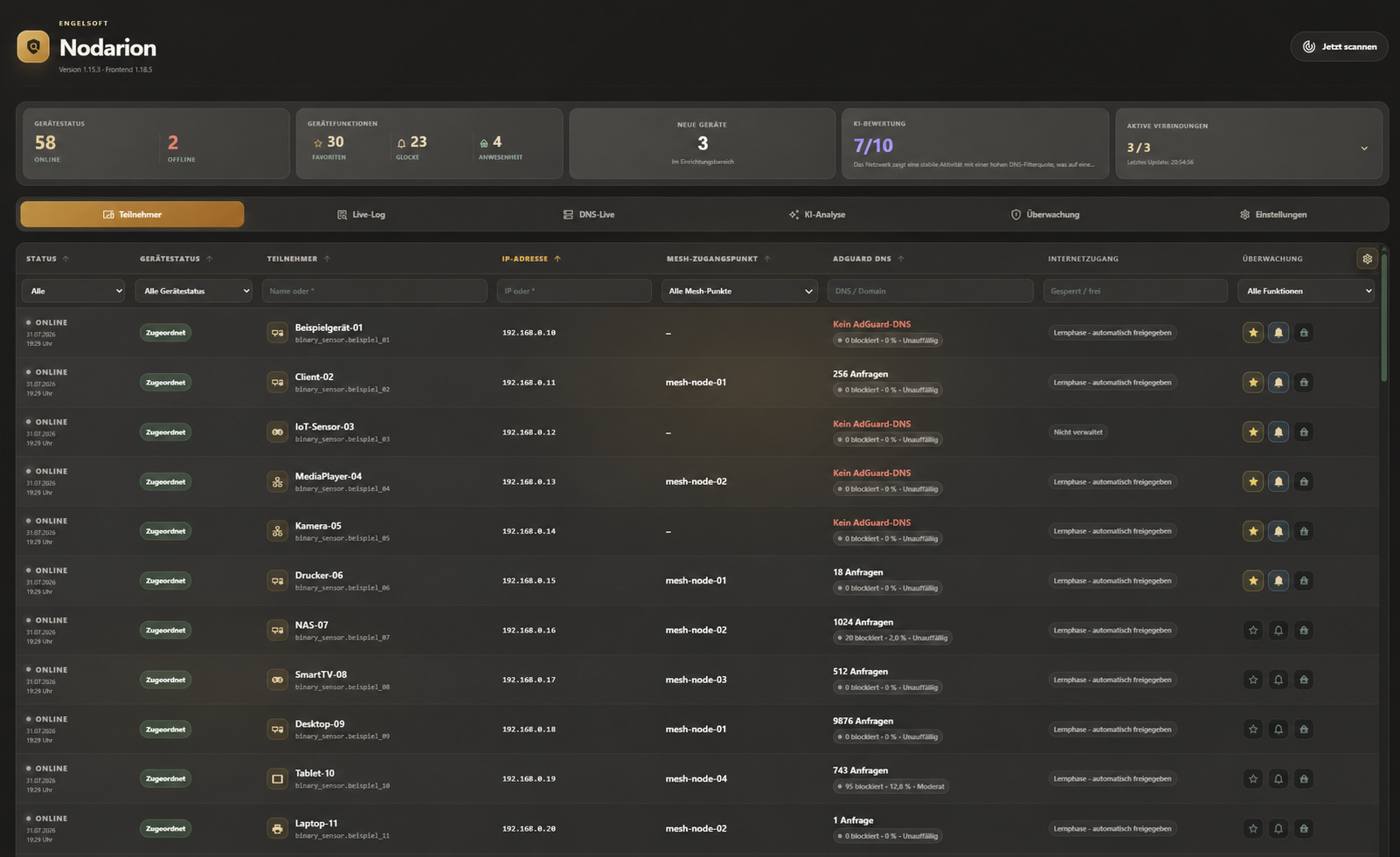
The central table combines reachability, device state, Mesh access point, AdGuard DNS activity, internet access, and personal monitoring controls.
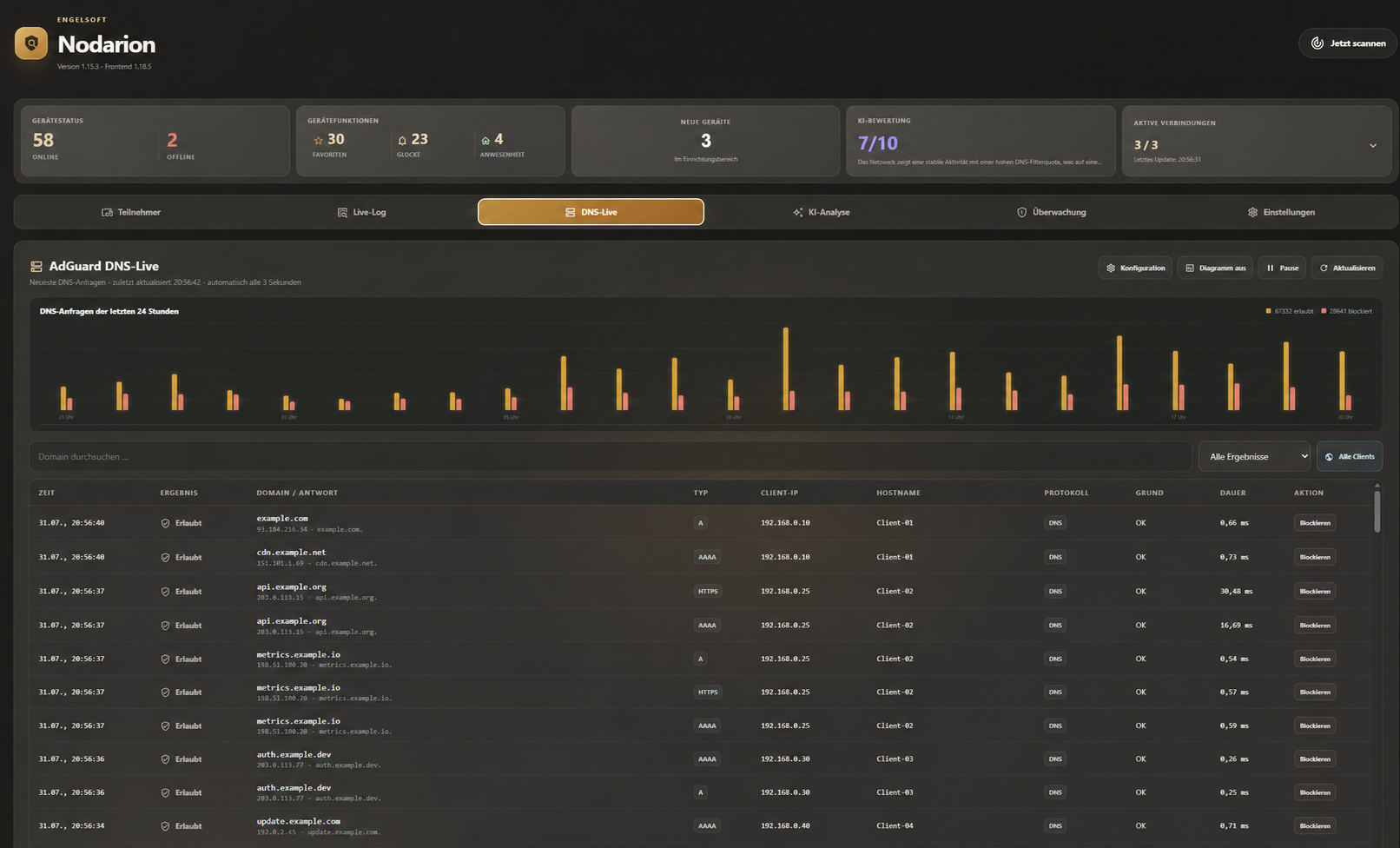
Review DNS queries live with history, client mapping, response type, processing time, and direct block or allow actions.
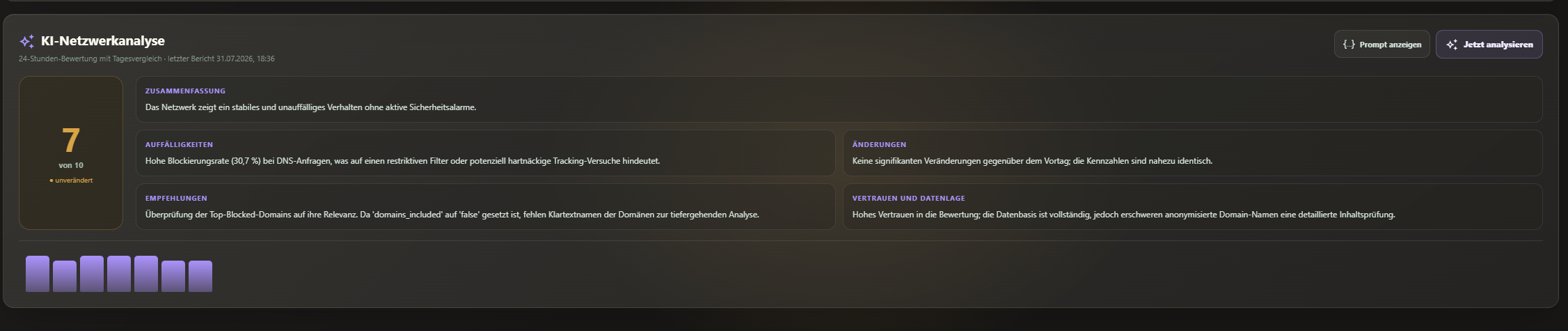
Optional AI analysis summarizes network health, anomalies, changes, and recommendations in a clear daily assessment.

Use the button above, or add the repository manually:
- Open Integrations in HACS.
- Select Custom repositories from the menu.
- Add
https://github.com/engelsofta/nodarionas an Integration repository. - Install Engelsoft Nodarion and restart Home Assistant.
- Copy
custom_components/nodarioninto the directory with the same name in your Home Assistant configuration. - Restart Home Assistant.
- Go to Settings → Devices & services → Add integration and search for Engelsoft Nodarion.
- Enter the local network in CIDR notation, for example
192.168.178.0/24.
- Automatically registered Engelsoft Nodarion page in the Home Assistant sidebar
- Active ping/TCP discovery with optional direct FRITZ!Box detection over TR-064
- One Home Assistant device and
binary_sensorfor every network device - Persistent inventory with stable entity IDs based on IP address
- Presence tracking for selected devices with a configurable offline timeout
- Search, status filters, sorting, metrics, configurable columns, and a responsive device table
- Editable VLAN/segment definitions with name, VLAN ID, subnet, role, colour, and monitoring; every monitored segment gets its own scanner
- VLAN column, filtering, sorting, and a segment-coloured edge in the device table
- MAC-backed warnings when a known device moves between segments; moves into isolated networks are treated as critical
- Favorites, current Mesh access point, and a log of Mesh handovers
- LAN, Wi-Fi, or powerline connection details, Wi-Fi band, RX/TX rate, and signal strength when supplied by the FRITZ!Box
- DHCP/static assignment and remaining DHCP lease time
- FRITZ!Box model and installed FRITZ!OS version
- Automatic internet blocking for newly discovered devices until they are explicitly approved
- Local MAC vendor database with more than 58,000 prefixes; randomized or locally administered addresses are intentionally not assigned to a vendor
- Persistent live log for new devices, online/offline transitions, name changes, guest activity, and Mesh handovers
- Configurable setup range for identifying new devices, optionally imported from the FRITZ!Box DHCP range
- Optional AdGuard Home analysis per device, including queries, blocking rate, domains, filter reasons, DNS log, and possible DNS bypass detection
- Administrator-only AdGuard management for filters, allow/block actions, and DNS rewrites
- Local monitoring rules for unknown devices, quiet-hour activity, frequent state changes, identity changes, important offline devices, and guest access
- Multiple Home Assistant notification targets for warnings and critical alerts
- A
nodarion_alertevent for custom Home Assistant automations - Optional daily AI analysis using the preferred Home Assistant AI Task entity
- Manual scans and AI reports directly from the Nodarion panel
Nodarion reads guest access locally and in read-only mode over TR-064. It shows the state, Wi-Fi name, reported security settings, and connected guests. Guest devices can be labelled and filtered in the device table. Connections and disconnections appear in the live log, with optional warnings for new guests, quiet-hour activity, or unusually long sessions.
The Show and monitor guest network setting can hide the feature completely. Connection start times and warning history are persisted, so restarting Home Assistant does not reset an ongoing guest session.
Under Settings → Notifications and checks, you can select any notify.*
entity configured in Home Assistant. Nodarion sends new alerts through
notify.send_message, so credentials for Telegram and other services remain in
Home Assistant.
The Home Assistant notification centre receives one summary that is updated as active anomalies change. Resolved warnings leave the summary but remain in the Nodarion history.
Every new warning also fires the nodarion_alert event. Event data includes
type, severity, device_name, ip_address, mac_address, access_point,
and message, allowing custom automations to respond independently of the
notification targets selected in Nodarion.
The Home Assistant host must be able to reach every actively monitored network
directly. VLAN IDs and roles are assigned from the configured subnet because an
IP address does not itself contain VLAN information.
Container installations may require network_mode: host. Without FRITZ!Box
support, devices that respond to neither ping nor a configured TCP port cannot
be discovered. With FRITZ!Box support enabled, a device reported as active by
the router is considered online even without a ping response.
TR-064 application access must be enabled on the FRITZ!Box. A dedicated
FRITZ!Box user for Nodarion is recommended. Internet protection uses the
X_AVM-DE_HostFilter service: local network communication remains possible,
while internet access is granted explicitly from the device table.
Approvals are also tied to the confirmed MAC address, survive DHCP address
changes and automatic stale-inventory cleanup, and are revoked only after a
changed MAC has been observed twice. Trust, enforcement, cleanup, and failure
reasons are recorded in the live log.
To reduce network and system load, ping/TCP discovery checks known addresses first and scans unknown addresses in small rolling batches. ARP/neighbor hints are prioritised, and the scanner remembers the last successful probe method or TCP port for each device. Monitored and presence devices use a fast recovery lane: while one is offline, it is rechecked at least every 15 seconds without triggering extra full-VLAN scans. Scan now deliberately performs complete discovery when required. Reverse DNS runs with bounded parallelism; successful names are cached for 24 hours and negative responses for 30 minutes. FRITZ!Box and Mesh data is refreshed at most once per minute, AdGuard data every ten minutes, and FRITZ!Box device information once per hour.
AdGuard Home analysis requires direct access to its web interface and an administrator account. The query log must be enabled. Devices using a VPN, Private DNS, or an external DNS server may not appear. Write operations are restricted to Home Assistant administrators and input is validated before it is sent to AdGuard Home. All Nodarion write operations require a Home Assistant administrator account.
AI analysis is disabled by default. With anonymized DNS privacy, only counters and stable, non-reversible domain identifiers are passed to the configured AI. Full domain names are included only when explicitly selected. When a cloud AI is used, the summarized network data leaves the local system.
Engelsoft Nodarion is released under the MIT License.