




CHAMPPy (Charging and Mobility Profiles in Python) is a Python library to generate synthetic mobility and charging profiles for different types of electric vehicles (EVs) including vans, trucks, busses and passanger cars.
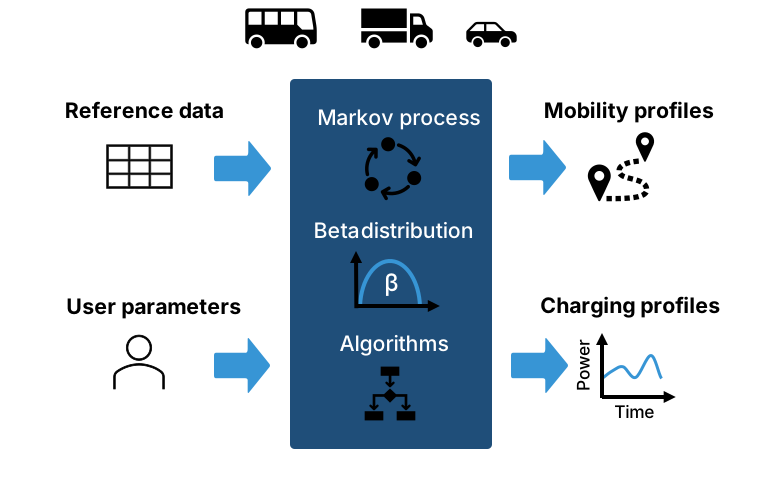
Road transport decarbonization requires realistic charging demand models across all vehicle classes. However, most existing studies and publicly available tools focus on private passenger cars. Commercial electric vehicles such as vans and trucks are often underrepresented despite their major relevance for emissions and grid impacts. CHAMPPy is an open Python package that addresses this gap by generating synthetic driving and charging profiles for different EV types, including commercial fleets. The model combines a Markov chain to represent vehicle locations over time with beta-distributed journey speeds, from which trip distances are derived, and uses dedicated algorithms to generate mobility and charging profiles. An optional clustering approach increases profile heterogeneity and is particularly useful when analyzing individual profiles.
🛠️ CHAMPPy supports two workflows:
- 🚀 Light: Use existing parameters to quickly generate drving and charging profiles with user-defined settings (e.g., simulation period, number of vehicles, charging power, battery capacity). An example of this workflow is provided in notebooks/01_demo_without_parameterization.ipynb.
- 🧪 Full: Re-parameterize the model with custom reference data (e.g. driving data for other countries, vehicle classes, or fleets). Afterwards, you can generate drving and charging profiles from your model parameters. An example of this workflow is provided in notebooks/02_demo_with_parameterization.ipynb
- Documentation: https://champpy.readthedocs.io
- Source code: https://github.com/ffe-munich/CHAMPPy
- PyPI releases: https://pypi.org/project/champpy/
- License: http://opensource.org/licenses/MIT
CHAMPPy has been developed by Florian Biedenbach (lead), Valentin Preis und Daniel Godin.
CHAMPPy/
├── src/champpy/                        # Main package source code
│   ├── __init__.py
│   ├── core/                           # Core functionality
│   │   ├── __init__.py
│   │   ├── charging/                   # Charging profile module
│   │   │   ├── __init__.py
│   │   │   ├── charging_model.py       # Model to generate charging profiles
│   │   │   └── charging_validation.py  # Charging validation & plotting
│   │   └── mobility/                   # Mobility profile module
│   │       ├── __init__.py
│   │       ├── mobility_cleaning.py    # Data cleaning
│   │       ├── mobility_components.py  # Data components
│   │       ├── mobility_data.py        # Data structures
│   │       ├── mobility_model.py       # Model to generate profiles
│   │       ├── mobility_validation.py  # Validation & plotting
│   │       └── parameterization.py     # Parameter extraction
│   ├── utils/                          # Utilities
│   │   ├── __init__.py
│   │   ├── data_utils.py               # Ddata helpers
│   │   ├── logging.py                  # Logging configuration
│   │   └── time_utils.py               # Time utilities
|   └── data/
│       ├── params_info.parquet         # Info about existing model parameters
│       └── params.parquet              # Existing model parameters
├── notebooks/                          # Jupyter notebooks
│   ├── 01_demo_without_parameterization.ipynb # Demo notebook 1
│   └── 02_demo_including_parameterization.ipynb # Demo notebook 2
├── scripts/                            # Python scripts
├── tests/                              # Test suite
├── data/                               # Data directory
├── plots/                              # Generated plots (HTML files)
├── pyproject.toml                      # Project configuration
├── LICENSE                             # License file
└──  README.md                          # This file
To install CHAMPPy on Windows, follow the steps below. For installation on Linux/Mac, please check the installation documentation.
- Python 3.11 or higher
- pip
# Clone the repository
git clone https://github.com/ffe-munich/CHAMPPy.git
cd CHAMPPy

# Create a virtual environment
py -m venv .venv

# Activate virtual environment
.\.venv\Scripts\activate


# Install the package
pip install .# Create a virtual environment
py -m venv .venv
# Activate virtual environment
.\.venv\Scripts\activate
pip install champpy