A local-first storage workspace built on Telegraph-Image. This fork keeps the existing Cloudflare Pages, Telegram/R2 storage, upload API, moderation, and stable /file/* serving paths, while reorganizing the interface into a public product page, focused sign-in, and one complete dashboard.
English|中文
Important
Since the original Telegraph API interface was closed by the official, you need to switch the upload channel to Telegram Channel. Please set TG_Bot_Token and TG_Chat_ID according to the deployment requirements in the documentation, otherwise the upload function will not work properly.
- Quick Start: deploy a working image host in 3 steps
- How to Obtain Telegram Bot Token and Chat ID
- Configuration Reference: all environment variables and the KV binding
- Features
- Optional Features Guide: dashboard / upload protection / short links / image review / anti-hotlinking / R2 storage / site customization / whitelist mode / custom domain
- Upload API
- Telegraph Cloud Document Database (Phases 2–3)
- Telegraph Cloud Projects and Developer API Keys (Phase 3)
- Telegraph Cloud Object Storage (Phases 4–6B)
- Telegraph Cloud Console (Phase 7)
- Production Readiness and Operations (Phase 6C)
- Limitations and Free Quotas
- How to Update if Already Deployed?
- FAQ
- Local Development and Testing
- Update Log
3 simple steps to have your own image hosting. The only thing you need in advance is a Cloudflare account (to deploy on your own server without relying on Cloudflare, refer to #46).
-
Fork this repository (Note: You must deploy using Git or the Wrangler CLI tool for it to work properly, Documentation)
-
Open the Cloudflare Dashboard, enter the Pages management page, select Create Project, choose
Connect to Git provider, follow the prompts to enter the project name, select the repository you just forked, then clickDeploy site
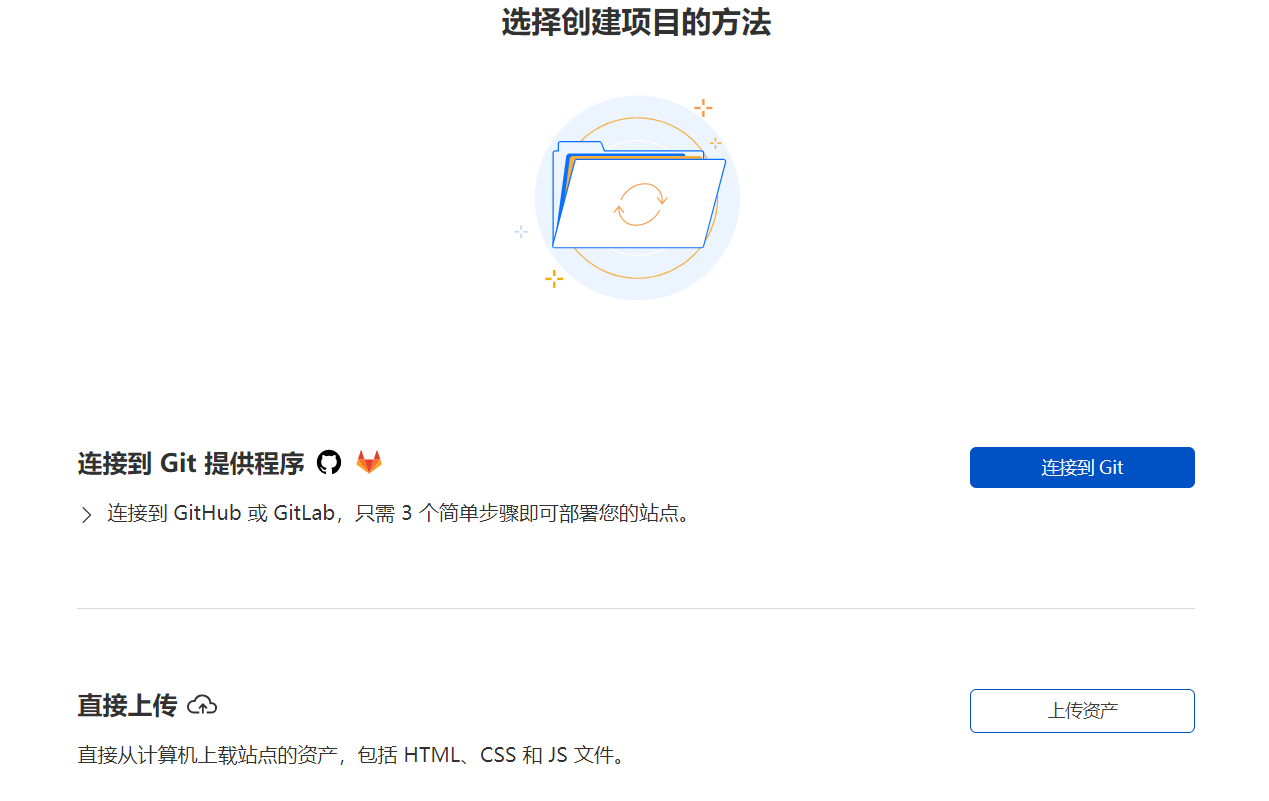
- After deployment, go to the project's
Settings->Environment Variables, addTG_Bot_TokenandTG_Chat_ID(see the next section for how to obtain them), save, then go to theDeploymentspage and redeploy once
Done! Open your *.pages.dev domain to read the product overview, then choose Open Dashboard. The canonical routes are / for the landing page, /login for GUI sign-in, and /console — the single management UI with global Overview, Projects, and Documentation plus per-project Overview, Data, Files, API, Connect, and Settings. The legacy media workspace (staging, sequential Push, Albums, public-link output, and remote management) is preserved at /admin-legacy and linked from the console as Legacy Media; /admin redirects into /console for compatibility with old bookmarks.
If you don't have a Telegram account yet, please create one first. Then, follow these steps to get the BOT_TOKEN and CHAT_ID:
- Get the
Bot_Token- In Telegram, send the command
/newbotto @BotFather, and follow the prompts to input your bot's name and username. Once successfully created, you will receive aBOT_TOKEN, which is used to interact with the Telegram API.
- In Telegram, send the command

- Set the bot as a channel administrator
- Create a new channel (Channel), enter the channel and select channel settings. Add the bot you just created as a channel administrator, so it can send messages.


-
Get the
Chat_ID- Get your channel ID through @VersaToolsBot. Send a message to this bot and follow the instructions to receive your
CHAT_ID(the ID of your channel). - Or get your channel ID through @GetTheirIDBot. Send a message to this bot and follow the instructions to receive your
CHAT_ID(the ID of your channel).

- Get your channel ID through @VersaToolsBot. Send a message to this bot and follow the instructions to receive your
All configuration is done in your Cloudflare Pages project's Settings. Note: after changing environment variables or the KV binding, you need to redeploy for the changes to take effect.
Required environment variables:
| Environment Variable | Example Value | Description |
|---|---|---|
TG_Bot_Token |
123468:AAxxxGKrn5 |
Telegram Bot Token obtained from @BotFather. |
TG_Chat_ID |
-1234567 |
Channel ID, ensure the TG Bot is an administrator of the channel or group. |
Optional environment variables (enable features as needed, see the Optional Features Guide):
| Environment Variable | Example Value | Description |
|---|---|---|
BASIC_USER |
admin |
Login username for the dashboard (/console and its legacy workspace). Leave unset for a dashboard without login. |
BASIC_PASS |
admin-password |
Login password for the dashboard. Must be set together with BASIC_USER. |
SESSION_SECRET |
long-random-string |
Optional but recommended. Secret used to sign the GUI sign-in session cookie. When unset, it is derived deterministically from BASIC_USER/BASIC_PASS so existing deployments keep working without configuration; set an explicit random value in production. |
API_KEY_PEPPER |
openssl rand -base64 48 |
Required to create or verify Phases 3–5 tg_live_… developer keys and protect Phase 5/5.1 object-list/repair tokens. Use a unique random Cloudflare Secret of at least 32 bytes per environment. It is not a dashboard password or S3 signing secret and must never be sent to a browser, Telegram, document record, or object metadata. Replacing it invalidates existing developer keys and outstanding developer/object-list/repair tokens; follow the disruptive pepper rotation procedure. |
TELEGRAPH_CLOUD_MAX_DOCUMENT_BYTES |
98304 |
Optional Phase 2 database JSON-document limit in bytes (1,024–98,304; default 98,304). Kept below the Telegram journal cap for revision metadata. |
TELEGRAPH_CLOUD_MAX_COLLECTION_NAME_LENGTH |
64 |
Optional Phase 2 collection-name limit (1–64 UTF-8 bytes). |
TELEGRAPH_CLOUD_MAX_RECORD_ID_LENGTH |
128 |
Optional Phase 2 record-ID limit (26–128 UTF-8 bytes). IDs are server-generated. |
TELEGRAPH_CLOUD_DEFAULT_QUERY_LIMIT |
20 |
Optional default Phase 2 database page size (1–configured maximum). |
TELEGRAPH_CLOUD_MAX_QUERY_LIMIT |
100 |
Optional Phase 2 database maximum page size (1–100). |
TELEGRAPH_CLOUD_MAX_OBJECT_BYTES |
10485760 |
Optional Phases 4–6B object body limit in bytes (1–20,971,520; default 10 MiB). The Telegram-backed adapter uses bounded buffers for hashing/multipart upload; Phase 6B SigV4 hashes a bounded request clone before the adapter reads the original branch. The 20 MiB hard ceiling preserves practical Bot API retrieval compatibility. |
TELEGRAPH_CLOUD_DEFAULT_OBJECT_LIST_LIMIT |
50 |
Optional Phase 5 default page size for GET /api/storage/:bucket (1–configured maximum; default 50). |
TELEGRAPH_CLOUD_MAX_OBJECT_LIST_LIMIT |
100 |
Optional Phase 5 maximum list page size (1–100; default 100). Keep it bounded to preserve worker/KV work; Phase 6B S3 max-keys uses the same hard bound. |
TELEGRAPH_CLOUD_S3_CREDENTIAL_PEPPER |
openssl rand -base64 48 |
Required for Phase 6B /s3/*. A distinct random Cloudflare Secret (32–4,096 UTF-8 bytes) that derives/verifies transient S3 credential secrets and protects S3 continuation tokens under separate domains. Never reuse or expose API_KEY_PEPPER; replacing this secret invalidates all S3 credentials/tokens and requires the disruptive S3 pepper recovery procedure. |
TELEGRAPH_CLOUD_S3_ENDPOINT_HOST |
s3.example.com |
Required for Phase 6B /s3/*. Exact public path-style host, optionally with a non-default port (for example s3.example.com:8443), with no scheme/path/wildcard. SigV4 host must match it and the actual request endpoint. |
TELEGRAPH_CLOUD_S3_MAX_CLOCK_SKEW_SECONDS |
300 |
Optional Phase 6B SigV4 UTC clock window; decimal 1–900 seconds, default 300. Smaller is safer where client clocks permit. |
UPLOAD_BASIC_USER |
uploader |
Username for protecting the public upload endpoint. Leave unset to keep uploads public. |
UPLOAD_BASIC_PASS |
strong-password |
Password for protecting the public upload endpoint. Must be set together with UPLOAD_BASIC_USER. |
ENABLE_SHORT_URLS |
true |
When enabled (and a KV namespace is bound), uploads return a short link like /file/AbC123 instead of the long file name. Existing long links keep working. |
SHORT_URL_LENGTH |
6 |
Length of generated short ids (4-16, default 6). Only used when ENABLE_SHORT_URLS is on. |
MODERATION_PROVIDER |
cloudflare-ai |
Image review provider: cloudflare-ai (Workers AI, recommended), moderatecontent (legacy), or none. When unset, auto-detects: a ModerateContentApiKey selects moderatecontent, an AI binding selects cloudflare-ai. See Enable Image Review. |
MODERATION_AI_MODEL |
@cf/meta/llama-3.2-11b-vision-instruct |
Workers AI model used by the cloudflare-ai review provider. When unset, a built-in fallback chain of current vision models is tried in order, so a model being retired by Cloudflare degrades gracefully. |
CF_ACCOUNT_ID / CF_API_TOKEN |
abc123 / token |
Optional, together enable live model discovery: the review model chain is built from Cloudflare's current model catalog (cached in KV for 6h) instead of the built-in list, so retired models drop out and new vision models join automatically. The token only needs the "Workers AI: Read" permission. |
ModerateContentApiKey |
abc123 |
Legacy image review via moderatecontent.com. The service has stopped accepting new registrations — new deployments should use Workers AI instead. |
ALLOWED_REFERERS |
myblog.com,*.example.com |
Anti-hotlinking: comma-separated list of hostnames allowed to embed your files. Unset = no restriction. Empty referers (direct visits, API clients) and your own domain are always allowed. |
STORAGE_PROVIDER |
telegram |
Where uploaded files are stored: telegram (default) or r2 (requires the img_r2 binding). Files remain readable regardless of the current setting — each file remembers where it lives. |
SITE_NAME |
My Images |
Site name shown in the homepage header (served to the frontend via GET /api/config). |
SITE_TITLE |
My Images | Home |
Browser tab title of the homepage. |
SITE_BACKGROUND |
https://.../bg.jpg |
Background image URL for the homepage. |
HIDE_ADMIN_ENTRY |
true |
Legacy/custom-frontend hint returned by /api/config; the product landing keeps its canonical /console action visible. |
WhiteList_Mode |
true |
Whitelist mode: only whitelisted images can be loaded. |
disable_telemetry |
true |
Opt out of remote telemetry. |
Bindings (Settings -> Functions):
| Type | Variable Name | Description |
|---|---|---|
| KV namespace | img_url |
Bind a pre-created KV namespace to enable the image management dashboard; the short links feature also requires this binding |
| KV namespace | TELEGRAPH_CLOUD_KV |
Dedicated Telegraph Cloud namespace for Phase 3 project/Developer-key and Phase 6B S3-credential control-plane records, Phase 2/3 document materialized indexes/outboxes, and Phases 4–6B object manifests/revision/list indexes/outboxes/internal cursor state (Phase 5.1 checkpoints and Phase 6B outer S3 tokens are stateless/encrypted, not KV records). Bind a separate namespace; it does not replace or read legacy img_url. |
| R2 bucket | img_r2 |
Bind a pre-created R2 bucket to enable STORAGE_PROVIDER=r2 |
| Workers AI | AI |
Bind Workers AI to enable the built-in image review provider |
TELEGRAPH_CLOUD_KV is intentionally separate from legacy img_url. It contains Phase 3 Developer-key and Phase 6B S3-credential control-plane records (project registry, verifier-only metadata, revocation/listing state), the Phase 2/3 document database's repairable materialized record/collection/filter/revision/outbox state, and Phases 4–6B object manifests/revision/list indexes/outboxes/internal cursor state (Phase 5.1 checkpoints and Phase 6B outer S3 tokens are stateless/encrypted, not KV records). Telegram stores immutable document revisions plus object byte documents and immutable object events; API-key/S3-secret plaintext and control-plane secrets never go to Telegram. Do not bind img_url in its place, and do not expect this binding to alter existing uploads, /file/* links, R2 behavior, or dashboard media records.
/api/projects/* is dashboard-administrator-only and requires both BASIC_USER and BASIC_PASS (existing HMAC dashboard session or Basic fallback). It creates opaque projects, one-time-reveal tg_live_… Developer keys, and dashboard-managed one-time-reveal tgsk_live_… S3 credentials. Neither kind is a dashboard credential. A verified Authorization: Bearer tg_live_… request derives one project server-side for /api/db/* and Bearer-only /api/storage/* with explicit storage:read / storage:write scopes. /s3/* instead requires a real header-form AWS4-HMAC-SHA256 signature using an active S3 credential, derives its project/scopes only from verified S3 credential metadata, and never accepts Basic/session, Bearer keys, or request project hints. Configure distinct strong Cloudflare Secrets for API_KEY_PEPPER and TELEGRAPH_CLOUD_S3_CREDENTIAL_PEPPER. Neither surface exposes Telegram identifiers.
Dashboard-only S3 credential endpoints are POST/GET /api/projects/:id/s3-credentials, DELETE /api/projects/:id/s3-credentials/:accessKeyId, and POST /api/projects/:id/s3-credentials/:accessKeyId/rotate. Creation and rotation reveal secret_access_key exactly once; list/revoke responses expose safe metadata only.
See Telegraph Cloud Document Database (Phases 2–3), Telegraph Cloud Object Storage (Phases 4–6B), the Phase 3 projects/key reference, the Phase 4 object-engine reference, Phase 5 listing/range reference, Phase 5.1 operator repair reference, the Phase 6B S3 SigV4 reference, the historical Phase 6A migration note, and the Phase 2 database reference.
Before enabling /s3/* outside an isolated test deployment, read the Phase 6C production-readiness guide. It documents the separate Production/Preview Pages audit, exact case-sensitive variable names (TG_Bot_Token and TG_Chat_ID, not all-uppercase aliases), binding separation, eventual-consistency/recovery limits, edge-rate-control recommendations, individual credential revocation, and disruptive pepper rotation.
GET /api/healthis a deliberately minimal public legacy-configuration signal ({"status":"ok"}or{"status":"degraded"}); it does not reveal or prove S3/KV/Telegram readiness.- Dashboard-authenticated
GET /api/projects/diagnosticsreturns enum-only configuration/readiness states.?probe=telegramadds a one-shotgetMereachability check without returning bot/chat data; it does not prove channel/write readiness. scripts/telegraph-cloud-staged-smoke.cjsis an explicit-confirmation, no-secret-output procedure for an authorized Preview/Production test. It creates temporary data, verifies external signed PUT/GET/HEAD/LIST/range/DELETE, isolation, inactive-project rejection, revoke/replacement, and attempts logical cleanup. It reports a known cleanup failure, but cannot promise physical Telegram deletion or recovery of an unreturned credential after a network failure.
The release candidate is not production-approved merely because local tests pass: audit the exact deployed Pages commit, verify the endpoint host, and run the documented staged smoke with approved credentials. Do not place a real credential, Bot token, pepper, canonical request, signature, payload hash/body, chat ID, or raw object path in a ticket, log, shell history, or commit.
-
Self-hosted image storage with capacity and throughput determined by Telegram/R2, Cloudflare quotas, configured limits, and your own operating controls — it is not unlimited storage
-
No need to purchase a server, hosted on Cloudflare's network. When usage does not exceed Cloudflare's free quota, it's completely free
-
No need to purchase a domain name, you can use the free second-level domain
*.pages.devprovided by Cloudflare Pages, and also supports binding custom domain names -
Pluggable image review, can be enabled as needed — built-in support for Cloudflare Workers AI (no external account) and legacy moderatecontent.com keys. When enabled, inappropriate images will be automatically blocked and no longer loaded
-
Supports backend image management, allowing you to preview uploaded images online, add to whitelist, blacklist, and other operations
-
Supports multiple file types (images, videos, audio, and more). Previewable files (images/video/audio/PDF) open directly in the browser instead of being force-downloaded
-
Optional Basic Auth protection for the upload endpoint and optional short links, both enabled on demand via environment variables
-
Pluggable storage: files live on Telegram by default, or in a Cloudflare R2 bucket with one environment variable — old links keep working either way
-
Batch upload with drag & drop and paste support, per-file progress, and one-click copy as URL / Markdown / BBCode / HTML; optional anti-hotlinking via a referer allowlist
-
Deployment self-check: when configuration is incomplete the dashboard says which environment variable or binding is missing and where to set it, instead of failing on the first Push
-
Nested Albums: organize objects into folder-like collections in the dashboard. Albums are a pure organization layer — an object's id, public
/file/...URL, storage location and moderation state never change when it is filed, renamed around or moved -
Deliberate, sequential Push: staged files upload one at a time with a small spaced gap, bounded exponential backoff for transient failures (429/5xx/network), live progress and a measured ETA, plus Pause / Cancel / Retry failed controls
-
MIME-aware links and previews: images, audio, video, PDFs and generic files each get the right preview surface and the right URL / Markdown / BBCode / HTML snippet — non-images never become
<img>or
Disabled by default. To enable: in the Cloudflare Pages backend, click Settings -> Functions -> KV namespace bindings -> Edit bindings, enter img_url as the Variable name, select a pre-created KV namespace as the KV namespace, redeploy, then visit http(s)://your-domain/console to open the dashboard
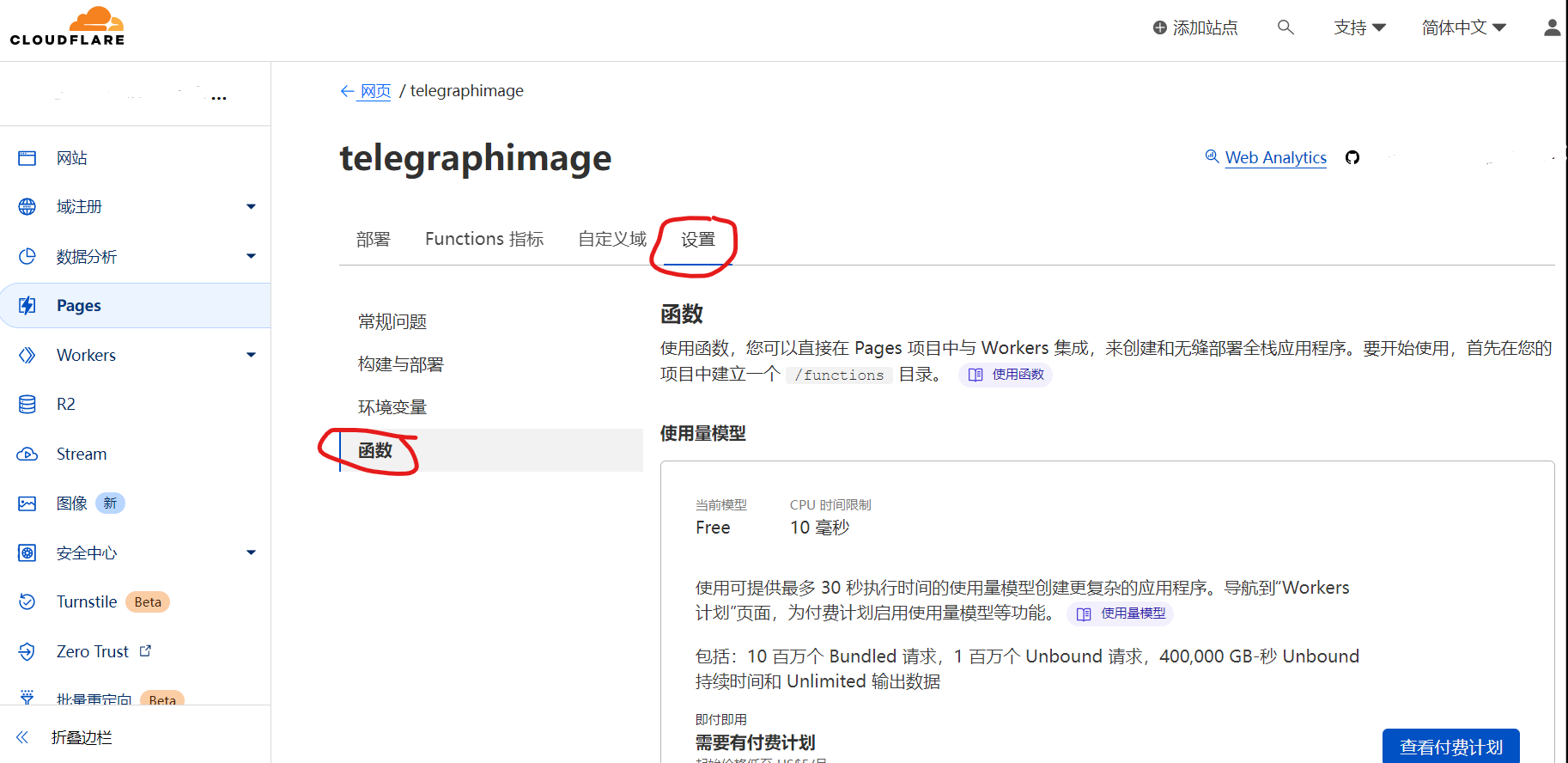
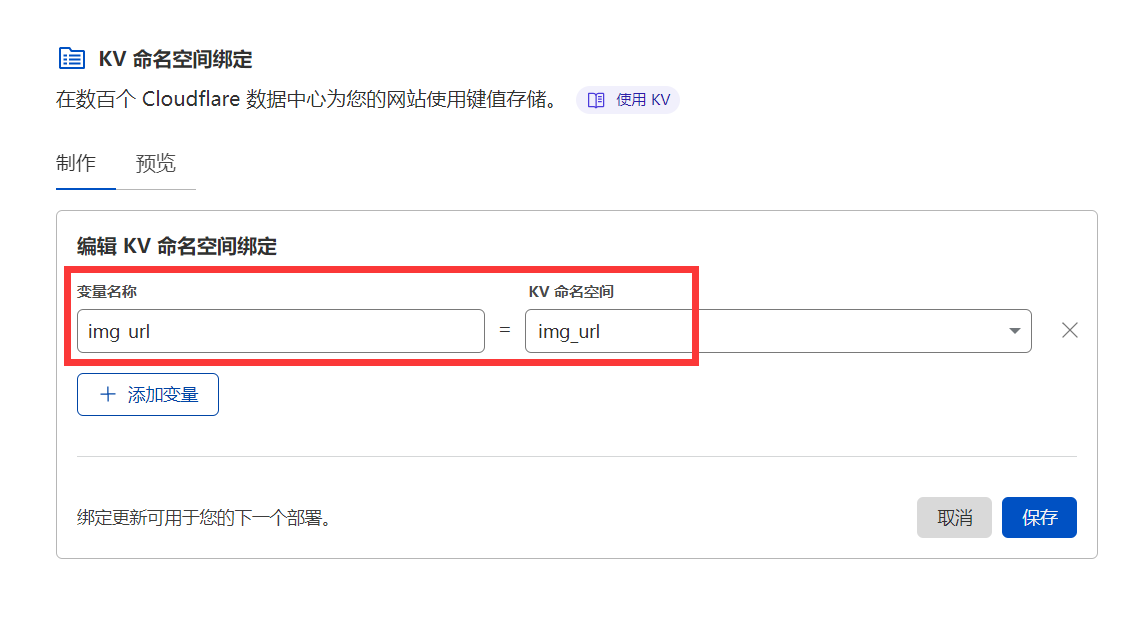
The legacy media workspace (/admin-legacy, linked from the console as Legacy Media) combines browser-local staging with the remote management index. Added files remain local until an explicit Push, which sends one request at a time with an inter-file delay, bounded retry/backoff, pause/cancel controls, partial-failure reporting, and retry-failed support. The same workspace provides filename search, paginated remote loading, grid/list/masonry views, MIME-aware previews, nested Albums, safe URL/Markdown/BBCode/HTML output, rename, save/unsave, blacklist/whitelist management, multi-select bulk actions, record deletion, tools, and a keyboard-first command palette.
Note: the dashboard "delete" action only removes the record from the list; it does not delete the source file from Telegram. To prevent a file from loading, use the blacklist feature.
Disabled by default. To enable, add the following environment variables:
| Variable Name | Value |
|---|---|
BASIC_USER |
Dashboard login username |
BASIC_PASS |
Dashboard login password |
SESSION_SECRET |
(Recommended) A long random string used to sign sign-in sessions |
The admin area ships with a Material 3 sign-in screen at /login. After signing in, an HttpOnly, Secure, SameSite=Lax session cookie is issued (valid for 7 days); credentials are never stored in the browser. If BASIC_USER is left unset, the dashboard stays open without a login — this keeps it compatible with Cloudflare Access or any reverse proxy that already authenticates traffic. Set SESSION_SECRET to a long random value in production; when it is unset it is derived from BASIC_USER/BASIC_PASS so upgrades require no new configuration.
The legacy HTTP Basic scheme is still accepted as a deliberate fallback for scripts and curl, but the API no longer sends a WWW-Authenticate challenge, so browsers are never prompted with the native credential dialog — the GUI handles sign-in instead. Endpoints: POST /api/manage/login (JSON {user,password}), POST /api/manage/logout, and GET /api/manage/session. To front the dashboard with Cloudflare Access, protect both /console and /api/manage/* (plus /admin-legacy if you use the legacy workspace).
After enabling the Cloud bindings (see Telegraph Cloud foundations), sign in and visit /console: a polished cloud console (Google Drive + Cloudflare/Supabase-style) that consumes the Phase 1–6C APIs without changing the backend. Global sections are Overview / Projects / Documentation / Settings; each project has Overview, Drive, Database (Telegraph Database — a document database, never PostgreSQL), S3, API Keys, S3 Credentials, Connect, Settings. The Drive shares the same object engine as /api/storage/* and /s3/*: drag-and-drop uploads with progress/retry, nested folders, rename, move, star, trash/restore, search/sort, grid/list, multi-select bulk actions, keyboard shortcuts, context menu, breadcrumbs, MIME-aware previews, a details drawer, and Direct URL/Markdown/HTML/BBCode/CSS snippets.
Public, unlisted direct links are served read-only at GET/HEAD /p/:projectId/:bucket/*key; they work anonymously, trashing an object revokes its link, and there are no anonymous writes, presigned URLs, or per-file passwords. API keys (tg_live_…, Bearer) and S3 credentials (tgsk_live_…, SigV4) are managed separately, are scoped, and reveal their plaintext exactly once — never via localStorage, URLs, or logs. The S3 section lists only the operations the adapter actually implements. The legacy workspace (/admin-legacy; /admin redirects into the console) remains linked as Legacy Media, and /file/* links are untouched. The console is fully internationalized (English + Chinese on the existing ti.lang system), responsive, keyboard/screen-reader accessible, and reduced-motion aware. Full reference: docs/telegraph-cloud-console.md.
Uploads are public by default. To protect only the public upload endpoint, set both UPLOAD_BASIC_USER and UPLOAD_BASIC_PASS; the web page and API uploads will then require Basic Auth (see Upload API for API usage). When these two variables are not set, uploads remain public for compatibility with existing deployments.
Disabled by default. With a KV namespace bound and ENABLE_SHORT_URLS=true, uploads return short links like /file/AbC123 (length configurable via SHORT_URL_LENGTH, 4-16, default 6), and the dashboard copy buttons prefer the short link. Existing long links are unaffected and keep working.
Image review is pluggable. Two providers are built in, and each file is only reviewed once — the verdict is stored in KV (Label), so later loads are fast and consume no review quota. Review requires the img_url KV binding.
Recommended: Cloudflare Workers AI (no external account needed)
- Open your Pages project, go to
Settings->Functions->Workers AI bindings, add a binding with the variable nameAI - Redeploy. That's it — with an
AIbinding present, review is enabled automatically (or setMODERATION_PROVIDER=cloudflare-aiexplicitly)
The default model is Llama 3.2 Vision (@cf/meta/llama-3.2-11b-vision-instruct); override it with MODERATION_AI_MODEL. When no override is set, a built-in fallback chain is tried in order — if Cloudflare ever retires the primary model, review automatically falls through to the next one instead of breaking, and a review failure never blocks an image (fail-open). Workers AI has a free daily allocation (10,000 neurons/day) which is typically plenty, since each image is only reviewed on its first load. Files flagged as adult content are blocked and redirect to the block page.
Optional: live model discovery. The AI binding can only run models, not list them, so keeping the chain current normally means updating this repo. If you'd rather not depend on that, set CF_ACCOUNT_ID and CF_API_TOKEN (a token with just the "Workers AI: Read" permission): the review chain is then built from Cloudflare's live model catalog — models past their deprecation date are dropped and currently-served vision models are appended automatically. The catalog is cached in KV for 6 hours, and if the catalog API is ever unreachable the built-in chain is used as before.
Legacy: moderatecontent.com
Warning
moderatecontent.com has stopped accepting new registrations. This provider is kept only for deployments that already have a working API key. Note that it can only review files uploaded through the old Telegraph channel (it fetches the image from telegra.ph); files uploaded via the Telegram Bot API cannot be reviewed by it — use the Workers AI provider instead.
If you have an existing key, set ModerateContentApiKey as before; it keeps working unchanged. To turn review off entirely regardless of other settings, set MODERATION_PROVIDER=none.
Nothing is uploaded while you stage files; Push changes is the only network boundary. When it runs:
- Files upload one at a time, in the order they were staged, with a short jittered gap (default 1.2s) between them so a large batch never becomes a burst.
- Transient failures (network errors,
429,408,5xx) are retried up to 3 times with exponential backoff and jitter, and aRetry-Afterresponse header is honoured up to a 60s cap. Permanent failures (e.g.4xx) are never retried. - A permanently failed file does not block the batch: later files continue, the failure stays visible, and Retry failed re-sends only those files.
- Progress, transferred bytes and the remaining-time estimate come from real measurements taken during this batch (upload durations and throughput); before there is any data the UI says
estimating…rather than inventing a number. - Pause lets the in-flight request finish and then stops; Cancel stops starting new uploads. In both cases the remaining files stay staged locally and can be pushed later.
Two advanced intervals are read from the workspace preferences (ti.prefs in localStorage) if present, otherwise defaults are used:
| Key | Default | Meaning |
|---|---|---|
pushDelayMs |
1200 |
Gap between two uploads (±25% jitter), 0–60000 |
pushRetryBaseMs |
2000 |
First retry backoff; doubles per attempt, capped at 30s |
Every object is presented as what it actually is. The declared MIME type is authoritative (File.type for staged files); the filename extension is only used as a fallback when no MIME type is available — which is the case for objects listed by the dashboard, since the stored metadata has no MIME field.
| Category | Preview | HTML snippet | Markdown | BBCode |
|---|---|---|---|---|
| Image | Image viewer | <img src alt loading="lazy"> |
 |
[img]url[/img] |
| Audio | Audio player | <audio controls preload="metadata" src> |
[name](url) |
[url=…]name[/url] |
| Video | Video player | <video controls preload="metadata" src> |
[name](url) |
[url=…]name[/url] |
| Embedded document view | <iframe src title> |
[name](url) |
[url=…]name[/url] |
|
| Text / archive / other | Generic file surface with metadata and Download | <a href download>name</a> |
[name](url) |
[url=…]name[/url] |
The direct URL output is always the untouched public /file/... URL. Filenames are escaped per output syntax (HTML entities, Markdown escapes, BBCode bracket entities), so a filename can never inject markup into a copied snippet.
Albums group local staged files and remote objects into a nested, Drive-like hierarchy in the legacy media workspace (/admin-legacy). They are enabled automatically and need no new binding or environment variable.
How it works:
- Storage. Album records are stored in the existing
img_urlKV namespace under the reservedalbum:<id>prefix (the dashboard already hidesnamespace:keys from the file list). An object's membership is a single extraalbumIdfield on its existing KV metadata. - Stable identity. Albums are referenced by a stable id (
alb_…), never by name, so renaming an album never detaches its children or its objects. Filing an object does not change its id, filename, public URL, short link, storage provider, like state or moderation flags. - Non-destructive deletion. Deleting an album removes the album only. Its child albums are lifted to the deleted album's parent, its objects keep their public URLs, and memberships that point at a removed album simply resolve back to the root. Deleting objects remains a separate, explicit action.
- Bounded trees. Nesting is limited to 8 levels, duplicate sibling names are rejected, and an album can never be moved into itself or one of its descendants.
- Local-first. In the dashboard you can create albums and file staged files into them entirely offline; nothing is uploaded until you press Push. Album records that are not yet stored remotely are marked Local only. Pushing uploads the objects through the existing
/uploadendpoint and then persists the album relationships.
Album management API (behind the existing dashboard session/Basic auth, same as every other /api/manage/* route):
| Method | Path | Purpose |
|---|---|---|
GET |
/api/manage/albums |
List album records |
POST |
/api/manage/albums |
Create an album { name, parentId?, id? } (passing id makes retries idempotent) |
GET |
/api/manage/albums/:id |
Album, its root-to-node path and its direct children |
PATCH |
/api/manage/albums/:id |
Rename and/or move { name?, parentId? } |
DELETE |
/api/manage/albums/:id |
Delete the album record only — never its objects |
POST |
/api/manage/albums/assign |
File objects: `{ albumId: string |
Deployments that never create an album are unaffected: no album keys exist, objects carry no albumId, and every existing endpoint behaves exactly as before.
Disabled by default. Set ALLOWED_REFERERS to a comma-separated list of hostnames allowed to embed your files, e.g. myblog.com,*.example.com (the *. prefix matches the domain and all of its subdomains). Requests from other sites receive 403. Requests with no referer (direct browser visits, curl, native apps) and requests from your own domain are always allowed, so enabling this never breaks direct links.
By default files are stored on Telegram. To store new uploads in Cloudflare R2 instead (no 20MB serving limit, no Telegram rate limits, but subject to R2 free quota):
- Create an R2 bucket, then in
Settings->Functions->R2 bucket bindingsadd it with the variable nameimg_r2 - Set the environment variable
STORAGE_PROVIDER=r2and redeploy
Switching is safe at any time: R2 file ids are self-describing (/file/r2-...), so previously uploaded Telegram files keep loading even after you switch, and vice versa.
The landing page and dashboard read public configuration from GET /api/config, so SITE_NAME, SITE_TITLE, and SITE_BACKGROUND continue to work without editing HTML. The landing page always keeps its canonical Open Dashboard path visible; HIDE_ADMIN_ENTRY remains available to custom frontends consuming this endpoint.
With the image management feature enabled, set the environment variable WhiteList_Mode to true and only images added to the whitelist will be loaded. Uploaded images need to be approved before they can be displayed, which prevents inappropriate images from loading to the greatest extent
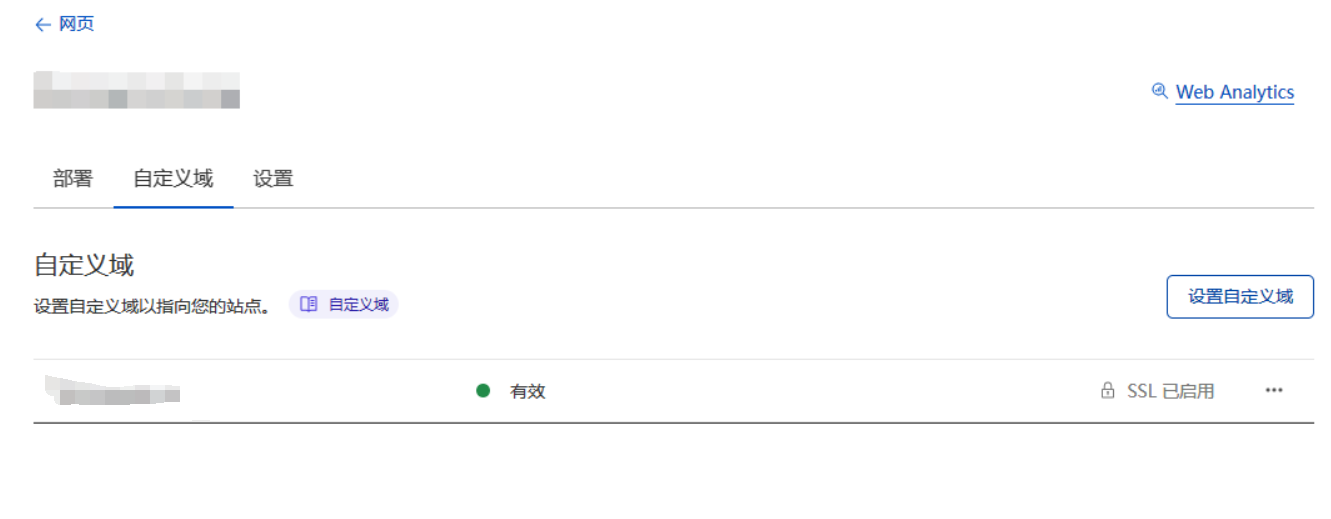
In the custom domain section of Pages, bind a domain name that exists in Cloudflare. For domain names hosted in Cloudflare, DNS records will be automatically modified
The upload endpoint is POST /upload using multipart/form-data, with the file in a field named file:
curl -F "file=@/path/to/image.png" https://your.domain/uploadThe response is a JSON array where src is the file's access path (with short links enabled, this returns the short link directly):
[{ "src": "/file/abc123def456.png" }]If UPLOAD_BASIC_USER and UPLOAD_BASIC_PASS are configured, include Basic Auth with the request:
curl -u uploader:strong-password -F "file=@/path/to/image.png" https://your.domain/uploadThe endpoint works with upload tools that support custom web image hosts, such as PicGo.
Note
When storing to Telegram (the default), uploads are subject to Telegram's Bot API rate limit of roughly 20 messages per minute per channel. Batch uploads that exceed this rate will start failing with Telegram errors — space out large batches, or switch to R2 storage, which has no such limit.
The experimental, self-hosted /api/db/* surface is a Telegram-backed document database, not PostgreSQL, SQL-compatible storage, relational/ACID storage, a secret manager, or an unlimited-performance service. Each create/update/delete appends a complete immutable JSON revision to Telegram; TELEGRAPH_CLOUD_KV stores the repairable document materialization/outbox while also holding the Phase 3 project and HMAC-only key control plane.
Bind TELEGRAPH_CLOUD_KV separately from img_url and configure TG_Bot_Token / TG_Chat_ID. For project-scoped developer access, create a dashboard-authenticated project/key under /api/projects/*, set API_KEY_PEPPER as a strong Cloudflare Secret, and send the resulting one-time-reveal key only as Authorization: Bearer tg_live_…. The server derives the project from the validated key; client project IDs do not authorize access. Existing dashboard session/Basic access remains a separate unscoped legacy mode and still requires both BASIC_USER / BASIC_PASS.
| Method | Route | Purpose |
|---|---|---|
POST |
/api/db/:collection |
Create an arbitrary JSON-object record; the server creates id and version 1. |
GET |
/api/db/:collection |
List a bounded, deterministic id:asc page; supports cursor, limit, and bounded top-level string equality filters. |
GET |
/api/db/:collection/:id |
Read the current visible record. |
PATCH |
/api/db/:collection/:id |
Shallow partial update; requires _expected_version in JSON or If-Match. Every success appends a new immutable revision. |
DELETE |
/api/db/:collection/:id |
Version-preconditioned logical delete/tombstone; normal reads and lists then return no record. |
Use an Idempotency-Key header on every mutation. Within its seven-day receipt window, a same-key retry of the same request returns the original logical result; reuse with a different request returns a conflict. A successful Telegram append followed by an index failure returns 503 {"error":"mutation_pending"} instead of claiming success—retry the exact request with the same key after KV recovers.
Record responses include data, version, created_at, and updated_at, plus an ETag carrying the quoted version. Telegram file_id / message identifiers, journal event identifiers, and internal index pointers never appear in API responses. This is not a secret manager: record JSON is materialized in KV as well as canonically journaled in Telegram, so do not store bot tokens, API-key secrets, passwords, or credentials in it. Documents, collection names, IDs, query pages, filters, cursors, and idempotency keys are bounded; the configurable environment limits are listed above. The detailed API examples, response shapes, mutation sequence, concurrency limitations, tombstones, query restrictions, and recovery behavior are in the Phase 2 database reference.
Phase 3 adds opaque prj_… project boundaries and securely generated tg_live_… developer credentials without changing legacy image hosting or /file/*. Project/key management is intentionally dashboard-only:
| Method | Route | Purpose |
|---|---|---|
POST, GET |
/api/projects |
Create/list projects. |
GET, PATCH, DELETE |
/api/projects/:id |
Read, edit, disable, or logically delete a project. |
POST, GET |
/api/projects/:id/keys |
Create (one-time plaintext reveal) or list safe key metadata. |
DELETE |
/api/projects/:id/keys/:keyId |
Revoke a developer key. |
POST |
/api/projects/:id/keys/:keyId/rotate |
Create a one-time-reveal replacement and revoke the old key. |
POST |
/api/projects/:id/storage/index-repair |
Phase 5.1 operator-only bounded list-index dry-run/apply repair; it never accepts a developer key. |
These routes require the existing dashboard HMAC session or Basic credentials, and fail closed if both BASIC_USER and BASIC_PASS are not configured. A developer key cannot access them. The Phase 5.1 repair route scans one bounded authoritative-manifest page, returns only safe count progress plus an opaque project-bound continuation when needed, and does not expose object/Telegram/KV pointers. Allowed developer-key scopes are db:read, db:write, storage:read, and storage:write; new keys intentionally default only to the two database scopes. Keys must be sent only as Authorization: Bearer tg_live_…; plaintext is never shown again after create/rotate and is never stored in Telegram or KV metadata.
A valid key derives a single project server-side before /api/db/* or /api/storage/* is handled. Same-named collections/records and object bucket/keys are isolated by project-scoped KV and immutable revision metadata. Missing/invalid/revoked keys return 401; a valid key with insufficient scope or an inactive project returns 403; caller-project absence returns 404 without cross-project disclosure. Dashboard Basic/session requests retain the old unscoped Phase 2 database namespace only; no existing data is silently assigned to a project.
Read the detailed Phase 3 projects, credentials, isolation, consistency, and migration reference before issuing keys. It includes the manual export/recreate path for legacy Phase 2 records, KV propagation/revocation limits, local-only mutation guards, and the features deliberately still out of scope.
The experimental /api/storage/:bucket and /api/storage/:bucket/:key surfaces are a project-scoped Telegram-backed generic object engine, not full S3/R2 compatibility, transactional/ACID storage, or an unlimited-performance service. Phase 7 adds one read-only public-delivery surface over this same engine — unlisted direct links at GET/HEAD /p/:projectId/:bucket/*key (anonymous reads; trashing revokes the link; no anonymous writes, listings, or presigned URLs) — see Telegraph Cloud Console (Phase 7). A storage-scoped Bearer key chooses the project; a client project_id hint never chooses it. Raw bytes are uploaded as Telegram documents while TELEGRAPH_CLOUD_KV holds small repairable manifests, staged outboxes, revision indexes, and Phase 5 list indexes; Phase 5.1 repair checkpoints and Phase 6B outer S3 continuation tokens are encrypted self-contained values rather than KV records. Existing /upload and /file/* behavior remains independent and unchanged.
| Method | Route | Scope | Purpose |
|---|---|---|---|
GET |
/api/storage/:bucket |
storage:read |
List current public object metadata with bounded prefix, delimiter, limit, and opaque cursor controls. |
PUT |
/api/storage/:bucket/:key |
storage:write |
Create/replace a bounded raw object. |
GET |
/api/storage/:bucket/:key |
storage:read |
Fetch active object bytes privately. |
HEAD |
/api/storage/:bucket/:key |
storage:read |
Fetch active object metadata without byte download. |
DELETE |
/api/storage/:bucket/:key |
storage:write |
Logical tombstone; it does not promise Telegram physical deletion. |
Use a key created with explicit storage:read/storage:write scopes and Authorization: Bearer tg_live_…. PUT accepts raw bytes, a validated Content-Type, bounded X-Amz-Meta-* custom metadata, optional Idempotency-Key, and standard If-Match / If-None-Match protection. GET/HEAD provide SHA-256 revision ETags, standard read conditions, and valid single byte ranges. GET on the bucket lists only current public metadata in deterministic key order. Responses are private, no-store, use safe attachment/nosniff headers, and never reveal Telegram file/message IDs, paths, or pointers. Default object limit is 10 MiB and the hard compatible ceiling is 20 MiB; the current adapter uses bounded buffering for SHA-256 plus Telegram multipart upload.
Phase 5 adds JSON listing and one valid single HTTP byte range. Listing is eventually consistent and not a whole-bucket scan; mutation stages are at-least-once. Retry a 503 object_mutation_pending with the same idempotency key after recovery, and do not assume physical erasure after DELETE.
Phase 5.1 adds no public storage operation. Its dashboard-only POST /api/projects/:id/storage/index-repair scans bounded pages of authoritative manifests and can dry_run or apply deterministic missing/stale list-index-path repair (including required branch markers). It never reads object bytes or changes a manifest/revision, and its encrypted project-bound checkpoint is safe to resume but not decode client-side.
Phase 6B adds a separate /s3/* XML adapter for ListObjectsV2 and object PUT/GET/HEAD/DELETE. It calls the same object facade, but requires strict header-form AWS4-HMAC-SHA256 using a dashboard-created, one-time-secret tgsk_live_… S3 credential. The verifier fixes region/service to us-east-1/s3, requires signed endpoint host/date/exact payload hash, derives project and s3:read/s3:write scopes only from verified credential metadata, rejects presigned/UNSIGNED-PAYLOAD modes, and uses bounded skew/replay policy. Basic/session identity and tg_live_… Bearer keys cannot authenticate S3 requests; TELEGRAPH_CLOUD_S3_TEST_PROJECT_ID is obsolete. It intentionally does not add presigned URLs, multipart, bucket CRUD, ACL/policies, SDK certification, public delivery, billing, analytics, copy/tagging/checksum/SSE/object-lock APIs, or a dashboard redesign. Read the Phase 6B SigV4 credential/security reference and the historical Phase 6A migration note.
-
Files are uploaded via the Telegram Bot API and stored on Telegram's servers. Uploads are limited by the Bot API (about 50MB per file), but the Bot API file download endpoint (getFile) only supports files up to 20MB, so files larger than 20MB cannot be served back after upload — treat 20MB as the practical per-file limit. Telegram also rate-limits bots to about 20 messages per minute per channel, which caps sustained upload throughput. Both limits disappear when using R2 storage instead
-
Due to the use of Cloudflare's network, image loading speed may not be guaranteed in some regions
-
The free version of Cloudflare Function is limited to 100,000 requests per day (i.e., the total number of uploads or image loads cannot exceed 100,000). If exceeded, you may need to purchase the paid plan of Cloudflare Function
With the image management feature enabled, Cloudflare KV free quotas also apply:
- Cloudflare KV only has a free write quota of 1000 times per day. Each new image loaded will consume this write quota. If this quota is exceeded, the image management backend will not be able to record newly loaded images
- Maximum of 100,000 free read operations per day. Each image load will consume this quota (when there is no cache. If your domain has cache enabled on Cloudflare, this quota will only be consumed when the cache misses). If exceeded, blacklist and whitelist features may fail
- Maximum of 1,000 free delete operations per day. Each image record will consume this quota. If exceeded, you will not be able to delete image records
- Maximum of 1,000 free list operations per day. Each time you open or refresh a management dashboard (/console or /admin-legacy), it will consume this quota. If exceeded, backend image management will be affected
In most cases, the free quota is basically sufficient and can be slightly exceeded. It doesn't stop immediately when exceeded. Each quota is calculated separately. When a certain operation exceeds the free quota, only that operation will be suspended and will not affect other functions. That is, even if my free write quota is used up, my read and write functions are not affected, images can load normally, I just can't see new images in the image management backend.
If your free quota is not enough, you can purchase the paid version of Cloudflare Workers from Cloudflare yourself, starting at $5 per month, pay-as-you-go, without the above quota limitations
In addition, changes made to environment variables will take effect on the next deployment. If you changed Environment Variables to enable or disable a certain function, remember to redeploy.
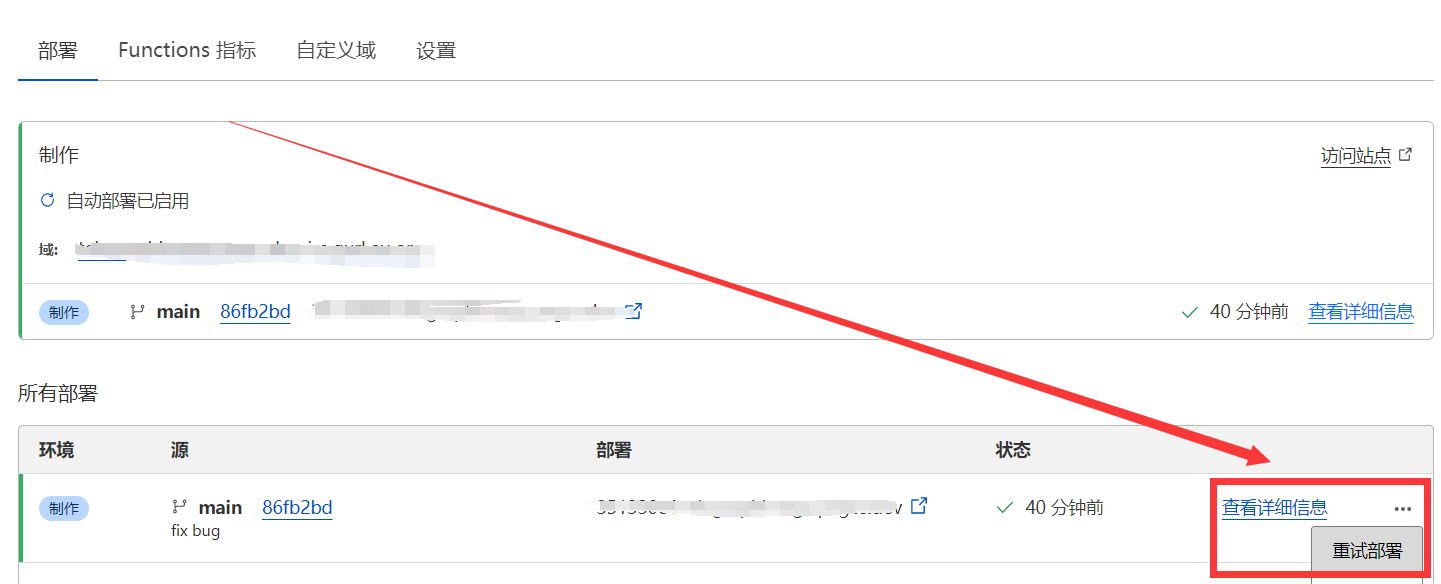
Updating is actually very simple. Just refer to the update log, first go to the Cloudflare Pages backend, set the required environment variables in advance and bind the KV namespace, then go to your previously forked repository on Github and select Sync fork->Update branch. After a while, Cloudflare Pages will detect that your repository has been updated and will automatically deploy the latest code
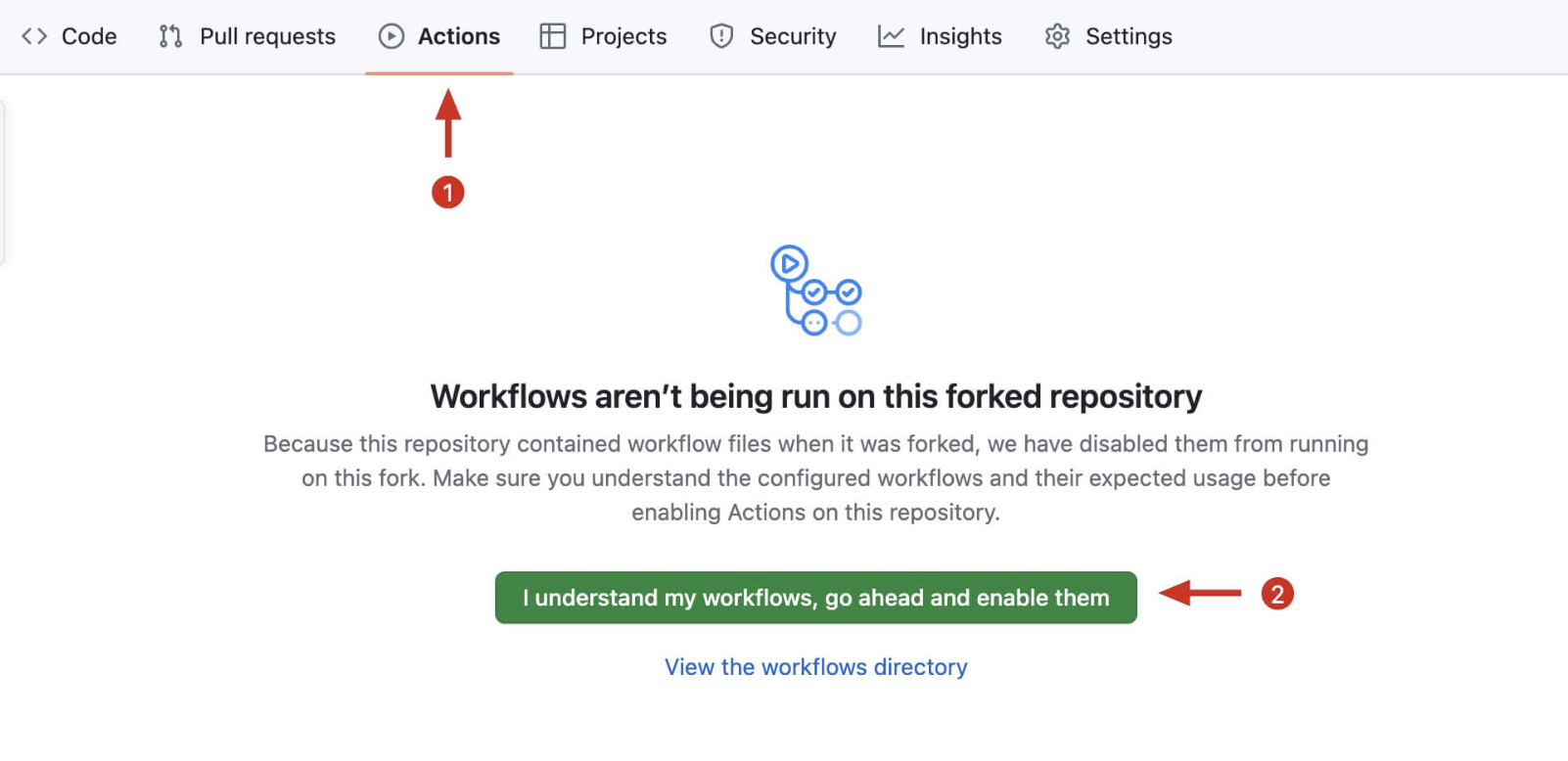
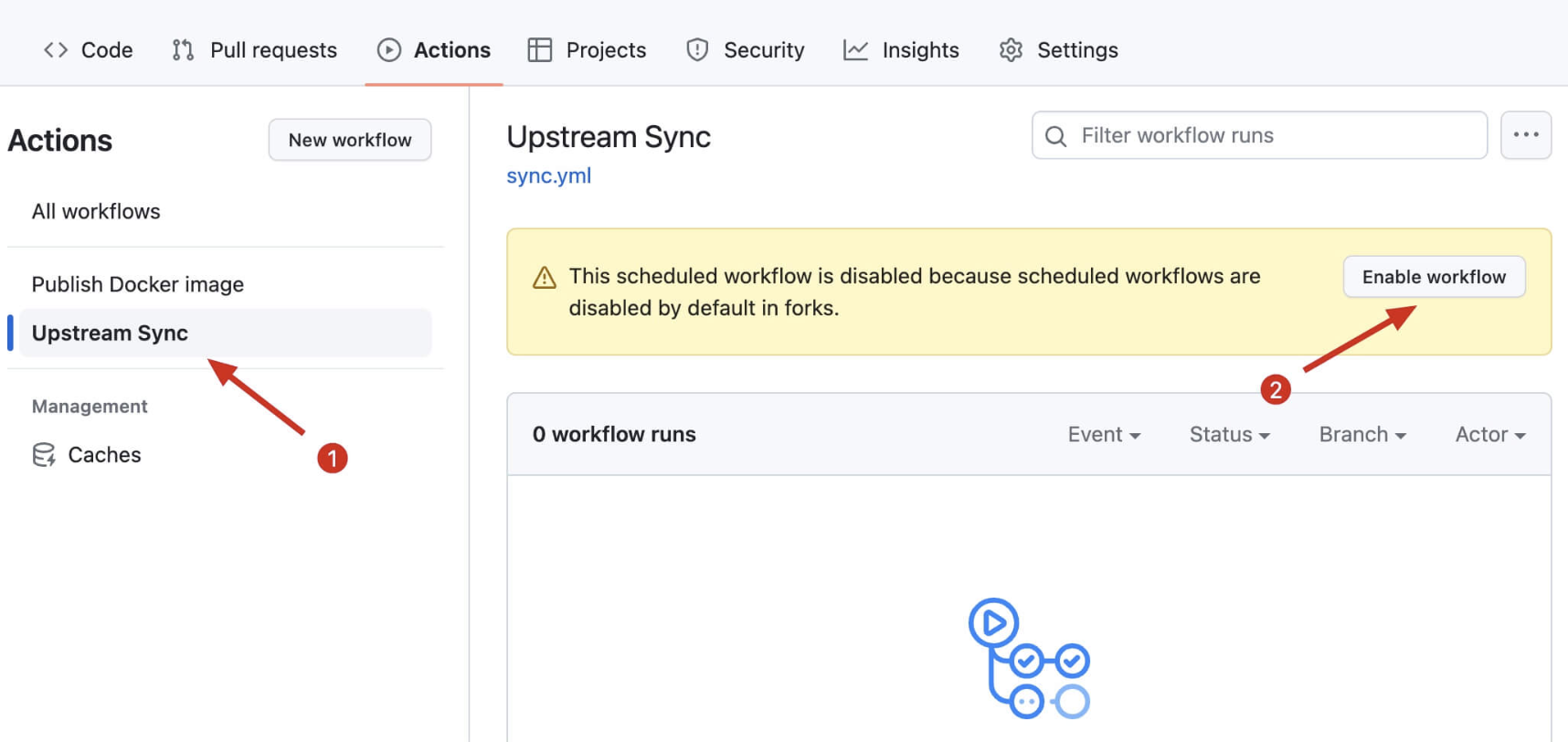
You can also enable automatic syncing: after forking, go to your repository's Actions page, enable Workflows and the Upstream Sync Action to sync with upstream hourly (see the July 2024 section of the Update Log for illustrated instructions).
Deployment fails with "Missing entry-point to Worker script or to assets directory"
This happens when the project is deployed as a Worker instead of a Pages project (e.g. wrangler deploy, or picking "Workers" when connecting the repository). This repository has no Worker entry point — it is a Pages project using file-based Functions. Deploy it via Workers & Pages -> Create -> Pages -> Connect to Git, leave the build command empty, and set the build output directory to /. From the CLI, the equivalent is wrangler pages deploy ., not wrangler deploy.
Images stopped loading / uploads fail after a while
Check the Telegram rate limit (about 20 messages per minute per channel, see Upload API) and the Cloudflare free quotas. Also make sure TG_Bot_Token and TG_Chat_ID are set and the bot is still an administrator of the channel.
Does changing an environment variable take effect immediately?
No — go to Deployments and redeploy once after any change to environment variables or bindings.
npm install
npm start      # start a local dev server (wrangler pages dev on port 8080; dashboard credentials default to admin/123)
npm test       # run the unit tests (mocha) — this is what CI runs
End-to-end tests drive a real browser via Playwright. They are an optional suite, so Playwright is deliberately not a project dependency (otherwise every contributor's npm install would pull a browser download). Install it once before the first run:
npm install --no-save playwright && npx playwright install chromiumThen start a dev server in one terminal and run the suite in another. Prefer start:r2, which points storage at a locally simulated R2 bucket so the whole upload path works without any Telegram credentials:
npm run start:r2   # terminal 1
npm run test:e2e   # terminal 2
The end-to-end suite covers batch upload, drag-and-drop, file retrieval and Content-Type, all four output formats, the setup self-check notice, and the dashboard; screenshots land in test/e2e/output/. Env vars: E2E_BASE_URL (default http://localhost:8080) and E2E_CHROMIUM (path to a Chromium binary, for environments where Playwright cannot download its own).
The dashboards (
/consoleand the legacy/admin-legacy) are dependency-free static pages that share the Material 3 design system with the landing and sign-in pages, so they render with no external CDN dependency. The end-to-end suite signs in through the GUI withBASIC_USER=admin/BASIC_PASS=123fromnpm start; if Chromium is unavailable, it reports that limitation explicitly.
Ideas and code provided by Hostloc @feixiang and @乌拉擦
September 20, 2026 - Workspace modularization and console i18n catalog sync
- Split the cohesive model/persistence clusters out of the 4,175-line
js/workspace.jsmonolith into focusedjs/workspace/modules:constants.js(shared keys and limits),items.js(pure item model helpers and formatters),db.js(the IndexedDB layer for staged items and the local album catalog), andpreview.js(the read-only text/code preview surface, decoupled from workspace state through an injected "still on screen" guard). The entry module keeps orchestration, state, and rendering; public behaviour is unchanged and the full behavioural DOM suite (485 tests) passes. - Synced the cloud console zh catalog with the collection-builder rework: the new empty-state and field-builder messages are translated and three stale keys are removed, so both console i18n guards pass again.
September 13, 2026 - Telegraph Cloud Phase 6C Production Hardening
- Added a minimal public
/api/healthsignal, dashboard-authenticated enum-only/api/projects/diagnostics(including an opt-in no-detail TelegramgetMereachability probe), and fixed-metadata sampled operational tags. No diagnostic returns secrets, binding values, project internals, or Telegram identifiers. - Strengthened application telemetry scrubbing for raw dynamic resource paths, Telegram resource URLs, embedded provider spans, S3 canonical requests/string-to-sign, signatures, payload hashes/bodies, and nested automatic Sentry breadcrumb/context fields. Legacy
/uploadnow uses an opaque safe error for caught provider/runtime detail instead of reflecting/logging it./s3/*retains its deliberately telemetry-free XML middleware boundary. - Added the confirmation-gated
scripts/telegraph-cloud-staged-smoke.cjs, local smoke-utility coverage, privacy tests, and the detailed production-readiness/runbook: Pages Production/Preview audit, honest KV/Telegram recovery limits, edge-control recommendations, compromised-credential revocation, replacement, inactive-project behavior, and disruptiveAPI_KEY_PEPPER/S3-pepper rotation.
September 13, 2026 - Telegraph Cloud Phase 6B S3 SigV4 Credentials
- Replaced the temporary Phase 6A dashboard-Basic/test-project
/s3/*bypass with strict header-formAWS4-HMAC-SHA256verification. The fixedus-east-1/s3policy verifies canonical request URI/query/headers, endpoint host, UTC skew, and exact bounded body hash before the existing protocol adapter/object facade runs. - Added dashboard-only S3 credential create/list/revoke/rotate endpoints backed only by
TELEGRAPH_CLOUD_KV: opaque randomtgsk_live_…access IDs, one-time derived secrets, verifier/fingerprint-only persistence, direct lookup, project/scopes/status/rotation/use metadata, and no plaintext secret/Telegram storage. - Preserved the dedicated XML protocol mapping, bounded list/range/condition behavior, safe errors, redaction, and legacy routes; added adversarial credential/SigV4/project/scope/tamper tests and the detailed Phase 6B SigV4 reference. The old Phase 6A note is historical migration context.
September 13, 2026 - Telegraph Cloud Phase 5.1 Operator Object-Index Repair
- Added the dashboard-authenticated-only
POST /api/projects/:id/storage/index-repairmaintenance route. It rejects developer Bearer keys and scans at most one project/bucket authoritative-manifest page per request. - Added
dry_runand idempotentapplymodes for deterministic missing/stale active index paths and retained tombstone leaves, with safe count-only status/progress and no object bytes, revision changes, Telegram IDs, raw KV keys, or pointers in output. - Added self-contained AES-GCM encrypted project-bound checkpoints (no dry-run KV mutation), bounded batch/input limits, retryable dependency failures, cross-project rejection, and the detailed Phase 5.1 operating reference.
September 13, 2026 - Telegraph Cloud Phase 5 Object Storage Semantics and Listing
- Added authenticated
GET /api/storage/:bucketJSON listing understorage:read, backed by a bounded repairable chunked KV index rather than Telegram ordering or bucket scans. Listings use lexicographickey:ascordering, bounded limits, literal prefix filtering, slash delimiter/common-prefix grouping, and short-lived opaque HMAC-bound cursors. - Added valid single byte-range GET responses (
206, exactContent-Range/Content-Length,Accept-Ranges) and safe416responses, with standard read conditional precedence before any Telegram byte retrieval. GET, HEAD, and LIST now expose consistent safe object metadata while hiding tombstones and all Telegram/KV pointers. - Documented migration, at-least-once repair, eventual-consistency and concurrent-mutation limits; retained Phase 4 immutable revisions, logical tombstones, legacy
/upload//file/*, and the intentional no-S3/SigV4/presigned/multipart/SDK scope.
September 12, 2026 - Telegraph Cloud Phase 4 Project-scoped Object Storage
- Added the Bearer-only
/api/storage/:bucket/:keyPUT/GET/HEAD/DELETE engine with explicitstorage:read/storage:writescopes, project-derived isolation, bounded key/body/MIME/metadata validation, SHA-256 revision ETags, conditional requests, safe private download headers, and no Telegram pointer exposure. - Added a dedicated Telegram object-byte/event adapter plus repairable KV manifests, staged outboxes, immutable revision-index records, and logical tombstones. DELETE intentionally does not claim physical Telegram deletion; legacy
/upload,/file/*, dashboard, Telegram/R2 providers, and public links remain unchanged. - Documented the 10 MiB default / 20 MiB hard limit, KV/Telegram at-least-once consistency limits, recovery retry behavior, and the deliberately deferred S3/SigV4/presigned/multipart/SDK work that Phase 5 continues to scope out.
September 12, 2026 - Telegraph Cloud Phase 3 Projects and Developer API Keys
- Added dashboard-only project/key control-plane APIs backed only by the dedicated
TELEGRAPH_CLOUD_KVnamespace: opaque project IDs, safe lifecycle metadata, cryptographically generated one-timetg_live_…key reveal, keyed-HMAC verification, revoke, and rotation. - Added Bearer-key-to-project database authorization with
db:read/db:writescopes, project-prefixed document KV/index/outbox keys, and non-secret project metadata in immutable Telegram revisions. Existing dashboard/session/Basic database access stays separate in the unscoped legacy namespace; no data is silently migrated. - Added safe 401/403/project-visible 404 boundaries, telemetry defense-in-depth for accidentally interpolated developer keys, documented KV/revocation and local-rate-guard limits, and retained all legacy upload,
/file/*, dashboard, Telegram/R2, and public-link behavior. At this Phase 3 point object/S3 routes were deferred; Phase 4 subsequently adds only the limited generic object engine, while S3 compatibility, billing, analytics, SDKs, and SQL remain out of scope.
September 12, 2026 - Telegraph Cloud Phase 2 Document Database
- Added the owner-only, Telegram-backed
/api/db/*CRUD surface: immutable JSON revision documents, server-generated record IDs, current versions/ETags, tombstones, bounded cursor/equality-filter reads, optimistic concurrency, and idempotency-key retries. - Added the separate
TELEGRAPH_CLOUD_KVmaterialized record/collection/filter/revision/outbox index. Telegram remains canonical for immutable revisions; a Telegram-success/KV-failure returns a retryable pending result rather than a false success. - Kept legacy upload,
/file/*, Telegram/R2 providers, dashboard media management, albums, and public links unchanged. Projects, developer API keys, object/S3 APIs, and database dashboard panels remain future phases.
August 19, 2026 - Telegraph Storage Interface Consolidation
- Reorganized
/as a concise product/about page for this customized fork, with/adminas the single storage workspace and/loginas the focused GUI sign-in. - Unified local staging, explicit sequential Push, Albums, MIME-aware previews and safe public-link output with paginated remote browsing, moderation, metadata actions, bulk operations, tools, and responsive navigation.
- Kept
/file/*, object IDs, provider behavior, upload/auth/API contracts, and non-destructive Album semantics unchanged. Formerindex-nuxt.htmlandindex-md.htmlentry points are loop-free compatibility bridges to/admin.
August 18, 2026 - Material 3 Remote Storage Console & GUI Sign-In
- Rebuilt the admin dashboard as the Material 3 "Remote Storage Console" (
/admin): a concise overview, a remote object browser with grid/list/masonry layouts, search and sorting, paginated load-more, an object-detail side sheet, copy URL in direct/Markdown/BBCode/HTML, rename, like/save, whitelist/blacklist, multi-select bulk actions, broken-link check, a keyboard command palette (⌘K), snackbars/dialogs instead of browseralert()/confirm(), responsive layouts, and full English/Bahasa Indonesia localization. The legacy Vue 2 + Element UI pages (admin-imgtc,admin-waterfall) are removed; their real capabilities were migrated. - Proper GUI sign-in at
/loginwith username/password fields, show/hide password, loading/validation/error states, theme and language support. Sessions use an HMAC-signed HttpOnly, Secure, SameSite cookie (7 days); no credentials or tokens are stored inlocalStorage. New minimal auth endpoints:POST /api/manage/login,POST /api/manage/logout,GET /api/manage/session. HTTP Basic remains accepted as a fallback for scripts/curl but no longer triggers the browser's native credential dialog. OptionalSESSION_SECRETenv var signs sessions (derived fromBASIC_USER/BASIC_PASSwhen unset). No new account system — upload, storage, Telegram/R2, file serving, and public URLs are unchanged. - Shared design foundation (
/css/app.css): Material 3 color tokens, typography, spacing, elevation, motion, and reusable controls used by the landing page, sign-in, and dashboard.
July 19, 2026 - Pluggable Storage & Review, New Homepage, Anti-Hotlinking
- Image review is now pluggable, with a new built-in provider based on Cloudflare Workers AI (bind
AI, no external account needed) — moderatecontent.com has stopped accepting registrations and its provider is kept for legacy keys only; review verdicts are now cached per file, so each file is reviewed at most once (#203/#196/#174/#166/#85/#49) - Storage is now pluggable:
STORAGE_PROVIDER=r2with animg_r2R2 bucket binding stores new uploads in Cloudflare R2, lifting the 20MB serving limit and Telegram rate limits; Telegram remains the default and old files keep loading either way (#181/#118) - Rebuilt the homepage as a dependency-free single file with batch upload, drag & drop, paste-to-upload, per-file progress, and URL/Markdown/BBCode/HTML link copying; the old Nuxt page remains at
/index-nuxt.html(#2/#5/#51/#92/#123/#156/#194) - Site customization via environment variables:
SITE_NAME,SITE_TITLE,SITE_BACKGROUND,HIDE_ADMIN_ENTRY, served to any frontend through the newGET /api/configendpoint (#55/#84/#107/#138/#195) - Anti-hotlinking via the
ALLOWED_REFERERSreferer allowlist, off by default and fully backward compatible (#78/#121) - Documented the Telegram ~20 messages/minute/channel rate limit (#245) and added a FAQ for the "Missing entry-point" deployment error (#267)
July 19, 2026 - Upload Protection, Short Links, and Preview Update
- Added optional Basic Auth protection for the upload endpoint via
UPLOAD_BASIC_USERandUPLOAD_BASIC_PASS, thanks to @ytagent and @lelouch0823 (#278/#279) - Added optional short links: enable with
ENABLE_SHORT_URLSand configure the length withSHORT_URL_LENGTH; uploads then return links like/file/AbC123and the dashboard copy buttons prefer the short link, thanks to @wyksean448 (#226/#305) - Previewable files (images, video, audio, PDF) now open directly in the browser instead of being force-downloaded (#279)
- Fixed incorrect Content-Type on files stored via the Bot API, which prevented images from rendering on GitHub and other strict clients, thanks to @gynamics (#233/#305)
- Fixed the broken rename feature in the dashboard, and refactored core functions with unit test coverage, thanks to @ytagent (#277/#304)
- The dashboard "delete" action is now explicitly record-only and does not remove the source file from Telegram (#279)
August 15, 2025 - Dashboard Loading Performance Update
- The dashboard file list now loads in pages (KV cursor pagination + load more) instead of fetching all records at once (#253)
- Dashboard search now filters by filename prefix on the server (#254)
July 6, 2024 - Backend Management Page Update
-
Support for two new management page views (Grid view and Waterfall view)
- Grid view, thanks to @DJChanahCJD for the submitted code
Supports batch delete/copy links
Supports sorting in reverse chronological order
Supports pagination
- Waterfall view, thanks to @panther125 for the submitted code
- Grid view, thanks to @DJChanahCJD for the submitted code
Supports batch delete/copy links
Supports sorting in reverse chronological order
Supports pagination
-
Added automatic update support
Now forked projects can automatically sync with the upstream repository to automatically install the latest project features, thanks to @bian2022
Steps to enable automatic updates: After you fork the project, due to Github's limitations, you need to manually go to the Actions page of your forked project to enable Workflows, and enable Upstream Sync Action. Once enabled, automatic updates will occur hourly:
If you encounter Upstream Sync execution errors, please manually Sync Fork once!Manually update code
If you want to manually update immediately, you can check Github's documentation to learn how to sync your forked project with upstream code.
You can star/watch this project or follow the author to receive notifications of new feature updates.
-
Added remote telemetry
You can opt out of telemetry by adding the
disable_telemetryenvironment variable
January 18, 2023 - Image Management Feature Update
- Support for image management feature, disabled by default. To enable, after deployment, go to the backend and click
Settings->Functions->KV Namespace Bindings->Edit Bindings->Variable Nameenter:img_urlKV Namespaceselect the KV storage space you created in advance. After enabling, visit http(s)://your-domain/console to open the backend management page | Variable Name | KV Namespace | | ----------- | ----------- | | img_url | Select the KV storage space created in advance |
- The backend management page has a new login verification feature, also disabled by default. To enable, after deployment, go to the backend and click
Settings->Environment Variables->Define variables for production->Edit variablesand add the variables shown in the table below to enable login verification | Variable Name | Value | | ----------- | ----------- | |BASIC_USER| Backend management page login username | |BASIC_PASS| Backend management page login password |
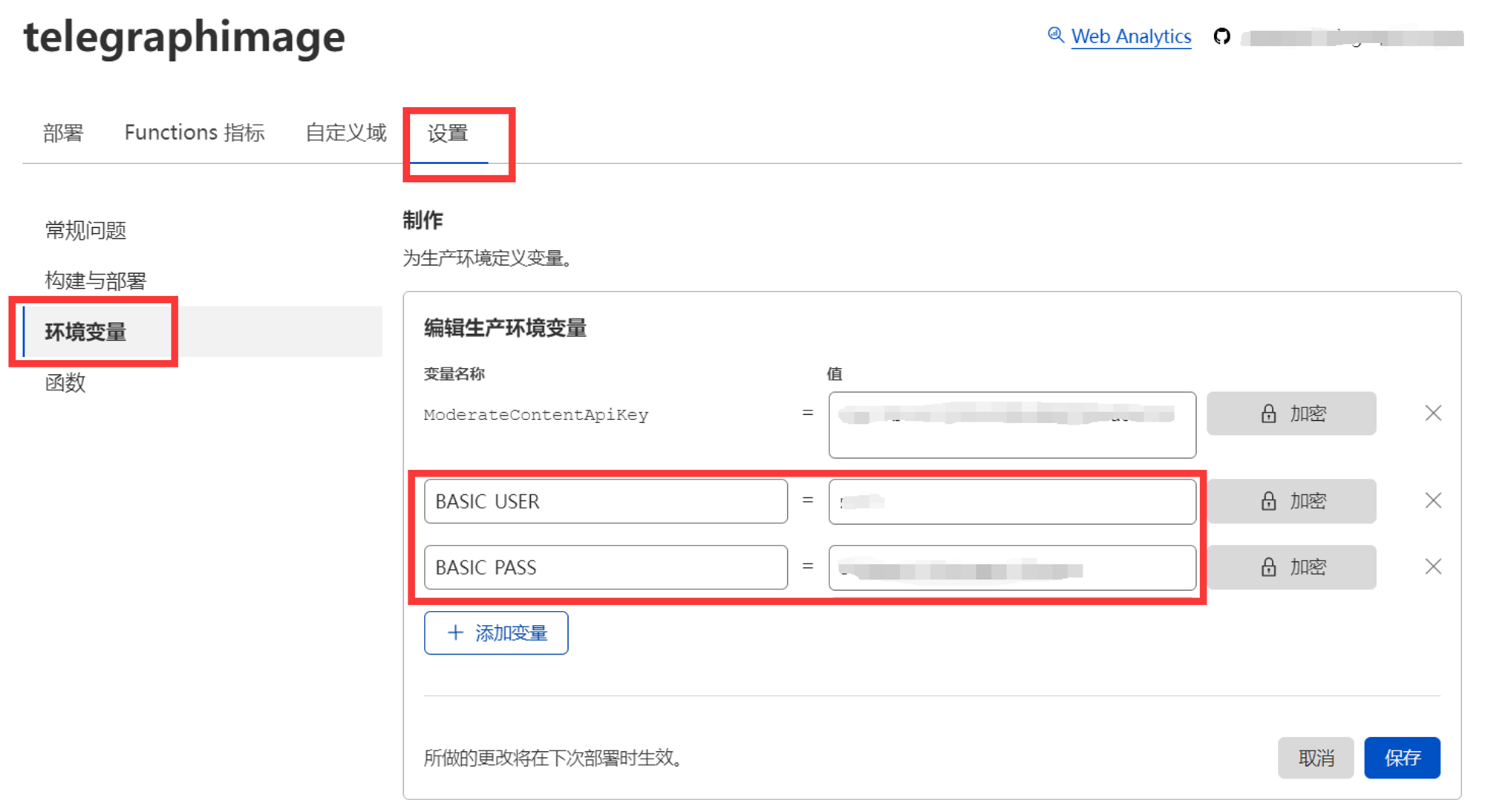
Of course, you can also choose not to set these two values, so that accessing the backend management page will not require verification and will skip the login step directly. This design allows you to use it in combination with Cloudflare Access to achieve email verification code login, Microsoft account login, Github account login, and other functions. It can be integrated with the existing login method on your domain without having to remember another set of backend credentials. For adding Cloudflare Access, please refer to the official documentation. Note that the protected path needs to include /console and /api/manage/* (plus /admin-legacy if you use the legacy workspace)
You can also protect the public upload endpoint separately by setting both UPLOAD_BASIC_USER and UPLOAD_BASIC_PASS. When these two variables are not set, uploads remain public for compatibility with existing deployments.
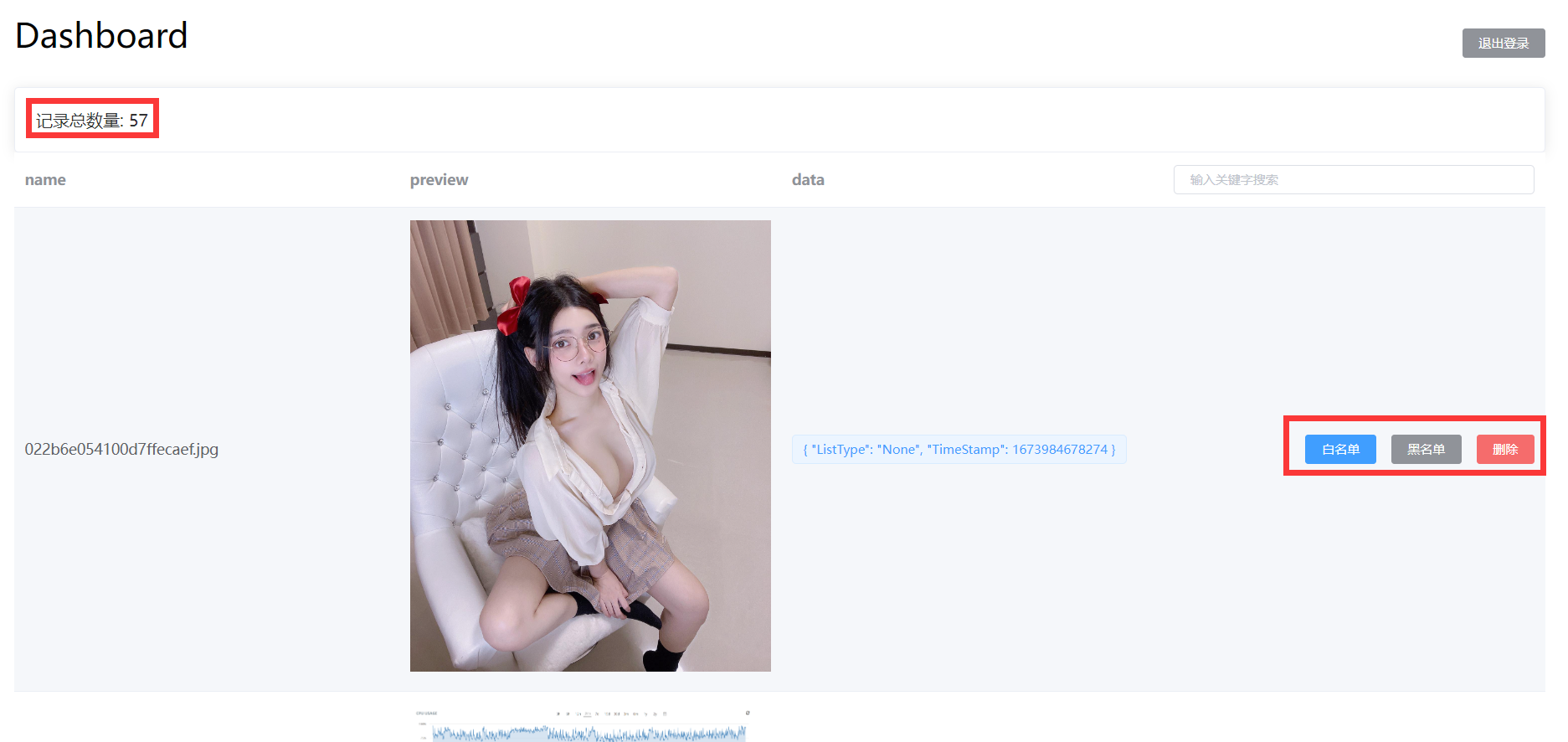
- Added image total count statistics When the image management feature is enabled, you can view the number of images in the record at the top of the backend
- Added image filename search When the image management feature is enabled, you can use the image filename in the backend search box to quickly search and locate the images you need to manage

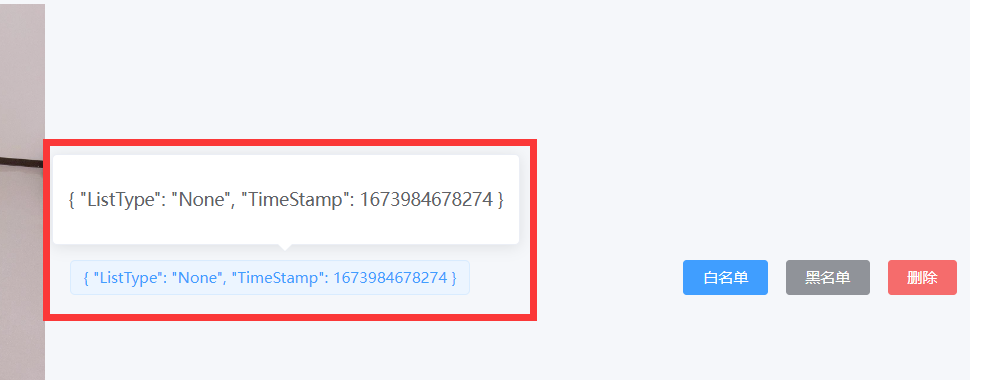
- Added image status display When the image management feature is enabled, you can view the current status of the image in the backend { "ListType": "None", "TimeStamp": 1673984678274 } ListType indicates whether the image is currently in the blacklist or whitelist. None means it's neither in the blacklist nor the whitelist, White means it's in the whitelist, Block means it's in the blacklist. TimeStamp is the timestamp when the image was first loaded. If image review API is enabled, the image review result will also be displayed here, identified by Label
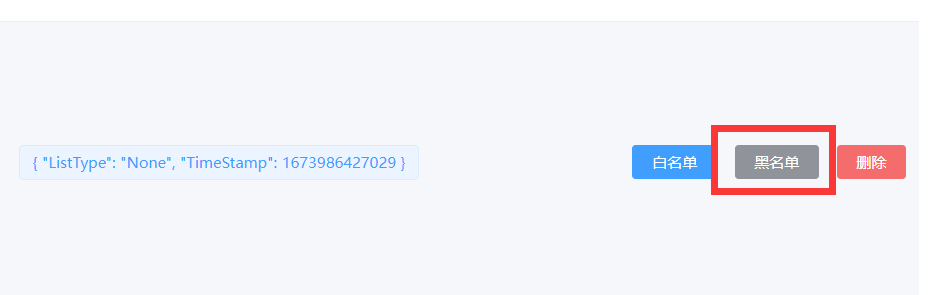
- Added blacklist feature When the image management feature is enabled, you can manually add images to the blacklist in the backend. Images on the blacklist will not load properly
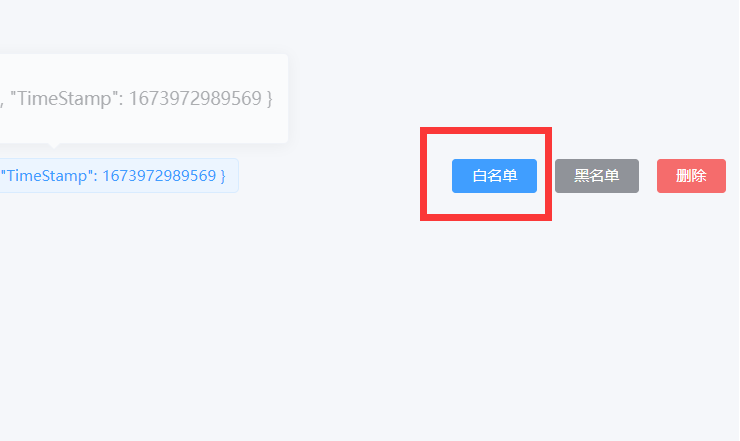
- Added whitelist feature When the image management feature is enabled, you can manually add images to the whitelist in the backend. Images on the whitelist will always load properly, bypassing the image review API results
-
Added record deletion feature When the image management feature is enabled, you can manually delete image records in the backend. This only removes the item from the backend list; it does not delete the original file from Telegraph or Telegram. If the file is uploaded and loaded again later, a record may be created again. To prevent the file from loading, use the blacklist feature mentioned in point 6 above.
-
Added program running mode: Whitelist mode When the image management feature is enabled, in addition to the default mode, this update also adds a new running mode. In this mode, only images added to the whitelist will be loaded. Uploaded images need to be approved before they can be displayed, which prevents inappropriate images from loading to the greatest extent. To enable, please set the environment variable: WhiteList_Mode=="true"
-
Added backend image preview feature When the image management feature is enabled, you can preview images loaded through your domain in the backend. Click on images to zoom in, zoom out, rotate, and perform other operations



This project is tested with BrowserStack.
This project is support by Cloudflare.