
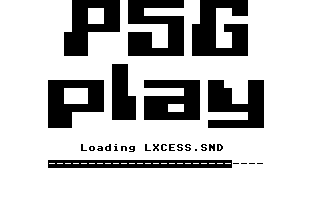
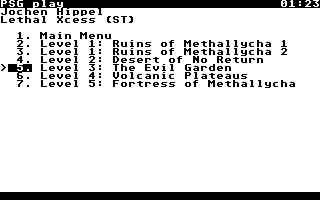
PSG play is a music player and emulator for the Atari ST Programmable Sound Generator (PSG) YM2149 and files in the SNDH archive.
The SNDH archive is a large repository of more than 5,900 SNDH music files by more than 600 composers. Each file often has several tracks, bringing the grand total to more than 11,000 tracks, available for download in a convenient zip.
SNDH music files can be played with PSG play in several ways:
- This repository has a
psgplayprogram which can play SNDH files with a simple command and text interface. It’s intended as a demonstration, for Linux, Mac and BSD operating systems. The main intent is rather to link the PSG play library with other music players, described in the following. - Open Cubic Player is a free software music player, especially for chip music and other formats related to demoscene music.
- Music Player Daemon (MPD) is a free software player server for music in general, with playlists and many other features.
- Cowbell is a web player for Demozoo. Example. Cowbell is also used for the SNDH archive.
- Gentoo Linux has a
media-sound/psgplaypackage. - Arch Linux has a
psgplay-gitpackage.
Github actions
automatically compile and publish archives with PSG play for
the Atari ST,
as well as Linux and the architecture
x86-64, and a
wasm web browser library
for use with Cowbell. These are built with
.github/workflows/compilation.yml.
This repository has Git submodules
so clone it with the --recurse-submodules option, or do
git submodule update --init --recursive.
For Linux and Mac OS, do make psgplay to compile psgplay.
For BSD systems, such as FreeBSD, replace make with gmake. To use
Advanced Linux Sound Architecture
(ALSA) and interactive text mode, do make ALSA=1 psgplay. To use
PortAudio and
interactive text mode, do make PORTAUDIO=1 psgplay.
For Atari ST, do make TARGET_COMPILE=m68k-elf- PSGPLAY.TOS.
For Javascript,
Webassembly, and the
Emscripten compiler, do
make HOST_CC=emcc web. The PSG play library is available with
Cowbell, having a particular
focus on demoscene music.
The BUILD_CC, HOST_AR, HOST_CC, and TARGET_CC with TARGET_LD
Makefile
variables can be configured for various compilation settings.
The BUILD_CFLAGS, HOST_CFLAGS, TARGET_CFLAGS, and TARGET_LDFLAGS
variables are available as well.
Type make install to install everything, by default in ~/.local/usr.
Set prefix to change the directory, for example
make prefix=$HOME/some/place/else install. More specific subtargets than
install are also available, for instance install-lib, install-psgplay,
and so on. Set DESTDIR for
staged installs.
Review the file
INSTALL
for installation instructions.
PSG play options for Linux and Mac OS:
Usage: psgplay [options]... <sndh-file>

General options:

    -h, --help             display this help and exit
    --version              display version and exit
    -v, --verbose          increase verbosity

    -i, --info             display SNDH file info and exit

Play options:

    -o, --output=<file>    write audio output to the file in WAVE format
                           or to an ALSA handle if prefixed with "alsa:".
			   See Notes below on post-processing audio

    --start=<[mm:]ss.ss>   start playing at the given time
    --stop=<[mm:]ss.ss|auto|never>
                           stop playing at the given time, or automatically
                           if the track has a known duration, or never
    --length=<[mm:]ss.ss>  play for the given duration

    -m, --mode=<command|text>
                           command or interactive text mode

    -t, --track=<num>      set track number
    -f, --frequency=<num>  set audio frequency in Hz (default 44100)

    --psg-mix=<empiric|linear>
                           empiric (default) mixes the three PSG channels
                           as measured on Atari ST hardware, having a lofi,
                           crunchy, zesty quality; linear sums the channels
                           to produce a cleaner, somewhat insipid sound. See
                           Notes below on combining filters
    --psg-balance=<A:B:C>  set balance between -1 (left) and +1 (right) for
                           PSG channels A, B and C. For example -0.4:0:+0.4
                           for stereo effect. Default is 0:0:0 for mono. A
                           linear mix of PSG channels is forced. See Notes
                           below on combining filters
    --psg-volume=<A:B:C>   set volume between 0 (off) and +1 (max) for
                           PSG channels A, B and C. For example 0:0:1 to
                           play channel C only. Default is 1:1:1. See Notes
                           below on combining filters

Disassembly options:

    --disassemble          disassemble SNDH file and exit; may be combined
                           with the --trace=cpu option for self-modifying code,
                           disassembly of interrupt code, etc.
    --disassemble-header   disassemble SNDH file header and exit
    --disassemble-address  display address column in disassembly
    --remake-header        remake SNDH file header in disassembly

Trace options:

    --trace=<device>,...   trace device operations of SNDH file and exit:
                           all cpu reg

Notes:

PSG play does not yet completely emulate the Atari STE LMC1992 tone (bass and
treble) hardware.

Multiple filters using the --psg-mix, --psg-balance, or --psg-volume options
cannot be combined. The last option given replaces any previous ones.

PSG play audio has a DC offset for optimum audio quality, because YM2149 chip
music hardware, made in the 1970s, fundamentally generates a unipolar signal
which is converted into a bipolar signal. It may be necessary to remove this
DC offset with a 2-5 Hz high-pass filter before post-processing.
PSG play defaults to interactive text mode if it is compiled with ALSA or PortAudio for Linux or Mac OS, or is compiled for Atari ST. If no audio output support is present, PSG play will default to WAVE format output.
For Linux and Mac OS, TTY mode and ECMA-48 are used, including support for job control such as process suspension.
For Atari ST, text mode and VT52 are used. See issues #5 and #6 for ideas about additional serial port and GEM user interfaces.
The currently playing tune is indicated in
reverse video.
A cursor is shown with >. Keyboard controls:
escapeorqto quit;sto stop;porspacebarto pause;1,2, ...,9to play tunes 1, 2, ..., 9;-to decrease volume;+to increase volume;<to play the previous tune;>to play the next tune;korup arrowto move the cursor up;jordown arrowto move the cursor down;returnto play the tune at the cursor.
PSG play runs in command mode if it is not compiled with ALSA for Linux,
or with PortAudio for Linux or Mac OS, or the options -o, --output, --start,
--stop, --length, --disassemble or --trace are given. Atari ST
does not support command mode.
Most modern processors made during the last 20 years or so will easily play in real-time, often using less than 10 % of processor resources. However, they may struggle if other processes demand a lot of the system at the same time.
On Linux, increasing the size of the ALSA buffer is the most effective
method to improve performance. Interactive text mode uses a very small
buffer, 0.1 seconds, to remain responsive when using the keyboard.
Command mode uses the default ALSA buffer size of the system, which may
(or may not) be significantly larger. Since command mode is noninteractive,
audio latency is not a problem when the size of the buffer increases. One
approach is to double the duration of the system ALSA buffer until
performance problems disappear. Starting with, say, 5 seconds,
then 10 seconds, then 20 seconds, and so on. Try to configure the ALSA
parameter buffer_time (set in microseconds).
The nice command can also
be used to improve scheduling priority for PSG play.
PSG play is compiled into the static library
lib/psgplay/libpsgplay.a and the shared library lib/psgplay/libpsgplay.so. The
application programming interface
(API) is documented in
include/psgplay/psgplay.h,
include/psgplay/stereo.h,
include/psgplay/sndh.h.
The library also supplies an unaltered 250.332 kHz digital form for custom
analogue filters and mixers. This digital interface is documented in
include/psgplay/digital.h.
There are two simple examples on how to use the PSG play library:
lib/example/example-info.cis an example on how to display SNDH tags;lib/example/example-play.cis an example on how to play an SNDH file in 44.1 kHz stereo.
PSG play can disassemble SNDH files. This can be used to debug, update
metadata and reassemble SNDH files. The --disassemble option can be used
for code inspection. The --disassemble-header option is the safest
choice when updating SNDH metadata, because most of the code is retained
with dc.b data bytes for exact reassembly.
The disassembly is guided by instruction reachability from the init,
play, and exit entry points, to separate executable instructions from
data. To deal with interrupt code and
self-modifying code,
use both the --disassemble and the --trace=cpu options. The disassembly
will then print what the processor actually executed in memory, which may
have been modified by the program itself, rather than the contents of the
SNDH file. The tracing execution length can be set with the --length
option.
The --remake-header option can be used to repair broken SNDH metadata such
as missing tags, excessive whitespace, etc. It can also be used to update or
add new metadata, by editing the produced assembly source code in an editor.
Excerpt of disassembly with the --disassemble option:
init:
	bra.w	_init				; init
exit:
	bra.w	_exit				; exit
play:
	bra.w	_play				; play
sndh:
	dc.b	$53,$4e,$44,$48,$43,$4f,$4d,$4d	; SNDHCOMM
	dc.b	$4d,$61,$64,$20,$4d,$61,$78,$00	; Mad Max.
	dc.b	$52,$49,$50,$50,$47,$72,$61,$7a	; RIPPGraz
	dc.b	$65,$79,$20,$2f,$20,$50,$48,$46	; ey / PHF
	dc.b	$00,$43,$4f,$4e,$56,$47,$72,$61	; .CONVGra
	dc.b	$7a,$65,$79,$20,$2f,$20,$50,$48	; zey / PH
	dc.b	$46,$00,$54,$49,$54,$4c,$57,$61	; F.TITLWa
	dc.b	$72,$70,$00,$23,$23,$30,$38,$00	; rp.##08.
	dc.b	$54,$43,$35,$30,$00,$00        	; TC50..
_init:
	lea	_9a(pc),a0			; init
	lea	_9e(pc),a1			; init
	move.l	a0,(a1)				; init
	subi.w	#1,d0				; init
	lea	_b4a(pc),a0			; init
	lea	_ac(pc),a1			; init
	move.l	d0,d1				; init
	asl.w	#3,d1				; init
	movea.l	(a1,d1.w),a2			; init
	addq.w	#6,d1				; init
	move.w	(a1,d1.w),d0			; init
	lea	_b4a(pc),a0			; init
	adda.l	a2,a0				; init
	lea	_ec(pc),a1			; init
	move.l	a0,56(a1)			; init
	move.l	a0,108(a1)			; init
	clr.w	2104(a1)			; init
	bsr.w	_ec				; init
	lea	_f4(pc),a0			; init
	lea	_9e(pc),a1			; init
	move.l	a0,(a1)				; init
_9a:
	rts					; init
_exit:
	rts					; exit
_9e:
	dc.b	$00,$00,$00,$00
_play:
	movea.l	_9e(pc),a0			; play
	jsr	(a0)				; play
	rts					; play
	...
Disassembly makes it possible to supply bug fixes and metadata updates in source patch form, for quick and easy review, application and SNDH file reassembly.
Various technical aspects such as pitch, tempo, etc. can be tested and
verified with quality metrics and audio graphs. The tests are SNDH files
compiled from C, so an m68k-elf cross-compiler is required:
make -j TARGET_COMPILE=m68k-elf- testcompiles all tests.make -j TARGET_COMPILE=m68k-elf- verifycompiles and verifies all tests.make -j TARGET_COMPILE=m68k-elf- reportcompiles and reports quality metrics for all tests.
More specific tests can be compiled, verified and reported. For example
verify-psgpitch to verify all psgpitch tests, or
verify-psgpitch-3 to verify only the third test, and so on.
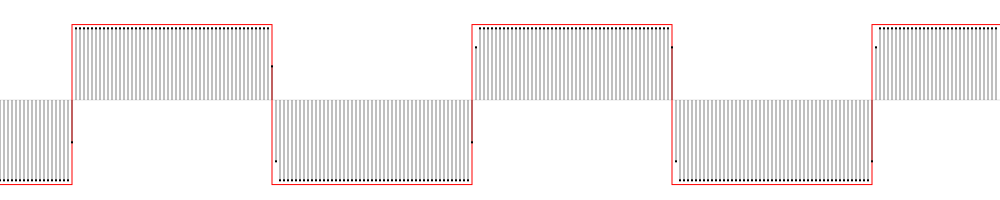
Making audio graph and report files:
make -j TARGET_COMPILE=m68k-elf- test/psgpitch-1.svgcompiles an SVG graph file.make -j TARGET_COMPILE=m68k-elf- test/psgpitch-1.pngcompiles a PNG graph file.make -j TARGET_COMPILE=m68k-elf- test/psgpitch-1.reportcompiles a report file.
Example report:
$ make -j TARGET_COMPILE=m68k-elf- report-psgpitch-2
path test/psgpitch-2.wave
name psgpitch
index 2
title PSG square wave C1 double low C 33 Hz
sample count 2686419 samples
sample duration 60.9 s
sample frequency 44100 Hz
tone clock 8010613 / 4 / 16 Hz
tone period 3793 cycles
wave reference frequency 32.999164 Hz
wave period 1336.398010 samples
wave frequency 32.999151 Hz
wave phase 42.000000 samples
wave zero crossing count 4021
wave zero crossing deviation max 0.910448 samples
wave error total count 1.022 samples
wave error total time 2.317e-05 s
wave error absolute frequency -0.000013 Hz
wave error relative frequency 3.80e-07
wave error relative tolerance 7.44e-07
Example graph:
Set the PSGPLAY_TEST Makefile option to run the test suite with a command
other than psgplay, for example a command using Hatari
instead. Note that the first and last seconds are automatically cut from input
WAVE files during testing, to avoid artifacts due to audio fading, etc.
Review the file
INSTALL
for test and verification instructions.
The SNDH file format is an Atari ST machine code executable form of music. A substantial part of Atari ST hardware must be emulated to play such files using other kinds of computers. The five most complex parts emulated in software by PSG play are:
- the Motorola 68000
processor, via the Musashi library
in
lib/m68k; - the Programmable Sound Generator
(PSG) YM2149
in
lib/cf2149/module/cf2149.c; - the MC68901
multifunction peripheral (MFP) timer and interrupt controller in
lib/cf68901/module/cf68901.c; - the DMA sound of the
Atari STE in
lib/cf300588/module/cf300588-sound.c; - the LMC1992 mixer of the Atari STE
in
lib/atari/mixer.c.
The digital emulation is currently fairly accurate, aiming to be within the variation of the compatible models of original Atari hardware. The analogue emulation is currently simpler, aiming to be accurate but also avoid unwanted artifacts such as the high level of noise produced with original Atari hardware.
The YM2149 PSG signal is unipolar, and has to be transformed to a bipolar signal for mixing with stereo samples. To avoid sharp and audible noise when starting and stopping playback, stereo samples fade in and out with a 10 ms logistic sigmoid at start and stop.
As described in the issue #9 the LMC1992 for tone control specific to Atari STE is not yet fully emulated by PSG play.