TUMSearch is an interactive web application that crawls a website, constructs its internal link graph, computes PageRank across all discovered pages, and visualizes the network with an interactive force-directed graph. It was built during the TUM Hackathon by Team Bandersnatchers.
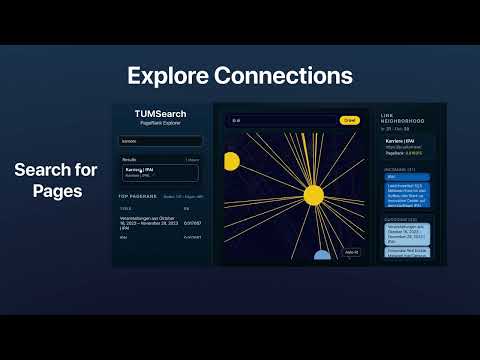
- Crawls the
cit.tum.dedomain (subdomains allowed) with polite delays - Extracts internal hyperlinks and detects page titles
- Filters non-HTML assets (PDFs, images, binaries, etc.)
- Builds a directed hyperlink graph
- Computes PageRank scores server-side (Python) and returns node scores to the UI
- Node size/color reflect PageRank score (blue → yellow)
- Hover to preview; click to explore incoming/outgoing links
- Smooth force-directed layout powered by
react-force-graph-2d
- Search discovered pages by title or URL
- Jump directly to nodes in the visualization
- Frontend: React,
react-force-graph-2d, custom CSS - Backend: Node.js, Express; spawns the Python crawler
- Crawler: Python 3,
requests,beautifulsoup4
- Frontend (
src/): React app with graph view, keyword search, and link neighborhood panel. It consumes PageRank-scored nodes/links directly from the backend response. - Backend (
server.js): Express API on port5001exposing/api/crawl, which shells out to the Python crawler insrc/search.py. - Crawler (
src/search.py): Domain-scoped crawler forcit.tum.dethat returns titles, adjacency, PageRank, and a force-graph-friendlynodes/linkspayload. A standalone PageRank helper exists atcrawler/pagerank_calc.py.
project/
├── server.js              # Node backend API
├── crawler/
│   └── pagerank_calc.py   # Standalone PageRank helper (optional/offline)
├── src/
│   ├── search.py          # Python crawler (cit.tum.de), emits nodes/links with PageRank
│   ├── components/        # Sidebar, GraphCard, Controls, Neighborhood
│   ├── hooks/
│   ├── App.js / App.css
│   └── graphUtils.js      # Legacy helpers (not used for PageRank in the UI)
├── public/
└── package.json
npm installpip install requests beautifulsoup4node server.jsBackend runs at http://localhost:5001.
npm startFrontend runs at http://localhost:3000.
Optional: use a virtualenv for Python
python3 -m venv .venv
source .venv/bin/activate
pip install aiohttp beautifulsoup4- Open
http://localhost:3000. - Enter a URL in the
cit.tum.dedomain (e.g.,https://www.cit.tum.de) and click Crawl. - After crawling:
- Graph appears in the center.
- Sidebar shows top PageRank pages.
- Right panel shows incoming/outgoing links.
Interactions: drag to move, scroll to zoom, hover for PageRank/title, click to view link neighborhood.
GET http://localhost:5001/api/crawl?url=https://www.cit.tum.de
Example response:
{
  "graph": { "https://www.cit.tum.de": ["https://www.cit.tum.de/page"] },
  "titles": { "https://www.cit.tum.de": "Department of Computer Science" },
  "nodes": [
    {
      "id": "https://www.cit.tum.de",
      "title": "Department of Computer Science",
      "pagerank": 0.12
    }
  ],
  "links": [
    { "source": "https://www.cit.tum.de", "target": "https://www.cit.tum.de/page" }
  ],
  "crawl_info": {
    "start_url": "https://www.cit.tum.de",
    "domain": "www.cit.tum.de",
    "max_pages": 30,
    "pages_crawled": 12,
    "delay": 0.0,
    "total_time": 2.4
  }
}
Defaults (max pages, delay) live in src/search.py.
- Normalizes URLs and accepts subdomains (
*.tum.de) - Ignores PDFs, images, videos, etc.; checks HTML via
Content-Type - Handles redirects/bot-detection pages gracefully
- Uses concurrent workers for speed
- Returns JSON with
graph,titles, andcrawl_info
Manual test:
python3 src/search.py https://www.cit.tum.de --max-pages 30 --delay 0.2Standalone PageRank helper:
python3 crawler/pagerank_calc.py input_graph.json output_pr.json- Crawler failed to start: Set
PYTHONto your interpreter (export PYTHON=pythonon mac/Linux,set PYTHON=pythonon Windows). - Graph is empty: Backend not running, invalid URL, or domain blocks bots.
- Windows SSL issues: Try
pip install certifior test another site.
MIT License.
Bandersnatchers — TUM Hackathon Project