
Spline Path Control is a simple tool designed to make it easy to create motion controls. It allows you to create and animate shapes that follow splines, and then export the result as a .webm video file.
This project was created to simplify the process of generating control videos for tools like VACE. Use it to control the motion of anything (camera movement, objects, humans etc) all without extra prompting.
Use it here for free: https://whatdreamscost.github.io/Spline-Path-Control/
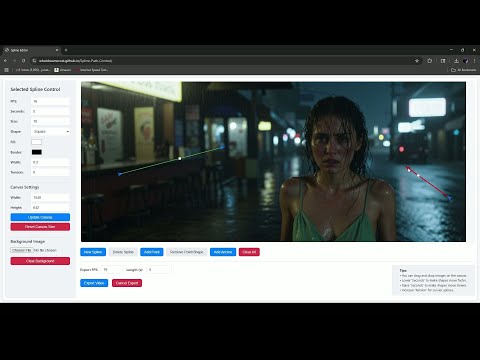
- Multi-Spline Editing: Create multiple, independent spline paths
- Easy To Use Controls: Quickly edit splines and points
- Full Control of Splines and Shapes:
- Start Frame: Set a delay before a spline's animation begins.
- Duration: Control the speed of the shape along its path.
- Easing: Apply
Linear,Ease-in,Ease-out, andEase-in-outfunctions for smooth acceleration and deceleration. - Tension: Adjust the "curviness" of the spline path.
- Shape Customization: Change the shape (circle, square, triangle), size, fill color, and border.
- Reference Images: Drag and drop or upload a background image to trace paths over an existing image.
- WebM Export: Export your animation with a white background, perfect for use as a control video in VACE.
- 6/18/25:
- Added 'Clone' Button, you can now clone any object copying it's properties and shape
- Added 'Play Once' and a 'Loop Preview' toggle. You can now set the preview to either play once or to loop continuously.
- Added ability to drag and move entire splines. You can now click and drag entire splines to easily move them.
- Added extra control to the size. You can now set the X and Y size of any shape.
- Made it easier to move anchors. (You can now click anywhere on an anchor to move it instead of just then center)
- Changed Default Canvas Size
- Fixed Reset Canvas Size Button
- Added offset to newly created anchors to prevent overlapping.

If anyone has features they want added let me know!
-
6/17/25:
- Fixed splines looping in exported video. Now the animation will only play once in the exported video.
- Made the export UI prettier 😎
-
6/17/25:
- Added Start Frame control to delay the beginning of a spline's animation.
- Added Easing Functions (Linear, Ease-in, Ease-out, Ease-in-out) for smoother animations.
- Fixed a CSS alignment issue in the control panel for a cleaner UI.
Here are just a few examples of what you can do with a simple control path:
AnimateDiff_00218.mp4
Example: Controlling the camera to rotate around a scene
AnimateDiff_00243.mp4
Example: Controlling the pose of a character
AnimateDiff_00376.mp4
Example: Using paths to control the movement of the dragon and person
AnimateDiff_00232.mp4
Example: Controlling the camera to push in
Simply plug the webm into the control_video or control_images VACE input using any load video node. There are example workflows below.
Download Workflows Here: https://github.com/WhatDreamsCost/Spline-Path-Control/tree/main/example_workflows
I2V VACE Control Workflow

(Coming Soon)
- Author: WhatDreamsCost
- Framework: Built with p5.js.
- Additional Info: I used DeepSeek and Google Gemini to make both this project and even this README file.