






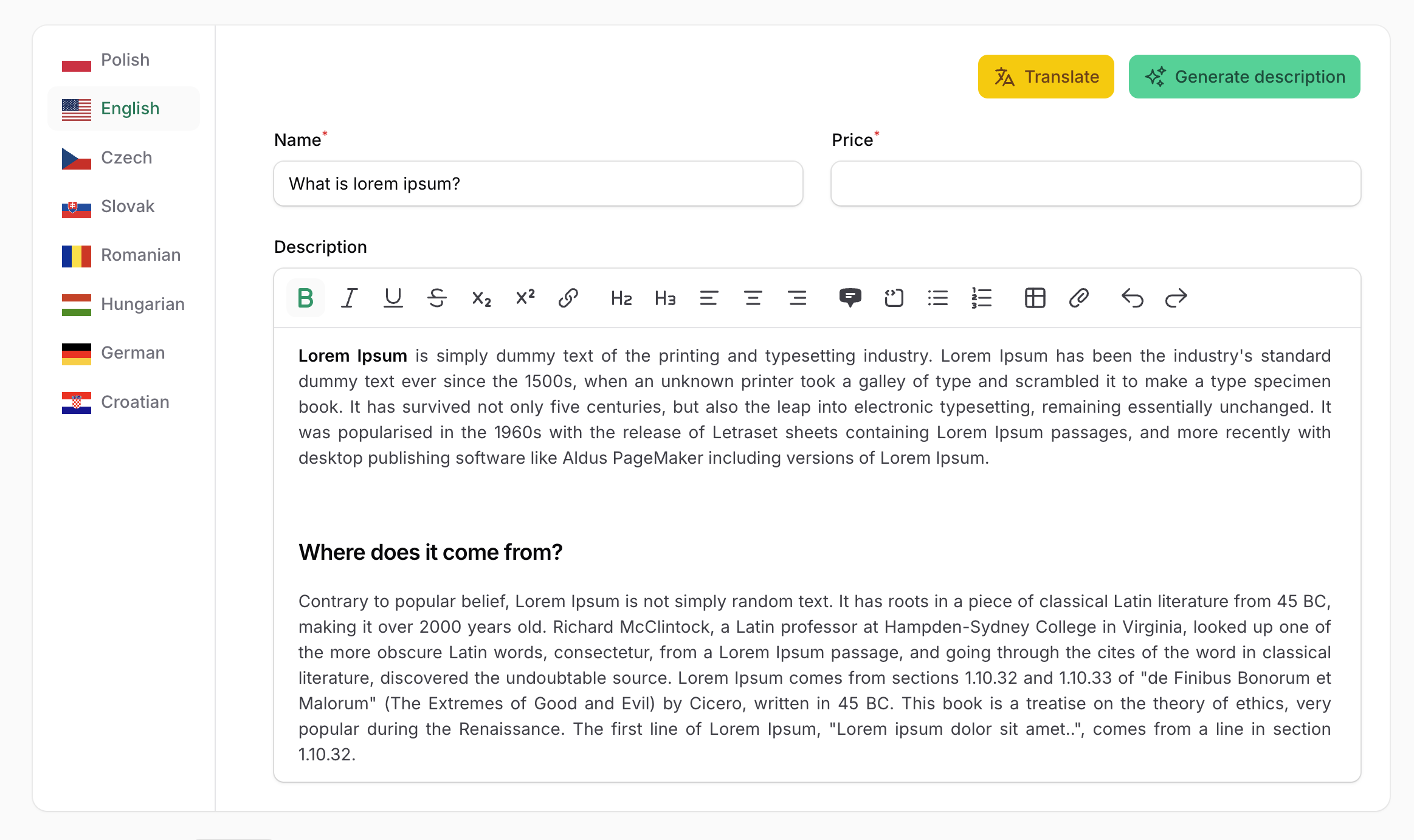
Filament Translatable is a flexible package that provides a complete solution for managing multilingual content in Filament admin panels. It allows you to easily create translatable form fields with an intuitive tabbed interface, supporting multiple locales and translation packages.
use Filament\Forms\Components\TextInput;

TextInput::make('name')
->translatable()- Multiple translation backends — supports both spatie/laravel-translatable and astrotomic/laravel-translatable
- Two usage modes — use the quick
translatable()macro on any field, or the fullTranslationscomponent for advanced scenarios - Locale tabs with flags — display translations in horizontal or vertical tabs with optional country flag icons
- Flexible locale configuration — define locales globally or per-component, with custom labels
- Required locale validation — mark fields as required for specific locales or only for the default locale
- Field decoration per locale — customize field appearance (prefix, suffix, etc.) for each language
- Custom actions per tab — add custom Filament actions to each locale tab with access to the current locale
- Include or exclude fields from translation — selectively control which fields are translated
- Prefix/suffix locale labels — optionally add locale indicators to field labels
| Package | Versions |
|---|---|
| PHP | 8.3 – 8.5 |
| Laravel | 12, 13 |
| Filament | 4, 5 |
Translations are stored by spatie/laravel-translatable (default) or astrotomic/laravel-translatable — install the one you use.
| Filament Version | Filament Translatable Version |
|---|---|
| 4.x | 5.x (current), 4.x (maintenance) |
| 5.x | 5.x (current), 4.x (maintenance) |
Filament 3 is not supported by any version of this package.
You can install the package via composer:
composer require happenv-com/filament-translatablePublish the assets:
php artisan filament:assetsOptionally, register the plugin in your panel provider to configure the package per panel (see Where settings come from):
use Happenv\FilamentTranslatable\FilamentTranslatablePlugin;

public function panel(Panel $panel): Panel
{
    return $panel
        // ...
        ->plugin(FilamentTranslatablePlugin::make());
}The Spatie package is the default translation backend. Follow the instructions in the Spatie documentation to properly configure your models.
The Astrotomic package is an alternative translation backend.
Follow the Astrotomic documentation to configure your models using the original Astrotomic\Translatable\Translatable trait — no custom trait is needed. The component loads each locale's value from the record itself and saves it using Astrotomic's title:en attribute format.
When using the Astrotomic package, configure the plugin to use Astrotomic mode:
use Happenv\FilamentTranslatable\Enums\TranslationMode;

FilamentTranslatablePlugin::make()
    ->translationMode(TranslationMode::Astrotomic)
You can also configure translationMode per component:
 Translations::make('translations')
    ->translationMode(TranslationMode::Astrotomic)
Or per field (after translatable() you configure the Translations component):
TextInput::make('name')
    ->translatable()
    ->translationMode(TranslationMode::Astrotomic)
translationMode() accepts TranslationMode::Spatie, TranslationMode::Astrotomic or your own implementation of Happenv\FilamentTranslatable\Drivers\TranslationDriver.
The plugin is optional — the Translations component also works in plain Livewire components and in panels without the plugin. Settings are resolved from weakest to strongest:
- Package defaults:
app.fallback_localeas the only locale and the default locale, Spatie mode, locale names shown, flags hidden,24pxflags. - The plugin registered on the current panel.
Translations::configureUsing(), e.g. in a service provider:
use Happenv\FilamentTranslatable\Forms\Component\Translations;

Translations::configureUsing(fn (Translations $translations) => $translations
    ->locales(['en' => 'English', 'pl' => 'Polski'])
->defaultLocale('en'));- Methods called on the component instance.
Every setting accepts a value or a Closure.
To set up the locales that can be used to translate content, pass an array of locales to the locales() plugin method:
FilamentTranslatablePlugin::make()
     ->locales(['en', 'pl', 'fr']),
You can set locale labels using key => value array:
FilamentTranslatablePlugin::make()
    ->locales([
        'pl' => __('Polish'),
        'en' => __('English')
    ])
Also, you can pass a Closure:
FilamentTranslatablePlugin::make()
->locales(fn () => Language::pluck('code', 'name'))You can set the default locale using the defaultLocale() method:
FilamentTranslatablePlugin::make()
     ->defaultLocale('pl'),
Otherwise, the app.fallback_locale config value will be used.
You can enable or disable flags in locale labels (disabled by default):
FilamentTranslatablePlugin::make()
->displayFlagsInLocaleLabels(true)You can set the flag width using:
FilamentTranslatablePlugin::make()
->flagWidth('24px')You can enable or disable locale names in locale labels (enabled by default):
FilamentTranslatablePlugin::make()
->displayNamesInLocaleLabels(false)To publish the views, run:
php artisan vendor:publish --tag="filament-translatable-views"The translatable() macro allows you to quickly convert any form field into a multilingual field that supports translations for each configured locale.
use Filament\Forms\Components\TextInput;

TextInput::make('name')
    ->translatable()
You can make a field required only for specific locales. In this example, the "name" field will only be required for the English language:
use Filament\Forms\Components\TextInput;

TextInput::make('name')
    ->requiredLocale('en')
->translatable()You can make a field required only for the default locale. The default locale is determined by the defaultLocale() setting or the app.fallback_locale config value:
use Filament\Forms\Components\TextInput;

TextInput::make('name')
    ->requiredDefaultLocale()
    ->translatable()
Both requiredLocale() and requiredDefaultLocale() accept a condition as a boolean or a Closure:
TextInput::make('name')
    ->requiredDefaultLocale(fn (): bool => auth()->user()->isEditor())
->translatable()You can customize the appearance of fields for specific locales using the decorateTranslationField() method. This is useful for adding locale-specific prefixes, suffixes, or other modifications. The decorator can also receive the locale code as $locale:
use Filament\Forms\Components\TextInput;

TextInput::make('price')
    ->decorateTranslationField('pl', fn (TextInput $field) => $field->suffix('PLN'))
    ->decorateTranslationField('en', fn (TextInput $field, string $locale) => $field->prefix('USD'))
->translatable()Use named arguments to set the locales or configure the generated Translations component:
use Filament\Forms\Components\TextInput;
use Happenv\FilamentTranslatable\Forms\Component\Translations;

TextInput::make('title')->translatable(
    locales: ['en', 'pl'],
    configureUsing: fn (Translations $translations) => $translations->vertical(),
);
When locales is omitted, the locales configured by the plugin or configureUsing() are used.
After using the translatable() method, the context of the field is switched to the Translations component, so you can use any method that belongs to the component.
use Filament\Forms\Components\TextInput;

TextInput::make('price')
    ->requiredDefaultLocale()
    ->translatable() // Here context is switched from TextInput to Translations component
    ->vertical()
    ->displayFlagsInLocaleLabels(true)
    ->displayNamesInLocaleLabels(false)
    ->flagWidth('48px')
Caution
Be sure to set field-specific methods like required() or requiredDefaultLocale() before calling the translatable() method.
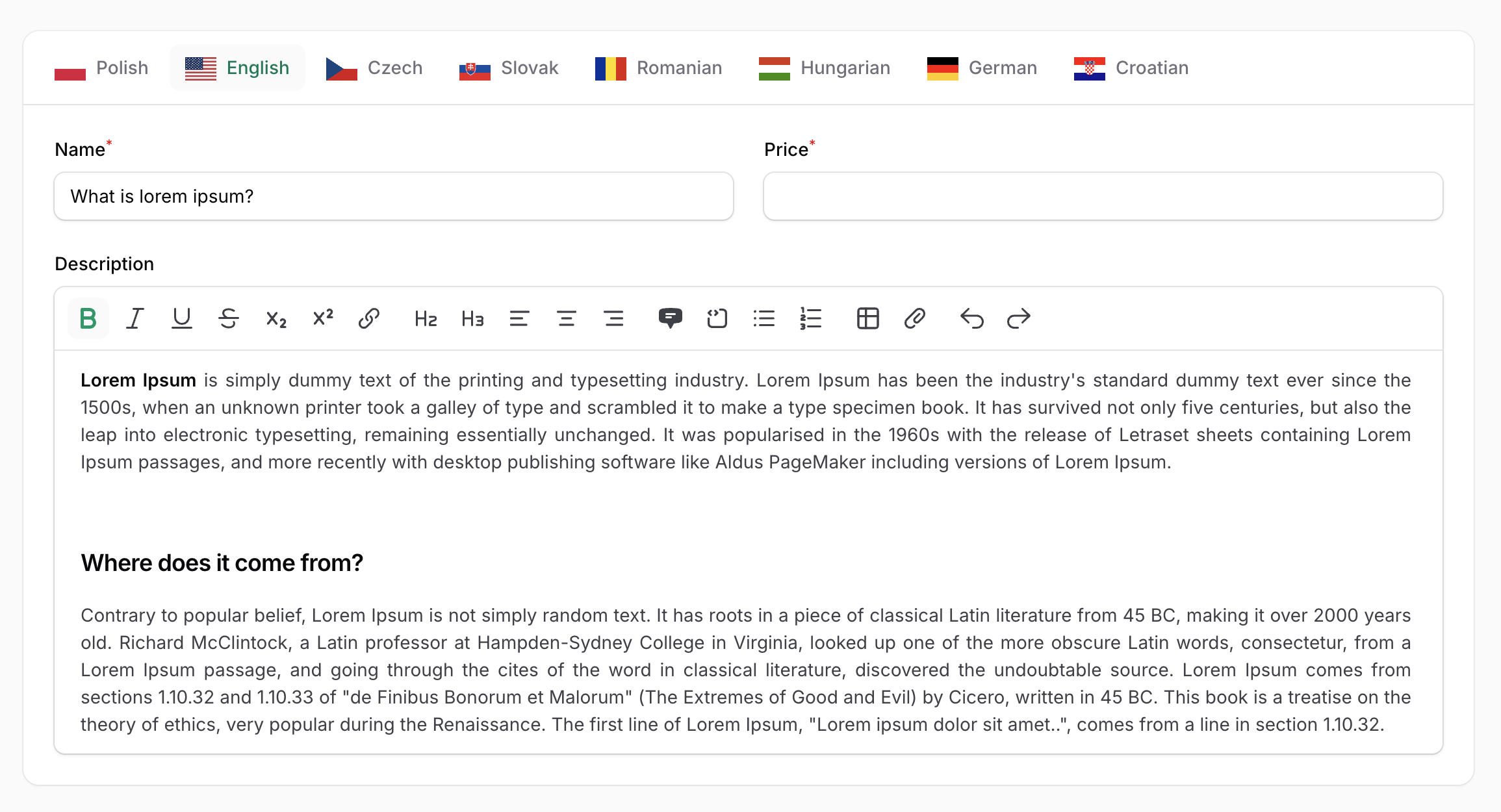
The Translations component provides a more powerful way to configure multiple form fields for multilingual support. It displays translations in a tabbed interface, with each tab representing a different locale.
use Happenv\FilamentTranslatable\Forms\Component\Translations;

Translations::make('translations') // name is required to properly handle actions
    ->schema([
        TextInput::make('name')
    ])
Note
Using the translatable() method within the Translations component is not needed.
Important
Be sure to set different names for each Translations component when using multiple instances.
By default, locales are configured globally in the plugin settings. However, you can override the locales for a specific Translations component:
Translations::make('translations')
->locales(['en', 'es'])You can customize field labels for each locale using the fieldTranslatableLabel() method. This is useful for translating field labels themselves. In all closures of this package $locale is the locale code (a string):
use Filament\Forms\Components\Field;
use Happenv\FilamentTranslatable\Forms\Component\Translations;

 Translations::make()
    ->schema([
        // Fields
    ])
->fieldTranslatableLabel(fn (Field $field, string $locale) => __($field->getName(), locale: $locale))You can add the locale name as a prefix or suffix to field labels using the prefixLocaleLabel() or suffixLocaleLabel() methods. This helps users identify which language they are editing:
use Happenv\FilamentTranslatable\Forms\Component\Translations;

Translations::make('translations')
    ->schema([
        // Fields
    ])
    ->prefixLocaleLabel()
->suffixLocaleLabel()By default, the prefix/suffix locale label is the locale label enclosed in parentheses (e.g., "(English)"). You can customize this format using the formatLocaleLabelUsing() method:
use Happenv\FilamentTranslatable\Forms\Component\Translations;

Translations::make('translations')
->formatLocaleLabelUsing(fn (string $locale, string $label) => "[{$label}]");You can conditionally add prefix/suffix labels by injecting the $field parameter into the callback. This allows you to apply locale labels only to specific fields:
use Filament\Forms\Components\Field;
use Happenv\FilamentTranslatable\Forms\Component\Translations;

Translations::make('translations')
    // ...
    ->prefixLocaleLabel(function(Field $field) {
        // Must return a boolean value
        return $field->getName() == 'title';
    })
    ->suffixLocaleLabel(function(Field $field) {
        // Must return a boolean value
        return $field->getName() == 'title';
})You can add custom Filament actions to each locale tab using the actions() method. Actions appear in the tab header and can be used for operations like auto-translation or copying content between locales:
use Filament\Actions\Action;
use Happenv\FilamentTranslatable\Forms\Component\Translations;

Translations::make('translations')
    ->actions([
        Action::make('fillDumpTitle')
])To access the current locale within an action, use the $arguments parameter and retrieve the locale value:
use Filament\Actions\Action;
use Happenv\FilamentTranslatable\Forms\Component\Translations;

Translations::make('translations')
    ->actions([
        Action::make('fillDumpTitle')
            ->action(function (array $arguments) {
                $locale = $arguments['locale'];
                // ...
            })
])You can access the current locale within the schema definition by defining a $locale parameter. This is useful for conditional logic based on the locale:
use Filament\Forms\Components\TextInput;
use Happenv\FilamentTranslatable\Forms\Component\Translations;

Translations::make()
->schema(fn (string $locale) => [TextInput::make('title')->required($locale == 'en')])By default, the Translations component is wrapped in a card-styled container. You can remove this styling using the contained() method:
use Happenv\FilamentTranslatable\Forms\Component\Translations;

Translations::make()
->contained(false)You can display translations as vertical tabs:
use Happenv\FilamentTranslatable\Forms\Component\Translations;

Translations::make()
->vertical()You can override the global plugin settings directly on individual components:
use Happenv\FilamentTranslatable\Forms\Component\Translations;

Translations::make()
    ->displayNamesInLocaleLabels(false)
    ->displayFlagsInLocaleLabels(true)
->flagWidth('48px')The exclude() method allows you to specify fields that should not be translated. Excluded fields will appear in the form but will not be duplicated for each locale. This is useful for fields that contain non-translatable content:
use Happenv\FilamentTranslatable\Forms\Component\Translations;

Translations::make('translations')
    ->schema([
        Forms\Components\TextInput::make('title'),
        Forms\Components\TextInput::make('description'),
    ])
    ->exclude(['description'])
Without exclude:
{
    "title": {
        "en": "Dump",
        "es": "Dump",
        "fr": "Dump"
    },
    "description": {
        "en": null,
        "es": null,
        "fr": null
    }
}
With exclude:
{
    "title": {
        "en": "Dump",
        "es": "Dump",
        "fr": "Dump"
    },
    "description": null
}The include() method allows you to specify which fields should be translated. This is useful when only a small subset of fields in a large form requires translations.
use Happenv\FilamentTranslatable\Forms\Component\Translations;

Translations::make('translations')
    ->schema([
        Forms\Components\TextInput::make('title'),
        Forms\Components\TextInput::make('description'),
    ])
    ->include(['title'])
Without include:
{
    "title": {
        "en": "Dump",
        "es": "Dump",
        "fr": "Dump"
    },
    "description": {
        "en": null,
        "es": null,
        "fr": null
    }
}
With include(['title']):
{
    "title": {
        "en": "Dump",
        "es": "Dump",
        "fr": "Dump"
    },
    "description": null
}composer test # unit and feature tests
composer phpstan # static analysis
composer cs # fix code style: composer normalize, Rector, Pint
composer ci # everything CI checks, locallyThe package's stylesheet is built by the Tailwind CLI from resources/css/app.css — with the utilities used in resources/views and src — into resources/dist, which is committed. After changing any of them, rebuild and commit the result — CI refuses outdated assets:
npm ci
npm run build   # or `npm run dev` to rebuild on change
npm run lint # Prettier check, as in CIBreaking changes and how to migrate are described in UPGRADING for every major version. Upgrading from 4.x? Start there.
See CHANGELOG and GitHub releases for what has changed recently.
See CONTRIBUTING for details.
Please review our security policy on how to report security vulnerabilities.
- Happenv sp. z o.o.
- webard
- Lipis for icons
- Solution Forest for great inspiration
- Outer Web for the macro idea
- All contributors
The MIT License (MIT). See License File for more information.
