A native Windows distribution of Herdr, maintained as a small, reviewable patch queue—not a permanent fork.



herdr-win is an unofficial, upstream-first delivery lane for Herdr on Windows. It keeps the normal herdr command and workflow, adds Windows behavior that has not yet landed upstream, and publishes tested snapshots from an exact reviewed Herdr release plus four explicit patches.
Why it exists · What it adds · Install · Patch flow · Upstream review · Maintaining · Herdr Sandbox
Note
Upstream Herdr owns the general CLI, configuration, integrations, and product documentation. This repository owns only its Windows-focused delta and distribution. Reproduce general issues with upstream Herdr before reporting them here.
Herdr already runs on Windows, but a good Windows release needs more than a binary that compiles. Terminal fidelity, remote attachment, safe packaging, updates, and native verification all need clear ownership.
This repository provides that focused delivery path:
- Useful Windows behavior now: fixes can ship without turning the fork into a separate product.
- A visible delta: every retained change belongs to one reviewable mailbox instead of disappearing into branch history.
- An upstream route: code that lands upstream is removed from the queue rather than maintained twice.
- Reproducible snapshots: source, patch order, build identity, artifacts, and SHA-256 digests stay connected.
The table is intentionally capability-level. The patch files contain the exact implementation and tests.
| Area | Status | What this repository contributes |
|---|---|---|
| Native ConPTY foundation | ✅ Upstreamed in Herdr v0.8.0 | herdr-win now reuses upstream's ConPTY and packaging foundation instead of carrying a duplicate implementation. |
| Terminal fidelity | Maintained here · 0001 |
Windows appearance, color and cursor fidelity, rendering, and VTI input behavior. |
| Windows remote attach and image bridge | Maintained here · 0003 |
Windows SSH and named-pipe attachment, shared remote orchestration, and bounded clipboard/drop image transport. |
| Managed Windows snapshots | Maintained here · 0004 |
Verified Windows packages, per-user setup, portable archives, package-manager update ownership, and safe runtime handoff. |
| OpenCode lifecycle reporting | Maintained here · 0005 |
Retry-aware status correlation so active retries stay quiet and terminal failures remain visible. |
| Runtime downloads | Maintained here · 0006 |
Cross-platform curl transfers ignore user configuration and permit only bounded TLS 1.2+ HTTPS requests and redirects. |
The Windows remote/image bridge builds on nsxdavid's feat/windows-remote-attach work. The maintained mailbox adapts and extends that foundation within this queue.
herdr-win is developed and validated with Herdr Sandbox, a disposable native Windows development environment for coding agents. It provides the clean Windows toolchains and realistic native boundary used to build and test this fork; it is a sister project, not a runtime dependency.
flowchart LR
    U["Upstream Herdr<br/>v0.8.0"] --> B["BASE<br/>346411fa21af"]

    subgraph Q["patches/delta/series"]
        direction LR
        P1["0001<br/>Terminal fidelity"] --> P3["0003<br/>Remote attach"]
        P3 --> P4["0004<br/>Windows distribution"]
        P4 --> P5["0005<br/>OpenCode lifecycle"]
        P5 --> P6["0006<br/>Hardened downloads"]
    end

    B --> P1
    P6 --> R["Fresh replay"]
    R --> G["Native + cross-platform gates"]
    G --> A["Setup · ZIP · digests"]
patches/delta/BASE records the exact upstream stable commit. series is the only application order. Each patch is a full-index, binary-safe mailbox with one logical responsibility.
An upstream refresh is deliberate: select the latest stable release, replay the complete queue, remove behavior upstream now owns, regenerate changed mailboxes, and verify a fresh replay. BASE never follows upstream master automatically.
Windows x86_64 is the managed distribution target. Each release also carries matching Linux and macOS binaries for remote endpoints that must speak the same wire protocol.
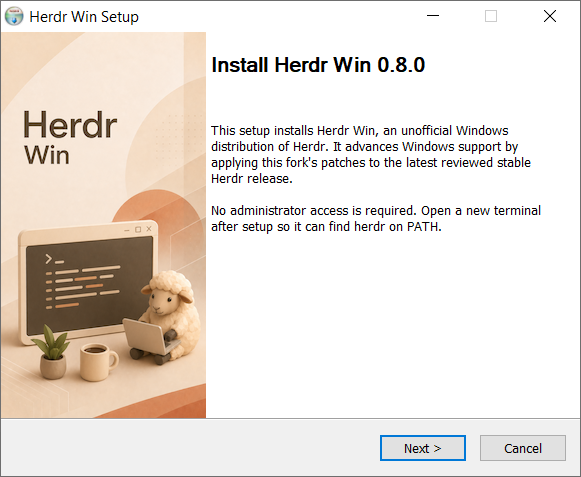
Download the newest herdr-win_v<version>_windows_amd64_setup.exe from Releases and run it. Setup installs for the current user without administrator access, adds herdr to the user PATH, and registers an uninstaller. Open a new terminal and run:
herdrFor setup downloaded directly from Releases, use herdr update from an ordinary terminal after detaching from active Herdr sessions. Updates preserve running sessions and activate the new verified snapshot when it is safe. A WinGet-owned installation instead updates through:
winget upgrade --id hdosys.herdr-win --exact --source wingetGitHub may publish a snapshot before the WinGet catalog finishes accepting it. A WinGet-owned copy shows an update only after the official winget source contains that exact release version, so its update action always points to installable bytes.
Uninstall from Windows Settings → Apps → Installed apps; settings are preserved unless you explicitly choose to remove them.
GitHub records a SHA-256 digest for every immutable release asset. Before running setup, verify the downloaded file against the digest for the same filename in that tagged release's GitHub metadata.
The release also includes herdr-win_v<version>_windows_amd64.zip. Extract the complete archive into one directory and run herdr.exe.
Warning
The Herdr executable and setup are currently unsigned, so Windows may show a SmartScreen warning. Download release artifacts only from this repository.
Each release includes raw linux_amd64, linux_arm64, macos_amd64, and macos_arm64 executables. They are compatibility companions for remote hosts, not managed installers.
herdr-win currently uses wire protocol 20. A remote client and server must agree on that protocol, so an official Herdr build with a different protocol is not interchangeable. Use matching binaries from the same herdr-win release on every endpoint.
For general commands, configuration, and agent integrations, use the official Herdr documentation.
The five files in patches/delta/series are the complete maintained product delta. You do not need to infer behavior from this fork's development history.
- Start at the exact commit in
BASE. - Apply
seriesin order withgit am --3way. - Review each mailbox as one responsibility-oriented change with its implementation, tests, and documentation.
- Follow
CONTRIBUTING.mdto reproduce the replay and verification gates.
The mailboxes are review units, not a request to merge each one unchanged. Generic parts can be split along upstream ownership boundaries. Fork branding, release workflows, and publication state stay outside the product queue.
Refresh and release are intentionally separate manual operations:
- Refresh: select and review a stable upstream release, then replay and minimize the queue.
- Build: replay recorded
BASE, run the complete gates, and retain one candidate with provenance and checksums. - Promote: publish those exact retained bytes without rebuilding or repackaging them.
Ordinary pushes do not publish binaries.
| Need | Canonical owner |
|---|---|
| User-visible fork behavior | PRODUCT.md |
| Technical boundaries | ARCHITECTURE.md |
| Patch ownership and refresh policy | patches/delta/README.md |
| Replay, verification, and release procedure | CONTRIBUTING.md |
| Open work | BACKLOG.md |
- Use upstream Herdr for general product behavior that reproduces with an official upstream build.
- Use herdr-win issues for this distribution's artifacts, update feed, workflows, or maintained patches.
- Read
CONTRIBUTING.mdbefore changing the queue or release automation.
Herdr is created and maintained upstream by Can Çelik. herdr-win is distributed under the Apache License 2.0.