Do your sources actually say what you claim?



Quickstart · How It Works · Usage · Limitations
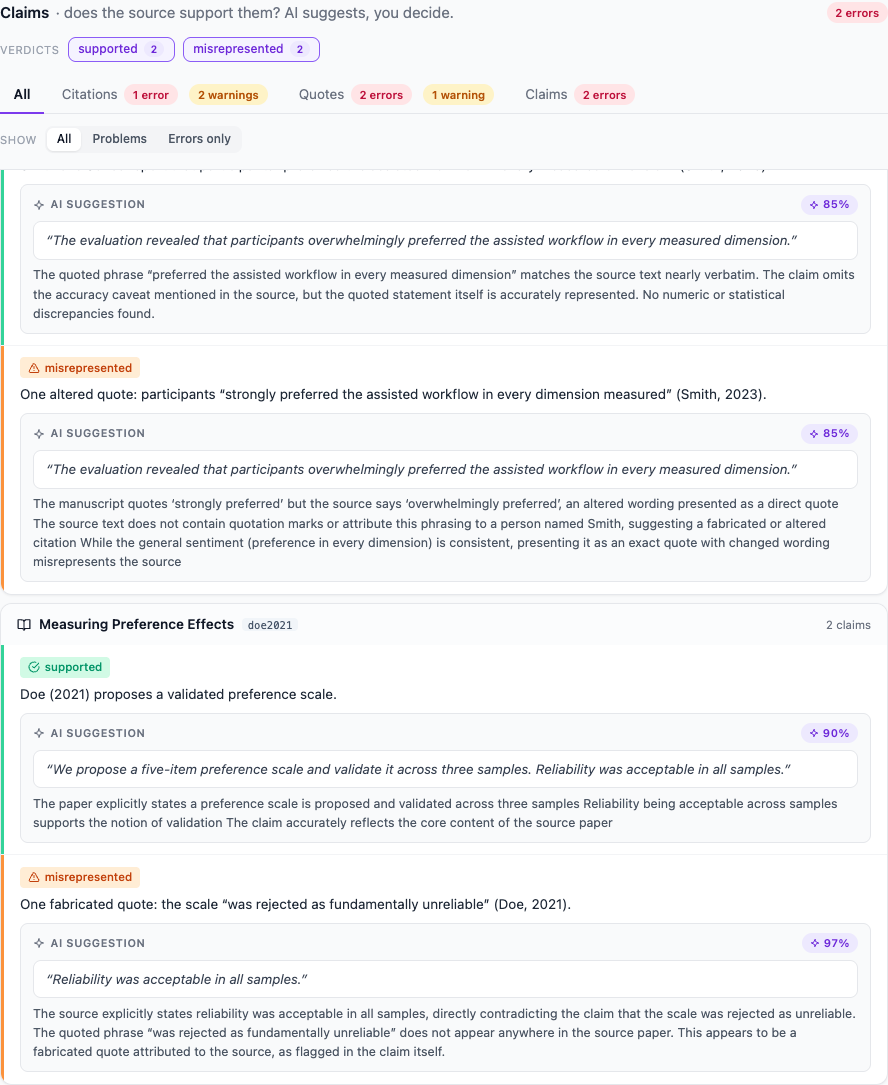
A fabricated quote caught with the source's own words. Full report.
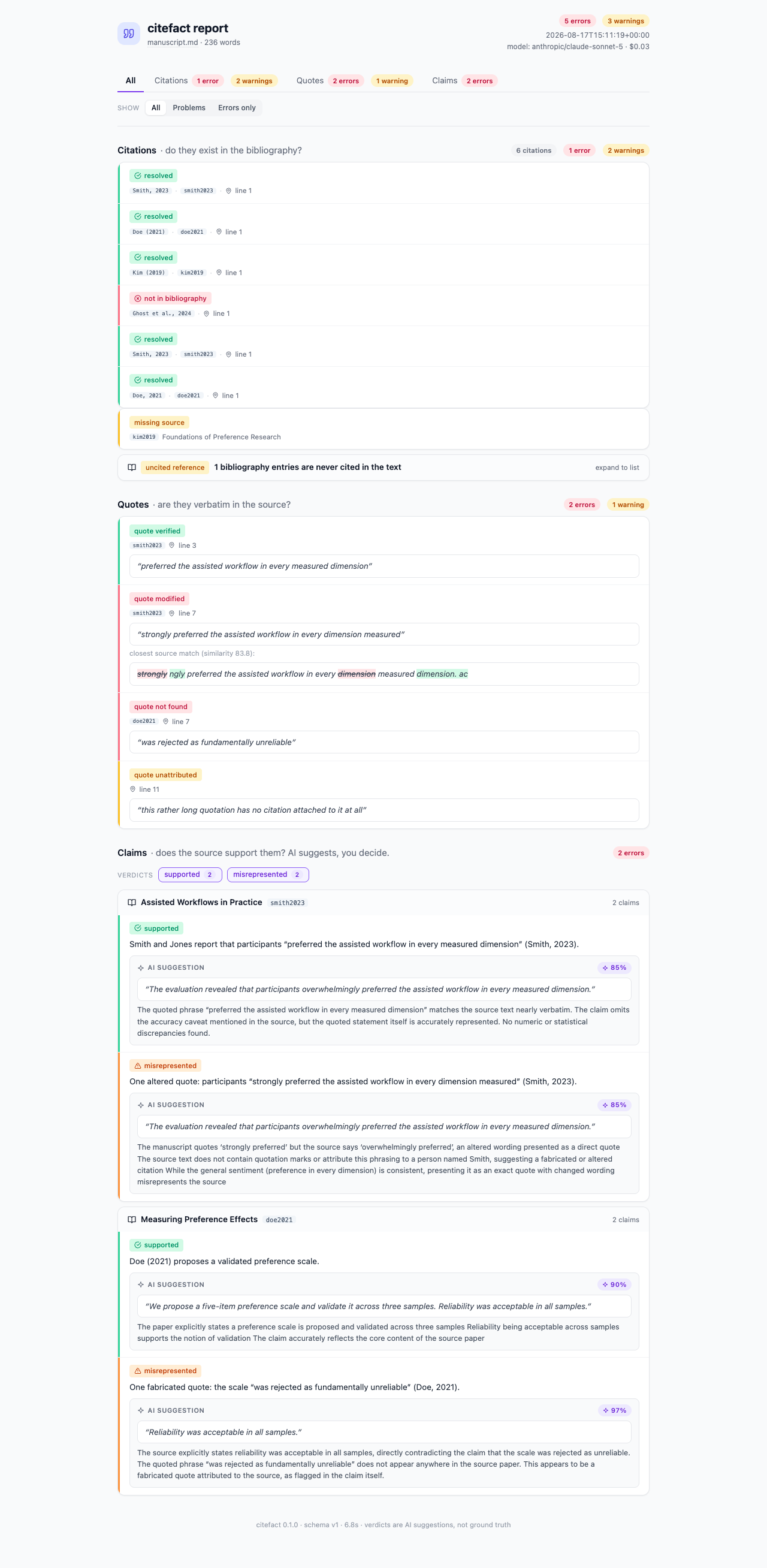
LLMs made it trivial to produce manuscripts with fabricated citations, altered quotes, and claims the cited sources never made. Existing tools check that citations exist; citefact reads the full text of every cited source and checks that it supports what you wrote — then hands you a report with the evidence, before a reviewer finds it first.
# From a Zotero collection (Zotero 7+ running; no export needed):
uvx citefact check manuscript.md --zotero-collection "PhD/Chapter 3"

# Or from a BibTeX file and a folder of PDFs:
uvx citefact check manuscript.md --bib refs.bib --pdfs ./papers/
That's the whole setup: uvx fetches citefact, the report lands in ./citefact-report/report.html. The citation and quote checks are free and need no API key. The claims check uses an LLM with your own key — run uvx citefact setup once and it configures everything interactively, or pass --skip-claims to stay entirely keyless and offline.
| Check | Question it answers | Method | Cost |
|---|---|---|---|
| 1 · Citations | Does every in-text citation exist in the bibliography, with a source document? | Deterministic | Free |
| 2 · Quotes | Is every direct quote really verbatim in its cited source? | Deterministic (normalized + fuzzy) | Free |
| 3 · Claims | Does the source actually support the claim attached to it? | LLM, with verbatim evidence per verdict | ~cents per source |
| Citation-existence checkers | citefact | |
|---|---|---|
| Citation exists in bibliography | ✅ | ✅ |
| Direct quotes verbatim in source | ❌ | ✅ |
| Source actually supports the claim | ❌ | ✅ |
| Works offline / keyless | varies | ✅ (checks 1+2) |
| Metadata / DOI linting | ✅ | ❌ (other tools do this well) |
Every claim verdict (supported / partial / misrepresented / not_in_paper) carries a verbatim evidence quote, reasoning, and a confidence score. It is presented as an AI suggestion, never as ground truth: citefact reports, you decide.
- 📚 Zotero-native - point it at a collection and it reads metadata and attached PDFs through Zotero's local API; no exports, no Better BibTeX
- 🔒 Keyless mode -
--skip-claimscatches fabricated citations and altered quotes with zero network calls - 🤖 Your LLM, your key - Anthropic, OpenAI, or fully local via Ollama, all through LiteLLM
- 📊 One-file report - self-contained HTML (no CDN, no requests), with every citation's status, word-level diffs for altered quotes, and one-click links to the manuscript and each source PDF
- ⚡ Cached everything - PDF conversions, claim extraction, and verdicts are content-addressed; editing one paragraph re-verifies only what changed, and an unchanged re-run costs $0 in seconds
- 🕵️ Private by construction - no telemetry; the only writes are the cache and the report, and the only network traffic is your LLM provider
flowchart LR
    A[manuscript.md] --> D[Citation parser]
    B[Zotero / refs.bib] --> E[Bibliography catalog]
    C[source PDFs] --> F[Docling conversion<br/>content-hash cache]
    D --> G[Citations check]
    E --> G
    F --> G
    G --> H[Quotes check]
    H --> I[Claims check<br/>LLM + caches]
    I --> J[report.html + report.json]
- Parse - a deterministic parser extracts every in-text citation (narrative, parenthetical, multi-author lists, multi-citation groups) and resolves it against the bibliography by first-author surname + year.
- Convert - source PDFs become text via Docling, cached by content hash.
- Check - citations and quotes are verified deterministically; claims are extracted verbatim and judged per (claim, source) pair by the LLM, evidence included.
- Report - a filterable single-file
report.htmlplus a versionedreport.jsonfor CI.
| Command | What it does |
|---|---|
citefact check MANUSCRIPT |
Run the audit and write the report |
citefact setup |
Interactive first-run: pre-download Docling, configure and validate your LLM key |
citefact doctor |
Show what is installed and missing, per feature |
citefact convert --pdfs DIR |
Pre-convert PDFs to warm the cache |
citefact check manuscript.md --bib refs.bib --pdfs ./papers/ --skip-claims --fail-on errorExit codes: 0 clean, 1 findings at or above --fail-on (default error), 2 execution error. Errors are the serious findings (fabricated citations, altered or unfound quotes, misrepresented/not_in_paper verdicts); --fail-on warning is stricter, --fail-on none just collects the report. Failed LLM calls surface as unverified findings and mark the run partial — never silently dropped.
Long phases draw progress bars with ETA and running LLM cost on interactive terminals (plain lines in CI), and every run ends with a summary:
Verifying claims ━━━━━━━━━━━━━━╸━━  38/41  0:03:12  ETA 0:00:15  $0.31  smith2023

⚠️ Summary: 0 errors, 13 warnings (quotes 13) | cost $0.33 | 158.2s
Report: citefact-report/report.html
check flags reference
| Flag | Default | Meaning |
|---|---|---|
--bib FILE |
BibTeX bibliography (this or --zotero-collection) |
|
--zotero-collection NAME |
Zotero collection (name or "Parent/Child" path); needs Zotero 7+ running |
|
--pdfs DIR |
Folder of source PDFs, fuzzy-matched to entries lacking one | |
--skip-claims |
off | Citations + quotes only: free, keyless |
--only LEVELS |
all | Comma-separated subset: citations,quotes,claims |
--model / --provider |
anthropic/claude-sonnet-5 |
LLM for the claims check |
--fail-on |
error |
error | warning | none: what makes the exit code 1 |
--out DIR |
./citefact-report |
Where report.html + report.json land |
--json |
off | Also stream report.json to stdout |
--quiet |
off | Silence progress and summary |
--force |
off | Ignore the conversion cache |
Environment: CITEFACT_CACHE relocates the .citefact/ cache (written next to the manuscript by default); CITEFACT_MODEL pins a model. citefact convert resolves its cache relative to the current directory, so run it from the manuscript's folder or set CITEFACT_CACHE.
All finding types (what lands in the report)
| Finding | Check | Severity | Meaning |
|---|---|---|---|
orphan_citation |
citations | error | In-text citation with no bibliography entry (the fabricated-citation signal) |
uncited_reference |
citations | warning¹ | Bibliography entry never cited in the text |
missing_source |
citations | warning | Entry is cited but no PDF/text is available, so later checks skip it |
quote_verified |
quotes | info | Quote found verbatim in the source |
quote_modified |
quotes | error | Near match only; the report shows a word-level diff |
quote_not_found |
quotes | error | Quote does not appear in the cited source |
quote_unattributed |
quotes | warning | Long quote with no resolvable citation nearby |
claim_verdict |
claims | by verdict | supported info · partial warning · misrepresented/not_in_paper error · unverified warning |
¹ Demoted to info with --zotero-collection: a collection is a reading library, so uncited entries are normal there.
The easy path is one command:
uvx citefact setupIt asks for your provider, takes the API key with hidden input, validates it with a minimal call, and stores it in ~/.config/citefact/config.toml (owner-only permissions). Done — citefact check just works from then on.
Everything else is an override, in precedence order: --model / --provider flags > ANTHROPIC_API_KEY-style environment variables and CITEFACT_MODEL > the setup config file > the built-in default (anthropic/claude-sonnet-5). Any LiteLLM-supported provider works, including fully local:
uvx citefact check manuscript.md --bib refs.bib --model ollama/llama3.1- Author-year (APA-like) citation styles only; numeric styles (Vancouver/IEEE) are on the roadmap
- Markdown manuscripts only in v0.1 (DOCX next; the manuscript itself cannot be a PDF)
- You supply the source PDFs; there is no automatic retrieval by DOI
- The first PDF conversion downloads the Docling environment (~1-2 GB, one-time) into the
uvcache - Claim verdicts are AI suggestions with the usual LLM failure modes; that is why every verdict carries its evidence
Roadmap: DOCX manuscripts → LaTeX (\cite{}) → numeric citation styles → stable JSON schema and JOSS submission. report.json already carries schema_version and is the contract for integrations.
For developers
git clone https://github.com/hearthresearch/citefact
cd citefact
uv sync
uv run pytest              # unit tests, LLM mocked
uv run pytest --run-evals # opt-in LLM eval fixtures (costs money)- LiteLLM for provider-agnostic LLM access
- Docling for PDF-to-Markdown conversion
- ZotSeek - related tool: AI-powered semantic search for Zotero
citefact: Do your sources actually say what you claim? Built by José Fernandes