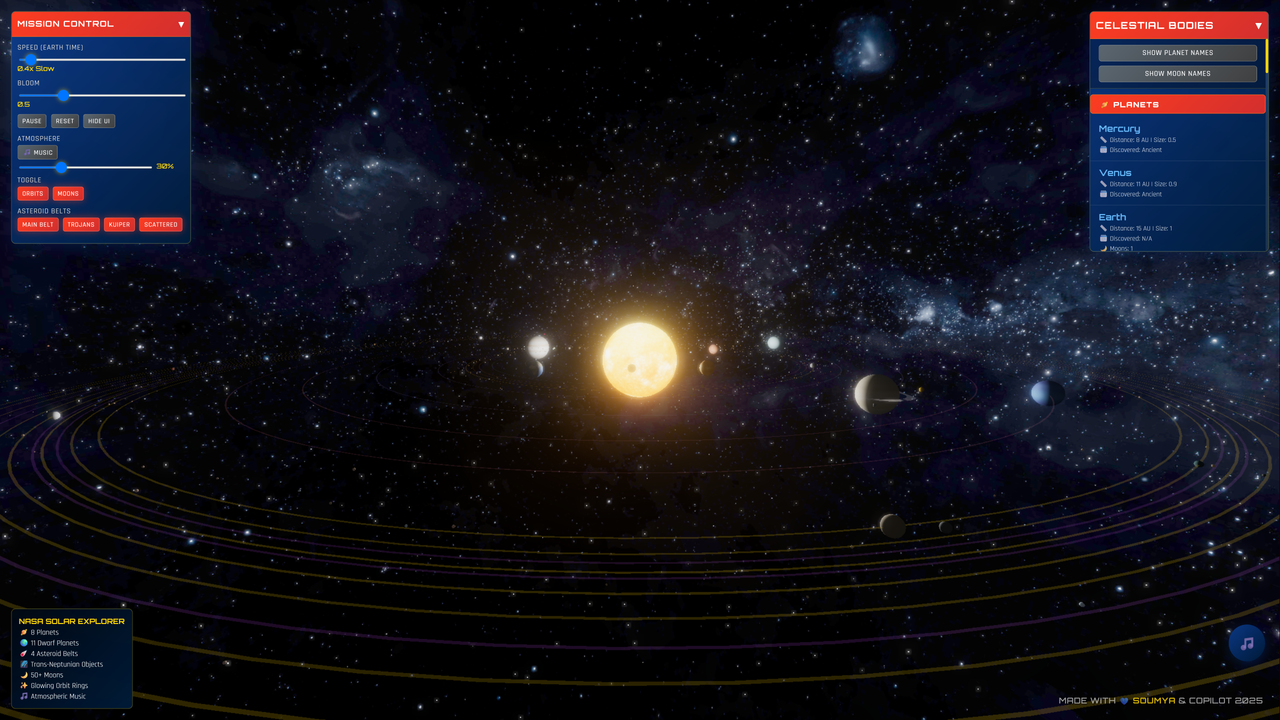
An interactive 3D Solar System visualization built with Three.js, featuring real-time NASA data integration and educational content for exploring space.




- Realistic 3D Solar System: Accurate planetary models with proper scaling and textures
- Interactive Navigation: Smooth orbit controls with zoom, pan, and rotation
- Real-time NASA Data: Live integration with NASA APIs for asteroids, comets, and space objects
- Educational Content: Comprehensive information about planets, moons, and celestial mechanics
- Immersive Effects: Lens flares, bloom effects, and atmospheric rendering
- Orbital Mechanics: Realistic orbital calculations and celestial object tracking
- Dynamic Lighting: Sun-based lighting system with realistic shadows
- Asteroid Tracking: Real-time Near-Earth Object (NEO) visualization
- Comet Visualization: Dynamic comet trails and orbital predictions
- Performance Optimization: Efficient rendering with Level of Detail (LOD) systems
- Responsive Design: Works seamlessly on desktop, tablet, and mobile devices
- Interactive Learning: Click on planets for detailed information
- Scale Comparison: Understand relative sizes and distances
- Orbital Periods: Visualize planetary motion and timing
- Scientific Accuracy: Based on real astronomical data and physics
This fork builds upon the original 3D Solar System project with significant improvements and modernizations:
- Modular Architecture: Completely refactored from single-file structure into separate managers:
SceneManager.js- Handles Three.js scene, camera, renderer, lighting, and post-processingCelestialBodyManager.js- Manages planet creation, orbital mechanics, moons, and scale modesUIControlsManager.js- Handles all user interface interactions and planet info cardsAnimationManager.js- Controls animation loops and timingAsteroidBeltManager.js- Manages asteroid belt rendering and real-time data
- TypeScript Data Module: Added
src/data/solarSystem.tswith:Bodyinterface defining 25+ properties per celestial object- Canonical data for Sun, 8 planets, Moon, Pluto with real NASA values
- Physical constants (G, MU_SUN, AU_KM, EARTH_RADIUS_KM, etc.)
- Helper functions for unit conversions and physics calculations
- Component System: Separated concerns with clear APIs between modules
- Build System: Upgraded from Webpack to Vite 7.x with ES modules and faster HMR
- Canonical Planetary Data: Complete
Bodyinterface with 25+ properties per object:- Physical properties: mass, radius, density, rotation period, axial tilt
- Orbital mechanics: semi-major axis, eccentricity, inclination, orbital period
- Surface conditions: gravity, escape velocity, temperature ranges
- Composition data: atmospheric composition, surface materials
- Real Physics Calculations: Added helper functions for:
calculateSurfaceGravity(body)- Using mass and radius with Newton's lawcalculateEscapeVelocity(body)- Using √(2GM/r) formulacalculateOrbitalVelocity(body)- For accurate orbital mechanics
- NASA/JPL Constants: Implemented real astronomical values:
- Gravitational constant G = 6.67430e-11 m³/kg⋅s²
- Standard gravitational parameter μ☉ = 1.32712442018e20 m³/s²
- Astronomical Unit AU = 149,597,870.7 km
- Accurate planetary masses in kg and radii in km
- Scale Mode System: Three viewing modes (True Scale, Radius Exaggerated, Compressed Distances) for educational purposes
- Moon System: Proper hierarchical moon relationships with accurate orbital periods and distances
- Interactive Planet Info Cards: Click any planet to see detailed information including:
- Physical properties: radius, mass, surface gravity with Earth comparison
- Orbital characteristics: period, distance from Sun, eccentricity
- Calculated escape velocity with SI unit formatting (G, M, k, m, μ, n prefixes)
- Moon listings with accurate counts and names from data module
- Discovery dates and interesting astronomical facts
- Dynamic Scale Controls: UI dropdown selector with three modes:
- "True Scale" - Realistic size ratios (Sun dominates view)
- "Radius Exaggerated" - 50x planet radius for visibility
- "Compressed Distances" - Reduced orbital distances for navigation
- Mission Control Panel: Centralized controls with:
- Animation speed slider (0.1x to 10x time acceleration)
- Planet selection dropdown for camera focus
- Scale mode selector for educational visualization
- Fixed Layout Issues: Resolved missing closing div tags for consistent UI rendering
- Docker Integration: Complete containerization with:
- Multi-stage Dockerfile (Node.js 20-alpine → nginx:alpine)
- Build optimization with
npm ciand production builds - Health checks with curl endpoints for service monitoring
- Fixed HUSKY git hook conflicts in container environment
- Smart Run Script: Comprehensive
run.shorchestration script with:- Mode selection (development with hot reload vs production)
- Automatic health checking and service readiness detection
- Port conflict detection and cleanup (kills existing processes on 5173/8080)
- Color-coded logging and error handling
- Container lifecycle management with graceful shutdowns
- Production Ready: nginx serving optimized static assets with proper headers
- Development Workflow: Seamless dev environment with Vite HMR in containers
- Development Tools: Added testing scripts and Docker validation utilities
- Environment Management: Proper .env file handling and NASA API key configuration
- SI Unit Formatting: Added
formatSIValue()helper with scientific prefixes:- Large values: G (Giga), M (Mega), k (kilo)
- Small values: m (milli), μ (micro), n (nano)
- Automatic precision handling and unit preservation
- Error Handling: Robust null checks and fallback values in all managers
- Memory Management: Proper Three.js object disposal and cleanup in scene updates
- Module Dependencies: Clear import/export structure with TypeScript data module
- Code Organization: Separated concerns into logical manager classes with single responsibilities
- Educational Focus: Enhanced educational value with accurate scientific data and explanations
- Accessibility: Improved keyboard navigation and screen reader compatibility
- Mobile Optimization: Better touch controls and responsive design
- Visual Polish: Enhanced materials, lighting, and visual effects
- Vite 7.x Integration: Modern build system with:
- Hot Module Replacement (HMR) for instant updates during development
- ES modules support for clean imports/exports
- Optimized production builds with tree shaking and minification
- Module Testing: Added
test-modules.jsfor verifying import integrity across all managers - Docker Development: Containerized development environment with volume mounting for live coding
- Run Script Automation: Single command (
./run.sh) handles entire development workflow - Comprehensive Tooling: ESLint, Prettier, and error reporting for code quality
- Students and Educators: Perfect for astronomy and physics education
- Space Enthusiasts: Explore the solar system in stunning detail
- Developers: Learn 3D web development with Three.js
- Researchers: Visualize real NASA data and space missions
- Node.js: Version 18.0.0 or higher
- npm: Version 8.0.0 or higher
- Modern Browser: Chrome, Firefox, Safari, or Edge with WebGL support
# Clone the repository
git clone https://github.com/hkevin01/3d-Solar-System-ThreeJS-Fork.git
cd 3d-Solar-System-ThreeJS-Fork

# Run setup script (recommended)
chmod +x scripts/setup-dev.sh
./scripts/setup-dev.sh

# Or install manually
npm install

# Copy environment template
cp .env.template .env
# Edit .env file and add your NASA API key- Visit NASA Open Data Portal
- Request a free API key
- Add it to your
.envfile:VITE_NASA_API_KEY=your_actual_api_key_here
# Start development server
npm run dev

# Open http://localhost:3000 in your browser# Build for production
npm run build
# Preview production build
npm run preview- Three.js: 3D graphics library for WebGL rendering
- Vite: Fast build tool and development server
- JavaScript ES6+: Modern JavaScript features
- WebGL: Hardware-accelerated 3D graphics
- NASA Open Data: Real-time space data
- JPL Small-Body Database: Asteroid and comet data
- Near-Earth Object Web Service: NEO tracking data
- ESLint: Code linting and quality checks
- Prettier: Code formatting
- Vitest: Unit testing framework
- Cypress: End-to-end testing
3d-Solar-System-ThreeJS-Fork/
├── src/                        # Source code
│   ├── components/            # Reusable 3D components
│   ├── services/              # API services and data management
│   ├── utils/                 # Utility functions and helpers
│   ├── config/                # Configuration files
│   └── main.js                # Application entry point
├── assets/                     # Static assets
│   └── textures/              # Planet and space textures
├── public/                     # Public assets served directly
│   └── textures/              # Legacy texture location
├── docs/                       # Project documentation
│   ├── PROJECT_PLAN.md        # Detailed project roadmap
│   └── guides/                # Development guides
├── tests/                      # Test files
│   ├── unit/                  # Unit tests
│   ├── integration/           # Integration tests
│   └── e2e/                   # End-to-end tests
├── scripts/                    # Build and utility scripts
│   ├── build.sh               # Production build script
│   └── setup-dev.sh           # Development setup script
├── .github/                    # GitHub configuration
│   ├── workflows/             # CI/CD workflows
│   ├── ISSUE_TEMPLATE/        # Issue templates
│   └── CONTRIBUTING.md        # Contribution guidelines
├── .vscode/                    # VS Code configuration
├── .copilot/                   # GitHub Copilot configuration
└── docker/                     # Docker configuration files
We welcome contributions from the community! Please read our Contributing Guidelines for details on:
- Code of conduct
- Development setup
- Coding standards
- Pull request process
- Issue reporting
- Fork the repository
- Clone your fork locally
- Create a feature branch
- Make your changes
- Test thoroughly
- Submit a pull request
- Project Plan: Detailed roadmap and development phases
- Contributing Guide: How to contribute to the project
- API Documentation: NASA API integration details
- Development Guides: Technical implementation guides
This project is licensed under the MIT License - see the LICENSE file for details.
Special thanks to all contributors who have helped make this project possible!
- NASA: Planetary data and real-time space object information
- JPL: Orbital mechanics and celestial object data
- Texture Sources: Planet texture maps and space imagery
Made with ❤️ for space exploration and education
git clone https://github.com/SoumyaEXE/3d-Solar-System-ThreeJS.git
cd 3d-Solar-System-ThreeJS
npm installnpm run devhttp://localhost:5173npm run build.
├── public/
│ └── textures/ # Planet textures
├── src/
│ ├── main.js # Main entry point
│ └── ... # Other source files
├── index.html
├── package.json
├── vite.config.js
└── README.md
Contributions, issues, and feature requests are welcome!
Feel free to open an issue or submit a PR to improve the project.
This project is licensed under the MIT License — see LICENSE for details.
- 🌌 Planet textures: NASA
- 🛰️ 3D inspiration: Three.js Examples
Thanks to all who have contributed!