Asset Pack Generator is a Python-based GUI tool designed to transform a collection of GIF-based animation frames into a Flipper Zero-compatible asset pack. This includes proper formatting, frame compression, metadata generation, and packing into a Flipper-usable structure with support for animation parameters.
-
Friendly GUI interface built with
tkinter -
Accepts either folders or EZGIF zip exports
-
Automatically processes and renames frames
-
Allows customization of:
- Pack name
- Frame size
- Animation metadata (butthurt, level, weight, etc.)
- Duration and frame rate
-
Outputs properly structured Flipper Zero asset packs
-
Compresses frames using Heatshrink2
-
Generates manifest files automatically
Make sure you are running Python 3.10+ on Windows and have the following packages installed:
pip install pillow heatshrink2pip install pillow ttkbootstrapYou can either clone the repository or manually download and extract the .zip file:
git clone https://github.com/hooker01/Flipper-Zero-Asset-Pack-Generator.git
cd Flipper-Zero-Asset-Pack-Generator- Download the repository ZIP
- Extract it anywhere on your PC
- Open a terminal (CMD or PowerShell) in the folder
-
Go to: https://ezgif.com
-
Upload a GIF or video file.
-
Convert the video to GIF (if needed).
-
Optionally:
- Crop the image to 2:1 ratio (recommended for 128x64)
- Resize to
128x64pixels - Apply Effects > Monochrome to convert to black & white
- If the output looks broken, try clicking "Unoptimize"
-
Download the ZIP from EZGIF.
- This zip will contain files like:
frame_0_delay-0.1s.png,frame_1_delay-0.1s.png, etc.
- This zip will contain files like:
Once the setup is complete:
python AssetGenerator.pyOnce the GUI window opens, follow these steps:
- Click "Select zip file" if you downloaded from EZGIF
- Or click "Select directory" if you manually organized the frames
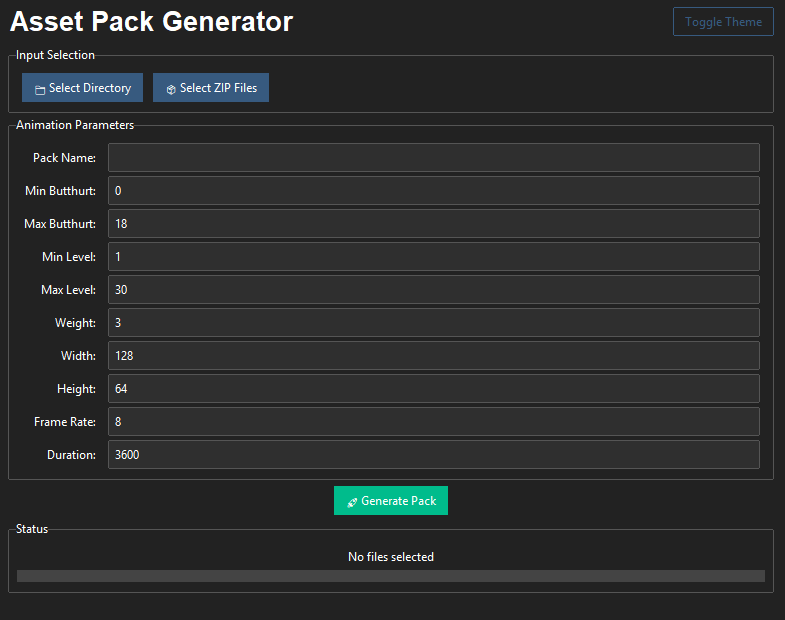
You can customize the following parameters:
| Field | Description | Default |
|---|---|---|
| Pack name | Name of the asset pack folder | N/A |
| Min butthurt | Minimum character trait value | 0 |
| Max butthurt | Maximum character trait value | 18 |
| Min level | Minimum user level | 1 |
| Max level | Maximum user level | 30 |
| Weight | Asset weight (for internal use) | 3 |
| Width | Width of frames (must match input) | 128 |
| Height | Height of frames (must match input) | 64 |
| Frame rate | Frames per second | 8 |
| Duration | Duration in milliseconds | 3600 |
Click "Generate" to start the process. The program will:
- Rename and sort frames
- Build necessary directories and metadata
- Compress the frames
- Export the result to a selectable directory
After generation, the output folder (asset_packs) will include:
asset_packs/
└── YourPackName/
    └── Anims/
        ├── manifest.txt
        └── AnimationName/
            ├── frame_0.png
            ├── frame_1.png
            ├── ...
            └── meta.txt
All frames are compressed into .bm format, and manifest files are properly created.
To use the generated asset pack on your Flipper Zero device, follow these steps:
-
Locate the generated
YourPackNamefolder inside theasset_packsdirectory on your computer. -
Connect your Flipper Zero device to your computer via USB, or insert its microSD card into your computer.
-
Open the Flipper Zero’s storage and navigate to the
asset_packsdirectory. -
Copy the entire
YourPackNamefolder from your computer’sasset_packsdirectory to the Flipper Zero’sasset_packsdirectory. -
Eject the Flipper Zero or its microSD card from your computer.
-
On the Flipper Zero, the new asset pack will be available for use in the animations section.
This script handles the packing logic including:
- Conversion of
.pngto.bm(1-bit black and white) - Compression via
heatshrink2 - Writing of
.meta,.manifest, and other config files - Ensures Flipper-compatible format
Functions inside:
convert_bm: Converts and compresses image to Flipper-compatible.bmpack_anim: Packs animation frames into correct folderpack_icon_static,pack_icon_animated,pack_font: Handle extra asset types (optional)pack: Main recursive logic that processes entire folders
- The image format must be black & white (1-bit), otherwise you’ll encounter errors or visual bugs on Flipper
- If you want to bulk create multiple packs, run
asset_packer.pydirectly - Avoid using special characters in animation or pack names
- The
asset_packer.pyscript was adapted from Xtreme-Firmware repository.