



Beacon gives Subnautica 2 IP/port multiplayer: players join through the Beacon launcher, hosts run BeaconServer next to Subnautica 2, and worlds stay on the server with snapshots, rollback, admin tools, server query, and mod support. No friend-code lobby, no peer-to-peer handoff, no four-player lobby cap.
Every player must install Beacon to join a Beacon server. Stock Subnautica 2 cannot connect to Beacon servers directly.
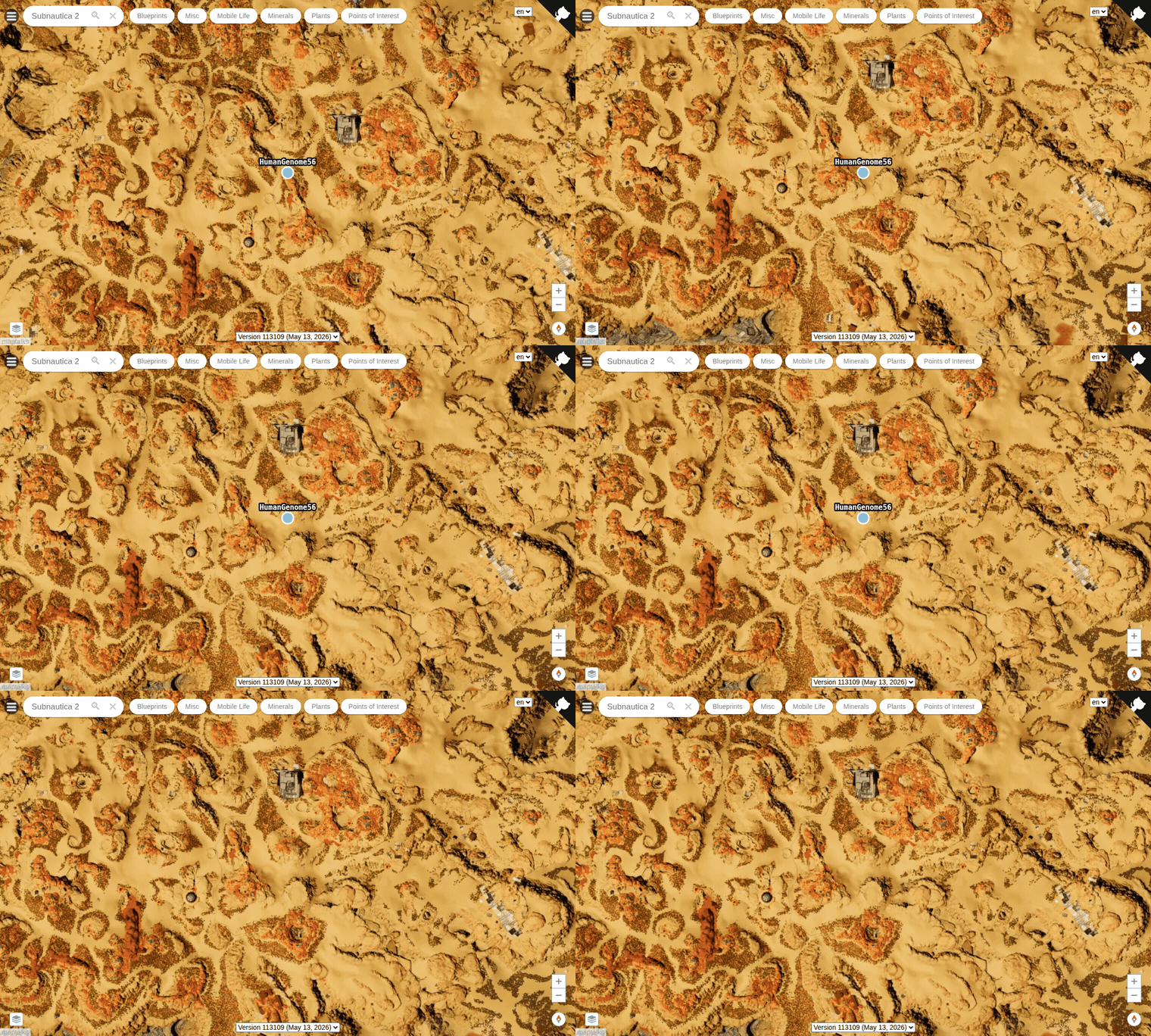
See who's online on a real, interactive map of the world. Connected players report their in-world positions, and the launcher's Map button opens a browser map that plots each player and updates live, on the full Subnautica 2 world with its points of interest. The map is served from the host's /map/ page; the live player overlay is visible to anyone the host shares the page with once Beacon:Map:Public is enabled in the server settings.
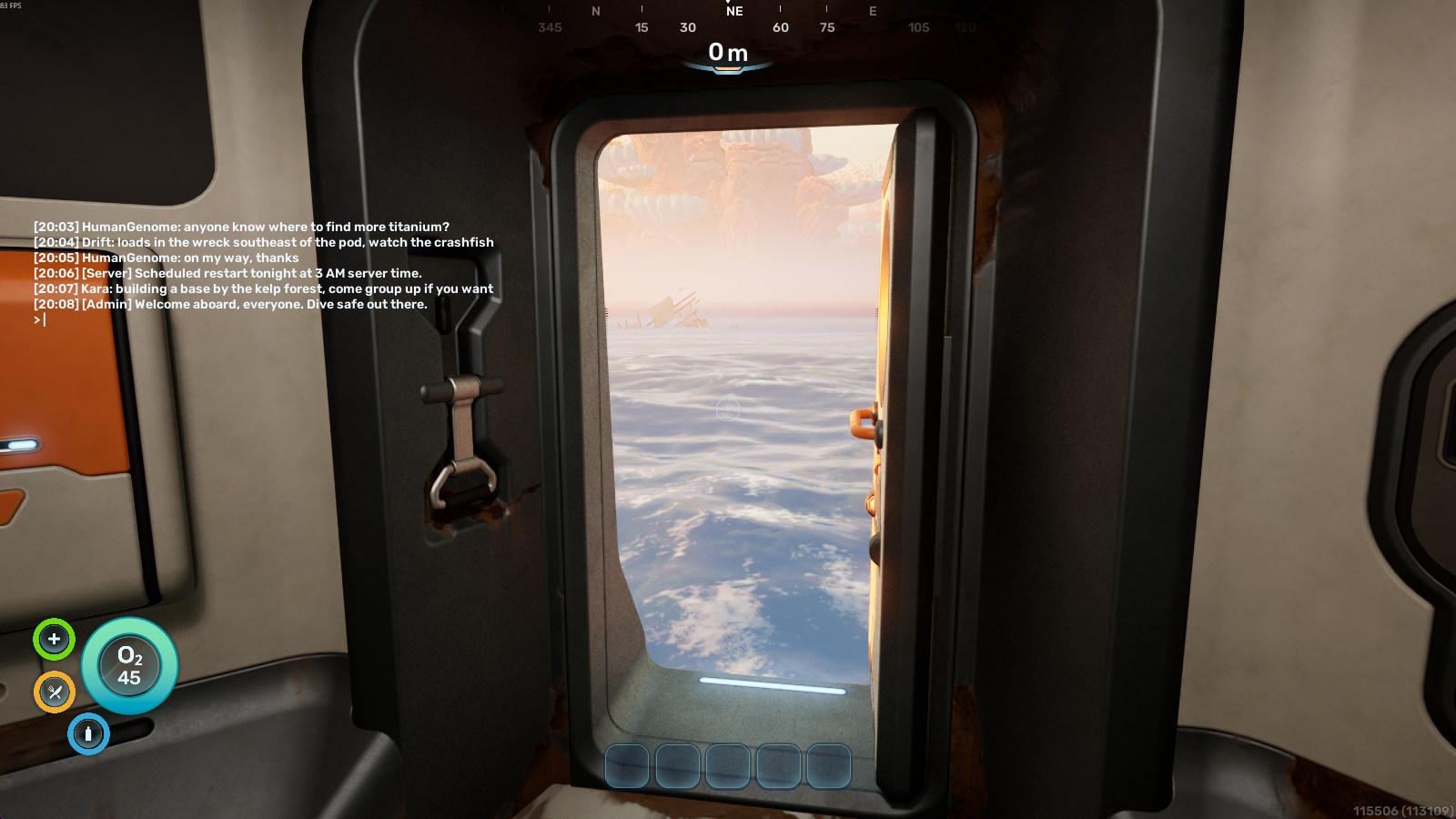
Press Enter to open chat without leaving the game. Beacon overlays a timestamped chat panel in Subnautica 2 with player messages, server notices, and admin announcements. Admins post announcements and a message of the day from the server console, RCON, or the HTTP API, and players can run commands like /players and /help straight from the chat box.
Stock Subnautica 2 caps co-op at four players. Beacon's transport path removes that lobby cap — the server's slot count is configurable (MaxPlayers), though the game's pacing is still balanced around smaller crews.
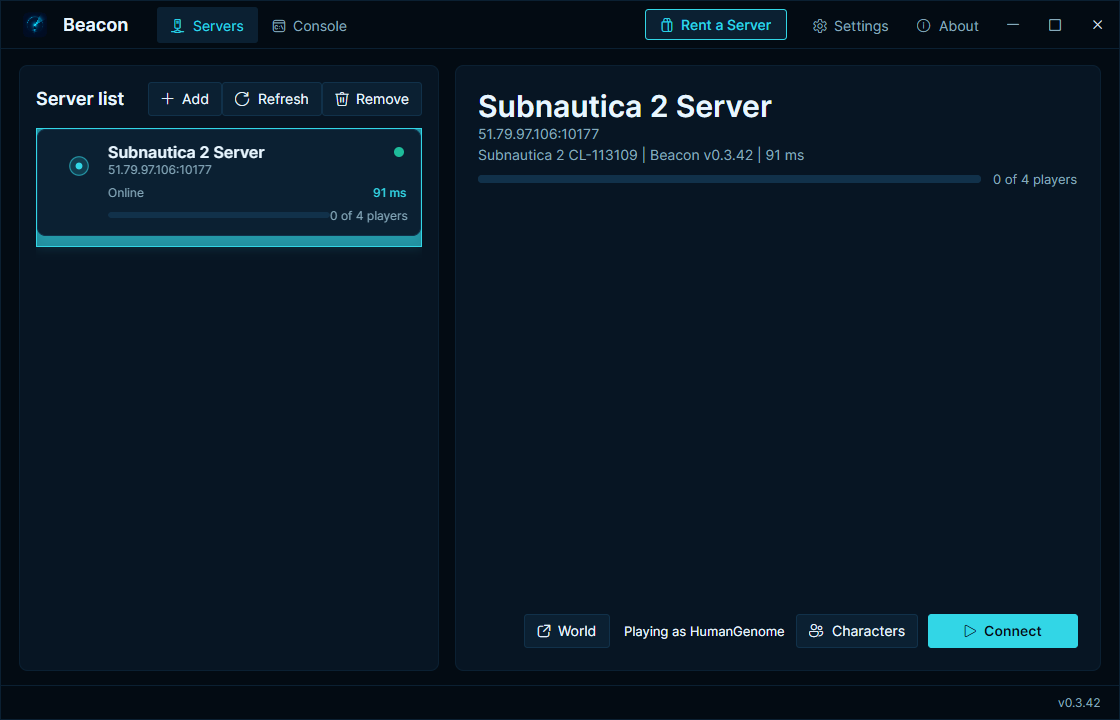
Add a server address once, pick your character, and connect straight into the hosted world.
Players can keep separate characters per server. Beacon remembers the character you used for each saved server.
Subnautica 2 has no native password handling, so Beacon adds its own. Set BeaconAuthPassword in the server's appsettings.json and the server gates every remote join on it and kicks anyone who doesn't match. The password flag is also reported in Source query, so server browsers show the server as locked.
The server snapshots the world on every auto-save, and admins can trigger and list snapshots over RCON:
> save snapshot
snapshot ok: snap-20260610T141503Z-7c9e2ab04d113e (52428800 bytes, sha=ab12cd34ef56ab12)
> save list
snap-20260610T141503Z-7c9e2ab04d113e  52428800B  age=42s  sha=ab12cd34ef56ab12
Restore by ID from the launcher's World backups dialog or the admin HTTP API (POST /api/v1/snapshots/<id>/restore) — there is no restore command over RCON. The server stops the game process, takes a pre-restore snapshot, swaps the world in, and relaunches Subnautica 2.
BeaconServer exposes Source RCON (default TCP 27018) with built-ins help, status, players, ping, save snapshot, save list, say, announce, and motd, plus slash commands registered by server mods:
> announce Server restarts in 10 minutes
chat ok (admin): Server restarts in 10 minutes
announce posts an admin notice to every connected player's in-game chat overlay.
BeaconServer answers Source A2S query (default UDP 27017), so server browsers, monitoring tools, and bots can read live status, player counts, and the player list:
Server name : Reef Runners
Map         : Awake
Game        : Subnautica 2
Players     : 3 / 8
Version     : beacon-<version>/sn2-<game build>
Beacon uses UE4SS for Lua and C++ mod loading on the client and host runtime. Servers declare mods in appsettings.json (Beacon:Mods); the launcher fetches GET /api/v1/manifest on join, verifies each pinned sha256, and installs required mods automatically:
"Mods": {
  "Required": [{
    "Id": "beacon-hud",
    "Name": "Beacon HUD chat overlay",
    "Version": "0.8.9",
    "Url": "https://mods.example.com/beacon-hud-0.8.9.zip",
    "Sha256": "<hex sha256 of the zip>",
    "InstallRoot": "Mods/BeaconHud"
  }]
}The easiest option is a SurvivalServers.com Subnautica 2 server (official hosting): the complete Beacon server runtime comes preinstalled and the ports are already configured.
- Download
BeaconSetup-<version>.exefrom the latest release. - Run the installer. Windows SmartScreen may warn because the installer is not code-signed yet; choose More info then Run anyway.
- Open Beacon, add the server address, select or create a character, and click Connect.
Beacon checks for launcher updates automatically on launch and while it is running.
- Download
Beacon-Server-Windows-x64-v<version>.zipfrom the latest BeaconServer release. It is self-contained — it includes the server (BeaconServer\), Beacon's in-game runtime (ue4ss\plus the nativeBeacon.dll), and the injector (tools\). - Extract it to a stable folder, for example
C:\Beacon\. - Install the Subnautica 2 game files under the folder set as
SnInstallRootinBeaconServer\appsettings.json(defaultC:\Beacon\game) — copy yoursteamapps\common\Subnautica2folder there, or install with SteamCMD (app1962700). BeaconServer launches the game from that folder; it does not ship the game. - Edit
BeaconServer\appsettings.json(server name, ports,RconPassword). - Forward/open the gameplay port (UDP), query port (UDP), RCON port (TCP), and admin HTTP port (TCP).
- Run
BeaconServer\BeaconServer.exe.
(Building the BeaconServer source yourself produces the supervisor only — the in-game runtime is built separately and bundled into the release zip above.)
Full server setup, settings, source query examples, RCON commands, and build instructions live in HumanGenome/BeaconServer.
This repo publishes the launcher only:
BeaconSetup-<version>.exe— installer for playersBeaconSetup-latest.exe— stable download URL that always points at the most recent installerBeacon-Launcher-Windows-x64-v<version>.zip— portable launcher buildchecksums-launcher.txt— hashes for the launcher assets
The dedicated server build (Beacon-Server-Windows-x64-v<version>.zip) lives on the BeaconServer release page.
Source archives are generated by GitHub automatically for tags.
Beacon is split into two repos:
- Beacon (this repo) — the client side: the desktop launcher players install, plus the public downloads and documentation.
- BeaconServer — the dedicated server hosts run next to Subnautica 2. Open source.
Players only need this repo's releases; hosts run the server from BeaconServer's.
Open Beacon, click Add Server, and enter a name, the server's IP or hostname, and its gameplay port. Add the server password if it has one. Beacon derives the query, RCON, and admin ports from the gameplay port, so you only enter the one port. Select the server, pick or create a character, and click Connect.
No. The Beacon server runs its own copy of Subnautica 2 in the background and your game client runs a second copy, and Steam only allows one running instance of a game per account. Run the server on a separate host and connect to it from your gaming PC.
Yes. BeaconServer launches the real game; it does not ship it. Install the game files under SnInstallRoot on the host, from a copy of steamapps\common\Subnautica2 or through SteamCMD with an account that owns the game.
Yes, from the launcher's World backups dialog, but the save must be a .zip, not a loose .sav. The zip must hold the contents of a SaveGames folder — savegame_0.sav and its sibling files at the root of the zip, not inside a subfolder. Beacon rejects a zip with no savegame_*.sav at its root, takes a backup before importing, and restarts the server on the imported world.
No. Beacon is Windows-only, for both the player app and the server (Windows 10/11 or Windows Server, 64-bit). The server launches the Windows build of Subnautica 2 and uses Windows process management.
- "The game was not started via the platform launcher and will be closed." Subnautica 2 asks the Steam client to confirm the copy of the game it is running. On a headless host that answer often does not come back, and the game closes itself, which leaves the server relaunching in a loop. Three things have to be true on the server machine: the Steam client is running (offline mode is fine) and signed in to an account that owns Subnautica 2, it is the same Windows user and session that runs BeaconServer, and
steam_appid.txtcontaining1962700sits next toSubnautica2-Win64-Shipping.exe. Beacon writessteam_appid.txtfor you from v0.3.125 on, so the part left to you is the Steam client. Tracked in issue #8. - Client and server must be on the same game build. After a Subnautica 2 update, joins can hang at the main menu until the server's game files are updated too. Update both sides together.
Beacon is a community project and is not affiliated with or endorsed by the developers of Subnautica 2.
See LICENSE.
- UE4SS — Unreal Engine scripting and modding framework
- Avalonia — .NET UI framework used by Beacon
- joric/subnautica (Unlicense) — the interactive Subnautica 2 map that powers Beacon's live web map