This Python script ensures the correct build plate sheet is loaded before printing on a PrusaConnect printer. It uses AprilTag markers printed on sheets to validate the material before resuming a paused print.
Put a marker on your print sheets:

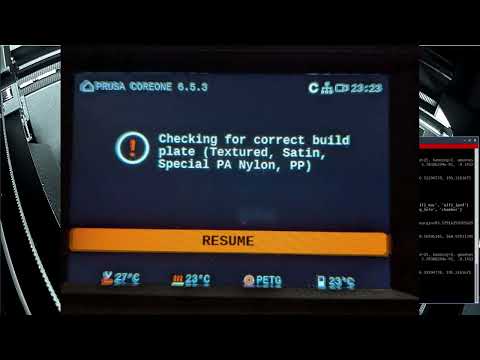
After print start the printer will stop for detection:

You can locally overwrite the detection (press resume on the LCD) or click on Prusa Connect:

See it in action:
- Monitors a PrusaConnect printer for new jobs.
- Downloads
.bgcodefiles and converts them to.gcode. - Parses
allowed_build_platesfrom G-code to determine valid sheets. - Detects AprilTag markers using a connected camera.
- Resumes prints only if the detected tag matches the allowed sheet ID.
- You can manually continue the print in PrusaConnect or at the printer (i.e. if you applied glue to a otherwise not supported sheet)
- Camera images are fetched locally via RTSP (if possible) or alternatively downloaded from PrusaConnect
- PrusaConnect printer with at least one connected camera
- AprilTags on all your build plates
- UV package manager installed (
uv)
Login to your PrusaConnect account:
uv run prusactl auth loginFind out the uuid of your printer:
uv run prusactl printersRun the script:
uv run detect_print_sheet.py your-printer-uuidThe script continuously monitors for new jobs and validates the build plate before resuming.
Add this to "Start G-code" in PrusaSlicer right after G28:
G28 ; home all without mesh bed level

; Start build plate check
G1 X242 Y220 Z100
; Based on https://help.prusa3d.com/filament-material-guide
{if filament_type[0] =~ /.*(PLA|HIPS).*/}
; allowed_build_plates=0, 1, 2
M0 Checking for correct build plate (Textured, Smooth PEI, Satin)
{elsif filament_type[0] =~ /.*(PETG).*/}
; allowed_build_plates=0, 2, 3, 4
M0 Checking for correct build plate (Textured, Satin, Special PA Nylon, PP)
{elsif filament_type[0] =~ /.*(ASA|ABS|PC).*/}
; allowed_build_plates=2, 4
M0 Checking for correct build plate (Satin, PP)
{elsif filament_type[0] =~ /.*(PVA|BVOH).*/}
; allowed_build_plates=0, 1, 2, 4
M0 Checking for correct build plate (Textured, Smooth PEI, Satin, PP)
{elsif filament_type[0] =~ /.*(PP).*/}
; allowed_build_plates=4
M0 Checking for correct build plate (PP)
{elsif filament_type[0] =~ /.*(FLEX).*/}
; allowed_build_plates=0, 4
M0 Checking for correct build plate (Textured, PP)
{elsif filament_type[0] =~ /.*(PVB).*/}
; allowed_build_plates=1, 2, 4
M0 Checking for correct build plate (Smooth PEI, Satin, PP)
{else}
; allowed_build_plates=None
M0 Checking for correct build plate (None)
{endif}
; End build plate check
- Allowed sheet IDs are automatically set based on filament type.
- Ensure the corresponding AprilTag is on the correct sheet.
| ID | Sheet |
|---|---|
| 0 | Textured |
| 1 | Smooth PEI |
| 2 | Satin |
| 3 | Special PA Nylon |
| 4 | PP |
Codes for detection:

Those print at 10x10mm (300dpi). Those can be also printed larger or smaller depending on your camera setup. I put them on the back of the sheet as the front of the sheet is too bright on my camera. The location in the picture does not matter. It is recommended to print this on temperature resistent material (i.e white PET stickers with a laser printer).
- Tested on Prusa Core One (let me know if it works on other printers)
- There currently seems no way to push a better message to Prusa Connect (M117 does not work on xBuddy and the message of M0 is lost)
- There is a delay of up to 10s due to the snapshot interval if you get them from PrusaConnect. Does not apply when they can be fetched via RTSP locally.
- We cannot move the bed down conditionally (i.e. only if the bed does not match)
- We cannot show messages conditionally (i.e. show: "The sheet does not match").
- We cannot send conditional messages to Prusa Connect (i.e. send a push or move the printer to ATTENTION state when the sheet does not match)
- Local camera feed via RTSP for lower latency
- Test on more printers
- Dockerfile + github actions
- Some way to send notifications to Prusa Connect
- Cancel prints instead of keeping them paused
- Support PrusaLink (M0 probably won't work here)
- Support Octoprint (can probably resolve all limitions)