
A desktop Flutter WebView plugin for Windows and Linux.
It exposes the same API as webview_flutter, so you can reuse familiar WebView code while targeting desktop platforms.
For developers upgrading from version 2.x to 3.x, please refer to API BREAKING CHANGES
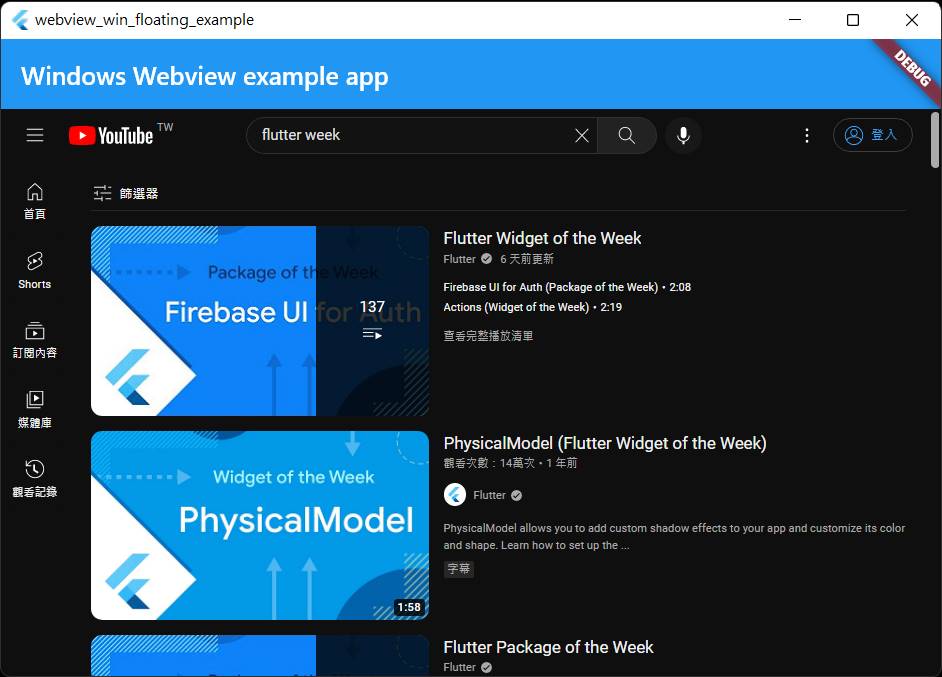
| Platform | Support | Use Library |
|---|---|---|
| Windows | ✅ | WebView2 |
| Linux | ✅ | webkit2gtk-4.1 |
You can write your app against the webview_flutter API and use this package as the desktop implementation.
- Native WebView rendering on Windows and Linux.
- High-performance video playback and scrolling.
- Compatible with the webview_flutter API on supported platforms.
This package places a native WebView directly on top of the Flutter window instead of rendering it as a texture.
That design has a tradeoff:
- You get native WebView performance and smooth video playback.
- Flutter widgets CANNOT render above the WebView on Windows and Linux.
- You cannot push a new route above the WebView.
- Tab-key focus switching between Flutter and WebView has some limitations.
- Flutter cannot clip the WebView, so it may remain visible even when scrolled outside its parent area.
- If the WebView is placed inside a scrollable widget, you may need a ScrollController so it can be repositioned while scrolling.
Hmm... there are so many limitations.
If your application targets only Windows or Linux, refer to the [Standalone mode] section below and use controller.setVisibility(bool) to toggle the WebView visibility.
Use this package if:
- You need smooth video playback.
- You care about scroll performance.
- You do not need Flutter overlays above the WebView.
Linux has a few build-time considerations. See README_Linux.md for details.
Add the package to your pubspec.yaml:
dependencies:
  webview_win_floating: ^3.0.0
webview_flutter: ^4.13.0NOTE: all the interface are supplied by webview_flutter
final controller = WebViewController();

@override
void initState() {
  super.initState();
  controller.setJavaScriptMode(JavaScriptMode.unrestricted);
  controller.loadRequest(Uri.parse("https://www.google.com/"));
}

@override
Widget build(BuildContext context) {
  return WebViewWidget(controller: controller);
}Enable JavaScript before loading pages that need it:
controller.setJavaScriptMode(JavaScriptMode.unrestricted);For example, to disable the facebook / twitter links in youtube website:
controller.setNavigationDelegate(NavigationDelegate(
  onNavigationRequest: (request) {
    return request.url.contains("youtube")
      ? NavigationDecision.navigate
      : NavigationDecision.prevent;
  },
));Hint: you can rename the name 'myChannelName' in the following code
controller.addJavaScriptChannel("myChannelName",
  onMessageReceived: (JavaScriptMessage jmsg) {
    String message = jmsg.message;
    print(message);  // print "This message is from javascript"
  }
);

controller.loadHtmlString(htmlContent);
controller.runJavascript("callByDart(100)");


var htmlContent = '''
<html>
<body>
<script>
function callByDart(int value) {
    console.log("callByDart: " + value);
}
myChannelName.postMessage("This message is from javascript");
</script>
</body>
</html>
''';Supported callbacks include:
- onPageStarted
- onPageFinished
- onUrlChange
- onHttpError (e.g. 404 Not Found)
- onSslAuthError (e.g. SSL certification expired, revoked, untrust)
- onWebResourceError (for non-ssl error and non-http error. e.g. connect timeout, hostname not found)
controller.setNavigationDelegate(NavigationDelegate(
  onPageStarted: (url) {
    print("onPageStarted: $url");
  },
  onPageFinished: (url) {
    print("onPageFinished: $url");
  },
  onUrlChange: (change) {
    String url = change.url ?? "";
    print("onUrlChange: $url"),
  },
  onHttpError: (error) {
    int httpCode = error.response!.statusCode; // e.g. 403 (Not Found)
    String url = error.response!.uri.toString();
    print("onHttpError: code=$httpCode, url : $url");
  },
  onSslAuthError: (error) {
    if (error is WinSslAuthError) {
      print("onSslAuthError: ${(error as WinSslAuthError).url}");
    } else {
      print("onSslAuthError: unknown url}");
    }
    error.cancel();
  },
  onWebResourceError: (error) {
    print("onWebResourceError: ${error.url} => ${error.description}");
  },
));- controller.loadRequest(uri)
- controller.runJavascript( jsStr )
- controller.runJavaScriptReturningResult( jsStr ) // return javascript function's return value
- controller.reload()
- controller.canGoBack()
- controller.goBack()
- controller.goForward()
- controller.canGoForward()
- controller.currentUrl()
- controller.clearCache()
- controller.enableZoom()
controller = null;
// and make sure no any WebViewWidget keep that controller object.
After official API interface webview_flutter: 4.0.0, controller is disposed after the WebViewController object is garbage collected.
So the controller object may not be disposed immediately when no any pointer keep the controller object.
Some websites request permissions such as notifications or camera access.
If you do not provide onPermissionRequest, all permission requests are denied by default.
For example, you can test Notification permission with the following code, in this site
final controller = WebViewController(onPermissionRequest: (request) {
  if (Platform.isWindows) {
    var req = request.platform as WinWebViewPermissionRequest;
    print("permission: ${req.kind} , ${req.url}");

    // only allow "notification", deny all others
    if (req.kind == WinWebViewPermissionResourceType.notification) {
      req.grant();
    } else {
      req.deny();
    }
  }
});
If onPermissionRequest is not provided, all the permission requests will be denied automatically:
final controller = WebViewController();Diffrent platforms have different implementations. Windows WebView2 allow you to grant/deny the following permission types:
enum WinWebViewPermissionResourceType {
  unknown,
  microphone,
  camera,
  geoLocation,
  notification,
  otherSensors,
  clipboardRead
}
User Data Folder:
- You can configure custom storage paths for browser data, including cache, cookies, and session information.
- If your app is installed in a read-only location such as
C:\Program Files\, set a custom user data folder.
Profiles:
- You can specify a Profile Name, similar to the "User Profile" mechanism in Google Chrome.
- Data for each profile is stored in:
<UserDataFolder>/EBWebView/WV2Profile_<ProfileName>/ - Isolation: Cookies, cache, and other browser data are stored separately.
String cacheDir = "c:\\test";
String profileName = "UserA";
var params = WindowsWebViewControllerCreationParams(userDataFolder: cacheDir, profileName: profileName);
var controller = WebViewController.fromPlatformCreationParams(params);If your application build with InnoSetup, or can be installed in "C:/Program Files/" or other read-only system directory, the webview cannot create data folder in read-only directory, so it won't work.
In this case, you should specify user data folder as mentioned above.
If your app only targets Windows and you want fewer dependencies, you can remove the webview_flutter dependency:
dependencies:
  webview_win_floating: ^3.0.0
  # webview_flutter: ^4.13.0  # mark this line for Windows only app
Then rename the core classes:
WebViewWidget -> WinWebViewWidget  // add "Win" prefix
WebViewController -> WinWebViewController  // add "Win" prefix
NavigationDelegate  -> WinNavigationDelegate  // add "Win" prefix
just only modify class names. All the properties / method are the same with webview_flutter
For permission grant/deny:
final controller = WinWebViewController(onPermissionRequest: (req) {
  print("permission: ${req.kind} , ${req.url}");

  // only allow "notification", deny all others
  if (req.kind == WinWebViewPermissionResourceType.notification) {
    req.grant();
  } else {
    req.deny();
  }
});The standalone Windows API also includes:
- controller.setVisibility(bool): show / hide webview
- onPageTitleChanged` callback in WinNavigationDelegate
- onHistoryChanged` callback in WinNavigationDelegate
- controller.openDevTools()
- controller.dispose()
- controller.setStatusBar(bool isEnable): show/hide status bar (Windows-only)
final controller = WinWebViewController();
controller.setVisibility(false); // hide webview
Additional information:
- To detect navigator push/pop, see the sample code in RouteObserver
- To detect widget visibility changes, see package visibility_detector
With the information above, you can manually trigger WebView visibility by hooking into navigator.push / pop events or widget visibility changes.
If your build fails with an error containing MSB3073, run the build command from an Administrator terminal.
If you use history.back() in JavaScript, remove your NavigationDelegate.onNavigationRequest() implementation. That callback can interfere with back navigation.
import 'package:flutter/material.dart';
import 'package:webview_win_floating/webview_win_floating.dart';
import 'package:webview_flutter/webview_flutter.dart';

void main() {
  runApp(const MyApp());
}

class MyApp extends StatefulWidget {
  const MyApp({Key? key}) : super(key: key);

  @override
  State<MyApp> createState() => _MyAppState();
}

class _MyAppState extends State<MyApp> {
  final controller = WebViewController();

  @override
  void initState() {
    super.initState();

    controller.setJavaScriptMode(JavaScriptMode.unrestricted);
    controller.loadRequest(Uri.parse("https://www.google.com/"));
  }

  @override
  Widget build(BuildContext context) {
    return MaterialApp(
      home: Scaffold(
        appBar: AppBar(
          title: const Text('Windows Webview example app'),
        ),
        body: WebViewWidget(controller: controller),
      ),
    );
  }
}