
Advanced Reasoning & Intelligent Execution Layer
An open-source AI agent that controls your PC through natural language.
It reasons, plans, executes — and remembers.
🌐 Website · 🚀 Quick Start · 📖 Full Guide · 🇪🇸 Español
🖥️ Full PC Control — Mouse, keyboard, screenshots, file management, and system commands, all through natural conversation.
🧠 Dual Memory — Short-term memory for the current session and persistent long-term memory with semantic search across sessions. ARIEL remembers you.
🔐 Security First — Password-protected from day one. API keys and tokens are encrypted on disk with Fernet. Destructive actions require explicit confirmation.
🧰 Dynamic Tools — ARIEL can create its own tools on the fly. Ask it to build a new capability and it writes, registers, and uses the tool — no code required from you.
📱 Telegram Gateway — Talk to ARIEL from your phone. Send tasks, receive results and screenshots remotely.
⏰ Scheduled Tasks — Automate routines with a visual scheduler. Define what ARIEL should do, when, and on which days.
📜 Constitution — A set of laws the agent never violates. Define boundaries and principles — ARIEL respects them always, no matter what.
💰 Prompt Caching — Reduces API costs up to 90% by caching the system prompt. Real savings, visible in the logs.
🌍 Multilingual — Full i18n support. The UI and agent responses adapt to your language. English and Spanish out of the box.
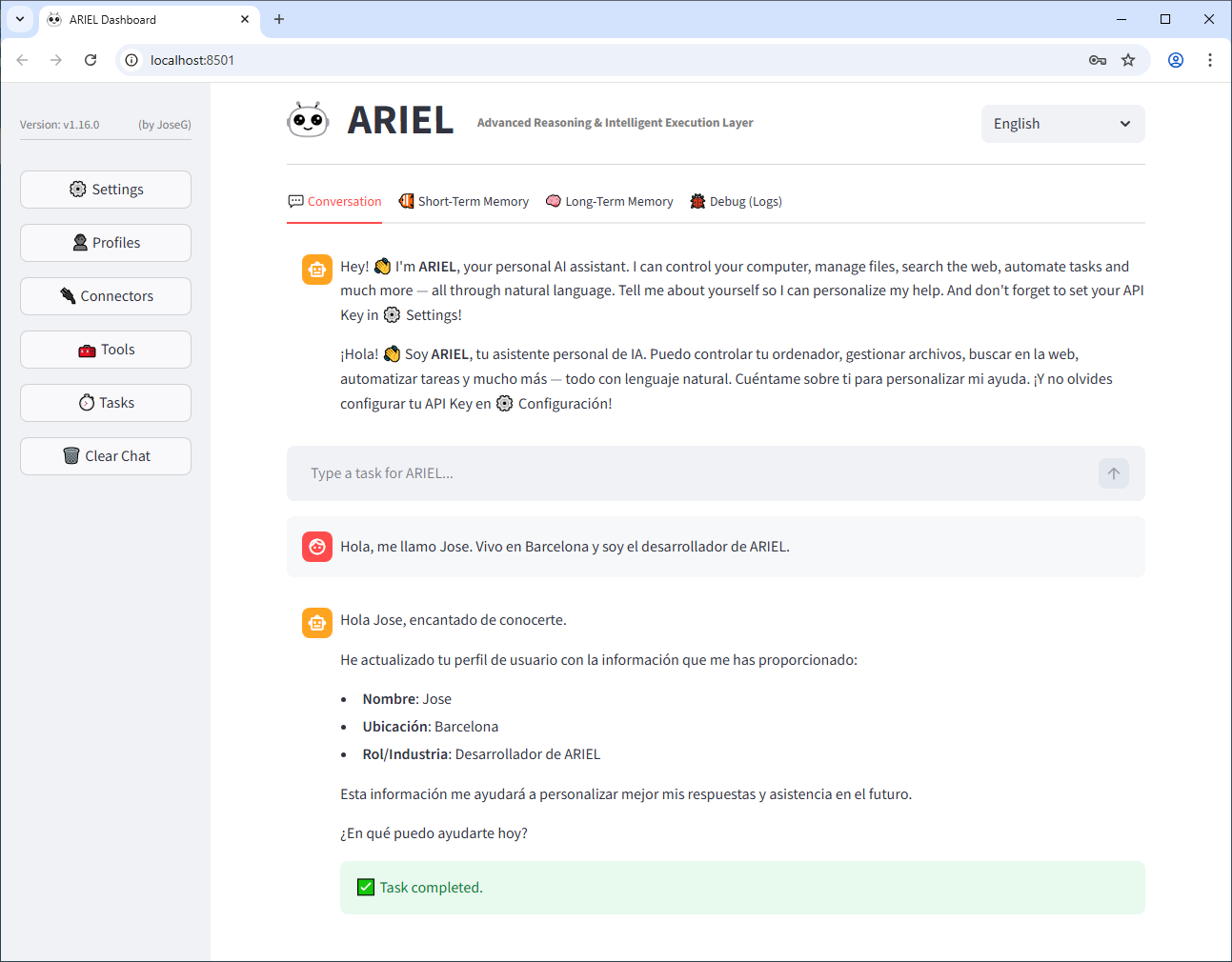
👤 User Profile — ARIEL learns about you through conversation and builds a personal profile automatically. No forms to fill.
📊 Dual Logging — Human-readable .log files plus structured .json for analysis and debugging.
🖼️ Web GUI — A clean Streamlit-based dashboard. Settings, memory viewer, tool inspector, task scheduler — all visual, no config files to edit.
# Clone the repository
git clone https://github.com/josegdeveloper/arielagent.git
cd arielagent

# Install dependencies
pip install -r requirements.txt

# Launch ARIEL
python ariel.py
Your browser will open at http://localhost:8501. On first launch, ARIEL will ask you to create a password and set up your API key.
Windows users: You can also double-click
setup.batfor an automated installation.
⚠️ Important Safety Recommendation: ARIEL is an AI agent with the ability to control your mouse, keyboard, execute system commands, and manage files. AI behavior can be unpredictable. We strongly recommend running ARIEL inside a virtual machine (e.g., VirtualBox, VMware, Hyper-V) or on a dedicated computer that does not contain sensitive personal data. Use at your own risk.
For detailed instructions, see INSTALL_en.md (English) or INSTALL_es.md (Spanish).
- Python 3.11+
- Windows 10/11 (64-bit)
- Anthropic API Key (get one here)
arielagent/
├── core/               # Brain: agent, GUI, memory, security, executor
├── gateways/           # Telegram bot & task scheduler
├── languages/          # i18n files (en.json, es.json)
├── laws/               # Constitution — rules the agent never breaks
├── logs/               # Dual logging output
├── memory/             # Short-term, long-term & embeddings
├── profiles/           # User and agent profiles
├── settings/           # Config, security settings, scheduled tasks
├── tools/              # Dynamic tool registry
├── uploads/            # User file uploads
├── ariel.py            # Entry point
├── setup.bat           # Automated Windows installer
└── requirements.txt    # Python dependencies
ARIEL is open source and contributions are welcome. Feel free to open an issue or submit a pull request.
This project is open source. See the LICENSE file for details.
- Initial public release.
Advanced Reasoning & Intelligent Execution Layer
Un agente de IA open source que controla tu PC mediante lenguaje natural.
Razona, planifica, ejecuta — y recuerda.
🌐 Web · 🚀 Inicio Rápido · 📖 Guía Completa · 🇬🇧 English
🖥️ Control total del PC — Ratón, teclado, capturas de pantalla, gestión de archivos y comandos del sistema, todo mediante conversación natural.
🧠 Memoria dual — Memoria a corto plazo para la sesión actual y memoria a largo plazo persistente con búsqueda semántica entre sesiones. ARIEL te recuerda.
🔐 Seguridad ante todo — Protegido con contraseña desde el primer día. Las API keys y tokens se cifran en disco con Fernet. Las acciones destructivas requieren confirmación explícita.
🧰 Herramientas dinámicas — ARIEL puede crear sus propias herramientas sobre la marcha. Pídele que construya una nueva capacidad y la escribirá, registrará y usará — sin que toques una línea de código.
📱 Pasarela Telegram — Habla con ARIEL desde tu móvil. Envía tareas, recibe resultados y capturas de forma remota.
⏰ Tareas programadas — Automatiza rutinas con un programador visual. Define qué debe hacer ARIEL, cuándo y qué días.
📜 Constitución — Un conjunto de leyes que el agente nunca viola. Define límites y principios — ARIEL los respeta siempre, pase lo que pase.
💰 Caché de prompts — Reduce los costes de API hasta un 90% cacheando el system prompt. Ahorro real, visible en los logs.
🌍 Multilingüe — Soporte i18n completo. La interfaz y las respuestas del agente se adaptan a tu idioma. Inglés y español de serie.
👤 Perfil de usuario — ARIEL aprende sobre ti a través de la conversación y construye un perfil personal automáticamente. Sin formularios que rellenar.
📊 Logging dual — Archivos .log legibles para humanos más .json estructurado para análisis y depuración.
🖼️ Interfaz web — Un panel limpio basado en Streamlit. Ajustes, visor de memoria, inspector de herramientas, programador de tareas — todo visual, sin archivos de configuración que editar.
# Clona el repositorio
git clone https://github.com/josegdeveloper/arielagent.git
cd arielagent

# Instala las dependencias
pip install -r requirements.txt

# Lanza ARIEL
python ariel.py
Tu navegador se abrirá en http://localhost:8501. En el primer arranque, ARIEL te pedirá que crees una contraseña y configures tu API key.
Usuarios de Windows: También puedes hacer doble clic en
setup.batpara una instalación automática.
⚠️ Recomendación de seguridad importante: ARIEL es un agente de IA con capacidad para controlar tu ratón, teclado, ejecutar comandos del sistema y gestionar archivos. El comportamiento de la IA puede ser impredecible. Recomendamos encarecidamente ejecutar ARIEL dentro de una máquina virtual (p. ej., VirtualBox, VMware, Hyper-V) o en un ordenador dedicado que no contenga datos personales sensibles. Úsalo bajo tu propia responsabilidad.
Para instrucciones detalladas, consulta INSTALL_es.md (Español) o INSTALL_en.md (Inglés).
- Python 3.11+
- Windows 10/11 (64-bit)
- Anthropic API Key (consigue una aquí)
arielagent/
├── core/               # Cerebro: agente, GUI, memoria, seguridad, executor
├── gateways/           # Bot de Telegram y programador de tareas
├── languages/          # Archivos i18n (en.json, es.json)
├── laws/               # Constitución — reglas que el agente nunca rompe
├── logs/               # Salida de logging dual
├── memory/             # Memoria corto plazo, largo plazo y embeddings
├── profiles/           # Perfiles de usuario y agente
├── settings/           # Configuración, seguridad, tareas programadas
├── tools/              # Registro dinámico de herramientas
├── uploads/            # Archivos subidos por el usuario
├── ariel.py            # Punto de entrada
├── setup.bat           # Instalador automático para Windows
└── requirements.txt    # Dependencias de Python
ARIEL es open source y las contribuciones son bienvenidas. No dudes en abrir un issue o enviar un pull request.
Este proyecto es open source. Consulta el archivo LICENSE para más detalles.
- Versión pública inicial.