


SleepLab is a local-first sleep therapy dashboard for importing and exploring ResMed CPAP data. It includes:
- A React + Vite frontend in
frontend/ - A FastAPI backend in
api/ - A PostgreSQL-backed importer in
importer/for ResMedDATALOGfolders
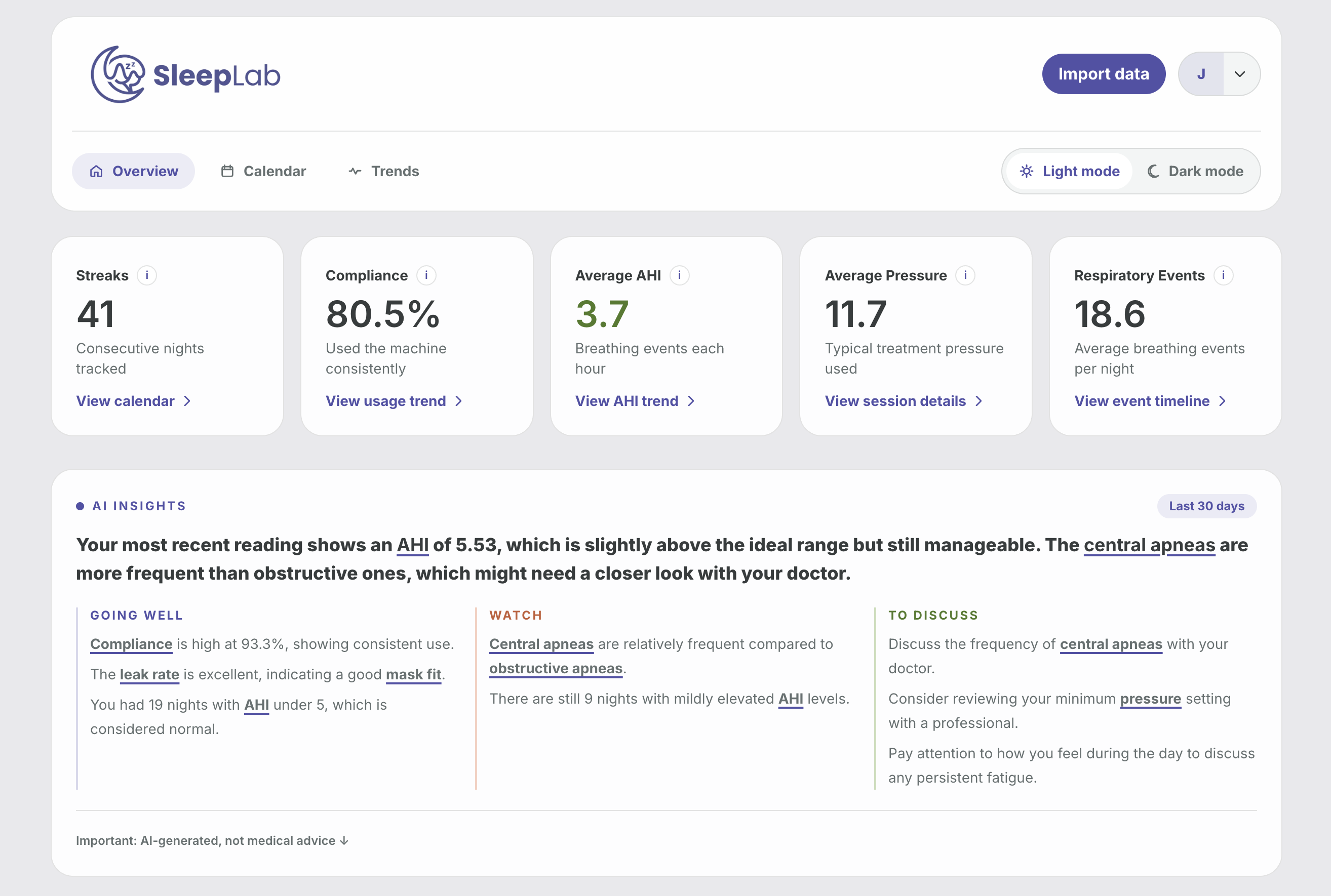
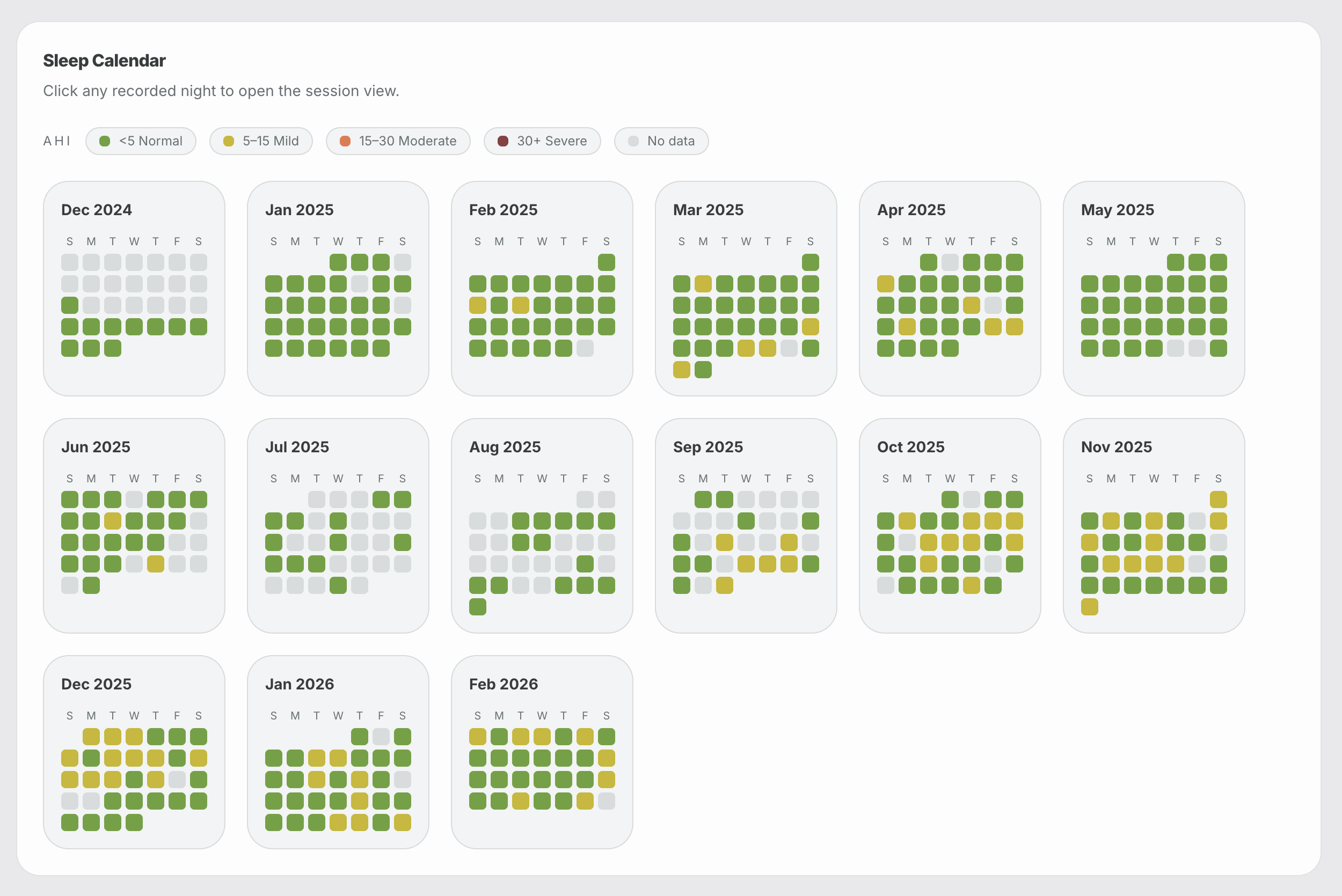
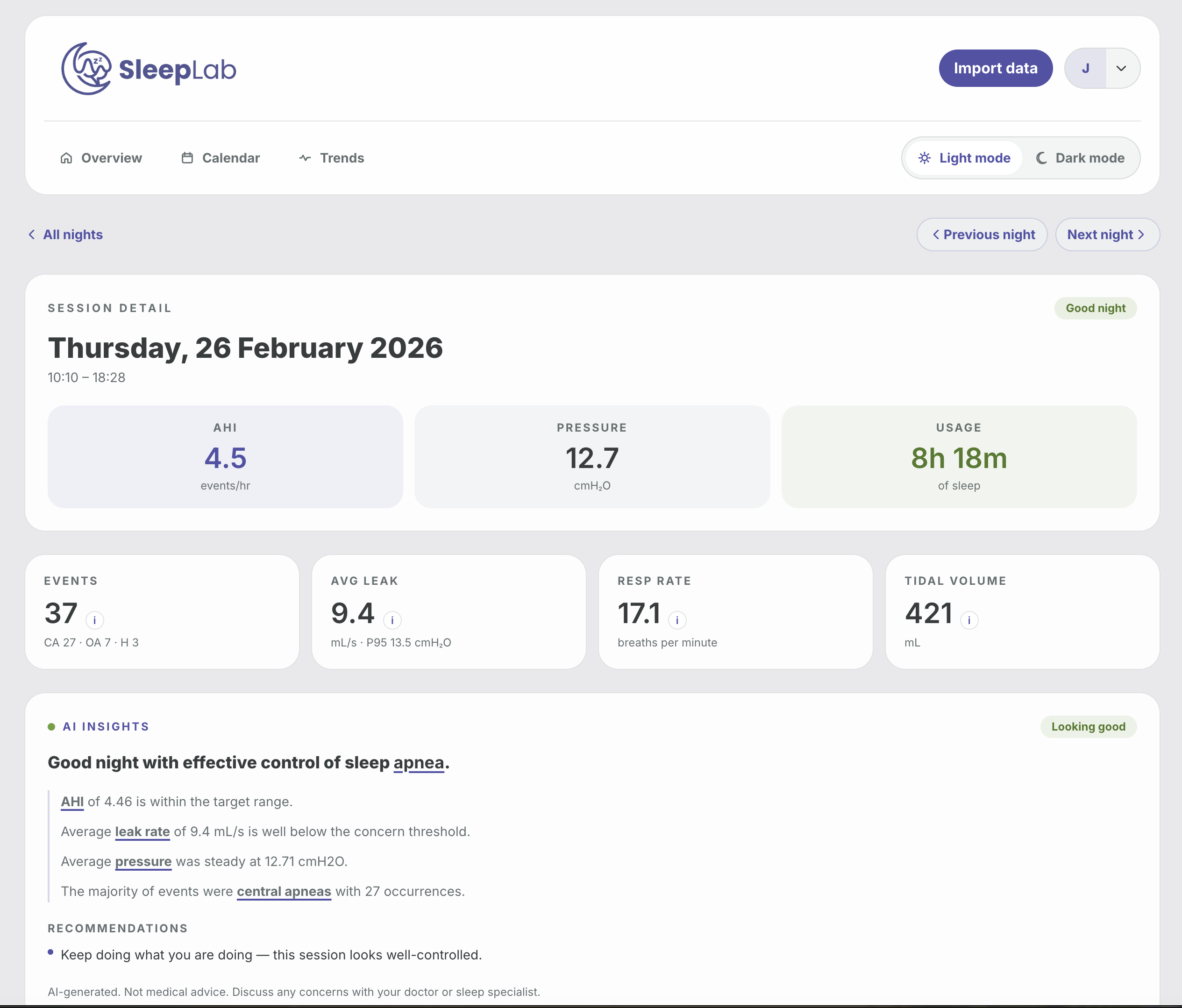
- Frontend: React 19, Vite, TypeScript, Tailwind
- Backend: FastAPI, SQLAlchemy, Uvicorn
- Database: PostgreSQL 16
- Workspace tooling: Nx
- Node.js 20+
- npm
- Python 3.12
- PostgreSQL 16
SleepLab can run as a self-hosted Docker stack with:
- PostgreSQL
- FastAPI backend
- Nginx-served frontend
- automatic schema migrations at API startup
- a prebuilt Docker image, so no local image build is required
Key files:
The default self-hosted image is:
joshuaaaronmyers/sleeplab:latest
Create an env file for deployment by copying .env.selfhost.example.
Set at minimum:
SECRET_KEY
Optional but commonly needed:
OPENAI_API_KEYCORS_ALLOWED_ORIGINSAPI_URL
Recommended values for a local/self-hosted machine:
SECRET_KEY=replace-me-with-a-long-random-secret
OPENAI_API_KEY=
CORS_ALLOWED_ORIGINS=*
API_URL=http://localhost:8000
The self-hosted compose stack always uses the internal Postgres DSN:
postgresql+psycopg2://cpap:cpap@postgres:5432/cpap
For the default self-hosted setup, CORS_ALLOWED_ORIGINS is * so the frontend can talk to the API regardless of whether you access it via localhost, 127.0.0.1, or a LAN hostname/IP. If you expose the app publicly, tighten that value to your actual frontend origin(s).
docker compose up -dIf you want the newest published image first:
docker compose pull
docker compose up -ddocker compose logs -fdocker compose downIf you want to self-host quickly on a server, you can use this docker-compose.yml directly:
services:
  postgres:
    image: postgres:16
    restart: unless-stopped
    environment:
      POSTGRES_DB: cpap
      POSTGRES_USER: cpap
      POSTGRES_PASSWORD: cpap
    volumes:
      - sleeplab_postgres_data:/var/lib/postgresql/data
    healthcheck:
      test: ["CMD-SHELL", "pg_isready -U cpap -d cpap"]
      interval: 10s
      timeout: 5s
      retries: 5

  app:
    image: joshuaaaronmyers/sleeplab:latest
    restart: unless-stopped
    depends_on:
      postgres:
        condition: service_healthy
    environment:
      DATABASE_URL: postgresql+psycopg2://cpap:cpap@postgres:5432/cpap
      SECRET_KEY: replace-me-with-a-long-random-secret
      OPENAI_API_KEY: ""
      CORS_ALLOWED_ORIGINS: "*"
      API_URL: http://localhost:8000
      API_HOST: 0.0.0.0
      API_PORT: 8000
    ports:
      - "8080:8080"
      - "8000:8000"

volumes:
  sleeplab_postgres_data:
Then start it with:
docker compose up -dIf you already have PostgreSQL running separately, you can run just the SleepLab app container:
docker run -d \
  --name sleeplab \
  --restart unless-stopped \
  -p 8080:8080 \
  -p 8000:8000 \
  -e DATABASE_URL="postgresql+psycopg2://USER:PASSWORD@HOST:5432/cpap" \
  -e SECRET_KEY="replace-me-with-a-long-random-secret" \
  -e OPENAI_API_KEY="" \
  -e CORS_ALLOWED_ORIGINS="*" \
  -e API_URL="http://localhost:8000" \
  joshuaaaronmyers/sleeplab:latest
Notes:
docker rundoes not include PostgreSQL. You must provide your own database.API_URLshould be the URL the browser will use to reach the API.- If the app is exposed publicly, replace
CORS_ALLOWED_ORIGINS="*"with your real frontend origin(s).
- Frontend:
http://localhost:8080 - API:
http://localhost:8000
- starts PostgreSQL with a named volume
- pulls
joshuaaaronmyers/sleeplab:latest - exposes the frontend on
8080 - exposes the API on
8000 - waits for Postgres to become healthy
- runs migrations automatically at API startup
Database data is stored in the named volume:
sleeplab_postgres_data
git pull
docker compose pull
docker compose up -d
Migrations run automatically through server.py when the API starts.
- If Docker Compose says the image is missing, run
docker loginanddocker compose pull. - If the frontend loads but API requests fail, verify
API_URLandCORS_ALLOWED_ORIGINS. - If the API container exits early, inspect
docker compose logs appfor DB or migration errors. - If AI summaries are unavailable, check
GET /llm/healthfor provider status and confirm the relevant env vars are set (see AI Summaries below). - If you are deploying to a Linux server, use the published multi-arch image tag rather than an old locally built arm-only image.
npm install
cd frontend && npm installThe repo includes a local Postgres service inside Docker Compose:
docker compose up -d postgresDefault database settings from docker-compose.yml:
- Database:
cpap - Username:
cpap - Password:
cpap - Port:
5432
The API currently connects to:
postgresql+psycopg2://localhost/cpapThat is defined in api/database.py. If your local database setup differs, update that file or add your own configuration layer.
Run the SQL files in migrations/ against the cpap database in order:
psql -d cpap -f migrations/001_add_auth.sql
psql -d cpap -f migrations/002_scope_sessions_per_user.sql
psql -d cpap -f migrations/003_add_public_ids.sql
psql -d cpap -f migrations/004_reset_uuid_ids.sql
psql -d cpap -f migrations/005_add_user_profile_fields.sqlStart frontend and backend together:
npm run devOr run them separately:
npm run api
npm run frontend
Default local URLs:
- Frontend:
http://127.0.0.1:5173 - API:
http://127.0.0.1:8000
Two IANA timezone settings control how session data is interpreted and displayed.
| Variable | Default | Purpose |
|---|---|---|
MACHINE_TZ |
UTC |
The timezone your CPAP machine is set to. The importer uses this to correctly interpret the naive local timestamps embedded in EDF files before storing them as UTC in the database. |
DISPLAY_TZ |
UTC |
The timezone used to format all time labels in the UI — plot axes, event timeline, session start time. Set this to your local timezone for accurate display. |
Both values must be valid IANA timezone names (e.g. America/New_York, Europe/London, Australia/Sydney).
Set them in your .env file or docker-compose.yml:
MACHINE_TZ=America/New_York
DISPLAY_TZ=America/New_York
If your machine is set to the same timezone as your display, both values will be identical. If you travel with your CPAP and don't update the machine clock, set MACHINE_TZ to the machine's home timezone and DISPLAY_TZ to wherever you want times displayed.
Re-importing after changing
MACHINE_TZ: The importer attaches the timezone at import time. If you changeMACHINE_TZafter sessions are already in the database, re-run the importer with--fromto update affected sessions.
SleepLab uses bearer-token auth.
POST /auth/registerandPOST /auth/loginreturn{ token, user }- The frontend stores the JWT in browser
localStorage - Authenticated API requests send
Authorization: Bearer <token>
Relevant files:
SleepLab imports ResMed SD card data from a DATALOG folder.
In the UI:
- Create an account or log in.
- Open the import screen.
- Select the
DATALOGfolder from the SD card. - The frontend uploads the files in batches to the API.
- The API runs the importer in the background and writes parsed sessions into Postgres.
The upload/import endpoints are implemented in api/routers/upload.py, and the importer lives in importer/import_sessions.py.
You can also run the importer manually:
cd importer
python3 import_sessions.py --datalog /absolute/path/to/DATALOG --user-id <user-uuid>
Optional filters:
python3 import_sessions.py --datalog /absolute/path/to/DATALOG --user-id <user-uuid> --folder 20241215
python3 import_sessions.py --datalog /absolute/path/to/DATALOG --user-id <user-uuid> --from 20250101Sessions can be pulled directly from SleepHQ without an SD card.
Add your SleepHQ OAuth credentials and team ID in Settings → SleepHQ Integration, or set them in .env:
SLEEPHQ_CLIENT_ID=your-client-id
SLEEPHQ_CLIENT_SECRET=your-client-secret
SLEEPHQ_TEAM_ID=your-team-id   # optional — auto-resolved if omitted
OAuth credentials are available from your SleepHQ developer/account settings.
Open Import → Sync from SleepHQ and click Sync now. The last 30 days of sessions are fetched and written to the database. Sessions imported this way use a sleephq-{id} session ID to avoid collisions with SD card imports.
cd importer
python3 sleephq_import.py --user-id <user-uuid> --days 30

# Explicit date range
python3 sleephq_import.py --user-id <user-uuid> --from 2024-01-01 --to 2025-01-01

# Dry run — fetch and map without writing to the database
python3 sleephq_import.py --user-id <user-uuid> --days 30 --dry-run
The importer retries automatically on rate-limit (HTTP 429) responses and pauses between paginated requests, so long historical back-fills work without manual intervention.
AI-generated session and trend summaries are powered by any OpenAI-compatible LLM backend. The provider is selected automatically based on environment variables — existing deployments with OPENAI_API_KEY continue to work with no changes.
LLM_PROVIDER |
Backend | Required env vars |
|---|---|---|
openai / auto-detected |
OpenAI cloud | OPENAI_API_KEY, OPENAI_MODEL (default gpt-4o) |
ollama / default when no key |
Local Ollama | OLLAMA_BASE_URL (default http://localhost:11434/v1), OLLAMA_MODEL (default llama3.1:8b) |
litellm |
LiteLLM proxy | LITELLM_BASE_URL (default http://localhost:4000/v1), LITELLM_MODEL (default gpt-4o-mini) |
custom |
Any OpenAI-compatible endpoint | LLM_BASE_URL, LLM_API_KEY, LLM_MODEL |
GET /llm/health
Returns the active provider, base URL, model, and whether the backend is reachable.
# docker-compose.yml
services:
  app:
    environment:
      LLM_PROVIDER: ollama
      OLLAMA_BASE_URL: http://ollama:11434/v1
      OLLAMA_MODEL: llama3.1:8b
  ollama:
    image: ollama/ollama:latest
    restart: unless-stopped
    volumes:
      - ollama_data:/root/.ollama
Without any LLM configuration, core dashboard features still work but AI summary endpoints return an error message instead of generated output.
api/         FastAPI application
frontend/    React/Vite client
importer/    ResMed EDF parsing and import pipeline
migrations/  SQL migrations
For local development:
- Install dependencies:
npm install
cd frontend && npm install- Start Postgres:
docker compose up -d postgres- Run the app:
npm run devUseful commands:
npm run api
npm run frontend
cd frontend && npm run build
cd frontend && npm run lint
Before opening a PR, make sure:
- the frontend builds successfully
- lint passes for the frontend
- any README or env changes are documented
- self-hosting changes are reflected in
docker-compose.ymland.env.selfhost.examplewhere relevant
npm run dev
npm run api
npm run frontend
cd frontend && npm run build
cd frontend && npm run lint- The backend reads
DATABASE_URLfrom environment and falls back to a local development default inapi/database.py. - The backend uses a fallback development JWT secret if
SECRET_KEYis not set. Set a realSECRET_KEYoutside local development.
This project depends on open-cpap-parser as a key functional module for multi-manufacturer CPAP data parsing. All SleepyHead/OSCAR-derived binary parsing code lives in open-cpap-parser — SleepLab itself does not implement any direct derivative of SleepyHead or OSCAR.
open-cpap-parser is a derivative of the free and open-source software SleepyHead, developed and copyright by Mark Watkins (Jedimark) (C) 2011-2018, and of OSCAR (Open Source CPAP Analysis Reporter), which is itself a derivative of SleepyHead. The binary-format parsing logic in open-cpap-parser's Rust extension module is ported from OSCAR.
Per Mark Watkins' redistribution request, any derivative of this work must mention clearly in its advertising material, software installer, and about screens that it "is based on the free and open-source software SleepyHead, developed and copyright by Mark Watkins (C) 2011-2018." Referencing "GPL software" alone is not sufficient. See NOTICE.md for the full redistribution notice and third-party copyright statements.
GNU General Public License v3.0 (GPL-3.0)
This project is licensed under the GNU General Public License v3.0. See LICENSE.md for the full license text.
This project incorporates open-cpap-parser as a key functional module, which is a derivative of OSCAR and the free and open-source software SleepyHead, developed and copyright by Mark Watkins (Jedimark) (C) 2011-2018. Both SleepyHead and OSCAR are distributed under the GPL-3.0, which this project inherits. All other components are permissively licensed (MIT, BSD-3-Clause, Apache-2.0) and are compatible with GPL-3.0.