
A powerful, privacy-first browser proxy extension



Switch proxies instantly. Spoof your timezone. Block WebRTC leaks. Stay invisible.
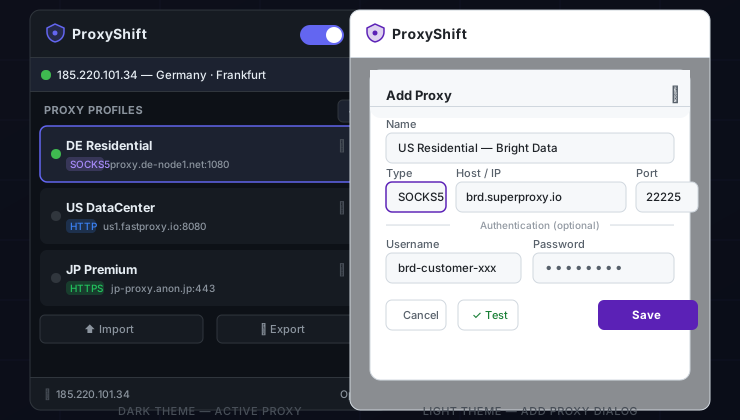
| Feature | Description |
|---|---|
| Multi-protocol proxies | HTTP, HTTPS, SOCKS4, SOCKS5 — with optional username/password auth |
| One-click toggle | Enable or disable the active proxy instantly from the popup |
| Proxy testing | Test any profile before activating — shows live outbound IP |
| Timezone spoofing | Auto-detects and overrides timezone to match the proxy's region |
| WebRTC leak prevention | Blocks STUN/TURN requests that can expose your real IP |
| Locale/language spoofing | Overrides navigator.language to match the proxy country |
| Canvas fingerprint noise | Adds imperceptible per-session noise to canvas reads |
| Proxy rotation | Automatically cycles through profiles on a configurable timer |
| Import / Export | Back up or share proxy lists as JSON |
| Dark & light theme | Polished UI that respects your preference |
| Cross-browser | Chrome, Edge, Brave, Firefox desktop, and Android mobile browsers |
ProxyShift works on Android in browsers that support Chrome extensions:
| Browser | Support |
|---|---|
| Kiwi Browser | ✅ Full (load unpacked ZIP) |
| Mises Browser | ✅ Full (load unpacked ZIP) |
| Lemur Browser | ✅ Full (Chromium-based) |
| Quetta Browser | ✅ Full (Chromium-based) |
| Firefox for Android | ✅ Via signed AMO add-on |
All Chromium-based Android browsers above support Chrome extensions natively. Load the
proxyshift-chrome-v1.0.0.zipthe same way you would on desktop.
- Download the latest
proxyshift-chrome-v1.0.0.zipfrom Releases - Open
chrome://extensions(oredge://extensions/brave://extensions) - Enable Developer mode (top right toggle)
- Drag and drop the ZIP file onto the page — or click Load unpacked and select the extracted folder
- Download
proxyshift-chrome-v1.0.0.zipto your phone - Open the browser → Menu → Extensions → Load from file (Kiwi) or Developer mode → Load unpacked
- Select the downloaded ZIP — done!
The build script produces a ready-to-load directory automatically:
git clone https://github.com/kakarot-oncloud/proxyshift.git
cd proxyshift
node scripts/generate-icons.js
node scripts/package.js firefox- Open
about:debugging#/runtime/this-firefox - Click Load Temporary Add-on
- Select
dist/firefox-unpacked/manifest.json
For permanent installation, sign and submit via addons.mozilla.org.
Firefox for Android supports signed extensions via Mozilla's approved collections. Sign your build at addons.mozilla.org and install from there.
Requirements: Node.js 18+
git clone https://github.com/kakarot-oncloud/proxyshift.git
cd proxyshift

# Generate icons
node scripts/generate-icons.js

# Build Chrome + Firefox ZIPs
node scripts/package.js

# Build Chrome only
node scripts/package.js chrome

# Build Firefox only (also produces dist/firefox-unpacked/)
node scripts/package.js firefox
Output files in dist/:
proxyshift-chrome-v1.0.0.zip— load in Chrome/Edge/Brave/Kiwi/Misesproxyshift-firefox-v1.0.0.zip— submit to AMOdist/firefox-unpacked/— load directly inabout:debugging
ProxyShift uses chrome.proxy.settings to configure a system-wide proxy for the browser session. All HTTP/HTTPS and SOCKS traffic routes through the configured server. The onAuthRequired listener supplies credentials automatically for authenticated proxies — both the MV3 asyncBlocking path (Chrome) and the MV2 blocking Promise path (Firefox) are supported.
The anti-detection code runs before any page script executes:
- Chrome MV3: Content script runs in
world: "MAIN"— patches take effect directly on the page's realwindow. - Firefox MV2: A
<script>element is injected into the DOM to reach the page's JavaScript context (since MV2 content scripts run in an isolated world). Settings are relayed viawindow.postMessage.
What gets patched (each independently toggleable):
| API | What changes |
|---|---|
RTCPeerConnection |
Replaced with a version that strips STUN/TURN ICE servers |
Intl.DateTimeFormat |
Wrapped to inject the spoofed timezone when none is specified |
Date.prototype.getTimezoneOffset |
Returns offset calculated from the spoofed timezone |
navigator.language / .languages |
Overridden with the target locale derived from proxy country |
HTMLCanvasElement.toDataURL / getImageData |
Adds per-session noise to thwart fingerprinting |
When timezone or locale is set to Auto, ProxyShift:
- Fetches the proxy's outbound IP via ipify.org (HTTPS, no-auth)
- Looks up the timezone and country via ipapi.co (HTTPS, free tier)
- Applies the resolved timezone and maps the country code to a BCP 47 locale
- Re-applies on every proxy rotation cycle
The chrome.alarms API fires on the configured interval (minimum 1 minute). On each tick, ProxyShift advances to the next enabled profile, applies the proxy, re-injects anti-detection settings, and triggers geo re-detection if auto timezone/locale is enabled.
| Feature | Chrome/Edge/Brave (MV3) | Firefox 91+ (MV2) | Kiwi/Mises/Lemur/Quetta (Android) | Firefox Android |
|---|---|---|---|---|
| HTTP/HTTPS/SOCKS proxies | ✅ | ✅ | ✅ | ✅ |
| Proxy authentication | ✅ | ✅ | ✅ | ✅ |
| Test proxy / IP check | ✅ | ✅ | ✅ | ✅ |
| Proxy rotation | ✅ | ✅ | ✅ | ✅ |
| WebRTC leak prevention | ✅ | ✅ | ✅ | ✅ |
| Timezone spoofing | ✅ | ✅ | ✅ | ✅ |
| Locale/language spoofing | ✅ | ✅ | ✅ | ✅ |
| Canvas fingerprint noise | ✅ | ✅ | ✅ | ✅ |
| Import/export profiles | ✅ | ✅ | ✅ | ✅ |
| Dark/light theme | ✅ | ✅ | ✅ | ✅ |
- All proxy credentials are stored locally in
chrome.storage.local— never sent to any server - IP lookup for proxy testing uses ipify.org (HTTPS, no-auth, no logging)
- Geolocation for timezone/locale auto-detection uses ipapi.co (HTTPS, free tier)
- No analytics, no tracking, no telemetry, no external dependencies
proxyshift/
├── manifest.json           # MV3 — Chrome, Edge, Brave, Kiwi, Mises
├── manifest.v2.json        # MV2 — Firefox (renamed to manifest.json by packager)
├── background/
│   └── service-worker.js   # Proxy engine, auth, rotation, messaging
├── content/
│   └── anti-detect.js      # WebRTC / timezone / locale / canvas patches
├── popup/
│   ├── popup.html
│   ├── popup.css
│   └── popup.js
├── options/
│   ├── options.html
│   ├── options.css
│   └── options.js
├── lib/
│   └── browser-polyfill.js # chrome.* / browser.* namespace bridge
├── icons/
│   ├── icon16.png
│   ├── icon48.png
│   └── icon128.png
├── scripts/
│   ├── generate-icons.js   # Generates PNG icons from canvas
│   └── package.js          # Builds distributable ZIPs
└── .github/workflows/
    └── release.yml         # Auto-builds ZIPs on version tags
Pull requests are welcome! Please open an issue first for significant changes.
git clone https://github.com/kakarot-oncloud/proxyshift.git
cd proxyshift
node scripts/generate-icons.js
# Load proxyshift/ as an unpacked extension in Chrome to developMIT — © 2025 kakarot-oncloud