Neurodoku is an interactive mobile Sudoku application for Android that goes beyond basic puzzle gameplay.
It features real-time solving visualizations using a recursive backtracking algorithm,
a clean and intuitive UI, and tools to help users train logic and focus.
This project was created as a fun and educational challenge to explore algorithmic thinking, UI/UX design, and mobile development on Android.
Whether you're a casual player or a programming enthusiast, there's something here for you.
-
Sudoku Puzzle Generator – Creates valid Sudoku boards across four difficulty levels: Easy, Medium, Hard, and Extreme.
-
Solver with Visualization – Solves puzzles using a recursive backtracking algorithm, with step-by-step animation.
-
Timer – Tracks puzzle-solving time with pause and resume functionality.
-
Hints & Editing Tools
- Request a hint for the current puzzle
- Erase entered numbers
- Restart the puzzle to its original state
- Generate a completely new puzzle
- Notes Mode – Toggle a pencil mode to write multiple possible numbers into a cell


- Dementia Prevention Tips – During paused state, the app shows helpful tips related to cognitive health and lifestyle.


- In-App Blog Section – Read short articles about dementia prevention, cognitive health, and Sudoku-solving strategies.
- Articles include:
- Mental wellness tips for seniors
- How Sudoku helps maintain cognitive function
- Strategies and logic techniques for solving puzzles efficiently


- Sign up / Log in – Create an account using email and password, or log in via your Google account.
- Custom Profiles – Set your display name and write a short bio after logging in.
- User Statistics – Track how many puzzles you've solved per difficulty level.
- Progress Saving – Store your puzzle history and preferences locally using Room and in the cloud with Firebase.


- Jetpack Compose UI – Built with modern Android UI framework for a smooth and responsive experience.
- Dark Mode Support – Toggle between light and dark themes in the Settings screen.
- Clean and Consistent Design – A uniform, material-themed interface focused on readability and ease of use.


- In-App Support Screen – Easily contact the developer in case of issues or feedback.


- Unit Tests – Includes unit tests for puzzle generation/solving logic, timer, and UI components using JUnit and Mockito.
The application is built natively for Android using modern development tools and libraries:
- Kotlin – Primary programming language
- Jetpack Compose – Declarative UI framework for building responsive and modern interfaces
- Android SDK – Core tools and APIs for Android development
- Room – Local database for storing puzzles and user data
- Koin – Lightweight dependency injection framework
- Firebase Authentication – User sign-in and account management
- Firebase Firestore – Cloud database for syncing game history (optional)
- Navigation Compose – Declarative navigation between screens
- Material 3 – Latest Material Design components and theming
- KSP – Kotlin Symbol Processing for annotation-based code generation
- JUnit & Mockito – Unit testing and mocking
Follow these steps to build and run the app locally.
- Android Studio Hedgehog or newer
- JDK 17
- Gradle 8+ (optional, Android Studio manages it automatically)
- Android SDK installed with emulator or physical device
git clone https://github.com/katarinakovacova/neurodoku.git
cd neurodoku- Open Android Studio
- Choose "Open an Existing Project"
- Navigate to the cloned
neurodokufolder - Let Gradle sync and index the project (this may take a moment)
- Connect your Android device or start an emulator.
- Click Run️ in Android Studio, or run from terminal:
./gradlew installDebugIf you'd like to enable authentication and Firestore features:
- Create a Firebase project at https://console.firebase.google.com
- Add an Android app and register the package name (e.g.,
com.example.neurodoku) - Download the
google-services.jsonfile and place it in:app/google-services.json - Rebuild the project.
To run all tests:
./gradlew testTo ensure code style is consistent:
./gradlew lintIf the build fails on first run:
- Try running
File → Invalidate Caches & Restartin Android Studio - Ensure you're using the correct JDK and Gradle versions
Once the app is installed and launched, here's how users can interact with Neurodoku:
-
When the app launches, a Sudoku puzzle is automatically generated at Medium difficulty.
-
To start a new puzzle with a different difficulty:
- Tap New Sudoku
- A dialog appears with four difficulty options:
Easy, Medium, Hard, Extreme - Select your preferred level — the app will generate a new puzzle accordingly.
-
During gameplay, you can:
- Use Notes Mode to jot down multiple possible candidates in a cell
- Tap Hint to reveal one correct number
- Tap Erase to remove an incorrect or unwanted number
- Tap the Timer button to stop the timer.
- During the paused state, the app shows brain health tips related to dementia prevention.
- In the Statistics screen, view how many puzzles you’ve completed in each difficulty.
- Sign up or log in using:
- Email and password
- Or your Google account
- After logging in, create a simple profile:
- Add a display name and a short bio
- Visit the in-app Blog for short articles:
- Sudoku solving techniques
- Mental wellness and cognitive health
- Lifestyle habits to reduce dementia risk
- Enable Dark Mode manually.
- Access the Support screen to contact the developer if needed.
This project follows the principles of Clean Architecture and the MVVM (Model-View-ViewModel) pattern, with a clear separation of concerns across the following layers:
data/
├── blog/
│   ├── local/           # Local blog storage (e.g. Room entities, DAOs)
│   └── repository/      # Blog data source implementation
├── sudoku/
│   ├── local/           # Local Sudoku storage (saved games, history)
│   ├── mapper/          # Mapping between domain and data models
│   └── repository/      # Sudoku data source implementation

di/
├── DatabaseModule.kt    # Room database setup and bindings
└── ViewModelModul.kt    # Koin bindings for ViewModels

domain/
├── model/               # Core business models (e.g. SudokuGame, SudokuDifficulty)
└── usecase/             # Business logic (e.g. generate, mask, save Sudoku)
└── repository/          # Interface

ui/
├── components/          # Reusable UI components built with Jetpack Compose
├── navigation/          # Navigation graph using Navigation-Compose
├── screens/             # UI screens (Game, Blog, Stats, etc.)
├── theme/               # Material 3 theming (colors, typography)
└── viewmodel/           # ViewModels providing state and logic for screens
- Separation of Concerns: Each layer is responsible for a single aspect of the app's functionality.
- Testability: Use cases and ViewModels are unit-testable and decoupled from framework code.
- Reusability: UI components and business logic are modular and reusable.
- Scalability: This architecture supports future expansion, including new features, modules, or platforms.
- Koin for dependency injection
- Jetpack Compose for declarative UI
- Room for local persistence
- Firebase Auth & Firestore for optional cloud features
The Sudoku grid generation uses a backtracking algorithm to fill the 9x9 board with valid numbers. The algorithm tries numbers 1 through 9 in each empty cell, verifying Sudoku rules (no duplicates in row, column, and 3x3 box). If no valid number fits, it backtracks to previous cells and tries other options until the grid is complete.
For a visual explanation, check out this animation demonstrating the backtracking process in action:
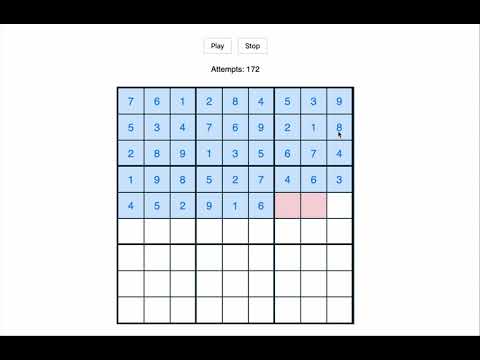
Click the image to watch the video.
This project is licensed under the MIT License.
See the LICENSE file for details.